
A deep-learning based multi-omics bulk sequencing data integration suite with a focus on (pre-)clinical endpoint prediction.

Project description




flexynesis
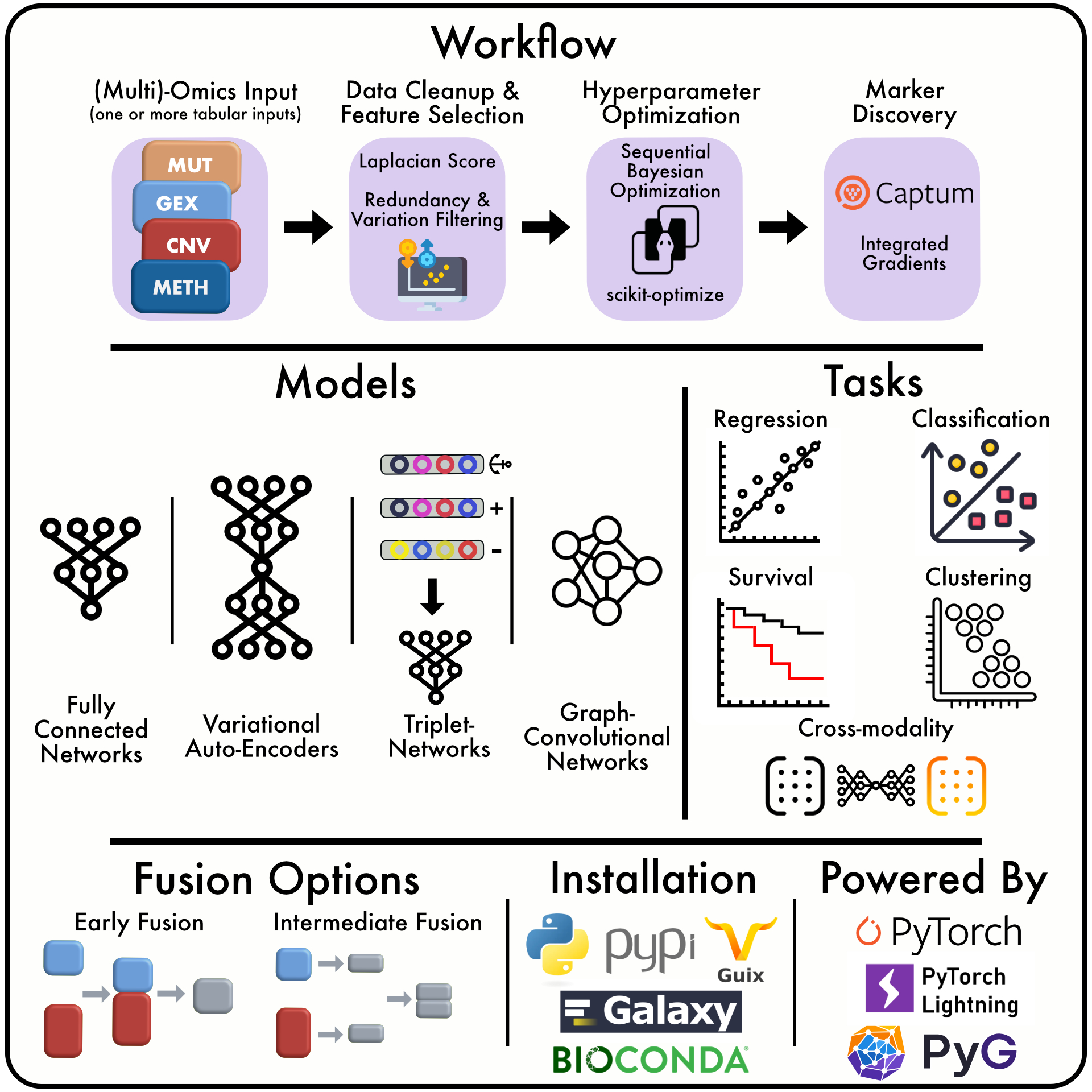
A deep-learning based multi-omics bulk sequencing data integration suite with a focus on (pre-)clinical endpoint prediction. The package includes multiple types of deep learning architectures such as simple fully connected networks, supervised variational autoencoders, graph convolutional networks, multi-triplet networks different options of data layer fusion, and automates feature selection and hyperparameter optimisation. The tools are continuosly benchmarked on publicly available datasets mostly related to the study of cancer. Some of the applications of the methods we develop are drug response modeling in cancer patients or preclinical models (such as cell lines and patient-derived xenografts), cancer subtype prediction, or any other clinically relevant outcome prediction that can be formulated as a regression, classification, survival, or cross-modality prediction problem.
Citing our work
In order to refer to our work, please cite our manuscript currently available at BioRxiv.
Getting started with Flexynesis
Command-line tutorial
Jupyter notebooks for interactive usage
- Modeling Breast Cancer Subtypes
- Survival Markers of Lower Grade Gliomas
- Unsupervised Analysis of Bone Marrow Cells
Benchmarks
For the latest benchmark results see: https://bimsbstatic.mdc-berlin.de/akalin/buyar/flexynesis-benchmark-datasets/dashboard.html
The code for the benchmarking pipeline is at: https://github.com/BIMSBbioinfo/flexynesis-benchmarks
Defining Kernel for the Jupyter Notebook
For interactively using flexynesis on Jupyter notebooks, one can define the kernel to make flexynesis and its dependencies available on the jupyter session.
Assuming you have already defined an environment and installed the package:
conda activate flexynesisenv
python -m ipykernel install --user --name "flexynesisenv" --display-name "flexynesisenv"
Compiling Notebooks
papermill can be used to compile the tutorials under examples/tutorials.
If the purpose is to quickly check if the notebook can be run; set HPO_ITER to 1. This sets hyperparameter optimisation steps to 1. For longer training runs to see more meaningful results from the notebook, increase this number to e.g. 50.
Example:
papermill examples/tutorials/brca_subtypes.ipynb brca_subtypes.ipynb -p HPO_ITER 1
The output from papermill can be converted to an html file as follows:
jupyter nbconvert --to html brca_subtypes.ipynb
Documentation
Documentation generated using mkdocs
pip install mkdocstrings[python]
mkdocs build --clean
Release history Release notifications | RSS feed


Download files
Download the file for your platform. If you're not sure which to choose, learn more about installing packages.
Source Distribution
Built Distribution
Filter files by name, interpreter, ABI, and platform.
If you're not sure about the file name format, learn more about wheel file names.
Copy a direct link to the current filters
File details
Details for the file flexynesis-0.2.11.tar.gz.
File metadata
- Download URL: flexynesis-0.2.11.tar.gz
- Upload date:
- Size: 66.7 kB
- Tags: Source
- Uploaded using Trusted Publishing? No
- Uploaded via: twine/6.0.1 CPython/3.11.0
File hashes
| Algorithm | Hash digest | |
|---|---|---|
| SHA256 |
075ed19b40b5187d96162eaa56ba4e663f284ce04bfc3e5aa64c0a005cf17c6a
|
|
| MD5 |
ae2bae723c6e1102d27d0990cd25926a
|
|
| BLAKE2b-256 |
8d548798c6747b73833a3795ef7b600fca87a30b66a1b9a97de1baff99972544
|
File details
Details for the file flexynesis-0.2.11-py3-none-any.whl.
File metadata
- Download URL: flexynesis-0.2.11-py3-none-any.whl
- Upload date:
- Size: 83.7 kB
- Tags: Python 3
- Uploaded using Trusted Publishing? No
- Uploaded via: twine/6.0.1 CPython/3.11.0
File hashes
| Algorithm | Hash digest | |
|---|---|---|
| SHA256 |
6f5ec47c7bd5ce5c1bca05042f7422e72ba94b9faa5a861a7e893ffa4f006dd8
|
|
| MD5 |
4b6f946fc8f3be712ac81dbedcde738f
|
|
| BLAKE2b-256 |
e8ca4adc345780d20d6b925a3cc26b3521575bee08a0b08d572a98f2be3c3c7f
|






