
flget









Search and extract books from a local Flibusta mirror.
There are two frontends over the same backend:
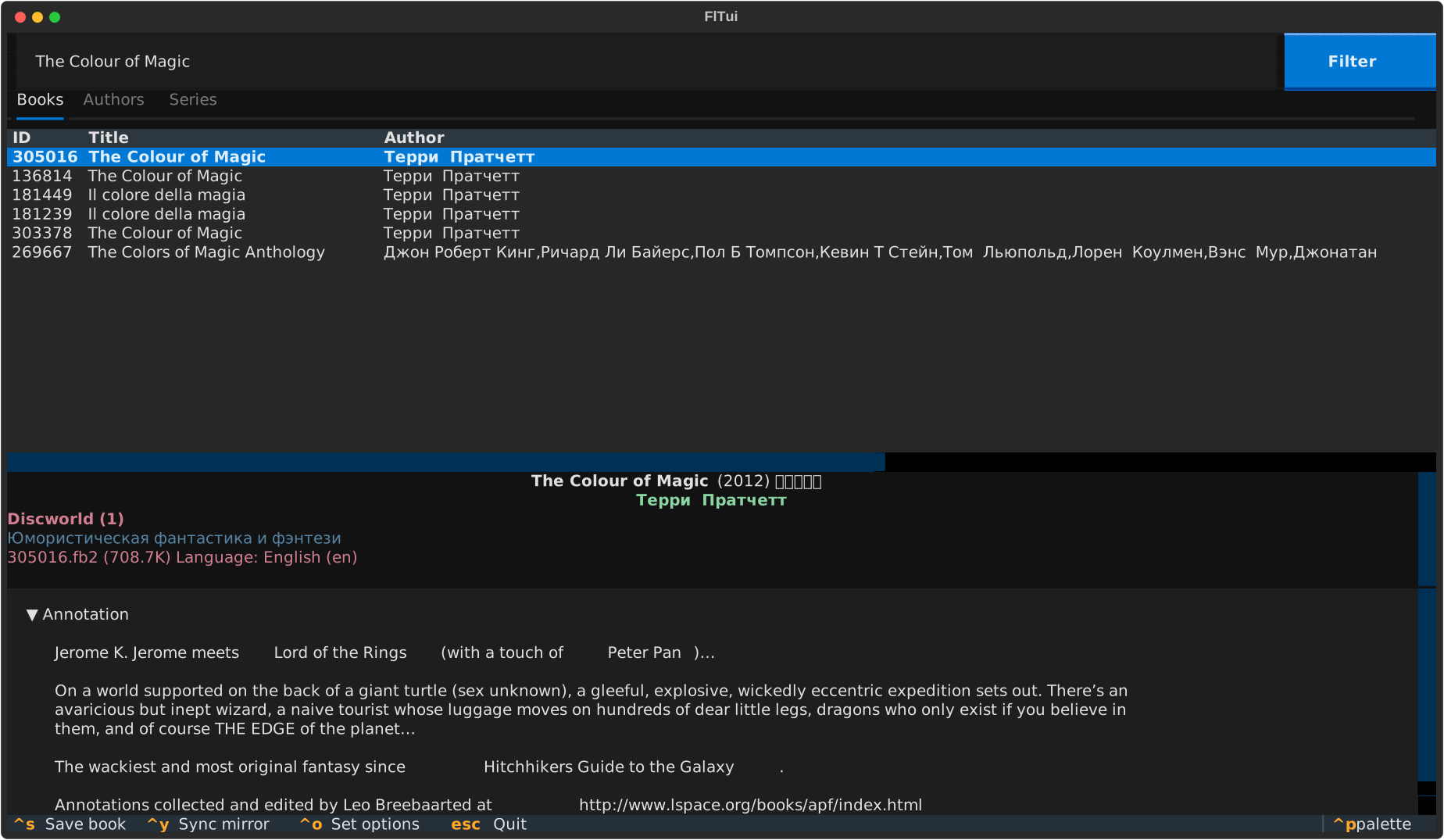
fltui: a terminal UI with search-as-you-type, author and series browsing, filters, and a book card with annotation, reviews and cover.flget: a CLI for searching, inspecting, syncing and extracting books.
⚠️ flget distributes no books and no copyrighted content. It only indexes and reads a library mirror that you already have on your own disk. It is not affiliated with Flibusta. See the Disclaimer.
Contents
Screenshots

Authors: an author's books, grouped by series |

Series: a cycle in reading order |

Filters: genre, format, language, year and file size |

CLI: |

CLI: flget search book "Foundation" -l en -f fb2
Requirements
-
Python 3.12 or newer.
-
A local Flibusta mirror.
/mnt/library/Flibusta.Net/
├── d.fb2-009373-367300.zip
├── d.usr-172703-173908.zip
├── f.fb2-173909-177717.zip
├── …
└── flibusta_all_local.inpx
-
Optional: a terminal with an image protocol (Kitty, WezTerm, iTerm2, Sixel) for covers. Elsewhere covers are drawn with half-block characters.
Installation
uv tool install flget
# or
pipx install flget
This installs two commands, flget and fltui.
From source:
git clone https://github.com/akashihi/flget.git
cd flget
uv sync
uv run fltui
First run
flget sync --library-path /mnt/library/Flibusta.Net   # import the INPX, build the index, validate
fltui
Once the sync succeeds, the mirror location is stored in flget.toml; later
commands and syncs use it.
The first sync parses the whole catalogue and opens every archive for validation, so on a full mirror it takes a while. Until a sync has completed, commands say so instead of returning empty results.
Usage
fltui
Type in the search box to search the active tab (Books, Authors or Series).
| Key | Action |
|---|---|
| Filter button | Genre, format, language, year and size filters |
Ctrl+S |
Save the highlighted book (default: Documents folder) |
Ctrl+P |
Command palette |
Esc |
Quit |
The Authors tab lists an author's books grouped by series. The This author only switch hides other authors' books in shared series.
flget
Search:
flget search book   "The Colour of Magic"
flget search author "Corris"
flget search series "Discworld"
flget search all    "Foundation"
Filters work on every search, can be repeated and combined:
flget search book "Foundation" -l en -f fb2 -f epub
flget search book "Dune" -l en --year-from 2000 --year-to 2015
flget search book "War and Peace" -l en --min-size 500K --max-size 5M
| Option | Meaning |
|---|---|
-g, --genre CODE |
Genre code |
-f, --format EXT |
File format: fb2, epub, pdf, … |
-l, --language CODE |
Language code: ru, en, … |
--year-from, --year-to |
Publication year range |
--min-size, --max-size |
File size range: 500K, 2M, 1.5G |
flget filters genres|formats|languages lists the values present in your mirror.
Show details by ID (IDs come from search output):
flget show book   273027
flget show author 81354
flget show author 81354 --author-only    # only this author's books in shared series
flget show series 3088
Extract a book:
flget get 305016             # into the Documents folder
flget get 305016 ~/Books
Sync
flget sync builds the catalogue from one of two sources:
| Source | Speed | Contents |
|---|---|---|
| INPX (default) | fast | titles, authors, series, genres, languages, file info |
| SQL dumps | slow | the above with Flibusta's real IDs, plus annotations, reviews and covers |
The default imports the INPX, then validates it against the archives on disk: missing archives, unknown archives, and books found in archives but not in the catalogue. If the INPX turns out incomplete, sync suggests a dump sync.
The INPX has no author or series IDs, so flget assigns its own during import.
Author and series IDs shown by flget search and used by flget show therefore
differ between an INPX sync and a dump sync; after switching sources, look them
up again.
The mirror location comes from --library-path, or from flget.toml when the
option is omitted. A successful sync stores it; a failed one leaves the stored
location unchanged. If the mirror moves, sync again with the new
--library-path.
flget sync --library-path /mnt/library/Flibusta.Net   # INPX, store the location
flget sync                                            # INPX, stored location
flget sync --dumps-dir ~/flibusta-sql                 # SQL dumps from a local folder
flget does not download the dumps itself. --dumps-dir takes a flat folder of the dumps under
their original names:
lib.libavtor.sql.gz         lib.libgenrelist.sql.gz     lib.libseq.sql.gz
lib.libavtorname.sql.gz     lib.libjoinedbooks.sql.gz   lib.libtranslator.sql.gz
lib.libbook.sql.gz          lib.librate.sql.gz          lib.b.annotations.sql.gz
lib.libfilename.sql.gz      lib.librecs.sql.gz          lib.b.annotations_pics.sql.gz
lib.libgenre.sql.gz         lib.libseqname.sql.gz       lib.reviews.sql.gz
lib.b.attached.zip
Files
Locations come from platformdirs:
| Linux | macOS | Windows | |
|---|---|---|---|
Config (flget.toml, mirror location) |
~/.config/flget/ |
~/Library/Application Support/flget/ |
%LOCALAPPDATA%\flget\flget\ |
Cache (index, files.db, dumps) |
~/.cache/flget/ |
~/Library/Caches/flget/ |
%LOCALAPPDATA%\flget\flget\Cache\ |
The cache is fully rebuildable: delete it and run flget sync. The mirror
itself is only ever read.
FAQ
Why are author names and genres in Russian? That's how the Flibusta catalogue stores them. Translated authors are listed under the Russian spelling (Terry Pratchett is Терри Пратчетт); genre names are always Russian. Titles keep their original language. If an author search finds nothing, search by title, series or the Russian name.
No annotations, reviews or covers. The INPX doesn't contain them. Sync from the SQL dumps.
Covers look blocky. The terminal has no image protocol; flget falls back to half-blocks.
Development
uv sync
uv run pre-commit install
uv run pre-commit run --all-files   # ruff, mypy --strict, deptry, codespell, gitleaks, pytest
Tests cover the pure parsers (INPX, mysqldump, naming, filters) and need no mirror. Sync, index, CLI and TUI are checked by running them.
Disclaimer
flget is a search and indexing tool. It does not host, distribute or link to books or other copyrighted material, and works only with a mirror already on your storage, which it reads but never modifies. It makes no network access. It is not affiliated with Flibusta. Make sure your use of any library complies with the laws of your country.
License
GPL-3.0-or-later. See LICENSE.
Denis Chaplygin - Initial work - akashihi
1 maintainer

Metadata
1 maintainer
Release files for flget 0.1.0
For a detailed explanation of source distributions (sdists) and built distributions (wheels), please see the package formats documentation.
Source distribution (sdist)
| File | Size | Uploaded | Provenance | Actions |
|---|---|---|---|---|
| flget-0.1.0.tar.gz | 53.1 kB | Without provenance | Details for flget-0.1.0.tar.gz |
Built distribution (wheel)
| File | Interpreter | ABI | Platform | Actions Reset |
|---|---|---|---|---|
| flget-0.1.0-py3-none-any.whl | Python 3 | none | any | Details for flget-0.1.0-py3-none-any.whl |
Total release size: 108.7 kB
Release files / flget-0.1.0.tar.gz
| Download URL | flget-0.1.0.tar.gz |
|---|---|
| Size | 53.1 kB |
| Tags | Source |
|
SHA-256 checksum How to use checksums |
cb353d17c2063f9319e8259720fe1abd99a11e35144c6992931956738b3f577f
|
|
BLAKE2b-256 checksum How to use checksums |
1d1c3570628ea7b8939ca38727f864d98749ee71c2f4516051105901abba66d4
|
| Upload date | |
|
Uploaded using Trusted Publishing? What is trusted publishing? |
Yes |
| Uploaded via |
uv/0.13.4 {"installer":{"name":"uv","version":"0.13.4","subcommand":["publish"]},"python":null,"implementation":{"name":null,"version":null},"distro":{"name":"Ubuntu","version":"24.04","id":"noble","libc":null},"system":{"name":null,"release":null},"cpu":null,"openssl_version":null,"setuptools_version":null,"rustc_version":null,"ci":true}
|
Release files / flget-0.1.0-py3-none-any.whl
| Download URL | flget-0.1.0-py3-none-any.whl |
|---|---|
| Size | 55.5 kB |
| Tags | Python 3 |
|
SHA-256 checksum How to use checksums |
0b8dc94881a9d5552ec1acdfb392c0444d44e29d85255f2840f8c411a9d0bd32
|
|
BLAKE2b-256 checksum How to use checksums |
8889b1b10ea1e69243d63ba355b62cdea9661e9e6de221271f4fb4d77765ad64
|
| Upload date | |
|
Uploaded using Trusted Publishing? What is trusted publishing? |
Yes |
| Uploaded via |
uv/0.13.4 {"installer":{"name":"uv","version":"0.13.4","subcommand":["publish"]},"python":null,"implementation":{"name":null,"version":null},"distro":{"name":"Ubuntu","version":"24.04","id":"noble","libc":null},"system":{"name":null,"release":null},"cpu":null,"openssl_version":null,"setuptools_version":null,"rustc_version":null,"ci":true}
|
Security for flget 0.1.0
Provenance
Provenance describes where a file came from. On PyPI, provenance is shared via attestations, which provide a verifiable record of the build or publishing details. View details, limitations and caveats.
No provenance found
None of the files in this release were uploaded with provenance metadata.
A note on package security
PyPI is a repository for distributing packages, not a service for auditing them. While third-party security researchers and our staff do their best to detect and remove malicious packages, PyPI cannot guarantee the quality, security or suitability of any given package.
To learn more about protecting yourself from malicious actors, visit our package security documentation.













