
FlightTracer
Turn an aircraft tail number, ICAO hex, or ADS-B Exchange link into a flight map, altitude and speed charts and reusable data.
pip install flight-tracer
flight-tracer trace --icao a40442
No date means recent activity. For a historical flight, add --date YYYY-MM-DD.
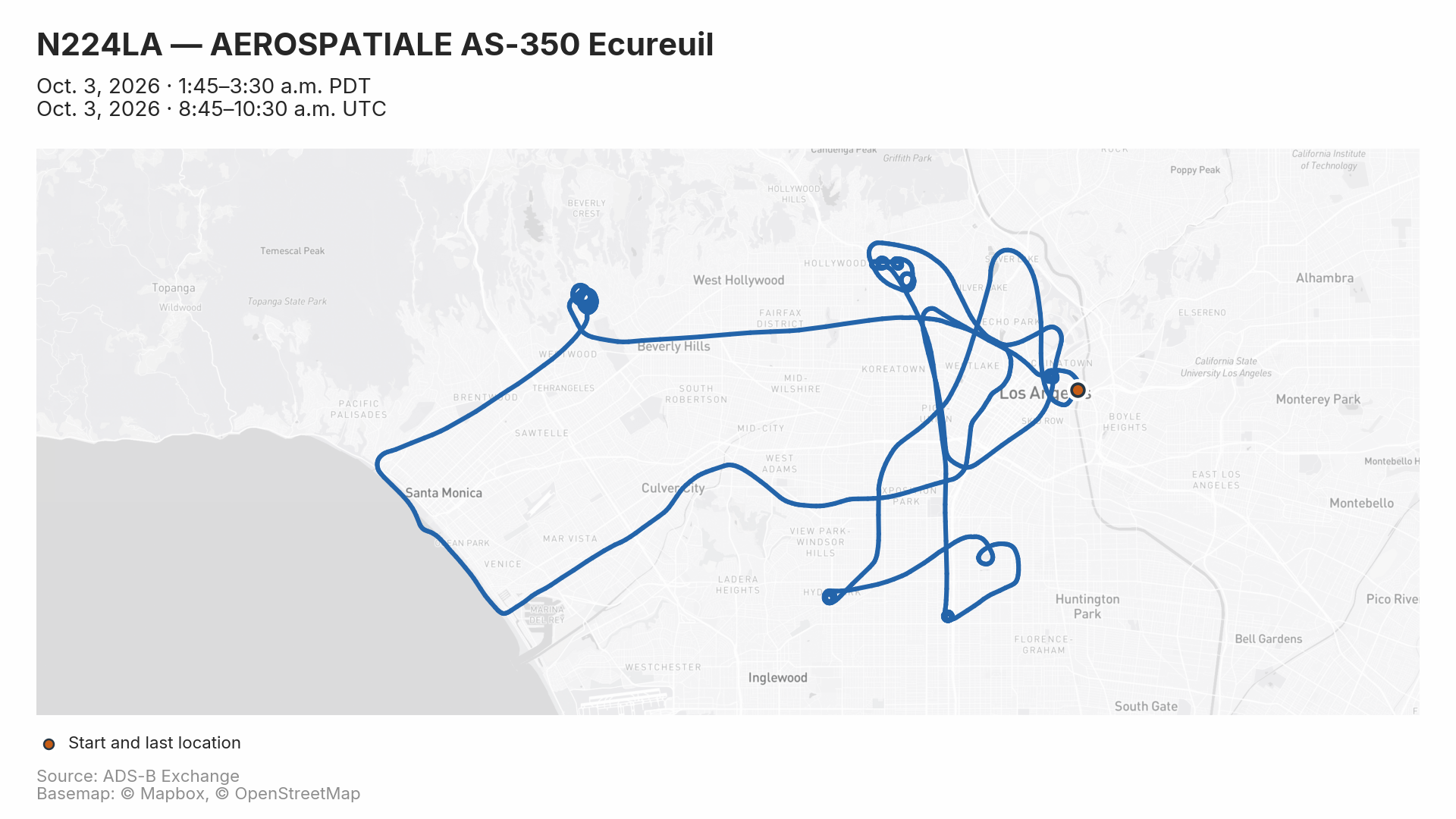
Example: An LAPD helicopter, N224LA, patrolling on an early Saturday morning.
Start with what you have
| You have | Command |
|---|---|
| ICAO hex | flight-tracer trace --icao a40442 |
| U.S. tail number | flight-tracer trace --n-number N358TV |
| Historical date | flight-tracer trace --icao a40442 --date 2026-09-16 |
| ADS-B Exchange link | flight-tracer trace --url "https://globe.adsbexchange.com/?icao=a9a1ad&showTrace=2020-01-26" |
| Tail number to look up | flight-tracer resolve --n-number N358TV |
Tail-number lookup requires pip install "flight-tracer[faa]". A callsign such as FDX9756 cannot currently be used as an input; first find the aircraft's ICAO hex or tail number for that flight and date.
Common recipes
Fetch a date range and render every leg
flight-tracer trace --n-number N868FD \
  --start 2026-09-26 --end 2026-09-27 --leg all
Both dates are included. Each detected leg gets its own folder, plus an overview map. Use --leg 1 for one leg or --leg latest for the most recent detected leg.
Select a time window
flight-tracer trace --icao a9a1ad --date 2020-01-26 \
  --after 2020-01-26T09:00:00 --before 2020-01-26T10:00:00 \
  --window-timezone America/Los_Angeles --timezone America/Los_Angeles
Bounds are inclusive. Timestamps without an offset default to UTC unless --window-timezone is set. --timezone controls display separately. For older archives, --infer-legs can optionally detect explicit ground stops. See the detailed January 26 case study.
Make a portrait map with local times
flight-tracer trace --icao a40442 --date 2026-09-16 \
  --aspect-ratio 9:16 --timezone America/Los_Angeles
Portrait outputs are 1080 × 1920. Local times appear alongside UTC; exported timestamps keep their full precision.
Change the basemap and gap threshold
flight-tracer trace --icao a40442 --date 2026-09-16 \
  --background osm --gap-minutes 2
Connections across tracking gaps longer than two minutes are dashed. The default threshold is five minutes. The default basemap is esri-light; see all map styles, including Mapbox with your own token.
Add a headline and label locations
flight-tracer trace --icao a40442 --date 2026-09-16 \
  --title "LAPD helicopter circles the San Fernando Valley" \
  --label "34.2098,-118.4898,Van Nuys Airport" \
  --label "34.2597,-118.4134,Whiteman Airport"
--title and --dek replace the map's generated headline and time span. Each --label takes latitude, longitude and text, and the map widens to include it. On multi-leg runs, the title and dek go on the overview and labels go on every map. They're saved in annotations.json, so render reuses them.
Re-render a saved run
flight-tracer render data/a40442_2026-09-16_2026-09-16 \
  --background osm --aspect-ratio 9:16 --output variants/portrait
Redraws images from the saved trace.csv without fetching the flight again. Data files are not rewritten. Saved annotations carry over; pass --title, --dek or --label to replace them.
Save your usual settings as presets
# ~/.config/flight-tracer/presets.toml
[default]
timezone = "auto"

[social]
aspect-ratio = "9:16"
output = "~/Desktop/social"
flight-tracer trace --icao a40442 --preset social
flight-tracer presets   # show the file's location and contents
[default] always applies. --preset NAME adds a named table on top, and flags override both. Keys are spelled like the flags. See the CLI reference for what presets can set.
Export data without charts
flight-tracer trace --icao a40442 --date 2026-09-16 \
  --no-plots --formats csv,geojson --output exports
What you get
A single-leg run writes:
data/a40442_2026-09-16_2026-09-16/
├── map.png           # Route, start and last location, dates, attribution
├── altitude.png      # Altitude over time
├── speed.png         # Ground speed over time
├── trace.csv         # Recorded points and decoded fields
├── points.geojson    # Point geometries
├── line.geojson      # Routes by leg
├── summary.json      # Aircraft metadata, times and statistics
├── selection.json    # Time bounds, leg selection and ground-filter settings
└── annotations.json  # Custom title, dek and location labels, reused by render
For several detected legs, the root contains the full data and overview.png; subfolders such as leg1_FDX9756/ contain each leg's data and charts. Interactive runs ask which leg to use; --leg all skips the prompt. Non-interactive runs default to all legs.
Running the same aircraft/date selection again writes to the same folder. Use a different --output directory to keep variants.
Installation and upgrades
Python 3.9 or newer is required. Optional extras add tail-number lookup and automatic timezone lookup:
pip install "flight-tracer[faa,tz]"
flight-tracer --version
flight-tracer trace --help
Quote extras such as [faa,tz] in zsh. To upgrade an existing installation:
pip install --upgrade flight-tracer
For local development, run this from the repository after installing dependencies:
pip install --no-deps -e .
Understand the trace
- Last location means last received position, not a confirmed landing or crash site.
- Check the data-quality notes. Each run reports tracking gaps, stale and multilaterated positions, missing metadata and how leg boundaries were found; the full set is in
summary.json. - Dashed segments approximate missing coverage. They do not establish the path flown. Exported route geometries include connections without dash styling.
- Legs use the archive's boundary flags. Older archives may lack them. Opt-in
--infer-legsuses explicit ground stops and labels its results as estimates; otherwise use a time window. Seven-field historical records are supported. - Date Line crossings are handled automatically. Maps wrap around the Pacific where appropriate; exported routes split at ±180°.
- Altitude and speed are raw, uncorrected values. Missing metadata stays empty. Times default to UTC; local time is opt-in.
More examples and reference
| Guide | What you'll find |
|---|---|
| Recipes | Historical links, older archives, ground points, timezones and troubleshooting |
| Map styling | Aspect ratios, basemaps, Mapbox tokens, OSM caching and tracking gaps |
| Python examples | Fetching, selecting time windows, plotting and working with fleets |
| CLI reference | Options, defaults and date precedence |
| Changelog | Release history |
| Backlog | Prioritized feature ideas and maintenance work |
Contributing and releasing
Run checks with python -m pytest tests/. tests/test_visual.py compares rendered maps and charts with the reference images in tests/baseline_images/. If a change to the output is intended, regenerate them with FLIGHT_TRACER_UPDATE_BASELINES=1 python -m pytest tests/test_visual.py and review the new images before committing. Pixels are only comparable within one matplotlib minor release, so regenerating records the version in tests/baseline_images/matplotlib-version.txt; other versions skip these tests, and a dedicated CI job runs them against the recorded version. Failed comparisons leave the new render and a diff in tests/visual_results/. See PUBLISH.md for the release workflow.
Credits and license
Flight data comes from ADS-B Exchange. Consider subscribing or contributing data. FAA tail-number resolution uses hangarbay. Keep the basemap attribution in exported maps.
FlightTracer is released under CC0 1.0. The bundled Inter typeface (flight_tracer/fonts/) is by The Inter Project Authors and keeps its own SIL Open Font License 1.1.
1 maintainer

Metadata
1 maintainer
Release files for flight-tracer 0.4.2
For a detailed explanation of source distributions (sdists) and built distributions (wheels), please see the package formats documentation.
Source distribution (sdist)
| File | Size | Uploaded | |
|---|---|---|---|
| flight_tracer-0.4.2.tar.gz | 470.5 kB | Details |
Built distribution (wheel)
| File | Interpreter | ABI | Platform | Reset |
|---|---|---|---|---|
| flight_tracer-0.4.2-py3-none-any.whl | Python 3 | none | any | Details |
Total release size: 921.1 kB
Release files / flight_tracer-0.4.2.tar.gz
| Download URL | flight_tracer-0.4.2.tar.gz |
|---|---|
| Size | 470.5 kB |
| Tags | Source |
|
SHA-256 checksum How to use checksums |
8e2fbf88bb1462ae3b0eb48a026831669a56d24cb415836cc215a85efcfc2f44
|
|
BLAKE2b-256 checksum How to use checksums |
fbd478870a1f48d4721b6c33275a5802f5163b896f8b064472a8afba719ae9f6
|
| Upload date | |
|
Uploaded using Trusted Publishing? What is trusted publishing? |
No |
| Uploaded via |
twine/7.0.0 CPython/3.14.8
|
Release files / flight_tracer-0.4.2-py3-none-any.whl
| Download URL | flight_tracer-0.4.2-py3-none-any.whl |
|---|---|
| Size | 450.7 kB |
| Tags | Python 3 |
|
SHA-256 checksum How to use checksums |
b58c3a27d21133ba10d6f5a2fb30772480d74e498f0dfddf696218bf364b6985
|
|
BLAKE2b-256 checksum How to use checksums |
f39cf24ec36191e6336597a342ee532d0d1dcdd2ced5bfb962825506f2186dad
|
| Upload date | |
|
Uploaded using Trusted Publishing? What is trusted publishing? |
No |
| Uploaded via |
twine/7.0.0 CPython/3.14.8
|














