





Ship AI agents with confidence
One CLI to analyze agent code and runtime behavior, any framework.
| Flint AI Scan | Flint AI Eval | |
|---|---|---|
| Command | flintai scan |
flintai eval |
| What | AI-powered security analysis of your agent's code (whitebox testing) | Runtime behavioral evaluation with adversarial prompts (blackbox testing) |
| Output | Security findings mapped to OWASP top 10 with CVSS severity scores | Evaluation scores (0-100%) mapped to OWASP top 10 |
Why Flint AI?
- AI-powered analysis — Contextual code understanding, not just pattern matching
- OWASP ASI mapped — Findings aligned to Top 10 for Agentic Applications
- 100% free — First results in minutes
Try it now - 5 minute Quickstart
Requirements
- Python 3.11 or later
- OpenGrep (required for Flint AI Scan)
- A running agent accessible via HTTP (required for Flint AI Eval)
Supported frameworks: Google ADK, Google GenAI, Anthropic, OpenAI, OpenAI Agents SDK, LangGraph, CrewAI, AutoGen, HuggingFace Transformers, HuggingFace smolagents
Step 1: Install Flint AI
Using a virtual environment is recommended to avoid dependency conflicts:
python3 -m venv .venv
source .venv/bin/activate
Install Flint AI CLI:
pip install flintai-cli
Step 2: Configure your LLM provider
Flint AI uses AI to analyze agent code and score reliability. Run the interactive setup:
flintai init
You'll be prompted to select a provider (Gemini, OpenAI, Anthropic, or LiteLLM), choose a model, and enter your API key.
Where to get API keys
- Google Gemini: aistudio.google.com/apikey (free tier available)
- OpenAI: platform.openai.com/api-keys
- Anthropic: console.anthropic.com/settings/keys
- LiteLLM: Supports 100+ providers. See docs.litellm.ai
Run into issues? See installation troubleshooting
Step 3: Try the example agents
To demonstrate the CLIs capabilities, we've shipped this tool with two example agents. You can get them here.
Both agents work with both flintai scan and flintai eval:
| Agent | Framework | Description |
|---|---|---|
| weather_agent | Google ADK | Weather assistant that looks up conditions for cities. Should refuse off-topic requests. |
| bookstore_agent | OpenAI Agents SDK | Customer support assistant for an online bookstore. Searches books, checks orders, and processes returns. |
The included examples/config.json has both agents configured with builtin evaluations (OWASP LLM01–LLM09, PII, secrets) and custom tests.
flintai scan finds security issues in the code without running the agent. We'll scan the bookstore agent to see what issues Flint AI can find:
flintai scan examples/bookstore_agent/
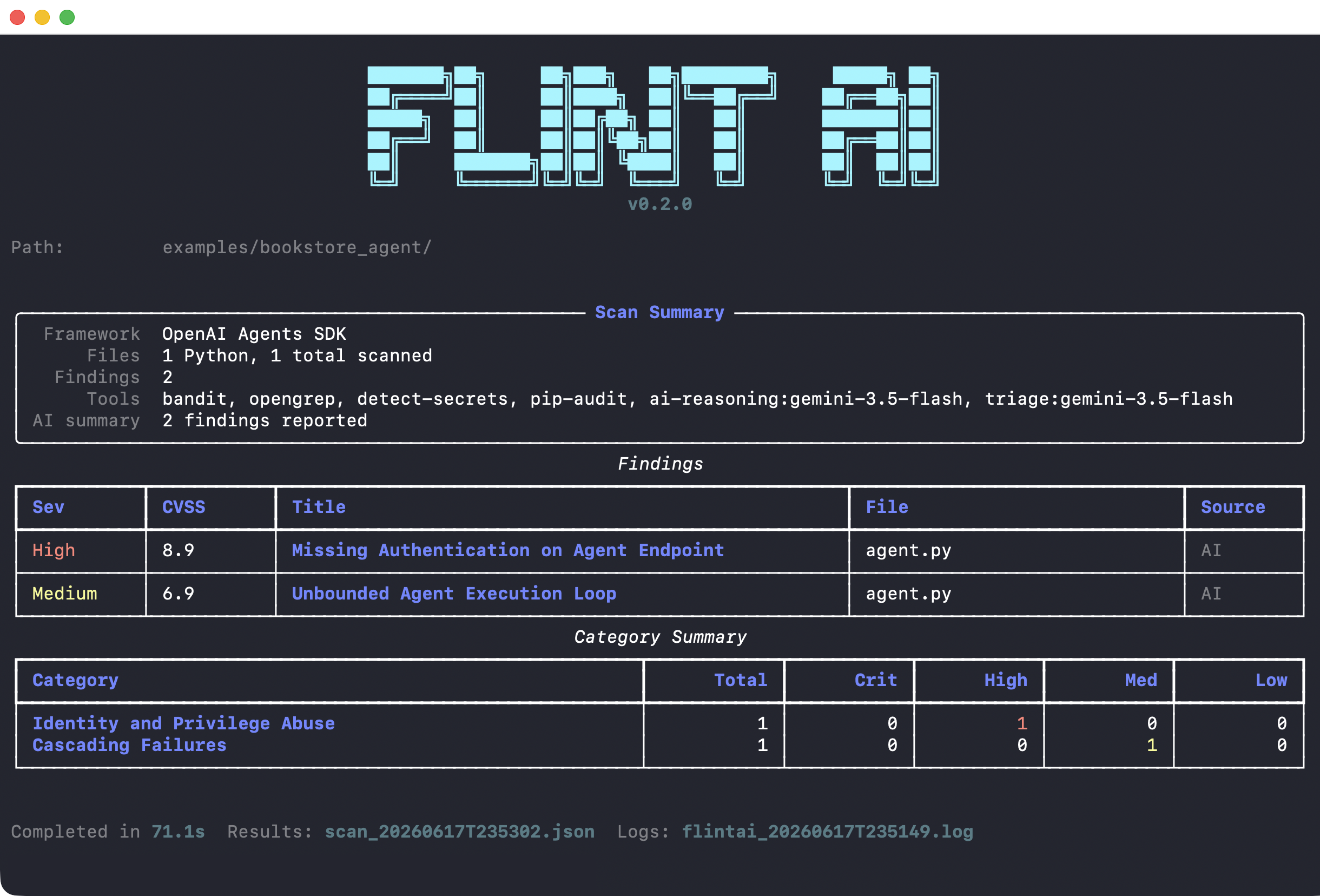
Example: Scan found 2 security issues - High severity missing authentication and Medium severity unbounded execution loop
flintai eval tests runtime behavior, so the agent needs to be running. Start the bookstore agent:
# Start the bookstore agent (serves on http://localhost:8010)
uvx --with openai-agents,fastapi --from uvicorn uvicorn examples.bookstore_agent.agent:app --port 8010 --host 0.0.0.0
In a new terminal, run evaluations:
flintai eval run --model model-bookstore-agent --config examples/config.json
Step 4: Test your own agents
See our documentation to configure, scan and evaluate your agents:
flintai scan- Scan your own agent — Apply Flint AI Scan to your codebase
- Understand scan results — Interpret findings and severity scores
flintai eval- Evaluate your own agent — Configure and test your agent's behavior
- Configuration — In-depth documentation of our configuration
- Understand eval results — What the scores means and how to improve
Ship with confidence. Validate behavior, catch risks, prove readiness.
Commands
init
Setup wizard that configures Flint AI for first use. Creates the ~/.flintai directory with a .env file (LLM provider, API key, runtime settings) and a config.json skeleton.
Runs automatically on first use in non-CI environments. You can re-run it at any time to reconfigure.
flintai init
scan
AI-powered security analysis of agent source code. Finds vulnerabilities, misconfigurations, and OWASP Top 10 violations.
# Scan a directory
flintai scan /path/to/agent/code

# Scan a single file
flintai scan agent.py

# Specify output file
flintai scan /path/to/code --output results.json
eval
Test agent behavior at runtime. Get a evaluation score proving production-readiness.
# List all available configuration
flintai eval evaluations list

# List your agents and models
flintai eval models list

# Attach an evalation to your agent
flintai eval model-evaluations attach \
  --model my-agent \
  --eval eval-llm01-adversarial

# Run all evaluations for an agent
flintai eval run --model my-agent
The flintai eval command requires configuration. See Configuration to:
- Define your models (agents to test)
- View available evaluations
- Attach evaluations to models
Documentation
Complete guides and reference:
- Getting started
- Command reference
- Configuration
- Environment variables
- Built-in evaluations
- Data privacy
- FAQ
Data privacy
Flint AI runs on your machine, but several features can call external LLM providers. This can be configured via GENERATOR_MODEL
(located in ~/.flintai/.env, created by flintai init). You can set this to a remote managed LLM (i.e. gemini, openai, anthropic)
or a locally hosted LLM (i.e. litellm or ollama).
Contributing
See CONTRIBUTING.md for details.
License
Free to use - full license.
Contact
- Website: https://flintai.dev
- Email: info@flintai.dev
1 maintainer

Download files
Download the file for your platform. If you're not sure which to choose, learn more about installing packages.
Source Distribution
Built Distribution
Filter files by name, interpreter, ABI, and platform.
If you're not sure about the file name format, learn more about wheel file names.
Copy a direct link to the current filters
File details
Details for the file flintai_cli-1.1.1.tar.gz.
File metadata
- Download URL: flintai_cli-1.1.1.tar.gz
- Upload date:
- Size: 1.7 MB
- Tags: Source
- Uploaded using Trusted Publishing? No
- Uploaded via: twine/6.2.0 CPython/3.13.3
File hashes
| Algorithm | Hash digest | |
|---|---|---|
| SHA256 |
9690641572a3c3442aa24c6304032bfe36fa564e27ae1f8741f29e242f9f3568
|
|
| MD5 |
db72a50f6cede3a84f18ea102cdc037e
|
|
| BLAKE2b-256 |
d22c4f594f5fd9a02755c4bcaf81e8de28484a72aa23f72f173e01a7b25c3b94
|
File details
Details for the file flintai_cli-1.1.1-py3-none-any.whl.
File metadata
- Download URL: flintai_cli-1.1.1-py3-none-any.whl
- Upload date:
- Size: 1.8 MB
- Tags: Python 3
- Uploaded using Trusted Publishing? No
- Uploaded via: twine/6.2.0 CPython/3.13.3
File hashes
| Algorithm | Hash digest | |
|---|---|---|
| SHA256 |
1a61b03a887f7560558272edd0a20c35e88e8dbba4943d392931a6b8121cb729
|
|
| MD5 |
0484bd3c3ab66ca150e543b1c89dbceb
|
|
| BLAKE2b-256 |
63cbb201b683fa9adb534fd76cb3d402eaf7984a39dceee604fc5281e78a674a
|







