
FlipBook
This tool provides a simple user interface for quickly flipping through images stored in some directory on your computer. It also optionally shows a form where you can take notes or answer questions about each image or set of images.
Example uses:
- manual curation / review of sequencing data visualization images such as those generated by REViewer for short tandem repeat loci
- machine learning training set creation
- reviewing a pile of photos
Features:
- simple way to flip through many local image files using your web browser
- crawls a top-level directory to find .png, .jpeg, or .svg image files
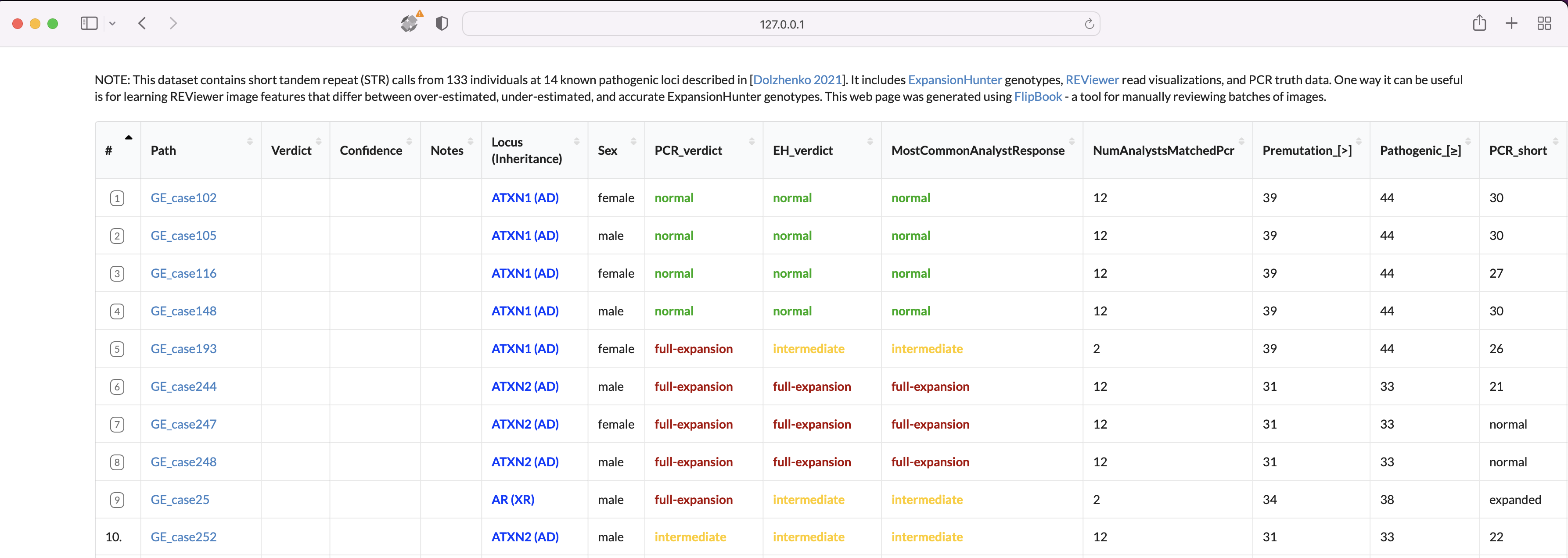
- browser interface: home page lists all images
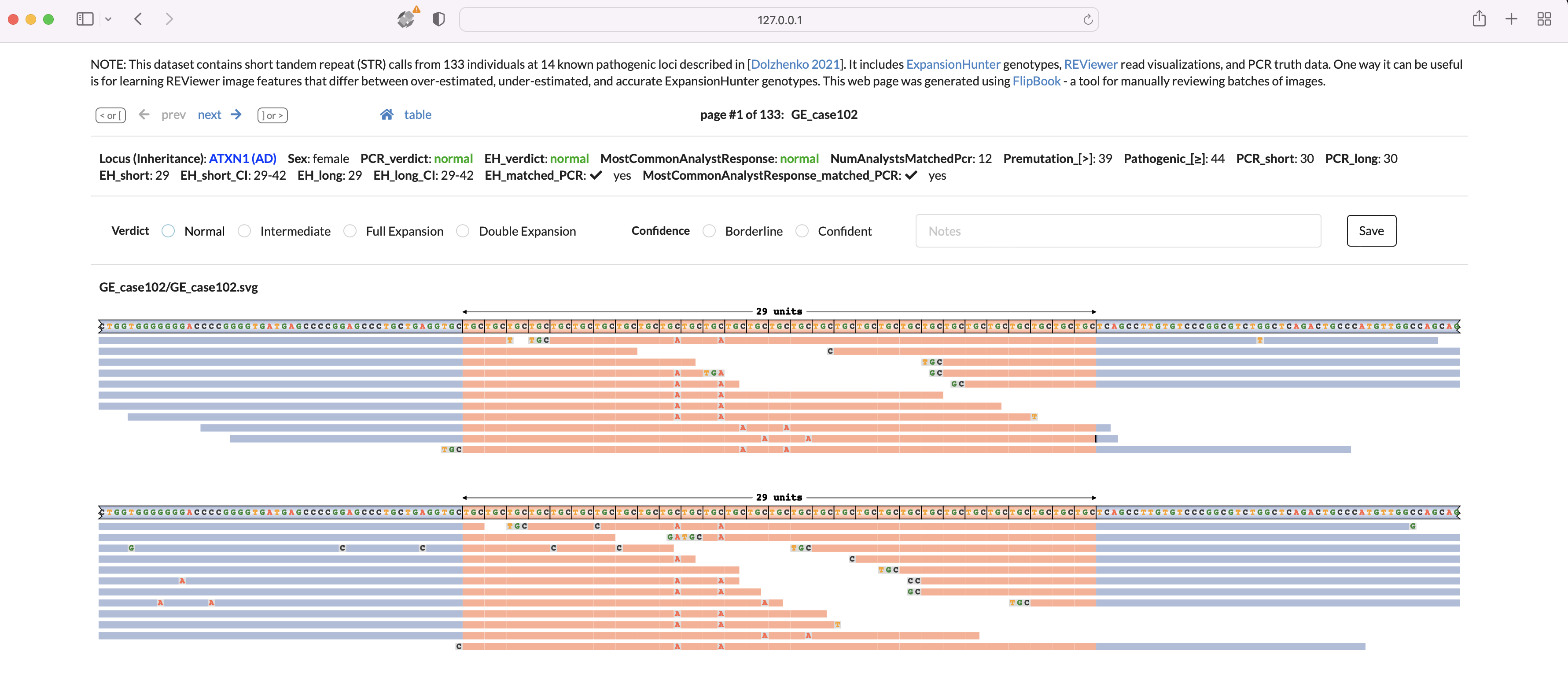
- browser interface: image pages show the image, an optional customizable form where you can take notes or answer questions about the image, next/previous page links, and optional other customizable info for context
- use subdirectories to group images. Any images found in the same subdirectory will be shown on the same page
- optionally generate a static html website to share your images and form responses publicly. Example @ https://broadinstitute.github.io/StrPileups/index.html


Install:
python3 -m pip install flipbook
Run:
python3 -m flipbook # start server for all images in the current directory and subdirectories
Below are more example command lines. Run with --help to see all available options and their descriptions.
python3 -m flipbook -x temp -x keyword2  /path/dir-with-images    #  -x are keyword(s) of paths to skip and /path/dir-with-images is the top level dir to search instead of the current dir

python3 -m flipbook -t /path/user_responses.xls    #  change where user responses get saved (default: flipbook_form_responses.tsv)

python3 -m flipbook -m /path/metadata.tsv          #  provide a metadata table
After the server is running, open your web browser to http://localhost:8080 to start reviewing images.
Screenshots
Image page:
Home page:
These pages are also available on the StrPileups website, a GitHub Pages site that was generated by running
python3 -m flipbook --generate-static-website
Options:
-
metadata table (
-m)It's often useful to add extra info to the image pages to help with review - such as image descriptions, quality scores, etc. To enable this, there are several ways to specify arbitrary key-value pairs to add to specific image pages. The 1st way is to put a file called
flipbook_metadata.jsonnext to the image(s). All keys and values from this file will appear on that image page. The 2nd way is to use-mto pass in a metadata table (.tsvor.xls) with aPathcolumn + arbitrary other columns. If thePathvalue matches the relative directory containing the image(s), entries from that row will be added to this image page.Since the keys and values are treated as html, they can be used to add more complex info - such as colors, text formatting, <img ..> tags with images from other web pages, iframes containing entire sections of external pages, etc.
-
responses table (
-t)As you fill in the forms at the top of the image pages, the responses are written to this table. If you later restart flipbook with the same
-t, it will reload previous responses. You can also optionally use this table to provide additional columns to display - sometimes this can be more convenient than using-m.Default:
flipbook_form_responses.tsv -
custom form schema (
--form-schema-json)If you'd like to use non-default questions in the image page forms, you can specify the path or url of a .json file containing a custom form schema. For a description and examples of the expected format see main/form_schema_examples.
-
config file (
~/.flipbook_config)Most settings that can be provided on the command line can also be set via this YAML config file instead. For example:
~/.flipbook_config
form-schema-json: /path/to/my-schema.json
hide-metadata-on-home-page: true
host: 127.0.0.1
port: 8080
For the full list of command-line options, run:
python3 -m flipbook --help
Comparing reviews:
If 2 or more people review the same images, the reviews can be compared using the compare_form_response_tables script.
For example:
python3 -m compare_form_response_tables egor_flipbook_form_responses.tsv ben_flipbook_form_responses.tsv -o combined_responses.tsv -s1 egor -s2 ben
This script will print concordance stats, and output a combined_responses.tsv table that contains one image per row as well as each person's review of the image.
To see the full list of args and descriptions, run python3 -m compare_form_response_tables --help
Development:
To create a local dev instance, run
git clone git@github.com:broadinstitute/flipbook.git
cd flipbook

# start server in dev mode so it reloads code on change
python3 -m flipbook /path/dir-with-images --dev-mode
1 maintainer

Metadata
1 maintainer
Release files for flipbook 1.2.2
For a detailed explanation of source distributions (sdists) and built distributions (wheels), please see the package formats documentation.
Source distribution (sdist)
| File | Size | Uploaded | Provenance | |
|---|---|---|---|---|
| flipbook-1.2.2.tar.gz | 1.3 MB | Without provenance | Details |
Built distribution (wheel)
| File | Interpreter | ABI | Platform | Reset |
|---|---|---|---|---|
| flipbook-1.2.2-py3-none-any.whl | Python 3 | none | any | Details |
Total release size: 2.6 MB
Release files / flipbook-1.2.2.tar.gz
| Download URL | flipbook-1.2.2.tar.gz |
|---|---|
| Size | 1.3 MB |
| Tags | Source |
|
SHA-256 checksum How to use checksums |
563769f1c9e9f7389357c05b0062cd6c31990185bc0fd3c5ea9dca58a3ad55f9
|
|
BLAKE2b-256 checksum How to use checksums |
0c2f502da51b188980e1c2d4ba10b96eeb76a14e3f771e39f990d97ac520bccc
|
| Upload date | |
|
Uploaded using Trusted Publishing? What is trusted publishing? |
No |
| Uploaded via |
twine/4.0.2 CPython/3.9.18
|
Release files / flipbook-1.2.2-py3-none-any.whl
| Download URL | flipbook-1.2.2-py3-none-any.whl |
|---|---|
| Size | 1.3 MB |
| Tags | Python 3 |
|
SHA-256 checksum How to use checksums |
984ed22e6a63a80cb64262afcc119bdd006585876745bb513f67dc9df2b16406
|
|
BLAKE2b-256 checksum How to use checksums |
79f9b53a5dfee4ccfecd746203318c78ba47bdfe9e5f4d2a411def3e5be60df2
|
| Upload date | |
|
Uploaded using Trusted Publishing? What is trusted publishing? |
No |
| Uploaded via |
twine/4.0.2 CPython/3.9.18
|
Security for flipbook 1.2.2
Provenance
Provenance describes where a file came from. On PyPI, provenance is shared via attestations, which provide a verifiable record of the build or publishing details. View details, limitations and caveats.
No provenance found
None of the files in this release were uploaded with provenance metadata.
A note on package security
PyPI is a repository for distributing packages, not a service for auditing them. While third-party security researchers and our staff do their best to detect and remove malicious packages, PyPI cannot guarantee the quality, security or suitability of any given package.
To learn more about protecting yourself from malicious actors, visit our package security documentation.














