

flitz
A fast, keyboard-friendly file manager written in Python.
Fast Location / Indexing / Traversal Zone




Features
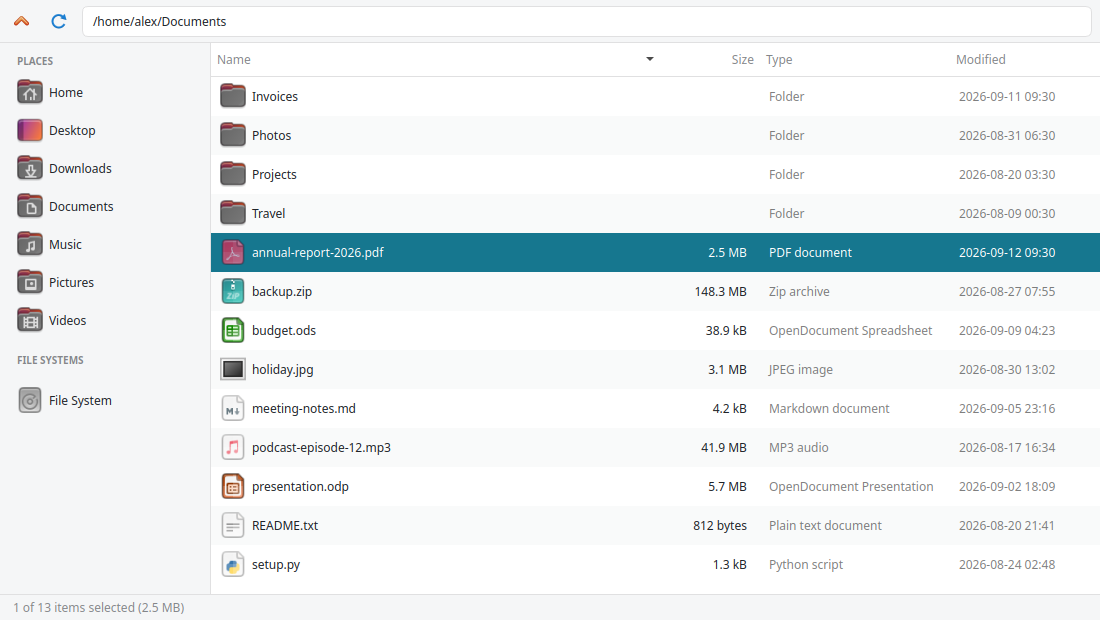
- Clean Qt interface with a sidebar for bookmarks and file systems, file type icons, and human-readable sizes.
- Sortable columns — click a column header to sort by name, size, type, or modification date.
- Keyboard first — search, rename, create, delete, copy and paste without touching the mouse. All shortcuts can be changed.
- Recursive search within the current folder.
- Customizable colors, fonts, context menu, and key bindings via a simple YAML file.
- Remote file systems such as FTP, next to your local disk.
- Extensible — add context menu entries and file systems with plugins.
Installation
flitz requires Python 3.10 or newer and runs on Linux and macOS.
pipx install flitz
Alternatively, use uv tool install flitz or pip install flitz.
Usage
flitz                 # open the current folder
flitz ~/Documents     # open a specific folder
flitz --list-fonts    # fonts which can be used in the configuration
flitz --version
Keyboard shortcuts
| Action | Shortcut |
|---|---|
| Open file / enter folder | Enter or double-click |
| Go to parent folder | Backspace |
| Refresh | F5 |
| Search | Ctrl+F |
| Leave search | Esc |
| Rename | F2 |
| Create folder | F7 |
| Delete | Delete |
| Copy / paste | Ctrl+C / Ctrl+V |
| Show hidden files | Ctrl+H |
| Increase / decrease font | Ctrl++ / Ctrl+- |
| Context menu | Right-click |
| Open the settings | Ctrl+M |
Configuration
flitz reads ~/.flitz.yml. Press Ctrl+M to create and open
it. Every setting is optional:
font: Ubuntu
font_size: 11
background_color: "#ffffff"
text_color: "#1f2328"
selection:
  background_color: "#16778f"
  text_color: "#ffffff"
show_hidden_files: false
keybindings:
  search: <Control-f>
  rename_item: <F2>
file_systems:
  - name: rebex
    type: FTP
    hostname: test.rebex.net
See the documentation
for all options, including sharing themes with external_config.
Plugins
Other packages can extend flitz via entry points:
flitz— aflitz.context_menu.ContextMenuItemfor the context menuflitz.file_systems— aflitz.file_systems.FileSystemsubclass
[project.entry-points.flitz]
compress = "my_plugin:compress_menu_item"
Development
flitz uses uv to manage its dependencies:
git clone https://github.com/MartinThoma/flitz.git
cd flitz
uv sync               # create .venv with all development dependencies
uv run flitz          # start flitz
make test             # run the tests
make lint             # ruff + mypy
pre-commit install    # run the checks before every commit
Releasing
- Update
flitz/_version.pyandCHANGELOG.mdin aREL: x.y.zcommit. - Create a tag with the release notes as tag message body:
git tag -s x.y.z - Push the tag:
git push origin x.y.z
The release workflow publishes the package to PyPI and creates a GitHub release.
License
flitz is licensed under the MIT License.
1 maintainer

Metadata
1 maintainer
Release files for flitz 0.0.9
For a detailed explanation of source distributions (sdists) and built distributions (wheels), please see the package formats documentation.
Source distribution (sdist)
| File | Size | Uploaded | |
|---|---|---|---|
| flitz-0.0.9.tar.gz | 310.8 kB | Details |
Built distribution (wheel)
| File | Interpreter | ABI | Platform | Reset |
|---|---|---|---|---|
| flitz-0.0.9-py3-none-any.whl | Python 3 | none | any | Details |
Total release size: 628.5 kB
Release files / flitz-0.0.9.tar.gz
| Download URL | flitz-0.0.9.tar.gz |
|---|---|
| Size | 310.8 kB |
| Tags | Source |
|
SHA-256 checksum How to use checksums |
b2463c3e16cd4fff456f39215bcda03d67870c2cd75fd399fd15c30f7dfbb8e5
|
|
BLAKE2b-256 checksum How to use checksums |
83964017538020c10c4feb93c3a6941db30f8ade46f0ddc392867e037a3e86f7
|
| Upload date | |
|
Uploaded using Trusted Publishing? What is trusted publishing? |
Yes |
| Uploaded via |
twine/7.0.0 CPython/3.13.14
|
Provenance
Provenance describes where a file came from. On PyPI, provenance is shared via attestations, which provide a verifiable record of the build or publishing details. View details, limitations and caveats.


PyPI Publish Attestation
PyPI verified that this artifact, at this checksum, originated from the publisher listed below.
Signed by GitHub Actions, verified by PyPI on Sep 13, 2026.
Transparency logRelease files / flitz-0.0.9-py3-none-any.whl
| Download URL | flitz-0.0.9-py3-none-any.whl |
|---|---|
| Size | 317.7 kB |
| Tags | Python 3 |
|
SHA-256 checksum How to use checksums |
da08ae6969d99a7e884c519ad5d64e1b13c13fc6ccac6b794a5ab2c5f6849f76
|
|
BLAKE2b-256 checksum How to use checksums |
696645ef792efc8db1916864ba237167559657bc72e79ed46dd8eb6d02a1a9fb
|
| Upload date | |
|
Uploaded using Trusted Publishing? What is trusted publishing? |
Yes |
| Uploaded via |
twine/7.0.0 CPython/3.13.14
|
Provenance
Provenance describes where a file came from. On PyPI, provenance is shared via attestations, which provide a verifiable record of the build or publishing details. View details, limitations and caveats.
PyPI Publish Attestation
PyPI verified that this artifact, at this checksum, originated from the publisher listed below.
Signed by GitHub Actions, verified by PyPI on Sep 13, 2026.
Transparency log













