
fLMCP — FL Studio MCP server




Let Claude, Cursor, VS Code Copilot, Codex — any MCP client — drive FL Studio 2024 / 2025 / 2026. Transport, patterns, the channel rack and step sequencer, mixer, plugin parameters, piano-roll note writing, playlist, arrangements, automation, undo, rendering — plus high-level music generators, voice-to-MIDI humming and audio-file analysis.
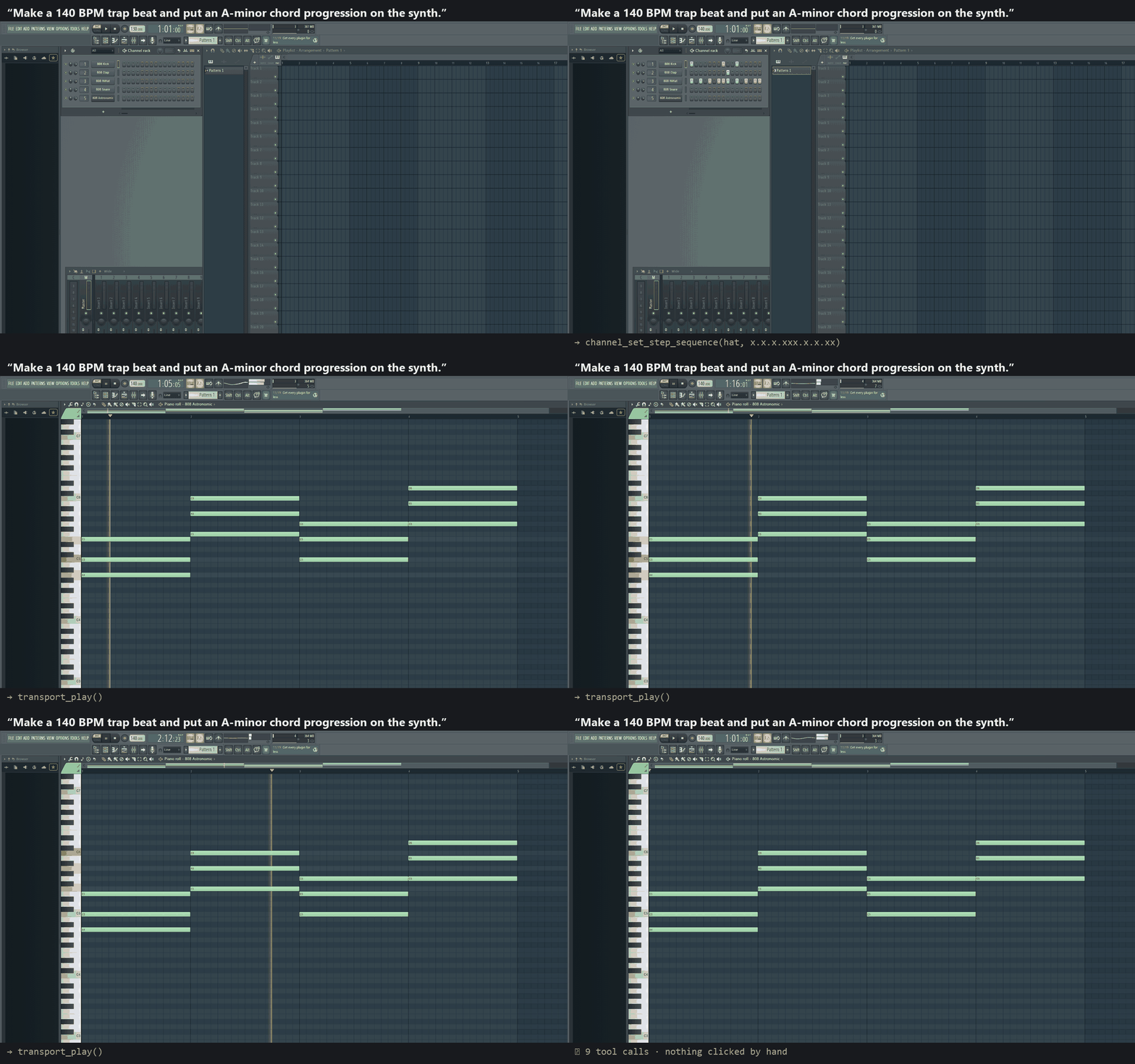
Recorded on FL Studio 2026 with the tool calls shown below the window; nothing was clicked by hand.
- 165 tools, 7 resources, 6 guided prompts, with MCP tool annotations (read-only / destructive) so clients can auto-approve safe calls.
- Works in FL Studio 2025 and 2026's sandboxed Python. No sockets or threads inside FL — a file transport with an optional MIDI wake-up (see Architecture).
- One-command setup:
uvx flmcp-studio installcopies the FL scripts, wires the MIDI port and registers the server with your AI apps.flmcp doctortells you exactly what is wrong when something is. - Toolsets keep the tool list small for clients with tool limits
(
FLMCP_TOOLSETS=lean).
fLMCP is an independent community project, not affiliated with or endorsed by Image-Line.
Quickstart
Requirements: Windows 10/11 (macOS works for most tools, see platform support), FL Studio 2024 or newer (any edition with MIDI scripting), and uv or Python 3.10+.
1. Install — close FL Studio first, then:
uvx flmcp-studio install
This:
- copies
device_FLStudioMCP.pyintoDocuments\Image-Line\FL Studio\Settings\Hardware\fLMCP Bridge\andComposeWithLLM.pyscriptinto...\Settings\Piano roll scripts\(it reads FL's own user data folder setting, so relocated folders work); - creates a loopMIDI
port named
fLMCPif loopMIDI is installed (recommended, and required on FL 2026: it gives the controller script a MIDI input to live on and wakes it for every command); - on Windows, with FL closed, assigns the fLMCP Bridge controller to that MIDI input in FL's settings and enables it, so there is nothing to click;
- registers the
flmcpserver with Claude Desktop, Claude Code, Cursor and VS Code where it finds them (existing configs are backed up to*.flmcp.bak). Limit it with--client cursor, or skip with--no-clients.
2. Start FL Studio. The bridge loads with FL; uvx flmcp-studio doctor should say
All good.
If FL was running during the install (FL rewrites its MIDI settings on exit, so
the installer leaves them alone then), either close FL and re-run the install,
or enable the bridge by hand once: Options → MIDI Settings → Input → select
the fLMCP row (or any MIDI input) → Controller type = fLMCP Bridge →
make sure the row is enabled.
Piano-roll writing needs no setup on Windows: the server runs the
ComposeWithLLM script from the piano roll's Tools menu itself, without
taking over the mouse, the keyboard or the window focus. On macOS, run
Tools → Scripts → ComposeWithLLM (or Cmd+Opt+Y after the first run) when a
tool says the edits are queued.
3. Restart your AI app and say "ping FL Studio". If it can't connect:
uvx flmcp-studio doctor
Claude Desktop: one-click bundle
Each release has a
flmcp-<version>.mcpb file. Double-click it (or drag it onto Settings →
Extensions in Claude Desktop) to add the server without editing any config.
Claude Desktop runs it with uv and lets you pick the tool groups and the
timeout in the extension's settings. You still need the FL side once: close
FL Studio, run uvx flmcp-studio install --no-clients, and start FL again. To build
the bundle yourself: npx @anthropic-ai/mcpb pack mcpb.
Other clients / manual config
uvx flmcp-studio config prints ready-to-paste snippets for every client. The
canonical entry is:
{
  "mcpServers": {
    "flmcp": { "command": "uvx", "args": ["flmcp-studio"] }
  }
}
| Client | Where |
|---|---|
| Claude Desktop | %APPDATA%\Claude\claude_desktop_config.json → mcpServers |
| Claude Code | claude mcp add --scope user flmcp -- uvx flmcp-studio |
| Cursor | ~/.cursor/mcp.json → mcpServers |
| VS Code | %APPDATA%\Code\User\mcp.json → servers (with "type": "stdio") |
| Codex CLI | ~/.codex/config.toml → [mcp_servers.flmcp] command = "uvx", args = ["flmcp-studio"] |
Without uv: pip install flmcp-studio, then use "command": "python", "args": ["-m", "fl_studio_mcp"]
(flmcp install --command python writes that for you).
What you can ask for
"Make a new pattern called Verse, put a boom-bap groove on channels 0–2, a C-minor octave bassline on channel 3 and an i–VII–VI–V progression on channel 4, then play it."
"Give me an overview of the project and tell me which mixer tracks are clipping-prone or unrouted."
"I'll hum a riff for 8 seconds — snap it to C minor, quantize to 1/16 at 120 BPM and write it into the open piano roll."
"Analyse
C:\samples\break.wav, detect key and tempo, and flip it into a 174 BPM drum & bass loop with the track's own melody on top."
The built-in prompts (Make a Beat, Write a Chord Progression, Hum to
Melody, Flip Audio to Drum & Bass, Review a Mix, Project Overview)
appear in clients that support MCP prompts (e.g. the / menu in Claude).
Tools
| Group | Tools | Highlights |
|---|---|---|
meta |
6 | ping/health, reconnect, bridge info, API introspection, raw action, toolsets |
transport |
14 | play / stop / record, position, tempo, time signature, metronome, jog |
patterns |
14 | create, rename, clone, clear, color, set length (FL 2026), find by name |
channels |
22 | channel rack, step sequencer get/set, rack swing, routing, note trigger |
mixer |
18 | volume / pan / mute / solo / arm, sends, EQ, FX slots |
plugins |
13 | parameters get / set / search, presets, editor windows |
piano_roll |
11 | add / read / clear notes, chords, quantize, transpose, humanize |
playlist |
14 | tracks, markers, clip capability report |
arrangement |
5 | list / select arrangements, jump to markers |
automation |
5 | record tempo, channel, mixer and plugin automation |
project |
11 | metadata, save, undo / redo history, render |
ui |
8 | show / hide / focus windows, plugin picker (FL 2026), hints |
generators |
12 | scales, chords, progressions, arpeggios, basslines, melodies, drum styles |
voice |
6 | record + transcribe humming (mono or polyphonic), GUI |
audio |
6 | analyse tempo / key / onsets / melody, slice, DnB flip |
Full reference: docs/TOOLS.md.
Resources (read without a tool call): fl://status, fl://project,
fl://transport, fl://channels, fl://mixer, fl://patterns,
fl://playlist.
Index conventions (the server also tells the model this): channel indices are global and 0-based, pattern numbers are 1-based, mixer track 0 is Master.
Toolsets
Some clients cap the number of tools (or get worse with 160+ of them). Choose groups at startup with environment variables:
| Variable | Example | Effect |
|---|---|---|
FLMCP_TOOLSETS |
lean · core · transport,mixer,piano_roll |
Presets: all (default, 165), lean (41 composing essentials), core (25). Groups can be combined with presets. |
FLMCP_DISABLE_TOOLS |
fl_call_raw,project_render |
Remove individual tools. |
fl_ping and fl_list_toolsets are always available; fl_list_toolsets shows
what is enabled.
"flmcp": { "command": "uvx", "args": ["flmcp-studio"], "env": { "FLMCP_TOOLSETS": "lean" } }
Optional extras
Voice-to-MIDI and audio analysis need heavier libraries (numpy, librosa, sounddevice…). The core server never imports them; the tools return an install hint until they are present.
uvx --from "flmcp-studio[audio,gui]" flmcp install # or: pip install "flmcp-studio[audio,gui]"
Polyphonic transcription (polyphonic=True: chords, strums, full mixes via
Spotify Basic Pitch on the ONNX runtime):
pip install "flmcp-studio[polyphonic]"
pip install basic-pitch --no-deps   # its metadata pins a TensorFlow that has no 3.12 build
MP3 decoding needs ffmpeg on PATH.
Architecture
 AI app ──stdio──► flmcp server ──writes──► mcp_command.json ─┐
   ▲                   │                                       │  FL Studio
   │                   └─(optional) MIDI CC wake via loopMIDI ─┤  device_FLStudioMCP.py
   │                                                           │  OnIdle / OnMidiMsg
   └──────────── result ◄── mcp_response.json ◄── executes FL API on FL's main thread
                            mcp_heartbeat.json (≈1 s, liveness + versions)

 Piano roll:  server stages fLMCP_request.json → Tools menu → ComposeWithLLM.pyscript
              edits notes through flpianoroll → writes fLMCP_state.json
- Why files? FL Studio 2025+ runs controller scripts in a sandboxed
interpreter: no sockets, no threads, unreliable
osfile operations — butopen()works. The bridge reads a command file when FL calls it back and writes the response. Commands carry a protocol version and unique id, stale commands from an earlier session are ignored, and calls are serialized with a cross-process lock. - Why MIDI wake? A CC 119 message on channel 16 sent to the
fLMCPloopMIDI port triggersOnMidiMsgimmediately, so round-trips stay in the tens of milliseconds (median ≈ 40 ms measured on FL 2026). FL 2026 does not call the script'sOnIdleat all in our tests, so there the wake port is required, not just faster. - Why a piano-roll script?
flpianoroll(the only API that adds/removes notes) exists only inside piano-roll scripts, so the server stages a request and triggers the script with FL's script hotkey.
Details: docs/ARCHITECTURE.md · what FL's API can't do:
docs/LIMITATIONS.md · FL 2026 API changes:
docs/FL_API_2026.md.
Platform support
| Windows | macOS | |
|---|---|---|
| Controller bridge (transport, mixer, channels, plugins…) | ✅ | ✅ (set FLMCP_BRIDGE_DIR if auto-detection fails) |
| MIDI wake (required on FL 2026) | ✅ loopMIDI | ❌ not yet: relies on OnIdle, which FL 2026 did not call on Windows (untested on macOS) |
flmcp install client registration |
✅ | ✅ |
| Automatic controller assignment | ✅ | manual |
| Piano-roll writing (script runs automatically) | ✅ | manual: Tools → Scripts → ComposeWithLLM |
| Voice / audio tools | ✅ | ✅ |
Troubleshooting
Run flmcp doctor first — it checks the installed scripts (and whether they
are outdated), the MIDI port and controller assignment, whether FL is running,
the bridge heartbeat, a live ping and version mismatches.
| Symptom | Fix |
|---|---|
bridge offline / no heartbeat |
FL isn't running or the controller isn't enabled. Close FL and re-run uvx flmcp-studio install, or set it by hand: Options → MIDI Settings → Input, Controller type fLMCP Bridge. Check View → Script output for [fLMCP] lines. |
| Calls time out or run twice | Doctor warns about several FL instances: they share the bridge folder and race for commands. Close all but one. |
| Calls time out while FL shows a dialog | A modal dialog (save prompt, plugin error, "Confirm") blocks FL's UI thread and the bridge with it. Close the dialog. |
| Doctor says the script is outdated | uvx flmcp-studio install, then restart FL (or MIDI Settings → Update scripts). |
| Commands are slow (~0.5–1 s) | Install loopMIDI and re-run flmcp install so the MIDI wake port exists. |
| Piano-roll edits don't apply | Pass channel so the tool opens that piano roll, and close any FL dialog. The result's note says why the script didn't run. As a last resort run Tools → Scripts → ComposeWithLLM in the piano roll yourself. |
playlist_place_pattern returns an error |
FL's API doesn't expose clip placement — see docs/LIMITATIONS.md. |
voice_* / audio_* say a module is missing |
Install the [audio] extra. |
Upgrading from 0.3 (fl-studio-mcp) |
uvx flmcp-studio install replaces the old fl-studio-mcp client entries and the old TCP bridge script. |
Development
git clone https://github.com/geezoria/FLStudioMCP.git && cd FLStudioMCP
python -m venv .venv && .venv/Scripts/activate      # source .venv/bin/activate on macOS
pip install -e ".[dev]"
pytest && ruff check .
python -m fl_studio_mcp install --command python    # copy your working-tree bridge into FL
The test suite runs offline: the bridge transport is faked and the FL-side
script is imported against the official FL API stubs. See
CONTRIBUTING.md and AGENTS.md.
Credits
Earlier community projects that showed the way:
karl-andres/fl-studio-mcp,
ohhalim/flstudio-mcp,
veenastudio/flstudio-mcp.
Contributors are listed in CHANGELOG.md.
MIT licensed — see LICENSE.
1 maintainer

Metadata
1 maintainer
Release files for flmcp-studio 0.4.0
For a detailed explanation of source distributions (sdists) and built distributions (wheels), please see the package formats documentation.
Source distribution (sdist)
| File | Size | Uploaded | Provenance | Actions |
|---|---|---|---|---|
| flmcp_studio-0.4.0.tar.gz | 148.6 kB | With provenance | Details for flmcp_studio-0.4.0.tar.gz |
Built distribution (wheel)
| File | Interpreter | ABI | Platform | Actions Reset |
|---|---|---|---|---|
| flmcp_studio-0.4.0-py3-none-any.whl | Python 3 | none | any | Details for flmcp_studio-0.4.0-py3-none-any.whl |
Total release size: 259.6 kB
Release files / flmcp_studio-0.4.0.tar.gz
| Download URL | flmcp_studio-0.4.0.tar.gz |
|---|---|
| Size | 148.6 kB |
| Tags | Source |
|
SHA-256 checksum How to use checksums |
311a62a542d40c7a538f8621c1ff63e8c6b39c7706be12eaab57e40f06dfe105
|
|
BLAKE2b-256 checksum How to use checksums |
b27d9b29b434b7370339ad6928ee4d703cfecfdace4fbe275ff6ddfcdf5affe1
|
| Upload date | |
|
Uploaded using Trusted Publishing? What is trusted publishing? |
Yes |
| Uploaded via |
twine/7.0.0 CPython/3.13.16
|
Provenance
Provenance describes where a file came from. On PyPI, provenance is shared via attestations, which provide a verifiable record of the build or publishing details. View details, limitations and caveats.


PyPI Publish Attestation
PyPI verified that this artifact, at this checksum, originated from the publisher listed below.
Signed by GitHub Actions, verified by PyPI on Nov 22, 2026.
Transparency logRelease files / flmcp_studio-0.4.0-py3-none-any.whl
| Download URL | flmcp_studio-0.4.0-py3-none-any.whl |
|---|---|
| Size | 111.0 kB |
| Tags | Python 3 |
|
SHA-256 checksum How to use checksums |
48367ba0ec837315fad10819f2df412d56f444308ec604bb9b55ad5fd34e6683
|
|
BLAKE2b-256 checksum How to use checksums |
68977546b02257a841d28d050aa3e08abf2b7c71aa719c5cd32ccc4d3b4b54ea
|
| Upload date | |
|
Uploaded using Trusted Publishing? What is trusted publishing? |
Yes |
| Uploaded via |
twine/7.0.0 CPython/3.13.16
|
Provenance
Provenance describes where a file came from. On PyPI, provenance is shared via attestations, which provide a verifiable record of the build or publishing details. View details, limitations and caveats.
PyPI Publish Attestation
PyPI verified that this artifact, at this checksum, originated from the publisher listed below.
Signed by GitHub Actions, verified by PyPI on Nov 22, 2026.
Transparency logSecurity for flmcp-studio 0.4.0
Provenance
Provenance describes where a file came from. On PyPI, provenance is shared via attestations, which provide a verifiable record of the build or publishing details. View details, limitations and caveats.
Full provenance
Both files in this release have been uploaded with provenance metadata.
Attestation for flmcp_studio-0.4.0.tar.gz
PyPI Publish Attestation
PyPI verified that this artifact, at this checksum, originated from the publisher listed below.
Signed by GitHub Actions, verified by PyPI on Nov 22, 2026.
Transparency logA note on package security
PyPI is a repository for distributing packages, not a service for auditing them. While third-party security researchers and our staff do their best to detect and remove malicious packages, PyPI cannot guarantee the quality, security or suitability of any given package.
To learn more about protecting yourself from malicious actors, visit our package security documentation.













