

Flow Atelier
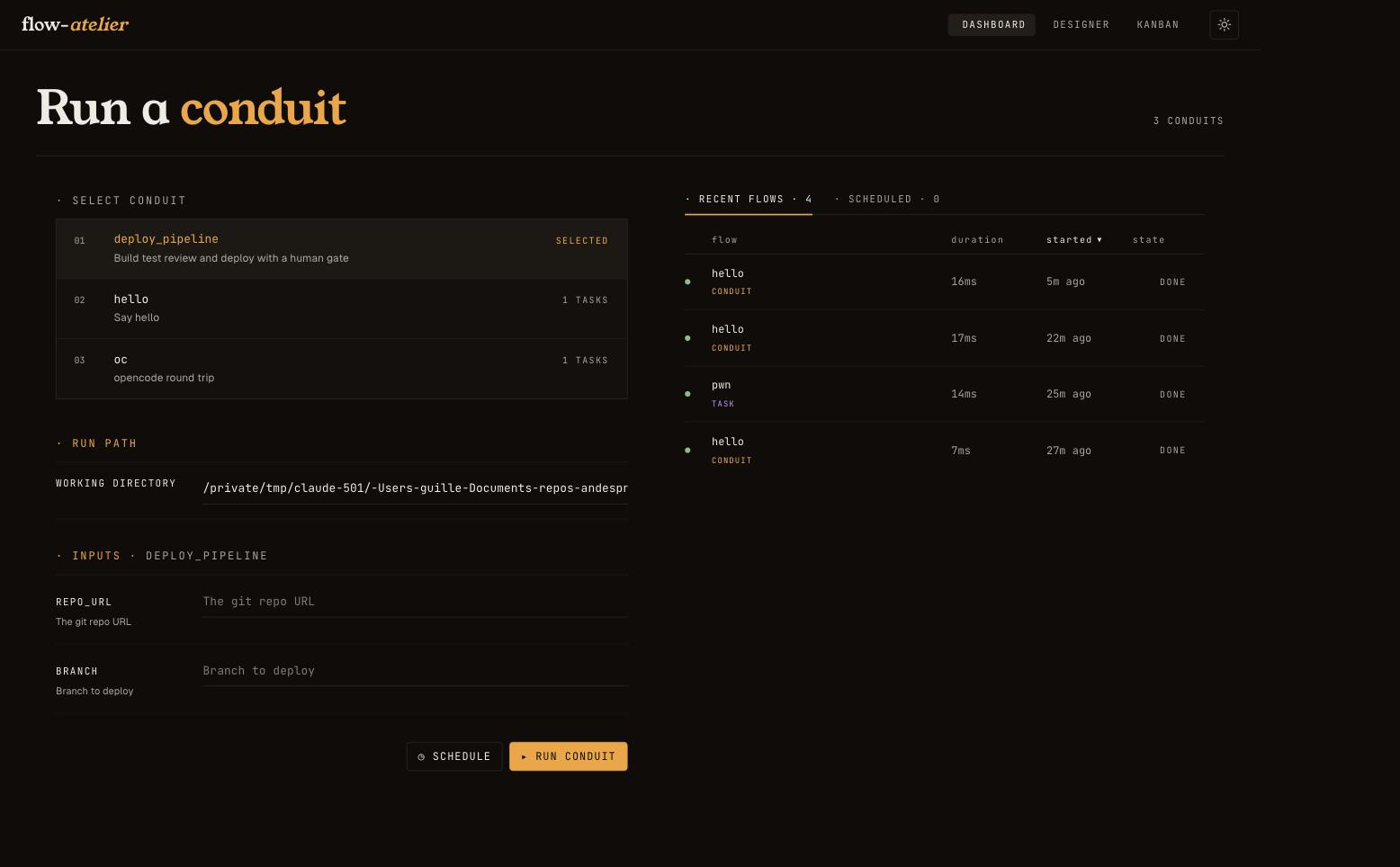
Flow Atelier lets AI coding agents work together, and hand work to each other, the same way every time, on your machine.
Why it is useful
- Write it once, repeat it. A job is one short YAML file, called a conduit. A step is a shell command, an AI coding agent (Claude Code, Codex, Gemini CLI, opencode and other agents that speak ACP), or a question for you. Steps run in parallel, loop until tests pass, and every run is saved to disk.
- Agents that work together and delegate safely. One agent plans, another
builds, a third reviews. One agent can answer another's questions. An agent
in one app can hand a task to another with
atelier ask, at a permission level you choose. - You stay in control. Approval gates, a live dashboard, schedules, and you can stop a run or resume a failed one. It runs on your machine with the agent logins you already have. Flow Atelier stores and proxies no API keys.
How to use it
# 1. Install
curl -fsSL https://raw.githubusercontent.com/Andesprit/flow-atelier/main/install.sh | bash

# 2. Set up a project: writes starter conduits for the agents it finds
cd your-project
atelier init

# 3. Run
atelier run pair    # one agent drafts a change, another reviews it
atelier serve       # the live dashboard on http://127.0.0.1:8000

# Or hand one task to another agent
atelier ask "Review the last commit" --path . --harness codex --permissions read-only
If Atelier cannot enforce the permission level you ask for, the run fails
instead of ignoring the level. The exit code tells the caller what happened:
0 done, 1 failed, 143 stopped.
No agent installed yet? atelier run hello --input name=world runs a shell
step only. Windows and PyPI installs are in the guide.
A conduit
name: ship
description: Codex plans, Claude builds until the tests pass, then you approve
inputs:
  goal: What to build
tasks:
  - plan:
      description: Codex writes the plan
      tool: harness:codex
      task: "Plan how to reach this goal: {{inputs.goal}}"
  - build_until_green:
      description: Build and test, up to 5 times, until the tests pass
      tool: tool:conduit
      depends_on: [plan]
      repeat: 5
      until: output.match(TESTS PASSED)
      on_exhaust: fail
      inputs:
        goal: "{{inputs.goal}}"
        plan: "{{plan.output}}"
        feedback: "{{loop.previous}}"
      tasks:
        - build:
            description: Claude Code makes the change
            tool: harness:claude-code
            task: "Goal: {{inputs.goal}}\nPlan: {{inputs.plan}}\nLast test run: {{inputs.feedback}}"
        - test:
            description: Run the tests
            tool: tool:bash
            depends_on: [build]
            task: "make test && echo 'TESTS PASSED'"
  - approve:
      description: You decide
      tool: tool:hitl
      task: "Tests pass. Ship it?"
      depends_on: [build_until_green]
      inputs:
        answer: "Type yes to ship"
Save it as .atelier/conduits/ship/conduit.yaml, then run
atelier run ship --input goal="add dark mode".
Good to know
- Agents run with full permissions by default: they can edit files and run commands. It is a local tool, not a hosted service. See Security.
- Check your provider's terms before you run agents unattended: Agent logins and provider terms.
- Everything else is in the guide: every command, the conduit reference, schedules and the HTTP API. Start with Your first workflow or Multi-agent workflows.
Contributing and license
To contribute, see CONTRIBUTING.md and DEVELOPMENT.md. To report a security problem in private, see SECURITY.md. Licensed under Apache 2.0.
1 maintainer

Metadata
1 maintainer
Release files for flow-atelier 0.14.1
For a detailed explanation of source distributions (sdists) and built distributions (wheels), please see the package formats documentation.
Source distribution (sdist)
| File | Size | Uploaded | Provenance | Actions |
|---|---|---|---|---|
| flow_atelier-0.14.1.tar.gz | 2.8 MB | With provenance | Details for flow_atelier-0.14.1.tar.gz |
Built distribution (wheel)
| File | Interpreter | ABI | Platform | Actions Reset |
|---|---|---|---|---|
| flow_atelier-0.14.1-py3-none-any.whl | Python 3 | none | any | Details for flow_atelier-0.14.1-py3-none-any.whl |
Total release size: 4.0 MB
Release files / flow_atelier-0.14.1.tar.gz
| Download URL | flow_atelier-0.14.1.tar.gz |
|---|---|
| Size | 2.8 MB |
| Tags | Source |
|
SHA-256 checksum How to use checksums |
bdaf7a57a669cfbc15375c5c910693c225738dec98d9934dd5ac3a02a43d7b16
|
|
BLAKE2b-256 checksum How to use checksums |
e40a73d8495855c7408289924f2c531fcd64f717219496b0c8eb9ef765f2a5d0
|
| Upload date | |
|
Uploaded using Trusted Publishing? What is trusted publishing? |
Yes |
| Uploaded via |
twine/7.0.0 CPython/3.13.16
|
Provenance
Provenance describes where a file came from. On PyPI, provenance is shared via attestations, which provide a verifiable record of the build or publishing details. View details, limitations and caveats.


PyPI Publish Attestation
PyPI verified that this artifact, at this checksum, originated from the publisher listed below.
Signed by GitHub Actions, verified by PyPI on Nov 11, 2026.
Transparency logRelease files / flow_atelier-0.14.1-py3-none-any.whl
| Download URL | flow_atelier-0.14.1-py3-none-any.whl |
|---|---|
| Size | 1.2 MB |
| Tags | Python 3 |
|
SHA-256 checksum How to use checksums |
61a6d87b8987b2af4e74466bb7e21b50f0212a3c1bab43e8386fbfef88b302b1
|
|
BLAKE2b-256 checksum How to use checksums |
6dd2768ee01c7c182783eedbaa2c19d7208a5b53f7af9d7203c5b6174311cad9
|
| Upload date | |
|
Uploaded using Trusted Publishing? What is trusted publishing? |
Yes |
| Uploaded via |
twine/7.0.0 CPython/3.13.16
|
Provenance
Provenance describes where a file came from. On PyPI, provenance is shared via attestations, which provide a verifiable record of the build or publishing details. View details, limitations and caveats.
PyPI Publish Attestation
PyPI verified that this artifact, at this checksum, originated from the publisher listed below.
Signed by GitHub Actions, verified by PyPI on Nov 11, 2026.
Transparency logSecurity for flow-atelier 0.14.1
Provenance
Provenance describes where a file came from. On PyPI, provenance is shared via attestations, which provide a verifiable record of the build or publishing details. View details, limitations and caveats.
Full provenance
Both files in this release have been uploaded with provenance metadata.
Attestation for flow_atelier-0.14.1.tar.gz
PyPI Publish Attestation
PyPI verified that this artifact, at this checksum, originated from the publisher listed below.
Signed by GitHub Actions, verified by PyPI on Nov 11, 2026.
Transparency logA note on package security
PyPI is a repository for distributing packages, not a service for auditing them. While third-party security researchers and our staff do their best to detect and remove malicious packages, PyPI cannot guarantee the quality, security or suitability of any given package.
To learn more about protecting yourself from malicious actors, visit our package security documentation.














