
flowchat - clean, readable, logical code.



A Python library for building clean and efficient multi-step prompt chains. It is built on top of OpenAI's Python API.
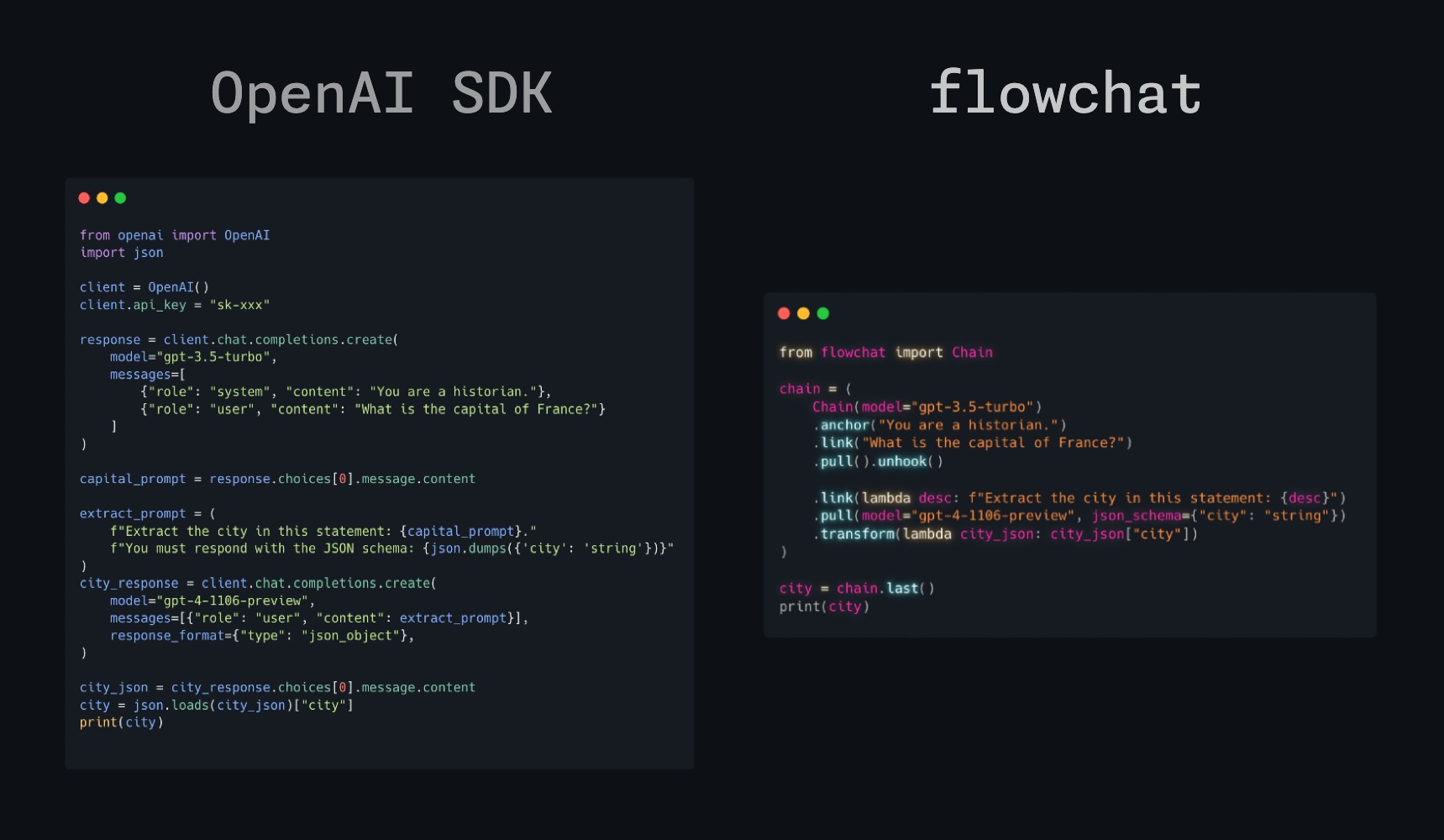
What is Flowchat?
Flowchat is designed around the idea of a chain. Start the chain with .anchor(), which contains a system prompt. Use .link() to add additional messages.
To get a response from the LLM, use .pull(). Additionally, you can use .pull(json_schema={"city": "string"}) to define a specific output response schema. This will validate the response and return a JSON object with the response. The subsequent response will be stored in an internal response variable.
When you're done one stage of your chain, you can log the chain's messages and responses with .log() and reset the current chat conversation messages with .unhook().
Unhooking does not reset the internal response variable.
Instead, the idea of 'chaining' is that you can use the response from the previous stage in the next stage.
For example, when using link in the second stage, you can use the response from the first stage by using a lambda function: .link(lambda response: f"Previous response: {response}").
You can use .transform() to transform the response from the previous stage into something else. For example, you can use .transform(lambda response: response["city"]) to get the city from the response JSON object, or even map over a response list with a nested chain! You'll see more ways to use these functions in the examples.
When you're finished with the entire chain, simply use .last() to return the last response.
Check out these example chains to get started!
Installation
pip install flowchat
Setup
Put your OpenAI API key in your environment variable file (eg. .env) as OPENAI_API_KEY=sk-xxxxxx. If you're using this as part of another project with a different name for the key (like OPENAI_KEY or something), simply pass that in Chain(environ_key="OPENAI_KEY"). Alternatively, you can simply pass the key itself when initializing the chain: Chain(api_key="sk-xxxxxx").
Example Usage
from flowchat import Chain

chain = (
    Chain(model="gpt-3.5-turbo")  # default model for all pull() calls
    .anchor("You are a historian.")  # Set the first system prompt
    .link("What is the capital of France?")
    .pull().log().unhook()  # Pull the response, log it, and reset prompts

    .link(lambda desc: f"Extract the city in this statement: {desc}")
    .pull(json_schema={"city": "string"})  # Pull the response and validate it
    .transform(lambda city_json: city_json["city"])  # Get city from JSON
    .log().unhook()

    .anchor("You are an expert storyteller.")
    .link(lambda city: f"Design a basic three-act point-form short story about {city}.")
    .link("How long should it be?", assistant=True)
    .link("Around 100 words.")  # (For example) you can make multiple links!
    .pull(max_tokens=512).log().unhook()

    .anchor("You are a novelist. Your job is to write a novel about a story that you have heard.")
    .link(lambda storyline: f"Briefly elaborate on the first act of the storyline: {storyline}")
    .pull(max_tokens=256, model="gpt-4-turbo").log().unhook()

    .link(lambda act: f"Summarize this act in around three words:\n{act}")
    .pull(model="gpt-4")
    .log_tokens()  # Log token usage of the whole chain
)

print(f"Result: {chain.last()}") # >> "Artist's Dream Ignites"
Natural Language CLI:
This is the short version that doesn't check if the command is possible to start. If you want to see a longer example with nested chains, check out the full version.
from flowchat import Chain, autodedent
import os
import subprocess


def execute_system_command(command):
    try:
        result = subprocess.run(
            command, shell=True, check=True,
            stdout=subprocess.PIPE, stderr=subprocess.PIPE, text=True
        )
        return result.stdout
    except subprocess.CalledProcessError as e:
        return e.stderr


def main():
    print("Welcome to the Natural Language Command Line Interface!")
    os_system_context = f"You are a shell interpreter assistant running on {os.name} operating system."

    while True:
        user_input = input("Please enter your command in natural language: ")

        should_exit = (
            Chain(model="gpt-3.5-turbo")
            .link(autodedent(
                "Does the user want to exit the CLI? Respond with 'YES' or 'NO'.",
                user_input
            )).pull(max_tokens=2).unhook().last()
        )

        if should_exit.lower() in ("yes", "y"):
            print("Exiting the CLI.")
            break

        # Feed the input to flowchat
        command_suggestion = (
            Chain(model="gpt-4-turbo")
            .anchor(os_system_context)
            .link(autodedent(
                "The user wants to do this: ",
                user_input,
                "Suggest a command that can achieve this in one line without user input or interaction."
            )).pull().unhook()

            .anchor(os_system_context)
            .link(lambda suggestion: autodedent(
                "Extract ONLY the command from this command desciption:",
                suggestion
            ))
            # define a JSON schema to extract the command from the suggestion
            .pull(json_schema={"command": "echo 'Hello World!'"})
            .transform(lambda command_json: command_json["command"])
            .unhook().last()
        )

        print(f"Suggested command: {command_suggestion}")

        # Execute the suggested command and get the result
        command_output = execute_system_command(command_suggestion)
        print(f"Command executed. Output:\n{command_output}")

        if command_output != "":
            description = (
                Chain(model="gpt-3.5-turbo").anchor(os_system_context)
                .link(f"Describe this output:\n{command_output}")
                .pull().unhook().last()
            )
            # Logging the description
            print(f"Explanation:\n{description}")

        print("=" * 60)


if __name__ == "__main__":
    main()
This project is under a MIT license.
1 maintainer

Metadata
1 maintainer
Release files for flowchat 1.4.0
For a detailed explanation of source distributions (sdists) and built distributions (wheels), please see the package formats documentation.
Source distribution (sdist)
| File | Size | Uploaded | |
|---|---|---|---|
| flowchat-1.4.0.tar.gz | 16.3 kB | Details |
Built distribution (wheel)
| File | Interpreter | ABI | Platform | Reset |
|---|---|---|---|---|
| flowchat-1.4.0-py3-none-any.whl | Python 3 | none | any | Details |
Total release size: 29.9 kB
Release files / flowchat-1.4.0.tar.gz
| Download URL | flowchat-1.4.0.tar.gz |
|---|---|
| Size | 16.3 kB |
| Tags | Source |
|
SHA-256 checksum How to use checksums |
268b31528c9510d9c6ea358d54c8daa85a2c1b2dd171d89fbf4e0a55ad9df5a3
|
|
BLAKE2b-256 checksum How to use checksums |
26f6e2c45dd4b9ad6e39a987c387d5391110d104b85932dfe2eca4bc7f377306
|
| Upload date | |
|
Uploaded using Trusted Publishing? What is trusted publishing? |
No |
| Uploaded via |
twine/4.0.2 CPython/3.11.3
|
Release files / flowchat-1.4.0-py3-none-any.whl
| Download URL | flowchat-1.4.0-py3-none-any.whl |
|---|---|
| Size | 13.6 kB |
| Tags | Python 3 |
|
SHA-256 checksum How to use checksums |
72119223a2b0528f042d4fa2208b5a4903549a0094f9cf79d59fc969d25efac5
|
|
BLAKE2b-256 checksum How to use checksums |
798017b0811d680210c8e681a53eb17b6477f6748ef7be4756b82c2ed7c8173e
|
| Upload date | |
|
Uploaded using Trusted Publishing? What is trusted publishing? |
No |
| Uploaded via |
twine/4.0.2 CPython/3.11.3
|














