
Flowfield
A workspace for you and your coding agents, with a board and task feeds.



What is Flowfield?
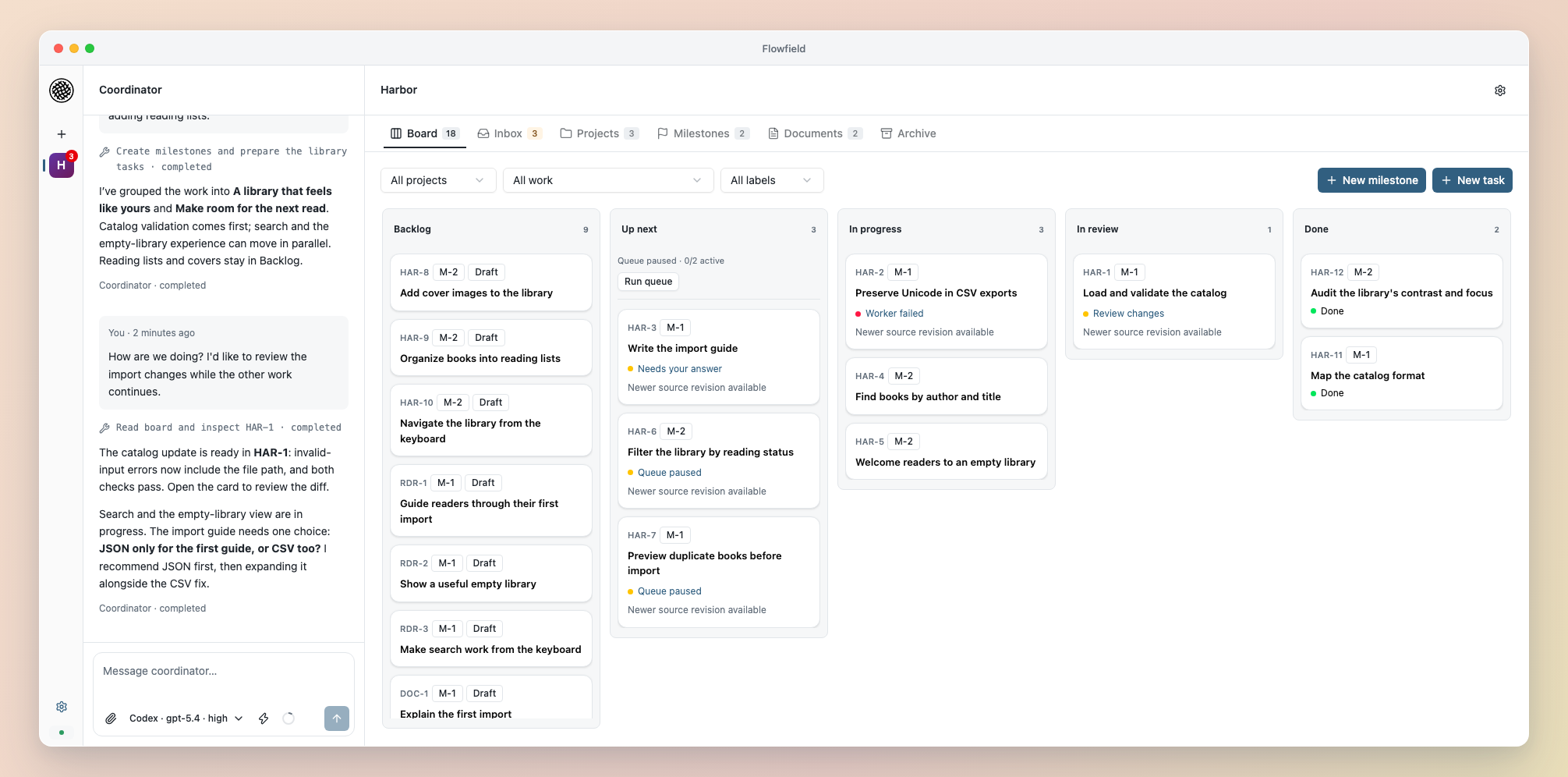
💬 Plan with the Coordinator
Explore ideas, turn them into milestones and tasks, and refine the plan while workers build. Open a card beside the conversation to discuss its scope or results.
📋 Organize work on the board
Prioritize tasks, track dependencies, and see what’s queued, running or ready for review. Needs you brings questions, blockers and review requests into one place.
🧵 Follow each task in its feed
Keep definitions, progress, tool activity, questions, answers and results together. See what changed and respond to the work that needs your attention.
⚡ Run workers in parallel
Independent tasks run in separate Git checkouts with configurable worker capacity. Dependencies hold work until it’s ready, and each worker uses your project’s tools and checks.
🔎 Review and integrate results
Inspect code changes, try an exact result, and request revisions or approve delivery to your project. Flowfield protects your working changes and keeps approval tied to the code you reviewed.
Install
Install and sign in to Codex CLI or Claude Code or Pi, then:
uv tool install flowfield-core
flowfield serve
The browser opens at localhost:8765. See Installation for the pip alternative.
Choose Add project in the sidebar and select an existing directory, or register it from a terminal:
flowfield project init
Start planning in the Coordinator, or connect a standalone coding agent. Connect the harness you already use: Codex, Claude Code or Pi 1.1+. Choose independently for the Coordinator and workers. Native support ships with Flowfield.
Fits your existing project
Choose an existing repository and use its tools, setup commands and tests. Keep architecture, designs and coding conventions in your repository; Flowfield keeps ongoing work on the board and execution evidence in task feeds.
Workers use separate Git checkouts. You review an exact code result before Flowfield delivers it to your project’s configured branch. Your working changes stay protected.
Documentation
Getting Started · Concepts · CLI · Agents
Build from source
Requires Python 3.12+, uv, Node 24+, pnpm 11.19.0 and Bun 1.3.11. Set FLOWFIELD_BUILD_BUN to the Bun executable before make setup.
make setup
pnpm --dir web build
uv run flowfield serve
See CONTRIBUTING.md for issue reporting and contribution policy. Report vulnerabilities through private security reporting.
License
1 maintainer

Metadata
1 maintainer
Release files for flowfield-core 0.3.1
For a detailed explanation of source distributions (sdists) and built distributions (wheels), please see the package formats documentation.
Source distribution (sdist)
| File | Size | Uploaded | |
|---|---|---|---|
| flowfield_core-0.3.1.tar.gz | 73.8 MB | Details |
Built distributions (wheels)
| File | Interpreter | ABI | Platform | Reset |
|---|---|---|---|---|
| flowfield_core-0.3.1-py3-none-manylinux_2_28_x86_64.whl | Python 3 | none | Linux glibc 2.28+ x86-64 | Details |
| flowfield_core-0.3.1-py3-none-manylinux_2_28_aarch64.whl | Python 3 | none | Linux glibc 2.28+ ARM64 | Details |
| flowfield_core-0.3.1-py3-none-macosx_13_0_arm64.whl | Python 3 | none | macOS 13.0+ ARM64 | Details |
Total release size: 175.1 MB
Release files / flowfield_core-0.3.1.tar.gz
| Download URL | flowfield_core-0.3.1.tar.gz |
|---|---|
| Size | 73.8 MB |
| Tags | Source |
|
SHA-256 checksum How to use checksums |
d6f5a47f88a0da949dca20d1520d1cb4c28cfc77a9c880a3479edf55410c3e28
|
|
BLAKE2b-256 checksum How to use checksums |
0882f3d6302e8e444f90ea393d14c1f08271dd0fa31908405bc3123e9a646f68
|
| Upload date | |
|
Uploaded using Trusted Publishing? What is trusted publishing? |
Yes |
| Uploaded via |
uv/0.9.26 {"installer":{"name":"uv","version":"0.9.26","subcommand":["publish"]},"python":null,"implementation":{"name":null,"version":null},"distro":{"name":"Ubuntu","version":"24.04","id":"noble","libc":null},"system":{"name":null,"release":null},"cpu":null,"openssl_version":null,"setuptools_version":null,"rustc_version":null,"ci":true}
|
Release files / flowfield_core-0.3.1-py3-none-manylinux_2_28_x86_64.whl
| Download URL | flowfield_core-0.3.1-py3-none-manylinux_2_28_x86_64.whl |
|---|---|
| Size | 39.0 MB |
| Tags | Linux glibc 2.28+ x86-64 Python 3 |
|
SHA-256 checksum How to use checksums |
1bbb93736afbe15e8c6c6413a9a7871c4442b1620ccca20b790c885699a626fb
|
|
BLAKE2b-256 checksum How to use checksums |
46b01b520ceb15f40e3658c68a558c5349e87046c913fe4bc2e0954f5f899305
|
| Upload date | |
|
Uploaded using Trusted Publishing? What is trusted publishing? |
Yes |
| Uploaded via |
uv/0.9.26 {"installer":{"name":"uv","version":"0.9.26","subcommand":["publish"]},"python":null,"implementation":{"name":null,"version":null},"distro":{"name":"Ubuntu","version":"24.04","id":"noble","libc":null},"system":{"name":null,"release":null},"cpu":null,"openssl_version":null,"setuptools_version":null,"rustc_version":null,"ci":true}
|
Release files / flowfield_core-0.3.1-py3-none-manylinux_2_28_aarch64.whl
| Download URL | flowfield_core-0.3.1-py3-none-manylinux_2_28_aarch64.whl |
|---|---|
| Size | 39.0 MB |
| Tags | Linux glibc 2.28+ ARM64 Python 3 |
|
SHA-256 checksum How to use checksums |
cdb00f8e372272ce6294f733fd7c30bdab19449e42d5b08a043a5b81ac4c2826
|
|
BLAKE2b-256 checksum How to use checksums |
819dc91b033ec826f7a72ad1f540f978596b5d378fc5713a759b55281cf5af3a
|
| Upload date | |
|
Uploaded using Trusted Publishing? What is trusted publishing? |
Yes |
| Uploaded via |
uv/0.9.26 {"installer":{"name":"uv","version":"0.9.26","subcommand":["publish"]},"python":null,"implementation":{"name":null,"version":null},"distro":{"name":"Ubuntu","version":"24.04","id":"noble","libc":null},"system":{"name":null,"release":null},"cpu":null,"openssl_version":null,"setuptools_version":null,"rustc_version":null,"ci":true}
|
Release files / flowfield_core-0.3.1-py3-none-macosx_13_0_arm64.whl
| Download URL | flowfield_core-0.3.1-py3-none-macosx_13_0_arm64.whl |
|---|---|
| Size | 23.4 MB |
| Tags | Python 3 macOS 13.0+ ARM64 |
|
SHA-256 checksum How to use checksums |
73481e1002e3093b374c844fdba345c4a1698dab6840c73b2cda35a1cb3d92bd
|
|
BLAKE2b-256 checksum How to use checksums |
edc37e78aeea7c57996f98353925a3bbb997d09b4175d4c31af4329227fb7ace
|
| Upload date | |
|
Uploaded using Trusted Publishing? What is trusted publishing? |
Yes |
| Uploaded via |
uv/0.9.26 {"installer":{"name":"uv","version":"0.9.26","subcommand":["publish"]},"python":null,"implementation":{"name":null,"version":null},"distro":{"name":"Ubuntu","version":"24.04","id":"noble","libc":null},"system":{"name":null,"release":null},"cpu":null,"openssl_version":null,"setuptools_version":null,"rustc_version":null,"ci":true}
|














