

FlowGlyph
Make automation workflows discoverable, executable and safe for AI agents.
Turn UiPath, SAP, BPMN, n8n and OpenAPI workflows into reusable, searchable functions for humans and AI agents.





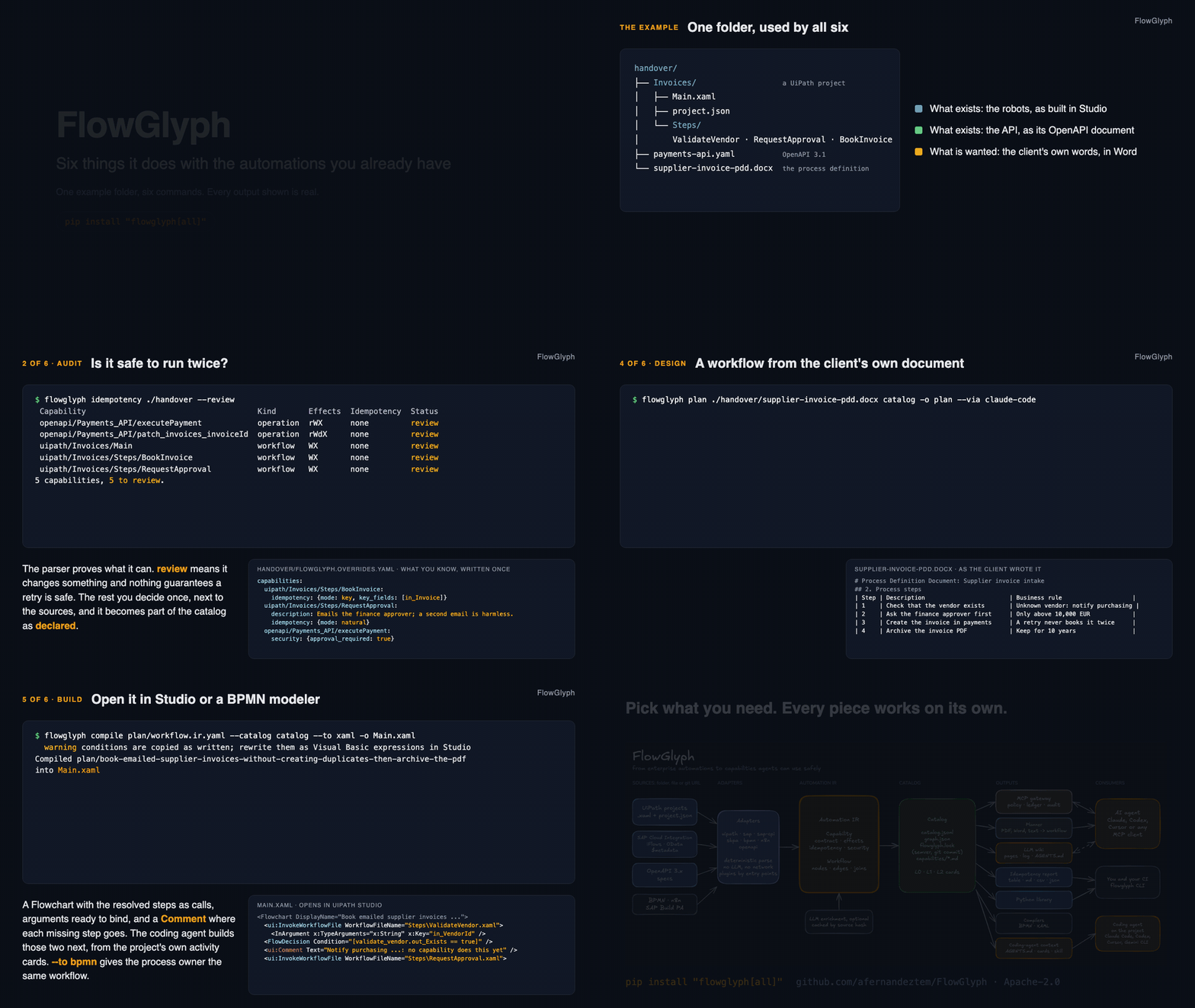
Eighty-five seconds, also as a video; rendered from the real output
by make walkthrough.
Why
Before anything, or anyone, presses the button on an automation, two questions matter: what will this change, and is it safe to run twice? Companies run thousands of automations, UiPath robots, SAP integration flows and OData services, SAP Build processes, BPMN processes, n8n workflows, internal APIs, and the answers are scattered across XML and JSON files nobody reads.
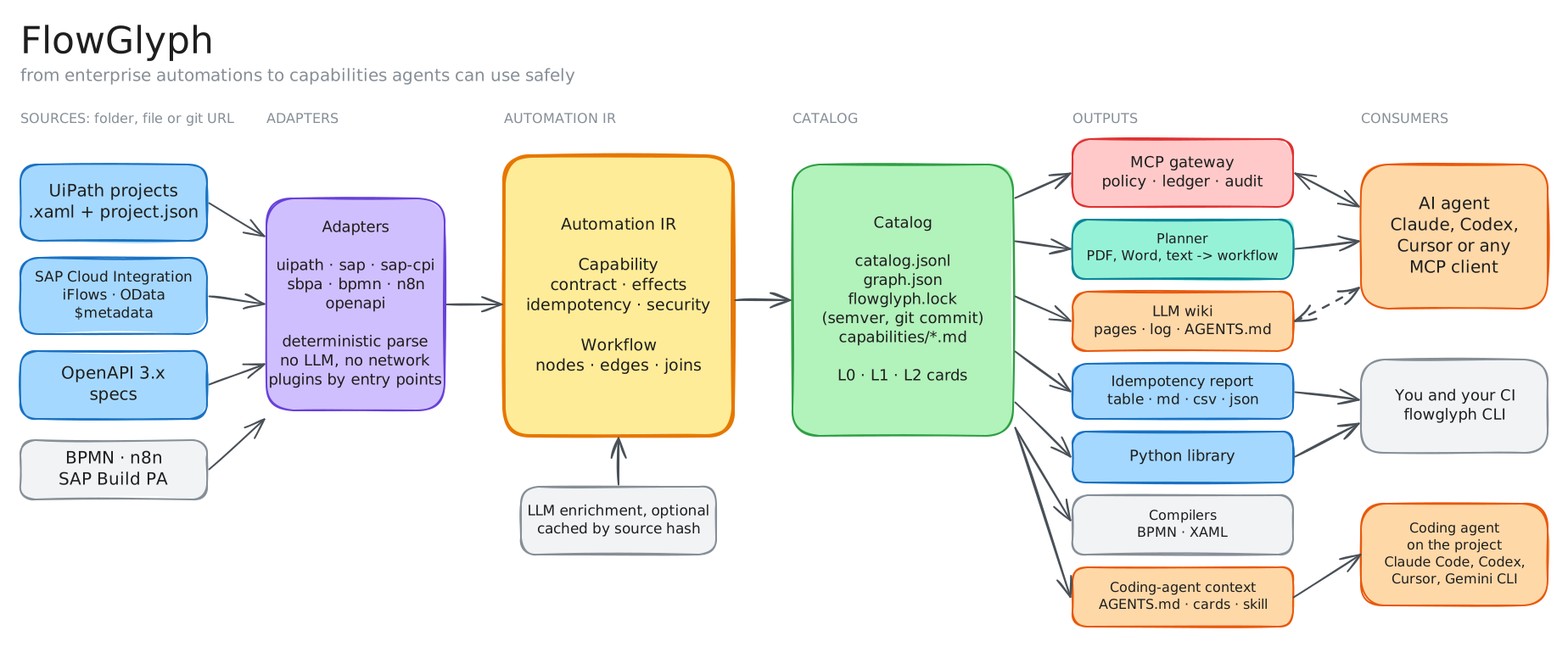
FlowGlyph reads those files with deterministic parsers, never with a model, and turns every workflow, service operation and API call into a small, typed capability: its inputs and outputs, what it does to the world, and whether a retry is a repeat. Every answer says whether it was inferred or declared, and what the sources cannot settle, you declare once in a file next to them. From that catalog you take only what you need: a report of every function and its retry safety, a wiki an LLM can maintain, an MCP gateway that lets agents use the automations without being able to break the rules, a planner that designs new workflows from the capabilities you already have, or context files for the coding agent working on a project.
New here? The guide walks through every feature in order, with samples you can run from a clone. HOWTO.md is the reference: every tool, what it does and how to use it.
Install
pip install flowglyph                    # the library: only pydantic and PyYAML
uv tool install "flowglyph[cli]"         # the command line
pip install "flowglyph[all]"             # everything: CLI, MCP gateway, Anthropic planner
| Extra | Adds | For |
|---|---|---|
| none | the Python library | import flowglyph in your own tools |
cli |
typer, rich | the flowglyph command |
mcp |
the MCP SDK, jsonschema | flowglyph serve, and flowglyph.gateway from Python |
llm |
the Anthropic SDK | flowglyph plan --via anthropic; the other planner backends need nothing extra |
documents |
pypdf, python-docx, openpyxl | flowglyph plan from a PDF, Word or Excel document |
From a clone, to work on it:
git clone https://github.com/afernandeztem/FlowGlyph && cd FlowGlyph
uv sync --all-extras && uv run flowglyph --version      # or: pip install -e ".[all]"
Quickstart
flowglyph extract https://github.com/UiPath/ReFrameWork -o catalog   # read a whole repository
flowglyph idempotency catalog                                         # every function and its retry safety
flowglyph inspect catalog                                             # the call tree of each entry point
Main RWdX none
├── InitiAllSettings RX natural
├── KillAllProcesses pure natural
├── Initialize Applications pure natural
├── GetTransactionData RWX none
├── Process pure natural
├── SetTransactionStatus RWdX none
│   ├── TakeScreenshot RWdX none
│   ├── CloseAllApplications pure natural
│   └── KillAllProcesses pure natural
└── CloseAllApplications pure natural
R reads, W writes, D destroys, X talks to another system; upper case means yes, lower
case means it may, pure means none of them. natural means a repeat changes nothing more;
none means every run has an effect.
Look at GetTransactionData: it writes. Its Get Transaction Item activity marks the queue
item In Progress, so calling it twice takes two different items. A retry is not a repeat. That
is the kind of fact FlowGlyph puts in front of you, from the sources alone, before an agent
retries something it should not.
Pick what you need
Every piece works on its own. Start with the first row and stop wherever you have what you need.
| I want to... | Run | Get |
|---|---|---|
| Know what every function does and whether it can be retried | flowglyph idempotency <source> |
a table, or Markdown, CSV, JSON |
| Keep a versioned catalog of all functions | flowglyph extract <source> -o catalog |
catalog.jsonl, graph.json, flowglyph.lock, one card per function |
| Fail CI when a contract breaks | flowglyph diff old-catalog catalog --fail-on major |
a non-zero exit on breaking changes |
| Give people and LLMs a wiki of the automations | flowglyph wiki build <source> -o wiki |
linked pages, an index, a log and an AGENTS.md for the LLM |
| Describe what sources leave undescribed | flowglyph enrich catalog --via claude-code |
descriptions and business meaning, marked as generated, cached |
| Let an AI agent use the automations safely | flowglyph serve catalog --policy policy.yaml |
an MCP server with policy, idempotency and audit |
| Design a new workflow from a description | flowglyph plan requirements.md catalog |
a checked workflow, with the missing pieces named |
| Turn a workflow into BPMN or UiPath | flowglyph compile plan/workflow.ir.yaml --to bpmn |
a .bpmn or .xaml its tool opens |
| Give coding agents context on a UiPath project | flowglyph context ./robots |
AGENTS.md, project context and activity cards, from the sources |
| Build my own tooling | import flowglyph |
the same features as a typed Python API |
<source> is a folder, a single file, a git URL (a repository, a folder of it, or --ref a
branch, tag or commit) or a catalog saved earlier. Each row is one section of
HOWTO.md.
Six things, on one folder
Each row of the table above is a tool of its own. To show how they connect, here are six of
them on one folder, the kind a client hands over: a UiPath project, the OpenAPI document of
the payments API and the process definition in Word. Every output is real; the sources are in
tests/fixtures, the process document is a two-page Word file with a table of steps. Each step
is also a page of its own in docs/use-cases, with who it is for
and how to tell it.
1. Read everything that exists. One command, every format it finds.
flowglyph extract ./handover -o catalog
Extracted 11 invocable capabilities and 7 that cannot be run on their own into catalog
  warning payments-api.yaml: PATCH /invoices/{invoiceId} has no operationId, using patch_invoices_invoiceId
  warning Invoices/Main.xaml: invoked workflow not found in the project: Steps/Missing.xaml
2. Settle what the sources cannot say. The report lists what still needs a decision. You write the decision once, next to the sources, and it becomes part of the catalog.
flowglyph idempotency ./handover --review
 Capability                                     Kind       Effects  Idempotency  Status
 openapi/Payments_API/executePayment            operation  rWX      none         review
 openapi/Payments_API/patch_invoices_invoiceId  operation  rWdX     none         review
 uipath/Invoices/Main                           workflow   WX       none         review
 uipath/Invoices/Steps/BookInvoice              workflow   WX       none         review
 uipath/Invoices/Steps/RequestApproval          workflow   WX       none         review
5 capabilities, 5 to review.
# handover/flowglyph.overrides.yaml
capabilities:
  uipath/Invoices/Steps/BookInvoice:
    idempotency: {mode: key, key_fields: [in_Invoice]}
  uipath/Invoices/Steps/RequestApproval:
    description: Emails the finance approver; a second email is harmless.
    idempotency: {mode: natural}
  openapi/Payments_API/executePayment:
    security: {approval_required: true}
Run the report again: three rows are left, and BookInvoice and RequestApproval read
declared.
3. Give the agents the picture. A wiki for people and LLMs, and the files a coding agent reads before touching the project, both from the sources alone.
flowglyph wiki build ./handover -o wiki
flowglyph context ./handover --catalog catalog
Wiki 30 pages in wiki
Context Invoices: 9 files written, 0 unchanged, in handover/Invoices
handover/Invoices/AGENTS.md now states that Main.xaml takes in_Threshold: number, that
BookInvoice writes to an Orchestrator queue and must not be retried blindly, and
.flowglyph/activities/AddQueueItem.md holds the XAML this project uses for that activity.
4. Design the new workflow from the client's own document. A model proposes the steps from the Word file; FlowGlyph checks each one against the catalog.
flowglyph plan ./handover/supplier-invoice-pdd.docx catalog -o plan --via claude-code
Book emailed supplier invoices without creating duplicates, then archive the PDF
 Step               Capability                             Intent
 validate_vendor    uipath/Invoices/Steps/ValidateVendor   Check that the vendor on the invoice exists in our records.
 notify_purchasing  missing                                Notify purchasing that the vendor is unknown and stop processing the invoice.
 request_approval   uipath/Invoices/Steps/RequestApproval  Ask the finance approver for approval before booking a high-value invoice.
 create_invoice     openapi/Payments_API/createInvoice     Create the invoice in the payments system, keyed by the invoice reference so a retry never books it twice.
 archive_pdf        missing                                Archive the invoice PDF in the document store with a 10-year retention period.
Two steps are missing, and that is the point: nothing in the sources notifies purchasing or archives a PDF, so the plan doubles as the gap list, and nothing was invented to fill it.
5. Open it in Studio.
flowglyph compile plan/workflow.ir.yaml --catalog catalog --to xaml -o Main.xaml
  warning conditions are copied as written; rewrite them as Visual Basic expressions in Studio
Compiled plan/book-emailed-supplier-invoices-without-creating-duplicates-then-archive-the-pdf into Main.xaml
A Flowchart with the three resolved steps as InvokeWorkflowFile calls, their arguments ready
to bind, and a Comment placeholder where each missing step goes. Those two are what the coding agent
builds next, from the activity cards; flowglyph skill tells it how.
6. Or let an agent run what exists, safely.
flowglyph serve catalog --policy policy.yaml
Every call goes through the contract, your policy, the idempotency ledger and the audit log,
and executePayment waits for a person.
What it reads
| Adapter | Reads | Each capability is |
|---|---|---|
uipath |
UiPath Studio projects: project.json and every .xaml |
a workflow typed from its arguments, with its graph of steps |
sap |
SAP OData $metadata, V2 and V4 |
an entity operation, function import, function or action the service allows |
sap-cpi |
SAP Cloud Integration iFlows, .zip or unpacked |
an endpoint the iFlow exposes, with its steps as the graph |
sbpa |
SAP Build Process Automation projects, .mtar or unpacked |
a process, and the automations and decisions it runs |
bpmn |
BPMN 2.0, with Camunda 7 and Camunda 8 extensions | a process, with tasks, gateways and call activities |
n8n |
n8n workflow exports | a workflow, started by its webhook, form, schedule or a parent |
openapi |
OpenAPI 3.0 and 3.1 documents | an API operation |
Nothing is guessed by a model: each adapter applies the semantics of its platform, an editable
taxonomy for UiPath activities, HTTP and OData semantics for services, the receiver types of an
iFlow. HOWTO.md lists the rules. New formats are plugins: implement
flowglyph.adapters.Adapter and register it under the flowglyph.adapters entry point group.
Examples
Three complete walkthroughs, with the real output of every command:
- A UiPath process on the ReFrameWork: UiPath's own template through the call tree, the report, overrides, a change made in Studio, the wiki and the gateway.
- An SAP landscape: OData services and Cloud Integration iFlows through the report, overrides, the wiki and the gateway.
- Supplier invoice intake: a UiPath project and an OpenAPI document in one catalog, planned and served.
How it works
The Automation IR is the contract between everything else. A Capability says what an
operation needs, what it returns, what it does to the world (reads, mutates_state,
destructive, external, each yes, no or unknown) and how it can be retried (natural,
key, conditional, none). A Workflow is the graph behind it: steps, guarded edges, and a
join on each step that says whether it needs every predecessor to have run or just one. The
full specification is in docs/ir-spec.md.
id: sap/ZSUPPLIER_INVOICE_SRV/SupplierInvoice/create
kind: operation
effects: {reads: no, mutates_state: yes, destructive: no, external: yes}
idempotency: {mode: none, provenance: inferred, confidence: 0.7}
input_schema:
  properties:
    body:
      properties:
        CompanyCode: {type: string, maxLength: 4, description: Company code}
        InvoicingParty: {type: string, maxLength: 10, description: Supplier}
      required: [CompanyCode, InvoicingParty]
Adapters produce IR and nothing else. They are deterministic and offline, so the same files always give the same catalog, byte for byte.
The catalog is plain files you can commit and review, versioned by a lock file: a change that can break a caller is a major version. Agents read it at three sizes, a one-line card to search thousands of functions, a page to choose between a few, the full contract to call one, so they never load more than they use.
The gateway is the only part that executes, and the only part that has to be trusted: effects and idempotency modes describe intent, the gateway enforces it. Every call is validated against the contract, checked against your policy, run at most once per idempotency key, and written to an audit log.
More in docs/architecture.md (the parts and the rules between them), docs/glossary.md (every term FlowGlyph uses) and the decision records.
How it compares
| What it gives you | What it does not | |
|---|---|---|
| Each vendor's own agent integration (UiPath, SAP, n8n...) | the deepest access to that one platform | one platform at a time; effects and retry safety as hints, not facts; the vendor's hosted service, not yours |
| OpenAPI-to-MCP converters | every operation of an API as a tool in minutes | nothing for UiPath, SAP CPI, BPMN or n8n; no effects, no idempotency, no policy, no ledger, no audit |
| Parsers for one format (XAML, BPMN, iFlow readers) | the structure of a file | no common model, no catalog, no versioning, nothing an agent can call |
| Asking an LLM to read the sources | a plausible description, fast | not deterministic, not auditable, and it will invent a workflow that does not exist |
FlowGlyph is the common model over all of them: one catalog for every platform, effects and retry safety as facts with a provenance, a gateway you host that enforces them, and nothing that leaves your machine unless you say so.
Status and roadmap
Alpha. The IR is at version 0.4 and may still change before 1.0, as may the library API; the command line and the file formats are what the guide and the reference describe. The adapters have been run on vendor templates and synthetic projects; real client estates will find cases they do not cover yet, and an issue with the file that broke is the most useful thing you can send.
What comes next, in order:
- The gateway running UiPath jobs and OData calls for real in more setups (Orchestrator folders, OData V4 actions with complex bodies), with the dry run as the default it is now.
- An HTTP transport with OAuth for
flowglyph serve, so one gateway can serve several agents. - More sources through the adapter entry point: Power Automate and Zapier exports first.
- A Temporal compiler, next to BPMN and XAML.
- 1.0 when the IR stops changing.
Contributing
Contributions are welcome. CONTRIBUTING.md explains the setup (make install,
make check), the code style, and how to write an adapter, with a complete example. Diagrams are
edited in Excalidraw from the .excalidraw files in docs/assets/ and
rendered with make diagrams. Security issues: see SECURITY.md.
License
Apache License 2.0. Test fixtures from UiPath ReFrameWork are MIT-licensed, see NOTICE.
UiPath and SAP are trademarks of their respective owners. FlowGlyph is an independent project and is not affiliated with or endorsed by them.
1 maintainer

Metadata
1 maintainer
Release files for flowglyph 0.1.1
For a detailed explanation of source distributions (sdists) and built distributions (wheels), please see the package formats documentation.
Source distribution (sdist)
| File | Size | Uploaded | Provenance | Actions |
|---|---|---|---|---|
| flowglyph-0.1.1.tar.gz | 657.4 kB | With provenance | Details for flowglyph-0.1.1.tar.gz |
Built distribution (wheel)
| File | Interpreter | ABI | Platform | Actions Reset |
|---|---|---|---|---|
| flowglyph-0.1.1-py3-none-any.whl | Python 3 | none | any | Details for flowglyph-0.1.1-py3-none-any.whl |
Total release size: 865.1 kB
Release files / flowglyph-0.1.1.tar.gz
| Download URL | flowglyph-0.1.1.tar.gz |
|---|---|
| Size | 657.4 kB |
| Tags | Source |
|
SHA-256 checksum How to use checksums |
8af807181708d9e40fa4db7026be0ac530946f4e0ec166cd3383577a3ee63552
|
|
BLAKE2b-256 checksum How to use checksums |
988b6e88ee6f9b5a911fccbbd41c3d7793f75ab8b094d6a988e5db3f7c30548a
|
| Upload date | |
|
Uploaded using Trusted Publishing? What is trusted publishing? |
Yes |
| Uploaded via |
twine/7.0.0 CPython/3.13.16
|
Provenance
Provenance describes where a file came from. On PyPI, provenance is shared via attestations, which provide a verifiable record of the build or publishing details. View details, limitations and caveats.


PyPI Publish Attestation
PyPI verified that this artifact, at this checksum, originated from the publisher listed below.
Signed by GitHub Actions, verified by PyPI on Nov 8, 2026.
Transparency logRelease files / flowglyph-0.1.1-py3-none-any.whl
| Download URL | flowglyph-0.1.1-py3-none-any.whl |
|---|---|
| Size | 207.6 kB |
| Tags | Python 3 |
|
SHA-256 checksum How to use checksums |
935063e260584001c6380e13d660e83aaa9995bd6ed7dc32bddde2cb8506272a
|
|
BLAKE2b-256 checksum How to use checksums |
49391ff2e5cc16a534078b8f0288f89dcdb68ed702e3e8e74d0a4cb58670d81f
|
| Upload date | |
|
Uploaded using Trusted Publishing? What is trusted publishing? |
Yes |
| Uploaded via |
twine/7.0.0 CPython/3.13.16
|
Provenance
Provenance describes where a file came from. On PyPI, provenance is shared via attestations, which provide a verifiable record of the build or publishing details. View details, limitations and caveats.
PyPI Publish Attestation
PyPI verified that this artifact, at this checksum, originated from the publisher listed below.
Signed by GitHub Actions, verified by PyPI on Nov 8, 2026.
Transparency logSecurity for flowglyph 0.1.1
Provenance
Provenance describes where a file came from. On PyPI, provenance is shared via attestations, which provide a verifiable record of the build or publishing details. View details, limitations and caveats.
Full provenance
Both files in this release have been uploaded with provenance metadata.
Attestation for flowglyph-0.1.1.tar.gz
PyPI Publish Attestation
PyPI verified that this artifact, at this checksum, originated from the publisher listed below.
Signed by GitHub Actions, verified by PyPI on Nov 8, 2026.
Transparency logA note on package security
PyPI is a repository for distributing packages, not a service for auditing them. While third-party security researchers and our staff do their best to detect and remove malicious packages, PyPI cannot guarantee the quality, security or suitability of any given package.
To learn more about protecting yourself from malicious actors, visit our package security documentation.














