
Optical Flow file wizard

Project description






Converts Optical Flow .flo files to images .png and optionally compiles them to a video .mp4 via ffmpeg
Installation
Grab the latest package from PyPI repo
pip install flowiz -U
or grab it straight from Github
pip install git+https://github.com/georgegach/flowiz/
or clone the repo and install using setup.py
git clone https://github.com/georgegach/flowiz.git
cd flowiz
python setup.py install --user
Make sure you have following packages installed
pip install numpy tqdm pillow eel
apt install ffmpeg
Usage
Package can be used both from the command line and python script.
Command line usage
The following script grabs .flo files from ./demo/flo/ directory and converts into .png saving in the same directory
python -m flowiz demo/flo/*.flo
You can pass output directory for .png images via -o or --outdir parameter
python -m flowiz demo/flo/*.flo --outdir demo/png/
You may compile converted .png images into a 24 fps .mp4 clip by passing -v or --videodir parameter with a video output directory (without a filename)
python -m flowiz demo/flo/*.flo -o demo/png --videodir demo/mp4
Pass -r or --framerate parameter to control the framerate of compiled video
python -m flowiz demo/flo/*.flo -o demo/png -v demo/mp4 --framerate 2
Python usage
Relevant python code is available in demo/test.ipynb notebook. Here's an excerpt:
import flowiz as fz

files = glob.glob('demo/flo/*.flo')
img = fz.convert_from_file(files[0])
plt.imshow(img)

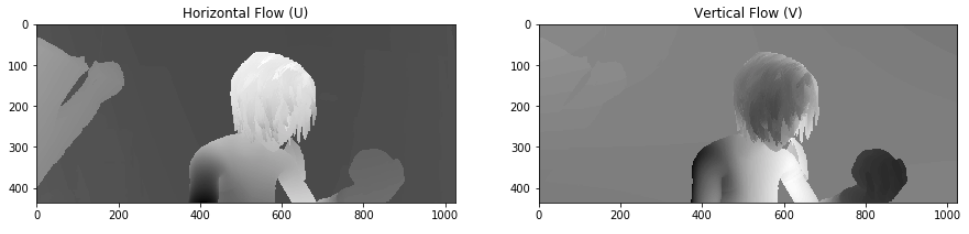
In case you need to visualize U V channels separately from your numpy floArray:
uv = fz.convert_from_flow(floArray, mode='UV')
axarr[0].imshow(uv[...,0], cmap=plt.get_cmap('binary'))
axarr[1].imshow(uv[...,1], cmap=plt.get_cmap('binary'))
GUI usage
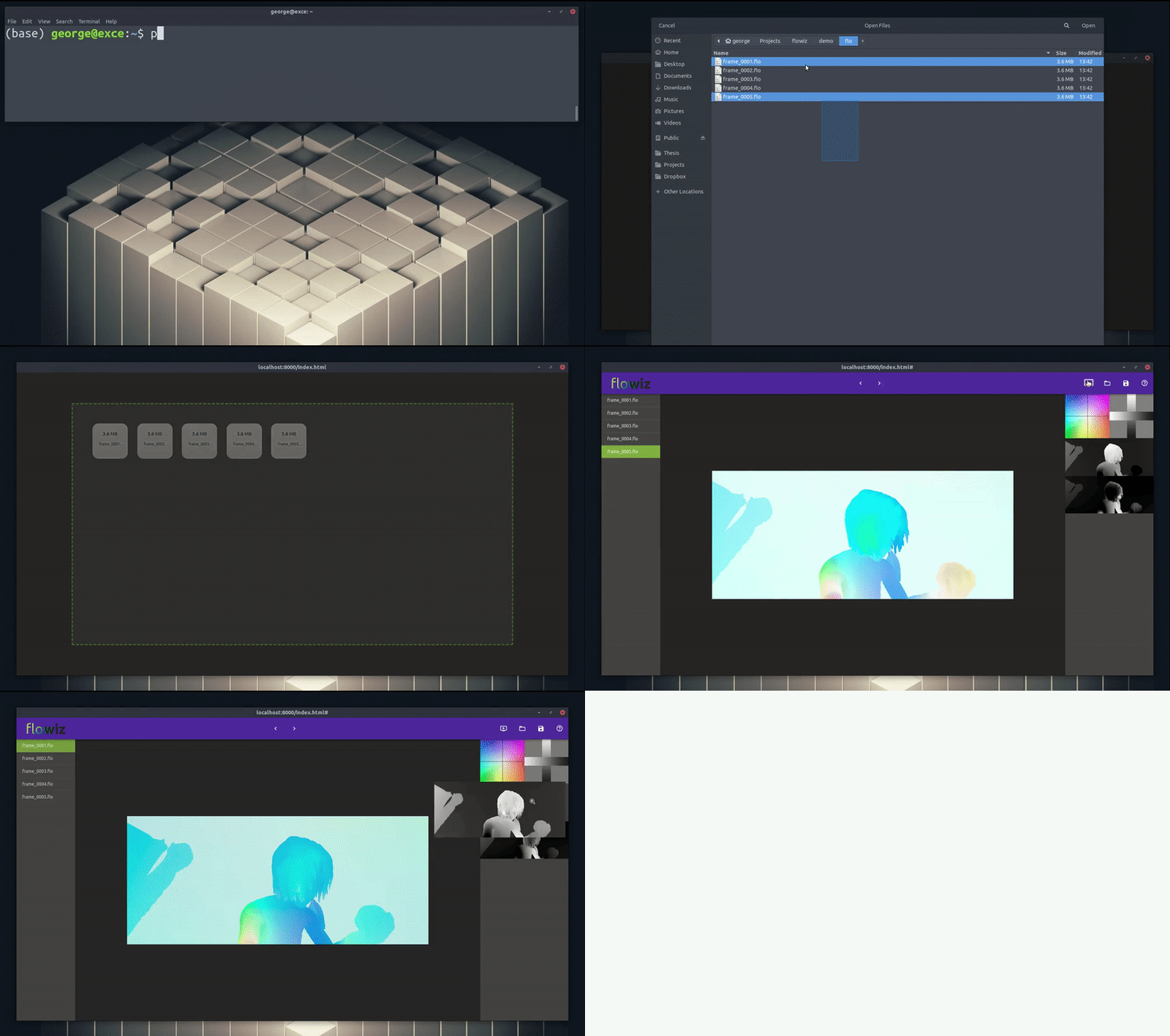
Beta version of the flowiz graphical user interface is now accessible via flowiz.gui package. It is packaged using ChrisKnott / Eel and available via default web browser. To run the GUI simply type:
python -m flowiz.gui
Upon launching the web app, drag and drop or choose .flo file(s) using the open file dialog. Files will be converted using the python backend and placed in a temporary directory flowiz/gui/web/guitemp. Upon every session temporary directory will be emptied to avoid unnecessary polution.
Mockup of the GUI is available at georgegach.github.io/flowiz
Help
$ python -m flowiz -h

usage: __main__.py [-h] [--outdir OUTDIR] [--videodir VIDEODIR]
                    [--framerate FRAMERATE]
                    input [input ...]

positional arguments:
  input                 Input file(s). (e.g.: __ ./demo/flo/*.flo)

optional arguments:
  -h, --help            show this help message and exit
  --outdir OUTDIR, -o OUTDIR
                        Output directory path. Default: same directory as
                        [.flo] files. (e.g.: __ -o ./demo/png/)
  --videodir VIDEODIR, -v VIDEODIR
                        Compiles [.mp4] video from [.png] images if parameter
                        is passed. Parameter requires video output directory
                        path without a filename. (e.g.: __ -v ./demo/mp4/)
  --framerate FRAMERATE, -r FRAMERATE
                        Frames per second of the video. (e.g.: __ -r 2)
Acknowledgements
The library is based on Midlebury's Vision Project MATLAB code: http://vision.middlebury.edu/flow/ Original credits to Daniel Scharstein (C++) and Deqing Sun (MATLAB)
FAQ
Q: But what kind of name is
flowiz?
A: The kind you choose whenflowkit,flowtools,flowlib,flowlabare already taken.
Q: Future work?
A: Some of theTo-Dofeatures are listed below with no determined timeline. If you'd like to contribute with the said features or something completely new, you mayand issue a pull request.
To-Do
-
Ported from Matlab
flow_code -
Project is available on PyPI
-
GUI
-
Fully argparsable CLI launch support
-
File
open withsupport -
Original image overlay
-
Full file explorer
-
Flow file info
- Basics: name, width, height, filesize
- Histogram
-
Progress bar
-
Client-side
.floformat validation (usingtag)
-
-
Library
- Arrow visualizations (using
opencvor custom compact nanomodule) - Standalone
rgbanduv:binaryimage creation (removesmatplotlibdependency) - Standalone
.mp4compiler (removesffmpegdependency)
- Arrow visualizations (using
-
CLI
- Nothing for now
-
Miscellaneous
- Better logo
Release history Release notifications | RSS feed


Download files
Download the file for your platform. If you're not sure which to choose, learn more about installing packages.
Source Distribution
Built Distribution
Filter files by name, interpreter, ABI, and platform.
If you're not sure about the file name format, learn more about wheel file names.
Copy a direct link to the current filters
File details
Details for the file flowiz-2.3.1.tar.gz.
File metadata
- Download URL: flowiz-2.3.1.tar.gz
- Upload date:
- Size: 2.5 MB
- Tags: Source
- Uploaded using Trusted Publishing? No
- Uploaded via: twine/1.13.0 pkginfo/1.5.0.1 requests/2.22.0 setuptools/40.6.3 requests-toolbelt/0.9.1 tqdm/4.32.2 CPython/2.7.15+
File hashes
| Algorithm | Hash digest | |
|---|---|---|
| SHA256 |
b1457d132817796e81c91887f62b89a41f280d5a64f4732bf6fec9a5fa845a4a
|
|
| MD5 |
674b5db6873118cb40ad01b917b42a1e
|
|
| BLAKE2b-256 |
b73aa5cff6b460c9c09b7d84ab54ff9a110d49a820e0e2f737517d595999ff2d
|
File details
Details for the file flowiz-2.3.1-py3-none-any.whl.
File metadata
- Download URL: flowiz-2.3.1-py3-none-any.whl
- Upload date:
- Size: 2.5 MB
- Tags: Python 3
- Uploaded using Trusted Publishing? No
- Uploaded via: twine/1.13.0 pkginfo/1.5.0.1 requests/2.22.0 setuptools/40.6.3 requests-toolbelt/0.9.1 tqdm/4.32.2 CPython/2.7.15+
File hashes
| Algorithm | Hash digest | |
|---|---|---|
| SHA256 |
5fd54e8baff1ff3ff063a84bc1826309930c08c1828e74ab8082870fca032015
|
|
| MD5 |
c402e50c67467ed03613ebdc39f47670
|
|
| BLAKE2b-256 |
8cf57a0edc26cffd1f8a426a8b0c61bce05296136a6c9057347f995e5e27cf13
|






