
Real-time macOS hardware performance monitoring for Apple Silicon (M1/M2/M3/M4) with AI workload focus - enhanced asitop alternative
Verified details
These details have been verified by PyPIProject links
GitHub Statistics
Maintainers

Project description
FluidTop - MacOS Performance Monitor for Local AI





Real-time macOS hardware performance monitoring CLI tool for Apple Silicon Macs (M1/M2/M3/M4+) with AI workload focus
FluidTop is a Python-based nvtop-inspired command line tool specifically designed for Apple Silicon Macs. This enhanced and actively maintained fork of the original asitop project provides comprehensive hardware monitoring with additional features, support for newer Apple Silicon chips, and optimizations for modern terminal emulators including Ghostty.
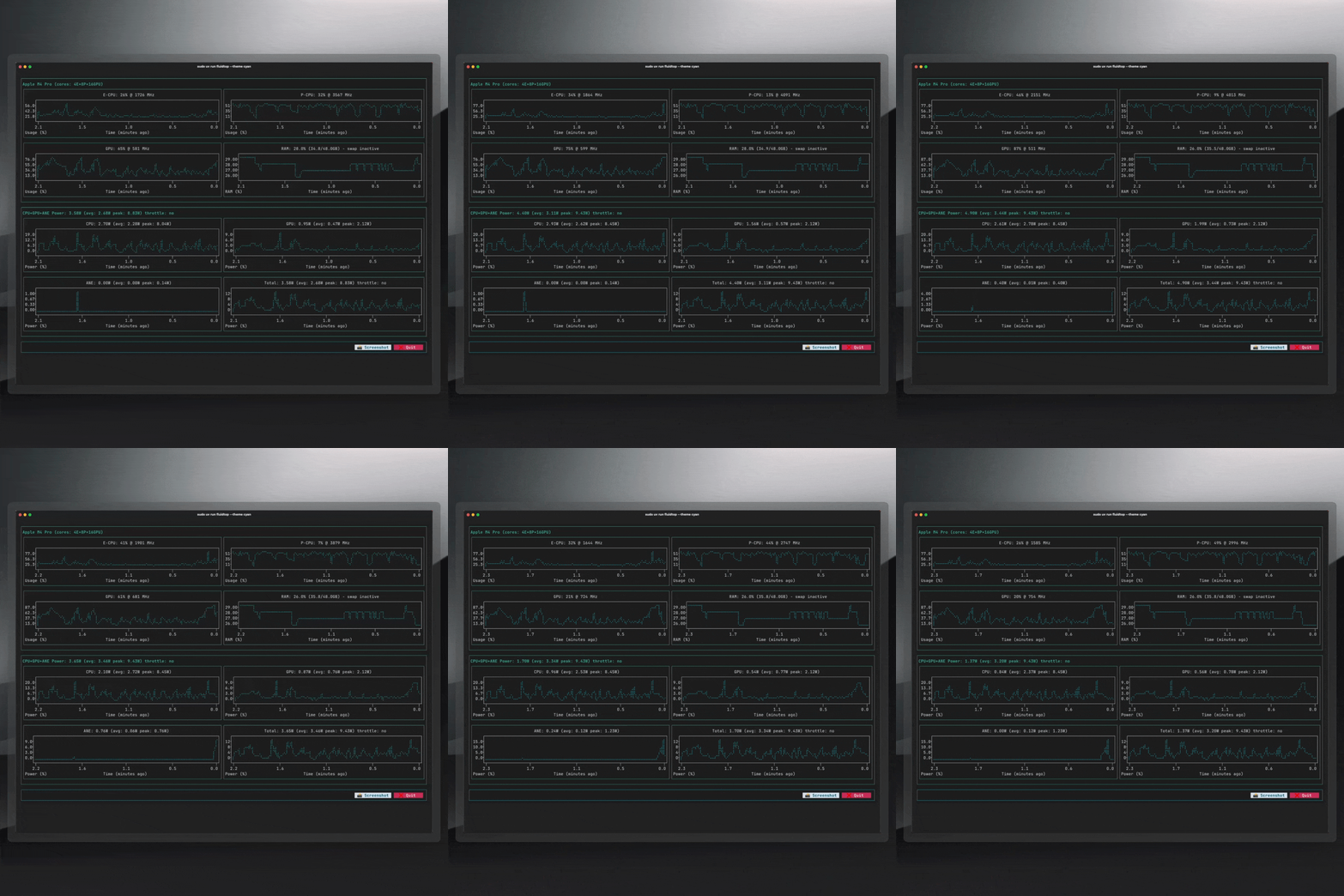
📦 Installation & Usage
Quick Start with UV (Recommended)
# Install UV package manager (if not already installed)
curl -LsSf https://astral.sh/uv/install.sh | sh
# Run FluidTop directly without installation (one-time usage)
sudo uvx fluidtop

# Run with custom options
sudo uvx fluidtop --interval 2 --color 5 --avg 60

# Or install as a tool for regular usages
uv tool install fluidtop@latest -U
sudo uv tool run fluidtop
# to update fluidtop
uv tool install fluidtop@latest -U
# Run with custom options
sudo uvx fluidtop --interval 2 --color 5 --avg 60
Install from PyPI
# Install with pip
pip install fluidtop

# Run after installation
sudo fluidtop
🚀 Key Features & Capabilities
Hardware Monitoring
- Real-time CPU monitoring - Individual core utilization and frequency tracking
- GPU performance tracking - Apple GPU usage, memory, and power consumption
- Neural Engine (ANE) monitoring - AI/ML workload detection and utilization
- Memory usage monitoring - RAM and swap memory tracking
- Power consumption analysis - CPU/GPU power draw with thermal throttling detection
- Temperature monitoring - System thermal state and throttling alerts
Apple Silicon Support
- Complete Apple Silicon coverage - M1, M2, M3, M4, and future chip support
- Optimized for modern terminals - Enhanced Ghostty compatibility and performance
- Hardware-specific metrics - TDP specifications for all variants
- Individual core monitoring - Detailed per-core performance and efficiency tracking
AI & Machine Learning Focus
- AI workload detection - Specialized monitoring for machine learning tasks
- Neural Engine utilization - Track AI inference and training workloads
- Memory usage optimization - Critical for large model performance
- Future ML framework integration - Planned support for popular AI libraries
Development Installation
# Clone repository
git clone https://github.com/FluidInference/fluidtop.git
cd fluidtop

# Install in development mode
uv sync
sudo uv run fluidtop
🎛️ Command Line Options & Configuration
fluidtop [OPTIONS]

Options:
  --interval INTERVAL   Display refresh rate in seconds (default: 1.0)
  --color COLOR        Color theme selection 0-8 (default: 2)
  --avg AVG           Power averaging window in seconds (default: 30)
  --show_cores        Enable individual CPU core monitoring
  --max_count COUNT   Restart powermetrics after N samples (stability)
  -h, --help          Show help message and exit
Usage Examples
# Basic monitoring with 1-second refresh
sudo fluidtop

# High-frequency monitoring for AI workloads
sudo fluidtop --interval 0.5 --show_cores

# Long-term monitoring with 60-second power averaging
sudo fluidtop --avg 60 --max_count 1000

# Custom color theme
sudo fluidtop --color 5
🔧 How FluidTop Works
FluidTop leverages macOS's built-in powermetrics utility to access hardware performance counters with minimal system impact. Root privileges are required due to powermetrics security requirements.
Technical Architecture
- CPU/GPU Utilization: Active residency measurements via
powermetrics - Power Consumption: Hardware energy counters and thermal state monitoring
- Memory Statistics:
psutilvirtual memory and swap tracking - System Information:
sysctlCPU details andsystem_profilerGPU specifications - Hardware Database: Built-in TDP specifications for all Apple Silicon variants
Note: Bandwidth monitoring was removed as macOS 13 deprecated bandwidth support in powermetrics.
System Requirements
- Hardware: Apple Silicon Mac (M1, M2, M3, M4, or newer)
- Operating System: macOS Monterey (12.0) or later
- Python: Python 3.8+ (automatically managed with UV)
- Privileges: Root access required for
powermetrics
Why Fork asitop?
The original asitop provided excellent Apple Silicon monitoring but lacked:
- Modern hardware support - M3, M4+ compatibility
- Terminal compatibility - Ghostty and modern terminal optimization
- AI workload focus - Machine learning specific monitoring
- Active maintenance - Regular updates and bug fixes
Migration from asitop
FluidTop is a drop-in replacement for asitop with identical command-line interface:
# Replace this:
sudo asitop

# With this:
sudo fluidtop
📚 Documentation
For detailed information, troubleshooting, and frequently asked questions, see our comprehensive FAQ which covers:
- Apple Silicon Architecture: Understanding E-CPU vs P-CPU cores
- System Requirements: Supported chips and compatibility
- Monitoring Details: Power accuracy, Neural Engine tracking, and more
- Troubleshooting: Common issues and solutions
- Migration Guide: Differences from asitop and compatibility
🗺️ Roadmap & Development
Completed Features
- ✅ Enhanced hardware support (M1-M4+)
- ✅ Ghostty terminal optimization
- ✅ Improved documentation and user experience
- ✅ PyPI publishing and UV integration
In Development
- 🔄 monitor a specific process/application
- 🔄 GUI-less monitoring and data collection
- 🔄 Performance data export capabilities (CSV, JSON)
- API interface for other Python services
🛠️ Development & Publishing
Automated Release Process
FluidTop uses GitHub Actions to automate the entire release process. No manual steps required!
🧪 Development Workflow
# Setup development environment
git clone https://github.com/FluidInference/fluidtop.git
cd fluidtop
uv sync

# Make changes to code
# Test changes locally
sudo uv run fluidtop

# Run with development options
sudo uv run fluidtop --interval 0.5 --show_cores

# Test build (optional)
uv build
sudo uv run fluidtop --help  # Verify build works
🐛 Known Issues & Contributing
Current Issues
- Chart height doesn't adapt to terminal height (width works correctly)
- Plot colors don't always respect theme selection
- Long-running sessions may require periodic restart
Contributing
- Report bugs and request features via GitHub Issues
- Submit pull requests for bug fixes and improvements
- Improve documentation and examples
- Test on different Apple Silicon variants
📄 License
MIT License - maintaining compatibility with the original asitop project.
🙏 Acknowledgments
This project builds upon the excellent foundation created by Timothy Liu with the original asitop project. We extend our gratitude for creating the groundwork for Apple Silicon performance monitoring.
Keywords: Apple Silicon monitoring, M1 M2 M3 M4 performance, macOS system monitor, AI workload tracking, Neural Engine monitoring, GPU utilization, real-time hardware stats, terminal performance tool, powermetrics CLI, asitop alternative
Project details
Verified details
These details have been verified by PyPIProject links
GitHub Statistics
Maintainers


Download files
Download the file for your platform. If you're not sure which to choose, learn more about installing packages.
Source Distribution
Built Distribution
Filter files by name, interpreter, ABI, and platform.
If you're not sure about the file name format, learn more about wheel file names.
Copy a direct link to the current filters
File details
Details for the file fluidtop-0.1.5.tar.gz.
File metadata
- Download URL: fluidtop-0.1.5.tar.gz
- Upload date:
- Size: 2.4 MB
- Tags: Source
- Uploaded using Trusted Publishing? Yes
- Uploaded via: twine/6.1.0 CPython/3.12.9
File hashes
| Algorithm | Hash digest | |
|---|---|---|
| SHA256 |
c28a0c060f6bd9bb323abbf70a72ff4b3607c48d9b858c7c94d41143a8511936
|
|
| MD5 |
3b2533c84cb12154b6120715b3243753
|
|
| BLAKE2b-256 |
e036475b513d1d803f3cde026a072984c182b186998a8eaaa32422e0857a9acb
|
Provenance
The following attestation bundles were made for fluidtop-0.1.5.tar.gz:
Publisher:
release.yml on FluidInference/fluidtop
-
Statement:
-
Statement type:
https://in-toto.io/Statement/v1 -
Predicate type:
https://docs.pypi.org/attestations/publish/v1 -
Subject name:
fluidtop-0.1.5.tar.gz -
Subject digest:
c28a0c060f6bd9bb323abbf70a72ff4b3607c48d9b858c7c94d41143a8511936 - Sigstore transparency entry: 264531883
- Sigstore integration time:
-
Permalink:
FluidInference/fluidtop@f873afb922642162032613e4a26ca96e7e79c190 -
Branch / Tag:
refs/heads/main - Owner: https://github.com/FluidInference
-
Access:
public
-
Token Issuer:
https://token.actions.githubusercontent.com -
Runner Environment:
github-hosted -
Publication workflow:
release.yml@f873afb922642162032613e4a26ca96e7e79c190 -
Trigger Event:
workflow_dispatch
-
Statement type:
File details
Details for the file fluidtop-0.1.5-py3-none-any.whl.
File metadata
- Download URL: fluidtop-0.1.5-py3-none-any.whl
- Upload date:
- Size: 16.1 kB
- Tags: Python 3
- Uploaded using Trusted Publishing? Yes
- Uploaded via: twine/6.1.0 CPython/3.12.9
File hashes
| Algorithm | Hash digest | |
|---|---|---|
| SHA256 |
7d730db8f0cf12e97fecc40bab556d915ab32ab03067be7e2384bd7e3160e513
|
|
| MD5 |
67857d885afc8c50f3c43f6a3fa4bc59
|
|
| BLAKE2b-256 |
8734f26c919e1ec220756e83a5f16ab9791463e3752e8079bd79f60488cb619c
|
Provenance
The following attestation bundles were made for fluidtop-0.1.5-py3-none-any.whl:
Publisher:
release.yml on FluidInference/fluidtop
-
Statement:
-
Statement type:
https://in-toto.io/Statement/v1 -
Predicate type:
https://docs.pypi.org/attestations/publish/v1 -
Subject name:
fluidtop-0.1.5-py3-none-any.whl -
Subject digest:
7d730db8f0cf12e97fecc40bab556d915ab32ab03067be7e2384bd7e3160e513 - Sigstore transparency entry: 264531885
- Sigstore integration time:
-
Permalink:
FluidInference/fluidtop@f873afb922642162032613e4a26ca96e7e79c190 -
Branch / Tag:
refs/heads/main - Owner: https://github.com/FluidInference
-
Access:
public
-
Token Issuer:
https://token.actions.githubusercontent.com -
Runner Environment:
github-hosted -
Publication workflow:
release.yml@f873afb922642162032613e4a26ca96e7e79c190 -
Trigger Event:
workflow_dispatch
-
Statement type:






