
Create custom and beautiful Fluid Property Diagrams with fluprodia. The package implements fluid property data from CoolProp [1]. Plotting is handled by matplotlib [2], all calculations are performed with numpy [3]. The list of fluids available can be found at CoolProp.
fluprodia is licensed under the MIT software license.
docs |
|
|---|---|
package |
    |

Installation
pip install fluprodiaUsage
To create a diagram import the library, specify unit system and isolines to be calculated and run the calculation:
>>> from fluprodia import FluidPropertyDiagram
>>> import matplotlib.pyplot as plt
>>> import numpy as np

>>> diagram = FluidPropertyDiagram(fluid='H2O')
>>> diagram.set_unit_system(T='°C', h='kJ/kg', p='bar')
>>> Q = np.linspace(0, 1, 11)
>>> T = np.arange(25, 501, 25)
>>> p = np.geomspace(0.01, 1000, 6)
>>> v = np.geomspace(0.001, 10, 5)
>>> s = np.linspace(1000, 10000, 10)
>>> h = np.linspace(0, 3600, 19)
>>> diagram.set_isolines(Q=Q, T=T, p=p, v=v, s=s, h=h)
>>> diagram.calc_isolines()
Then you can plot the data to different types of plots, e.g. logph diagram:
>>> fig, ax = plt.subplots(1, figsize=(8, 5))
>>> diagram.draw_isolines(diagram_type='logph', fig=fig, ax=ax, x_min=0, x_max=3000, y_min=0.01, y_max=1000)
>>> plt.tight_layout()
>>> fig.savefig('logph_diagram_H2O.svg')
>>> fig.savefig('logph_diagram_H2O.png', dpi=300)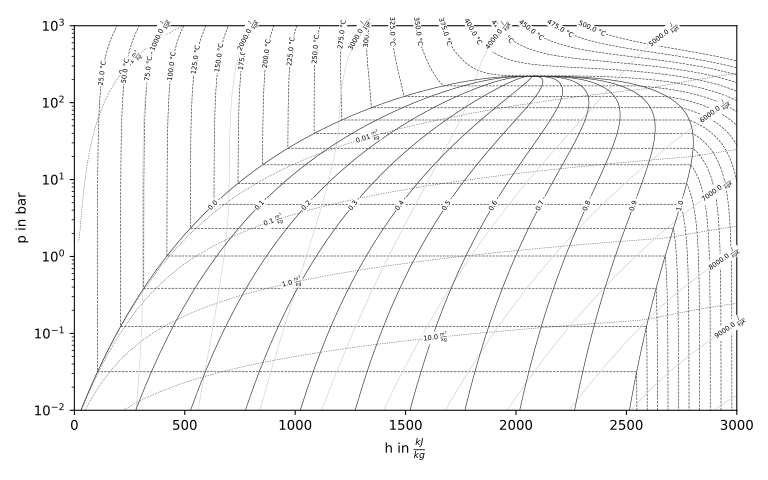
Or, a Ts-diagram:
>>> fig, ax = plt.subplots(1, figsize=(8, 5))
>>> diagram.draw_isolines(diagram_type='Ts', fig=fig, ax=ax, x_min=0, x_max=8000, y_min=0, y_max=700)
>>> plt.tight_layout()
>>> fig.savefig('Ts_diagram_H2O.svg')
>>> fig.savefig('Ts_diagram_H2O.png', dpi=300)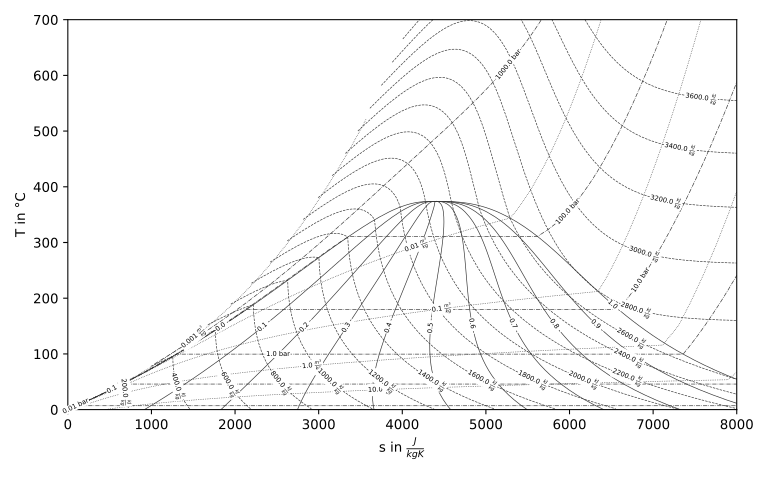
The fluids are available through CoolProp. To generate a diagram for a new fluid simply change the name. Isolines come with defaults as well.
>>> diagram = FluidPropertyDiagram(fluid='R290')
>>> diagram.set_unit_system(T='°C', h='kJ/kg', p='bar')
>>> diagram.calc_isolines()
>>> fig, ax = plt.subplots(1, figsize=(8, 5))
>>> diagram.draw_isolines(diagram_type='logph', fig=fig, ax=ax, x_min=0, x_max=800, y_min=1e-1, y_max=1e2)
>>> plt.tight_layout()
>>> fig.savefig('logph_diagram_R290.png', dpi=300)
>>> fig.savefig('logph_diagram_R290.svg')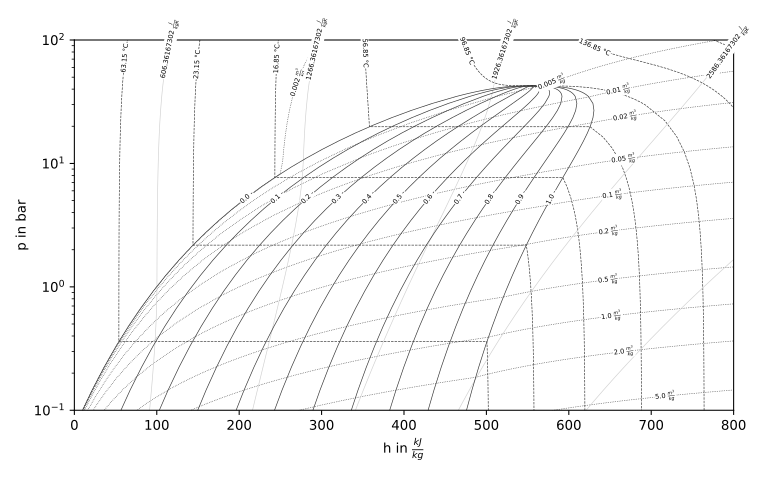
You can change the back-end of CoolProp, e.g. to use REFPROP:
diagram = FluidPropertyDiagram(fluid='R290', backend='REFPROP')Documentation
For further examples and usage please refer to the online documentation at https://fluprodia.readthedocs.io/.
Citation
Every version of fluprodia is archived at zenodo. You can cite the latest or a specific version. For citation info and more details please go to the zenodo entry of fluprodia.
References
This software depends on the packages CoolProp, matplolib and numpy.
1 maintainer

Download files
Download the file for your platform. If you're not sure which to choose, learn more about installing packages.
Source Distribution
Built Distribution
Filter files by name, interpreter, ABI, and platform.
If you're not sure about the file name format, learn more about wheel file names.
Copy a direct link to the current filters
File details
Details for the file fluprodia-4.3.tar.gz.
File metadata
- Download URL: fluprodia-4.3.tar.gz
- Upload date:
- Size: 1.2 MB
- Tags: Source
- Uploaded using Trusted Publishing? No
- Uploaded via:
twine/7.0.0 CPython/3.13.6
File hashes
| Algorithm | Hash digest | |
|---|---|---|
| SHA256 |
4fe8382239789b1e08ad7e5ead52bd9cccb15a935217117388073a044d007f6b
|
|
| MD5 |
0990c328dc8c8c633e4be944957cc4f5
|
|
| BLAKE2b-256 |
cb858f899172807cd18274e255586c8d8d76f694eb04a5366b010e9e62e7df04
|
File details
Details for the file fluprodia-4.3-py3-none-any.whl.
File metadata
- Download URL: fluprodia-4.3-py3-none-any.whl
- Upload date:
- Size: 22.9 kB
- Tags: Python 3
- Uploaded using Trusted Publishing? No
- Uploaded via:
twine/7.0.0 CPython/3.13.6
File hashes
| Algorithm | Hash digest | |
|---|---|---|
| SHA256 |
bbba609b798246a9a959f210962f4a424476d879e4ecd084a39d725d9bc98fea
|
|
| MD5 |
6b03404d8ee9d59d6b5d080a1dcdfa96
|
|
| BLAKE2b-256 |
4d886475d693774133161ae91f7e77cda701d208184c64eb80ee83a8a2d1d469
|














