
Bring Flutter to Python
Verified details
These details have been verified by PyPIProject links
GitHub Statistics
Maintainers

Project description
Flut

Bring Flutter to Python
Overview
Flut is a Python project that brings the real Flutter widget system into the Python ecosystem. It is designed to expose Flutter's API as honestly and closely as possible.
Common Use Cases
Flut is a good fit when you are writing a Python application and need a modern desktop UI, when your project needs to stay in the Python ecosystem, or when you want Flutter's widget model without moving your codebase to Dart.
Typical examples include:
- A Python data, automation, or AI tool that needs a polished cross-platform desktop interface.
- Students, researchers, or developers who want to quickly build a desktop proof-of-concept UI while keeping models, inference code, or data pipelines in Python.
- An internal business application whose networking, domain logic, or integrations already live in Python.
- A Python enthusiast who wants a UI application that can be installed through the familiar
pip install appworkflow.
Because Flut follows Flutter's API closely, Flutter examples and AI-generated Flutter code can often be adapted to Flut with only straightforward Python syntax changes. The reverse is also true: if you later decide to migrate to Flutter and Dart, you can retain your entire UI structure and design work.
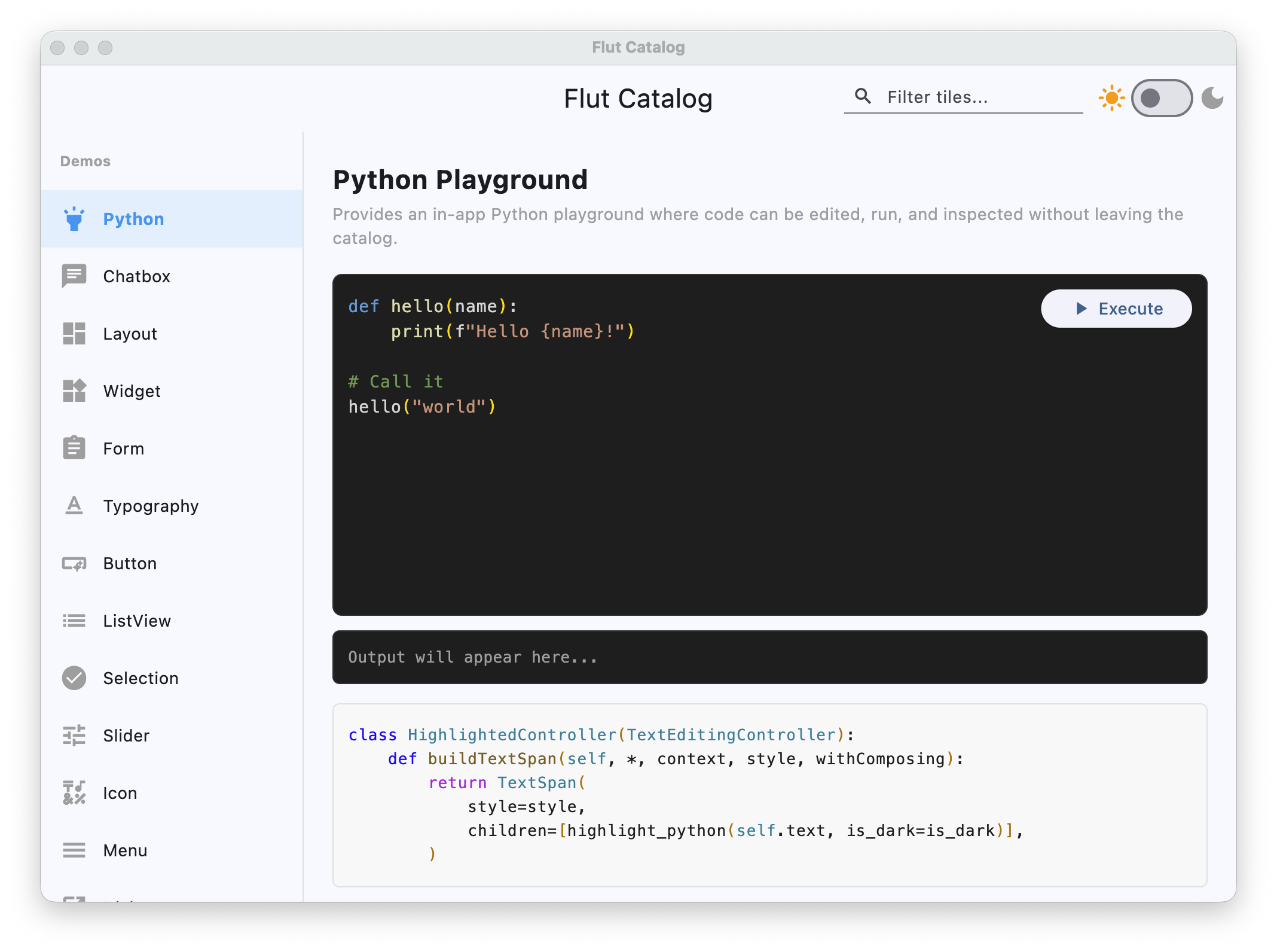
Please take a look at the catalog app, and Rocky — a Python-based desktop AI agent.
True Flutter
Flutter code maps almost 1:1 from Dart to Python.
// Flutter (Dart)
Container(
  padding: EdgeInsets.all(16),
  decoration: BoxDecoration(
    color: Colors.blue,
    borderRadius: BorderRadius.circular(8),
  ),
  child: Text('Hello'),
)
# Flut (Python)
Container(
  padding=EdgeInsets.all(16),
  decoration=BoxDecoration(
    color=Colors.blue,
    borderRadius=BorderRadius.circular(8),
  ),
  child=Text('Hello'),
)
Under the hood, the real Flutter widget system is used. Because Flut closely mirrors Flutter's API, coding agents can transfer their knowledge of Flutter patterns and generate Flut code naturally.
State-of-the-Art asyncio Integration
Flut provides a true async integration, bridging asyncio with the Flutter UI thread in a design that exactly matches Flutter. Thread safety and event loop conflicts are handled internally.
No Performance Surprises
The majority of projects using Flut will enjoy near identical performance to Flutter. FFI between Python and Dart does bring additional communication overhead, but the cost is fixed.
Installation
pip install flut
Prebuilt wheels are available for Windows (x64), macOS (x64, arm64), and Linux (x64).
Building from source is also supported and requires the Flutter SDK.
Usage
Create a file app.py:
from flut import run_app
from flut.flutter.widgets import StatelessWidget, StatefulWidget, State, Text, Center, Column, Icon
from flut.flutter.material import MaterialApp, Scaffold, AppBar, FloatingActionButton, Icons, ThemeData, ColorScheme, Colors, Theme
from flut.flutter.rendering import MainAxisAlignment


class MyApp(StatelessWidget):
    def build(self, context):
        return MaterialApp(
            title="Flut Demo",
            theme=ThemeData(
                colorScheme=ColorScheme.fromSeed(seedColor=Colors.deepPurple),
            ),
            home=MyHomePage(title="Flut Demo Home Page"),
        )


class MyHomePage(StatefulWidget):
    def __init__(self, title):
        super().__init__()
        self.title = title

    def createState(self):
        return _MyHomePageState()


class _MyHomePageState(State[MyHomePage]):
    def initState(self):
        self._counter = 0

    def _incrementCounter(self):
        def _update():
            self._counter += 1

        self.setState(_update)

    def build(self, context):
        return Scaffold(
            appBar=AppBar(
                title=Text(self.widget.title),
                backgroundColor=Theme.of(context).colorScheme.inversePrimary,
            ),
            body=Center(
                child=Column(
                    mainAxisAlignment=MainAxisAlignment.center,
                    children=[
                        Text("You have pushed the button this many times:"),
                        Text(
                            f"{self._counter}",
                            style=Theme.of(context).textTheme.headlineMedium,
                        ),
                    ],
                ),
            ),
            floatingActionButton=FloatingActionButton(
                onPressed=self._incrementCounter,
                tooltip="Increment",
                child=Icon(Icons.add),
            ),
        )


if __name__ == "__main__":
    run_app(MyApp())
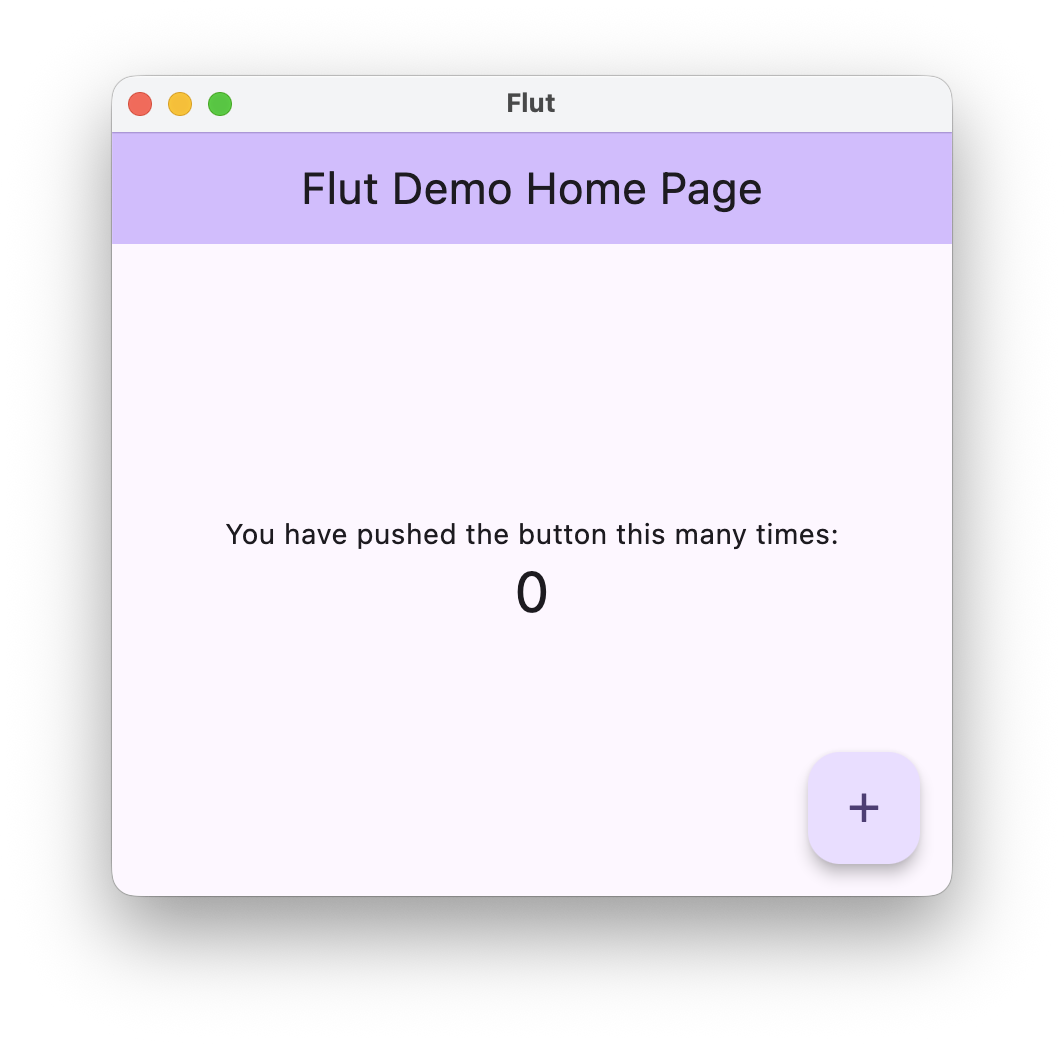
Run it:
python app.py
For async support:
import asyncio
from flut import run_app_async

# ... your app code ...

if __name__ == "__main__":
    asyncio.run(run_app_async(MyApp()))
For a more complete example, see the catalog app.
Flutter Parity
Flut is a project that brings Flutter to Python. Some features are not applicable in this context: whether due to platform limitations, overlap with Python's own ecosystem, being tied to the Dart development workflow, or simply due to its challanging nature. The following are out of scope, listed from lowest to highest priority for future consideration:
- Web Support
- Mobile Support
- Plugins
- Flutter DevTools
- Isolates
- Platform Channels
- Streams/StreamBuilder
- Non-State Mixins
The following are implemented with compromises:
- InheritedWidget Uses
visitAncestorElements+dependOnInheritedElementinstead of type-based lookup, resulting in O(depth) lookup vs Flutter's O(1). Negligible for typical widget trees. - Shortcuts / Actions O(depth) action lookup vs Flutter's O(1). Negligible for typical widget trees.
- showDialog wraps the builder in a StatelessWidget proxy so the dialog's widget tree is built through the standard Dart-initiated build path, enabling callbacks in dialog children to work correctly.
Build
cd flut/.flutter
flutter build windows/macos/linux --no-tree-shake-icons
License
MIT
Disclaimer
Flut is an independent project and is not endorsed by, sponsored by, or affiliated with Google LLC. Flutter is a trademark of Google LLC.
Project details
Verified details
These details have been verified by PyPIProject links
GitHub Statistics
Maintainers
Release history Release notifications | RSS feed


Download files
Download the file for your platform. If you're not sure which to choose, learn more about installing packages.
Source Distribution
Built Distributions
Filter files by name, interpreter, ABI, and platform.
If you're not sure about the file name format, learn more about wheel file names.
Copy a direct link to the current filters
File details
Details for the file flut-0.0.5.tar.gz.
File metadata
- Download URL: flut-0.0.5.tar.gz
- Upload date:
- Size: 573.9 kB
- Tags: Source
- Uploaded using Trusted Publishing? Yes
- Uploaded via: twine/6.1.0 CPython/3.13.12
File hashes
| Algorithm | Hash digest | |
|---|---|---|
| SHA256 |
65c1821c28226dc8989bdc97b6e5d0a87cbf62e35205d0e7d000cd3d8d0631eb
|
|
| MD5 |
a1ed1b93eb3100f6bffe869900870415
|
|
| BLAKE2b-256 |
2cb19e05165fe5319d40c6ebd2c9c7bcdd158f9e4d60419b0d9f5a82a91abd5a
|
Provenance
The following attestation bundles were made for flut-0.0.5.tar.gz:
Publisher:
publish.yml on yangyuan/flut
-
Statement:
-
Statement type:
https://in-toto.io/Statement/v1 -
Predicate type:
https://docs.pypi.org/attestations/publish/v1 -
Subject name:
flut-0.0.5.tar.gz -
Subject digest:
65c1821c28226dc8989bdc97b6e5d0a87cbf62e35205d0e7d000cd3d8d0631eb - Sigstore transparency entry: 1343303078
- Sigstore integration time:
-
Permalink:
yangyuan/flut@b64365c4dca29cea226dc65fd6ee6b3fb31163c9 -
Branch / Tag:
refs/heads/master - Owner: https://github.com/yangyuan
-
Access:
public
-
Token Issuer:
https://token.actions.githubusercontent.com -
Runner Environment:
github-hosted -
Publication workflow:
publish.yml@b64365c4dca29cea226dc65fd6ee6b3fb31163c9 -
Trigger Event:
workflow_dispatch
-
Statement type:
File details
Details for the file flut-0.0.5-py3-none-win_amd64.whl.
File metadata
- Download URL: flut-0.0.5-py3-none-win_amd64.whl
- Upload date:
- Size: 13.4 MB
- Tags: Python 3, Windows x86-64
- Uploaded using Trusted Publishing? Yes
- Uploaded via: twine/6.1.0 CPython/3.13.12
File hashes
| Algorithm | Hash digest | |
|---|---|---|
| SHA256 |
dd5345c0359ac11988a1c9d47a654f487ab87c5da67fa8e4e652d0f94e5068d6
|
|
| MD5 |
5170daf39990419d1ebb0292549900c1
|
|
| BLAKE2b-256 |
81f3b512da34ccababc0f73c5a9274870fc66f7e8f24a907c2a6a59ced58e591
|
Provenance
The following attestation bundles were made for flut-0.0.5-py3-none-win_amd64.whl:
Publisher:
publish.yml on yangyuan/flut
-
Statement:
-
Statement type:
https://in-toto.io/Statement/v1 -
Predicate type:
https://docs.pypi.org/attestations/publish/v1 -
Subject name:
flut-0.0.5-py3-none-win_amd64.whl -
Subject digest:
dd5345c0359ac11988a1c9d47a654f487ab87c5da67fa8e4e652d0f94e5068d6 - Sigstore transparency entry: 1343303107
- Sigstore integration time:
-
Permalink:
yangyuan/flut@b64365c4dca29cea226dc65fd6ee6b3fb31163c9 -
Branch / Tag:
refs/heads/master - Owner: https://github.com/yangyuan
-
Access:
public
-
Token Issuer:
https://token.actions.githubusercontent.com -
Runner Environment:
github-hosted -
Publication workflow:
publish.yml@b64365c4dca29cea226dc65fd6ee6b3fb31163c9 -
Trigger Event:
workflow_dispatch
-
Statement type:
File details
Details for the file flut-0.0.5-py3-none-manylinux1_x86_64.whl.
File metadata
- Download URL: flut-0.0.5-py3-none-manylinux1_x86_64.whl
- Upload date:
- Size: 19.6 MB
- Tags: Python 3
- Uploaded using Trusted Publishing? Yes
- Uploaded via: twine/6.1.0 CPython/3.13.12
File hashes
| Algorithm | Hash digest | |
|---|---|---|
| SHA256 |
89def8f7e021c9839da6fec79dd7d411158cdd13fdf6ac611d61a30da2b61fb1
|
|
| MD5 |
7289e77f829e615c26d3017ff8fdd16c
|
|
| BLAKE2b-256 |
f96fd578392fce34bc0da16d9f46e95a1ad1a98cecdded5c3dceeb415c150147
|
Provenance
The following attestation bundles were made for flut-0.0.5-py3-none-manylinux1_x86_64.whl:
Publisher:
publish.yml on yangyuan/flut
-
Statement:
-
Statement type:
https://in-toto.io/Statement/v1 -
Predicate type:
https://docs.pypi.org/attestations/publish/v1 -
Subject name:
flut-0.0.5-py3-none-manylinux1_x86_64.whl -
Subject digest:
89def8f7e021c9839da6fec79dd7d411158cdd13fdf6ac611d61a30da2b61fb1 - Sigstore transparency entry: 1343303124
- Sigstore integration time:
-
Permalink:
yangyuan/flut@b64365c4dca29cea226dc65fd6ee6b3fb31163c9 -
Branch / Tag:
refs/heads/master - Owner: https://github.com/yangyuan
-
Access:
public
-
Token Issuer:
https://token.actions.githubusercontent.com -
Runner Environment:
github-hosted -
Publication workflow:
publish.yml@b64365c4dca29cea226dc65fd6ee6b3fb31163c9 -
Trigger Event:
workflow_dispatch
-
Statement type:
File details
Details for the file flut-0.0.5-py3-none-macosx_10_14_universal2.whl.
File metadata
- Download URL: flut-0.0.5-py3-none-macosx_10_14_universal2.whl
- Upload date:
- Size: 57.1 MB
- Tags: Python 3, macOS 10.14+ universal2 (ARM64, x86-64)
- Uploaded using Trusted Publishing? Yes
- Uploaded via: twine/6.1.0 CPython/3.13.12
File hashes
| Algorithm | Hash digest | |
|---|---|---|
| SHA256 |
5bc59f73ff2a74a5d1ae1fe3fca37bc0d907fa653059eee456091c4c1988370f
|
|
| MD5 |
04dcb39a557d9d970b22ab2200b44519
|
|
| BLAKE2b-256 |
0470a60b806a45c1288c916bfbb5f4d945d4b7e401ecef6bdc1875e1571e5524
|
Provenance
The following attestation bundles were made for flut-0.0.5-py3-none-macosx_10_14_universal2.whl:
Publisher:
publish.yml on yangyuan/flut
-
Statement:
-
Statement type:
https://in-toto.io/Statement/v1 -
Predicate type:
https://docs.pypi.org/attestations/publish/v1 -
Subject name:
flut-0.0.5-py3-none-macosx_10_14_universal2.whl -
Subject digest:
5bc59f73ff2a74a5d1ae1fe3fca37bc0d907fa653059eee456091c4c1988370f - Sigstore transparency entry: 1343303092
- Sigstore integration time:
-
Permalink:
yangyuan/flut@b64365c4dca29cea226dc65fd6ee6b3fb31163c9 -
Branch / Tag:
refs/heads/master - Owner: https://github.com/yangyuan
-
Access:
public
-
Token Issuer:
https://token.actions.githubusercontent.com -
Runner Environment:
github-hosted -
Publication workflow:
publish.yml@b64365c4dca29cea226dc65fd6ee6b3fb31163c9 -
Trigger Event:
workflow_dispatch
-
Statement type:






