

FluxMedia
A premium, cross-platform media portal and processing toolkit.





FluxMedia is a production-ready media manager, automated downloader, and local streaming gateway wrapped in a responsive terminal application and web interface.
📢 Latest Release: v1.7.8
- Android/Termux Installation: Fixed
Failed to build 'pydantic-core'error occurring during installation on Termux. Updated the one-liner installation script and auto-updater to explicitly fetch pre-compiledpydantic-coreAndroid wheels using a custom PyPI index, bypassing local rust compiler requirements.
📢 Previous Release: v1.7.7
- Settings Menu Crash: Fixed a
KeyError: 'filename_format'crash when opening the settings menu. Restored the complete list of missing default configuration keys that were accidentally dropped during the modular extraction, enablingconfig.jsonto self-heal missing properties automatically.
📢 Previous Release: v1.7.6
- CLI Duplicate Option: Suppressed duplicate output of the 'W/w' option in the CLI main menu by explicitly hiding choices in the Rich Prompt.
- Web UI Launch: Fixed
cannot import name 'load_config' from 'fluxmedia.main'crash when launching Web UI ('W') by redirecting imports tofluxmedia.corein theapi.pymodule.
📢 Previous Release: v1.7.5
- Version Tracking: Fixed an issue where the application would incorrectly prompt users to update due to a hardcoded version string (
1.7.2). The version is now dynamically loaded from the package metadata.
📢 Previous Release: v1.7.4
- UI Crashes & Type Hints: Fixed a critical
AttributeError: 'NoneType' object has no attribute 'width'that occurred when navigating the UI due to therich.console.Consoleinstance being overwritten by a residual dummy type hint during the modular extraction. Removed all remainingcast(Any, None)dummies. - Update Checker Proxy Fix: Fixed an issue where selecting "Update Now" in the UI would silently exit the program without performing the update. This was caused by the dummy proxy function evaluating to
passinstead of lazy-loading the actual CLI update handler.
📢 Previous Release: v1.7.3
📢 Previous Release: v1.7.2
- Hotfix: Fixed missing
requestsandloggingimports in thecoreandutilsmodules that caused crashes during startup and updates.
📢 Previous Release: v1.7.1
- Hotfix: Fixed package discovery to ensure the new
fluxmedia.cli,fluxmedia.core, and other modules are properly included in the PyPI wheel, resolvingModuleNotFoundErrorduring startup.
📢 Previous Release: v1.7.0
- Major Architectural Overhaul: The legacy 5,200-line monolithic God Object has been completely decoupled into distinct modular packages.
- FastAPI Share Portal: Completely replaced the legacy synchronous
http.serverwith an asynchronous, high-performanceFastAPIinstance for the LAN Share Portal. - Security & CI/CD: Eliminated all High-Severity
shell=Truesubprocess vulnerabilities and integrated strict GitHub Actions workflows for continuous integration and deployment.
📢 Previous Release: v1.6.57
- Highly Optimized Sync Option: Upgraded the internal sync and share portal server to use multithreading (
socketserver.ThreadingTCPServer). This allows multiple requests to be processed concurrently across all platforms (Linux, Windows, macOS, Termux). - Improved Streaming Performance: Increased the file chunk size to 1MB, greatly improving file streaming efficiency and reducing overhead for the Share Portal.
📢 Previous Release: v1.6.56
- Synchronous Playback Barrier: Added a distributed state barrier for Watch Parties. If any synced device stops playback (due to internet buffering or a browser autoplay block), the host CLI will automatically detect it and transition the entire Watch Party into a "Waiting" state. Playback will only resume perfectly synchronously once every synced device reports it is ready to play.
- Mobile Browser Caching Fixed: Added
Cache-Controlheaders and cache-busting query strings to the portal's UI assets. This ensures Android and iOS devices always load the latest version of the Watch Party features instead of stale cached files. - Watch Party Host Waiting Flow: The CLI now properly waits and displays a live-updating table of connected devices for the host to review before proceeding to the device selection stage.
- Full Watch Party in Share Portal: Connected devices now appear in a live panel (FAB or tab mode) with green pulsing dots for SYNCED vs grey for WATCHING. The CLI host picks which devices to sync, and the browser clients automatically seek and play/pause in real time.
- Sync Lock Modes: Strict (full lock) or Loose (volume/fullscreen allowed) — user-configurable in Settings.
- Custom Device Names: Each device auto-detects its name (iPhone, Android, Mac...) and lets users override it in Settings > Watch Party.
🌟 Key Features
- Universal Extraction Core: Seamlessly download high-quality videos, playlists, audio streams, channel collections, and subtitles powered by a robust wrapper around
yt-dlp. - Sync Play (Watch Party) [Beta]: Synchronize media playback across all connected devices on your local network, perfect for hosting local watch parties.
- FluxMedia Web UI: A beautiful, responsive React-based web dashboard to remotely control your downloads, manage files, and host Watch Parties directly from your browser.
- Built-in LAN Sharing Gateway: Share downloaded files instantly to any device on your local network using a built-in password-protected HTTP server with QR code access.
- Instagram Profile Downloader [Beta]: Batch download media directly from Instagram profiles with our new custom extraction module.
- Advanced Post-Processing: Automatically extract audio (MP3/M4A/FLAC), merge separate audio/video formats, inject descriptions and tags, and embed album artwork via FFmpeg.
- Universal OS Support: The one-liner
install.shscript automatically resolves dependencies across macOS (brew), Android Termux (pkg), and virtually all Linux package managers (apt,pacman,dnf,apk,zypper,xbps).
💻 Visual Preview
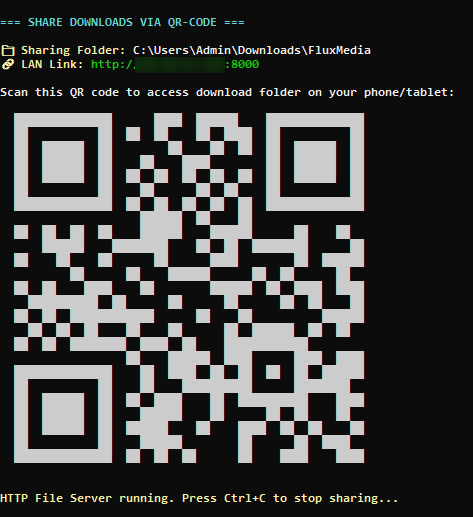
FluxMedia CLI showing QR Share Gateway active on the local network.
🚀 Quick Start
1. Installation
Linux / macOS (Bash):
curl -sL https://raw.githubusercontent.com/pdev-labs/FluxMedia/main/install.sh | bash
Windows (PowerShell):
iex (irm https://raw.githubusercontent.com/pdev-labs/FluxMedia/main/install.ps1)
Alternatively, you can install directly via pip:
pip install fluxmedia
(Android/Termux Users: Pydantic-core requires compilation. See the Installation Guide for the correct pip command.)
For detailed, OS-specific manual installation instructions, please check the Installation Guide.
2. Usage
Launch the interactive console portal:
fluxmedia
Launch the newly added Web UI dashboard (also accessible by pressing W in the main menu):
fluxmedia --web
Or open the Textual TUI dashboard directly:
fluxmedia --tui
📚 Documentation
Detailed user guides and developer docs are organized in the docs/ folder:
- 📥 Installation Guide — Step-by-step setup guides for Windows, macOS, Linux, and Android (Termux).
- ⚙️ Configuration Guide — Explanations of config options, directories, and customization schemas.
- 📦 Downloader Engine — Internals on formatting flags, post-processors, and download strategies.
- 📶 LAN QR Share Portal — Guide to local HTTP streaming, REST API endpoints, and authentication tokens.
- 🛠️ Troubleshooting Guide — Common solutions for SSL issues, Windows Defender configurations, and storage permissions.
- 📖 Frequently Asked Questions — Answers to common developer and user questions.
- 🏗️ Architecture Overview — Codebase directory layout, dynamic imports, and module dependencies.
🗺️ Roadmap
We are constantly improving the platform. Here are our high-level goals:
- Milestone 1: Parallel multi-threaded downloading and expanded website extractors.
- Milestone 2: In-terminal visual video trimming and custom TUI styling themes.
- Milestone 3: Multi-user permissions on the share portal and upgraded web player seeking.
Check out ROADMAP.md for our complete milestones plan.
🤝 Contributing
We welcome all contributions! Whether you are fixing type errors, adding new feature modules, or enhancing the documentation:
- Review the Contributing Guide.
- Ensure you adhere to the Code of Conduct.
- If you modify any frontend web assets, remember to run the repack builder:
python repack.py
📜 License & Credits
FluxMedia is open-source software licensed under the MIT License.
Credits
- Core extraction engine powered by yt-dlp.
- Terminal styling and layouts powered by rich and textual.
- Audio tagging powered by mutagen.
1 maintainer

Download files
Download the file for your platform. If you're not sure which to choose, learn more about installing packages.
Source Distribution
Built Distribution
Filter files by name, interpreter, ABI, and platform.
If you're not sure about the file name format, learn more about wheel file names.
Copy a direct link to the current filters
File details
Details for the file fluxmedia-1.7.8.tar.gz.
File metadata
- Download URL: fluxmedia-1.7.8.tar.gz
- Upload date:
- Size: 1.3 MB
- Tags: Source
- Uploaded using Trusted Publishing? Yes
- Uploaded via: twine/6.1.0 CPython/3.13.14
File hashes
| Algorithm | Hash digest | |
|---|---|---|
| SHA256 |
5a19025e6fee0c7c32c4598a8ab027e2eb48ab63c0c2d361223b1f8d2b8887b4
|
|
| MD5 |
48ad62b25135c0d4ab22d1a55f3837e6
|
|
| BLAKE2b-256 |
0bd23b6770e33ffa616f25b4efb2e53cd7bd2d5508060c0b59fdc669494820fd
|
Provenance
The following attestation bundles were made for fluxmedia-1.7.8.tar.gz:
Publisher:
publish.yml on pdev-labs/FluxMedia
-
Statement:
-
Statement type:
https://in-toto.io/Statement/v1 -
Predicate type:
https://docs.pypi.org/attestations/publish/v1 -
Subject name:
fluxmedia-1.7.8.tar.gz -
Subject digest:
5a19025e6fee0c7c32c4598a8ab027e2eb48ab63c0c2d361223b1f8d2b8887b4 - Sigstore transparency entry: 2212382042
- Sigstore integration time:
-
Permalink:
pdev-labs/FluxMedia@2959dbf40a71bb5398bcea31dbe47b70f8ef6d01 -
Branch / Tag:
refs/tags/v1.7.8 - Owner: https://github.com/pdev-labs
-
Access:
public
-
Token Issuer:
https://token.actions.githubusercontent.com -
Runner Environment:
github-hosted -
Publication workflow:
publish.yml@2959dbf40a71bb5398bcea31dbe47b70f8ef6d01 -
Trigger Event:
release
-
Statement type:
File details
Details for the file fluxmedia-1.7.8-py3-none-any.whl.
File metadata
- Download URL: fluxmedia-1.7.8-py3-none-any.whl
- Upload date:
- Size: 1.3 MB
- Tags: Python 3
- Uploaded using Trusted Publishing? Yes
- Uploaded via: twine/6.1.0 CPython/3.13.14
File hashes
| Algorithm | Hash digest | |
|---|---|---|
| SHA256 |
9d267c13fb9e44065ad8bb261a9f16f5e19559499ffdfbe3c1b838300420e2c0
|
|
| MD5 |
6e27a06e49ee48429639793f8ae565ee
|
|
| BLAKE2b-256 |
7199185596a067234cdb46e7c42f2f7c46449f158e9ac034e7d01f7425304b28
|
Provenance
The following attestation bundles were made for fluxmedia-1.7.8-py3-none-any.whl:
Publisher:
publish.yml on pdev-labs/FluxMedia
-
Statement:
-
Statement type:
https://in-toto.io/Statement/v1 -
Predicate type:
https://docs.pypi.org/attestations/publish/v1 -
Subject name:
fluxmedia-1.7.8-py3-none-any.whl -
Subject digest:
9d267c13fb9e44065ad8bb261a9f16f5e19559499ffdfbe3c1b838300420e2c0 - Sigstore transparency entry: 2212382080
- Sigstore integration time:
-
Permalink:
pdev-labs/FluxMedia@2959dbf40a71bb5398bcea31dbe47b70f8ef6d01 -
Branch / Tag:
refs/tags/v1.7.8 - Owner: https://github.com/pdev-labs
-
Access:
public
-
Token Issuer:
https://token.actions.githubusercontent.com -
Runner Environment:
github-hosted -
Publication workflow:
publish.yml@2959dbf40a71bb5398bcea31dbe47b70f8ef6d01 -
Trigger Event:
release
-
Statement type:







