
Fluxyr
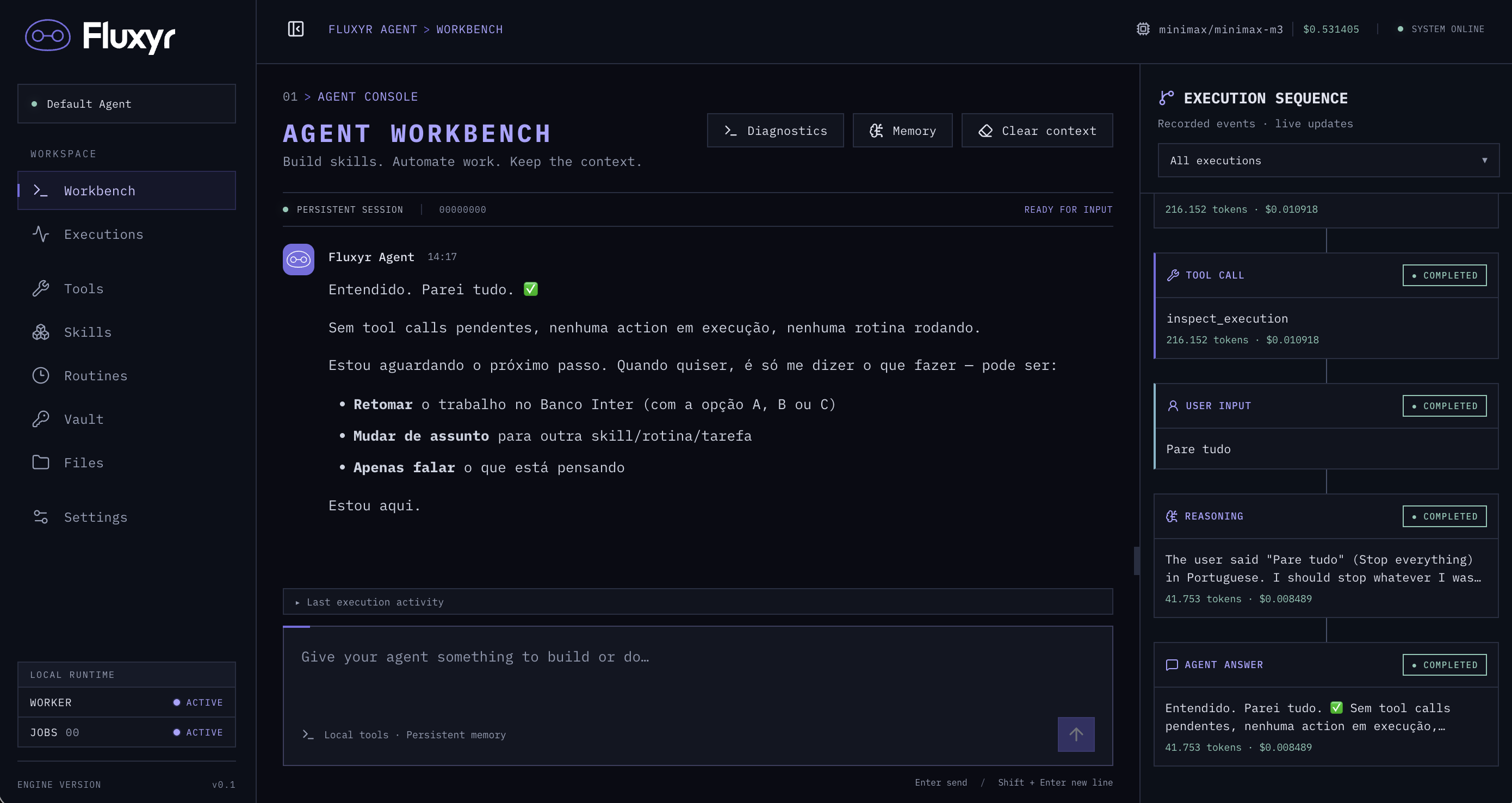
A Python framework for agents that expand their own capabilities and repair their skills through a self-healing workflow. Describe what you need in the chat: Fluxyr can research an integration, generate Python actions, test them and save them as reusable skills.
Create an application with a Flask-style API; Fluxyr handles tools, memory, conversations, streaming, background executions and scheduled routines.
Install
pip install fluxyr
Requires Python 3.11+. The package includes the web UI; Node is only needed when contributing to the frontend.
Your first application
Create a .env file:
FLUXYR_MODEL=minimax/minimax-m3
OPENROUTER_API_KEY=your-key
Create app.py:
from fluxyr import Fluxyr

app = Fluxyr(__name__)

@app.tool()
def greet(name: str) -> dict:
    """Greet someone by name."""
    return {"message": f"Hello, {name}!"}

@app.get("/api/hello")
def hello():
    return greet("Fluxyr")

if __name__ == "__main__":
    app.run()
Run python app.py and open http://localhost:5050.
The agent is ready for you to configure its skills,
credentials and routines and start a conversation.
Build skills through conversation
Ask Fluxyr to create an integration in the chat, for example:
Create a weather skill for my provider's API, with a forecast action accepting a city. Ask me for the documentation URL and help me configure any credentials in Vault. Test it for São Paulo, then create a routine that retrieves the forecast every day at 08:00 in America/Sao_Paulo.
Fluxyr turns the request into skill instructions and a technical specification. A dedicated builder generates the Python actions and declares their dependencies and Vault credentials. The agent inspects the generated code, runs tests, checks the results and activates a tested version for future conversations and routines. You can follow the build and execution progress in the UI.
The same loop supports self-healing: when an action fails, the agent can inspect the execution, diagnose the problem, revise the specification and rebuild the affected action. It tests the replacement before activation and can improve the skill's instructions from what it learns. Each code change creates a new version, preserving the previous versions and execution history. Missing credentials or required user choices are handled through embedded dialogs.
Configuration
Fluxyr reads .env from the directory where you start the application.
Environment variables take precedence. Only the model and its provider's API key
are required.
| Variable | Default |
|---|---|
FLUXYR_MODEL |
Required |
OPENROUTER_API_KEY |
Required for the default provider |
FLUXYR_PROVIDER |
openrouter; also supports openai, anthropic and custom |
PORT |
5050 |
FLUXYR_AGENT_NAME |
Default Agent |
DATABASE_URL |
SQLite at .fluxyr/state/fluxyr.sqlite3; PostgreSQL is optional |
FLUXYR_ROOT |
.fluxyr in the launch directory; override to mount one instance volume |
FLUXYR_SKILLS_DIR |
Optional folder of Markdown skills |
With another provider, supply its key: OPENAI_API_KEY, ANTHROPIC_API_KEY or
CUSTOM_API_KEY. See the configuration reference
for provider endpoints and other options.
All local instance storage lives under .fluxyr/. Set FLUXYR_ROOT to mount it
as one volume. Existing installations use the explicit
storage migration.
Skills and integrations
Point FLUXYR_SKILLS_DIR at a folder to load its .md files as agent instructions.
Use @app.tool() to expose Python functions and standard Flask routes for your API.
The agent can also build and test Python actions, manage credentials in Vault,
request human input and schedule routines.
- Minimal application
- Framework API and configuration
- Custom tools (
@app.tool) and human-in-the-loop workflows - Native tools reference
- Headless browser, private input, OTP and passkeys
- Reactive routines and webhooks
- Continuous worker routines
- Python actions and credentials
- Human interaction
- Approval API and optional Bearer key
- Docker and execution protection
Development
git clone https://github.com/shpyrd-io/fluxyr.git
cd fluxyr
pip install -e '.[dev]'
pnpm --dir frontend install --frozen-lockfile
pnpm --dir frontend build
fluxyr --reload
See CONTRIBUTING.md for local development and test suites, and the release guide for versioning and publication.
1 maintainer

Metadata
1 maintainer
Release files for fluxyr 0.9.12
For a detailed explanation of source distributions (sdists) and built distributions (wheels), please see the package formats documentation.
Source distribution (sdist)
| File | Size | Uploaded | |
|---|---|---|---|
| fluxyr-0.9.12.tar.gz | 1.5 MB | Details |
Built distribution (wheel)
| File | Interpreter | ABI | Platform | Reset |
|---|---|---|---|---|
| fluxyr-0.9.12-py3-none-any.whl | Python 3 | none | any | Details |
Total release size: 2.7 MB
Release files / fluxyr-0.9.12.tar.gz
| Download URL | fluxyr-0.9.12.tar.gz |
|---|---|
| Size | 1.5 MB |
| Tags | Source |
|
SHA-256 checksum How to use checksums |
635ca2d5f80b0e6bf4762769d6da5c918fe139be6bb1aa44ea48e841d9b0b849
|
|
BLAKE2b-256 checksum How to use checksums |
662730b3a4f8dc3f4914ba3f57884f8f421f869d1d47aa90926849b44b18582f
|
| Upload date | |
|
Uploaded using Trusted Publishing? What is trusted publishing? |
Yes |
| Uploaded via |
twine/7.0.0 CPython/3.13.14
|
Provenance
Provenance describes where a file came from. On PyPI, provenance is shared via attestations, which provide a verifiable record of the build or publishing details. View details, limitations and caveats.


PyPI Publish Attestation
PyPI verified that this artifact, at this checksum, originated from the publisher listed below.
Signed by GitHub Actions, verified by PyPI on Oct 13, 2026.
Transparency logRelease files / fluxyr-0.9.12-py3-none-any.whl
| Download URL | fluxyr-0.9.12-py3-none-any.whl |
|---|---|
| Size | 1.2 MB |
| Tags | Python 3 |
|
SHA-256 checksum How to use checksums |
ad7aed9ed1d8b156fc21a33bbc758e91a7626eab662efb3f4806f2b2e1c18971
|
|
BLAKE2b-256 checksum How to use checksums |
815b8e400a36c1ebcd5fba362dd8ec779e39a4f0829faa7f3f35710763b298b7
|
| Upload date | |
|
Uploaded using Trusted Publishing? What is trusted publishing? |
Yes |
| Uploaded via |
twine/7.0.0 CPython/3.13.14
|
Provenance
Provenance describes where a file came from. On PyPI, provenance is shared via attestations, which provide a verifiable record of the build or publishing details. View details, limitations and caveats.
PyPI Publish Attestation
PyPI verified that this artifact, at this checksum, originated from the publisher listed below.
Signed by GitHub Actions, verified by PyPI on Oct 13, 2026.
Transparency log













