
flyyer-python


The AI-powered preview system built from your website (no effort required).
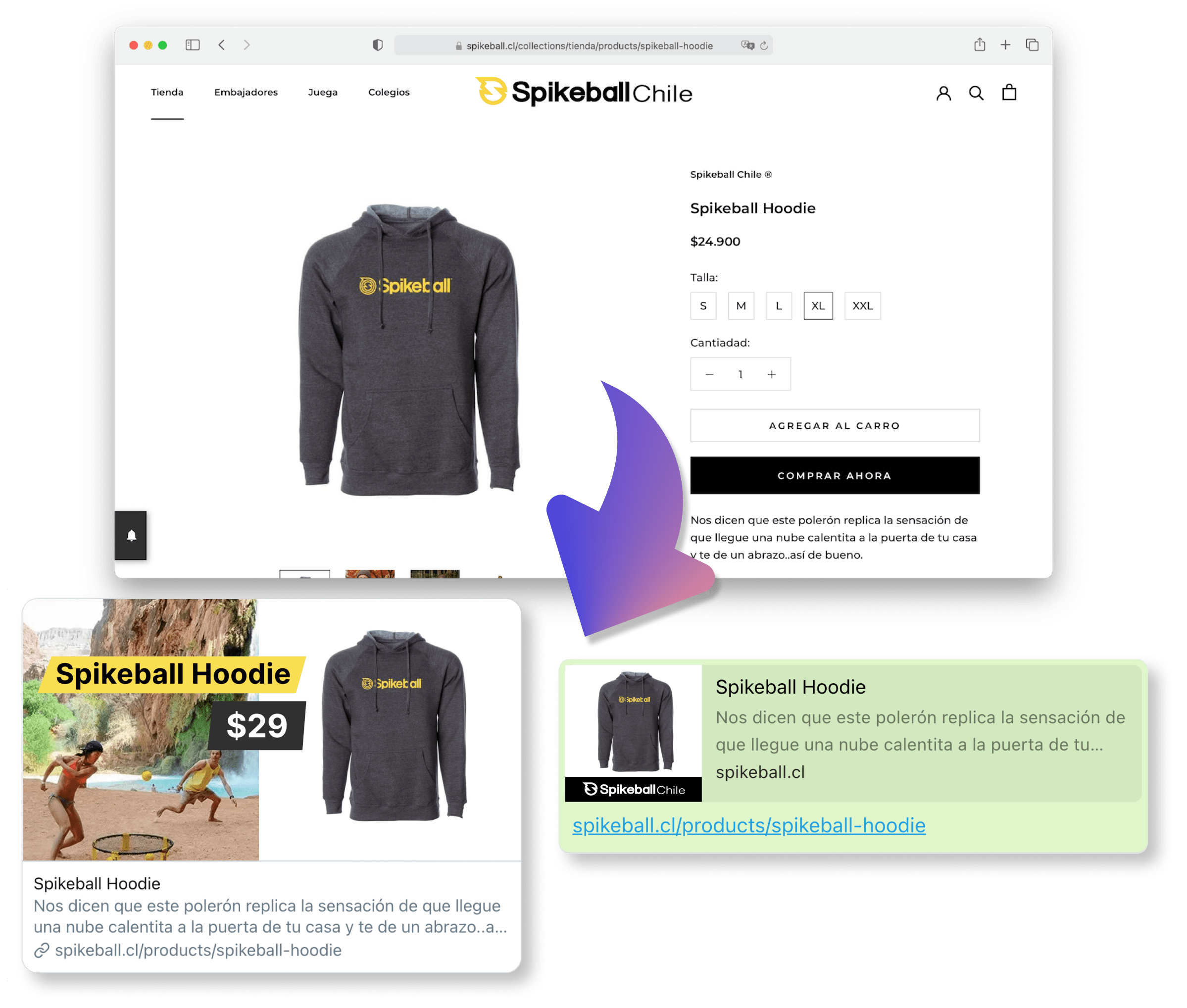
This module is agnostic to any Python framework.
Index
Get started (5 minutes)
Haven't registered your website yet? Go to Flyyer.io and create a project (e.g. website-com).
1. Install the library
This module requires Python >= 3.6.
Install it with Poetry.
poetry add flyyer
Or install it with pip.
pip install flyyer
2. Get your Flyyer.io smart image link
In your website code (e.g. your landing or product/post view file), set the following:
from flyyer import Flyyer

flyyer = Flyyer(
  # Your project slug
  project="website-com",
  # The current path of your website
  path="/path/to/product", # In Django you can use {{ request.get_full_path }}
)

# Check:
print(flyyer.href())
# > https://cdn.flyyer.io/v2/website-com/_/__v=1618281823/path/to/product
3. Put your smart image link in your <head> tags
You'll get the best results like this:
<meta property="og:image" content="{{ flyyer.href() }}">
<meta name="twitter:image" content="{{ flyyer.href() }}">
<meta name="twitter:card" content="summary_large_image">
4. Create a rule for your project
Go to your dashboard here and create a rule like the following:
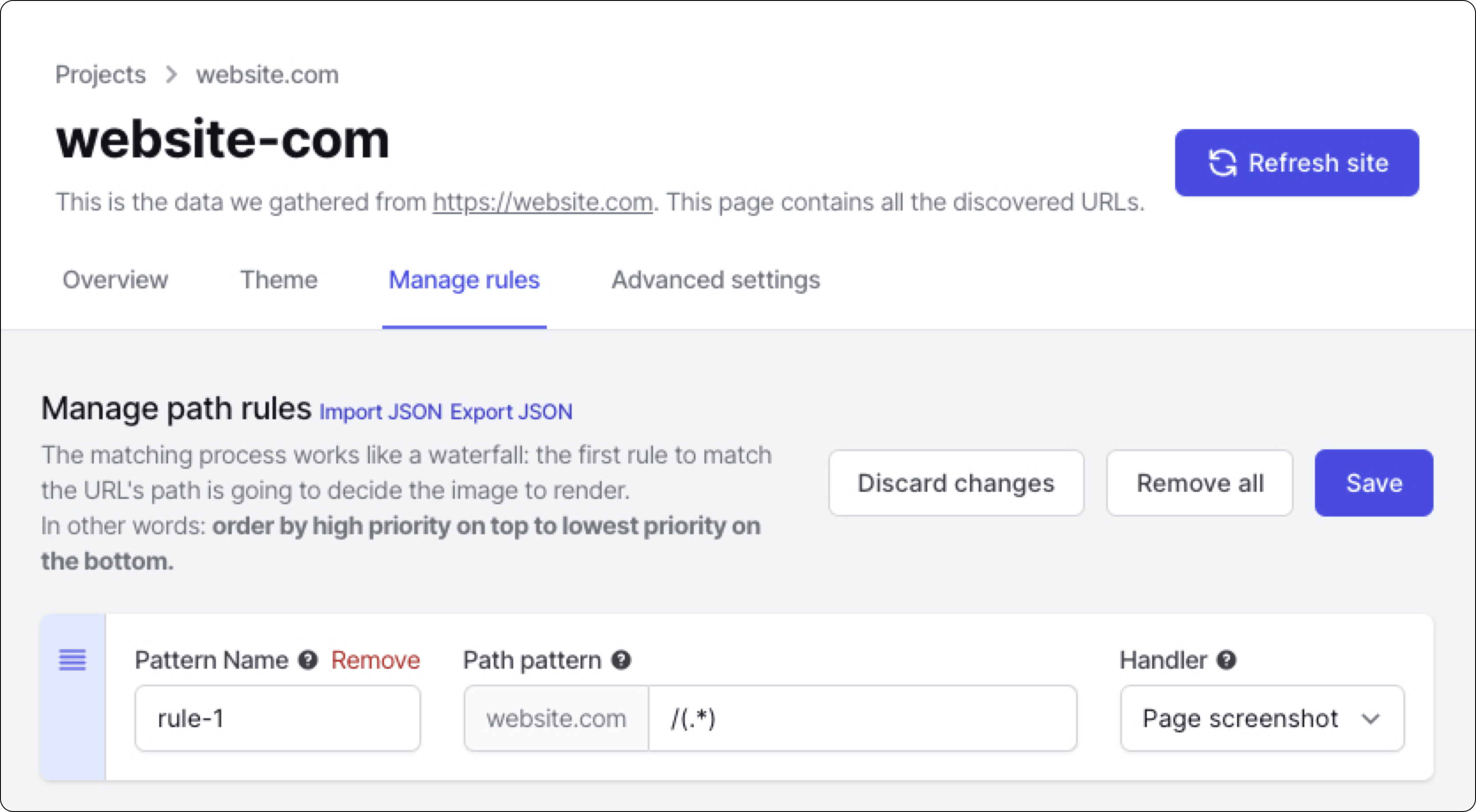
Voilà!
Advanced usage
Advanced features include:
- Custom variables: additional information for your preview that is not present in your website. [Note: if you need customization you should take a look at Flyyer Render]
- Custom metadata: set custom width, height, resolution, and more (see example).
- Signed URLs.
Here you have a detailed full example for project website-com and path /path/to/product.
from flyyer import Flyyer, FlyyerMeta

flyyer = Flyyer(
  # [Required] Your project slug, find it in your dashboard https://www.flyyer.io/dashboard/_/projects/_/integrate.
  project="website-com",
  # [Recommended] The current path of your website (by default it's `/`).
  path="/path/to/product",
  # [Optional] In case you want to provide information that is not present in your page set it here.
  variables={
    "title": "Product name",
    "img": "https://flyyer.io/img/marketplace/flyyer-banner.png",
  },
  # [Optional] Custom metadata for rendering the image. ID is recommended so we provide you with better statistics.
  meta=FlyyerMeta(
    id="jeans-123", # recommended for better stats
    v="12369420123", # specific handler version, by default it's a random number to circumvent platforms' cache,
    width=1200,
    height=600,
    resolution=0.9, # from 0.0 to 1.0
    agent="whatsapp", # force dimensions for specific platform
  ),
)

# Check:
print(flyyer.href())
# > https://cdn.flyyer.io/v2/website-com/_/__v=1618281823/path/to/product
For signed URLs, just provide your secret (find it in Dashboard > Project > Advanced settings) and choose a strategy (HMAC or JWT).
flyyer = Flyyer(
  project="website-com",
  path="/path/to/product",
  secret="your-secret-key",
  strategy="JWT", # or 'HMAC'
)

print(flyyer.href())
# > https://cdn.flyyer.io/v2/website-com/jwt-eyJ0eXAiOiJKV1QiLCJhbGciOiJIUzI1NiJ9.eyJwYXJhbXMiOnsiX19pZCI6ImplYW5zLTEyMyJ9LCJwYXRoIjoiXC9wYXRoXC90b1wvcHJvZHVjdCJ9.X8Vs5SGEA1-3M6bH-h24jhQnbwH95V_G0f-gPhTBTzE?__v=1618283086
Flyyer Render
As you probably realized, Flyyer uses the rules defined on your dashboard to decide how to handle every image based on path patterns. It analyses your website to obtain information and then render a content-rich image with no effort. Let's say "Flyyer delivers images based on the content of this route".
Flyyer Render instead requires you to explicitly declare template and variables for the images to render, giving you more control for customization. Let's say "FlyyerRender delivers an image using this template and these explicit variables".
from flyyer import FlyyerRender

flyyer = FlyyerRender(
    tenant="tenant",
    deck="deck",
    template="template",
    variables={"title": "Hello world!"},
)

# Use this image in your <head/> tags
url = flyyer.href()
# > https://cdn.flyyer.io/render/v2/tenant/deck/template.jpeg?__v=1596906866&title=Hello+world%21
Variables can be complex arrays and hashes.
from flyyer import FlyyerRender, FlyyerMeta

flyyer = FlyyerRender(
    tenant="tenant",
    deck="deck",
    template="template",
    variables={
        "items": [
            { "text": "Oranges", "count": 12 },
            { "text": "Apples", "count": 14 },
        ],
    },
    meta=FlyyerMeta(
        id="slug-or-id", # To identify the resource in our analytics report
    ),
)
You can use signatures with Flyyer Render like below.
from flyyer import FlyyerRender

flyyer = FlyyerRender(
    tenant="tenant",
    deck="deck",
    template="template",
    variables={"title": "Hello world!"},
    secret=key,
    strategy="HMAC", # JWT
)

# Use this image in your <head/> tags
url = flyyer.href()
# > https://cdn.flyyer.io/render/v2/tenant/deck/template.jpeg?__v=d+&title=Hello+world%21&__hmac=1bea6d523496848c
IMPORTANT: variables must be serializable.
To decode the URL for debugging purposes:
from urllib.parse import unquote

print(unquote(url))
# > https://cdn.flyyer.io/render/v2/tenant/deck/template.jpeg?title=Hello+world!&__v=123
Development
Prepare the local environment:
poetry install
poetry shell
Deploy with:
# Set API Token
poetry config pypi-token.pypi pypi-TOKEN

poetry version X.Y.Z
poetry build
poetry publish
Test
Run tests with pytest:
poetry run pytest
Run black linter:
black .
2 maintainers


Metadata
2 maintainers
Release files for flyyer 2.1.2
For a detailed explanation of source distributions (sdists) and built distributions (wheels), please see the package formats documentation.
Source distribution (sdist)
| File | Size | Uploaded | Provenance | |
|---|---|---|---|---|
| flyyer-2.1.2.tar.gz | 7.0 kB | Without provenance | Details |
Built distribution (wheel)
| File | Interpreter | ABI | Platform | Reset |
|---|---|---|---|---|
| flyyer-2.1.2-py3-none-any.whl | Python 3 | none | any | Details |
Total release size: 13.0 kB
Release files / flyyer-2.1.2.tar.gz
| Download URL | flyyer-2.1.2.tar.gz |
|---|---|
| Size | 7.0 kB |
| Tags | Source |
|
SHA-256 checksum How to use checksums |
a2eac0500328e514b22e33171c2b067ec9ddeda109362dec78563d8d4e6db607
|
|
BLAKE2b-256 checksum How to use checksums |
061f133bba2b60fb32e9df2c81fdd487df50d1a932a6a81015112b688a2dc502
|
| Upload date | |
|
Uploaded using Trusted Publishing? What is trusted publishing? |
No |
| Uploaded via |
poetry/1.1.7 CPython/3.9.2 Darwin/19.6.0
|
Release files / flyyer-2.1.2-py3-none-any.whl
| Download URL | flyyer-2.1.2-py3-none-any.whl |
|---|---|
| Size | 6.0 kB |
| Tags | Python 3 |
|
SHA-256 checksum How to use checksums |
c10c6836c066d77586eb519ab05cd8619fb52821279daf17e59bef8ca485f588
|
|
BLAKE2b-256 checksum How to use checksums |
ce4a845761c94fdbd4942978da62cc82f4204676a95c03eedca6847fdc2dca01
|
| Upload date | |
|
Uploaded using Trusted Publishing? What is trusted publishing? |
No |
| Uploaded via |
poetry/1.1.7 CPython/3.9.2 Darwin/19.6.0
|
Security for flyyer 2.1.2
Provenance
Provenance describes where a file came from. On PyPI, provenance is shared via attestations, which provide a verifiable record of the build or publishing details. View details, limitations and caveats.
No provenance found
None of the files in this release were uploaded with provenance metadata.
A note on package security
PyPI is a repository for distributing packages, not a service for auditing them. While third-party security researchers and our staff do their best to detect and remove malicious packages, PyPI cannot guarantee the quality, security or suitability of any given package.
To learn more about protecting yourself from malicious actors, visit our package security documentation.














