
fMRI-QCtoolkit
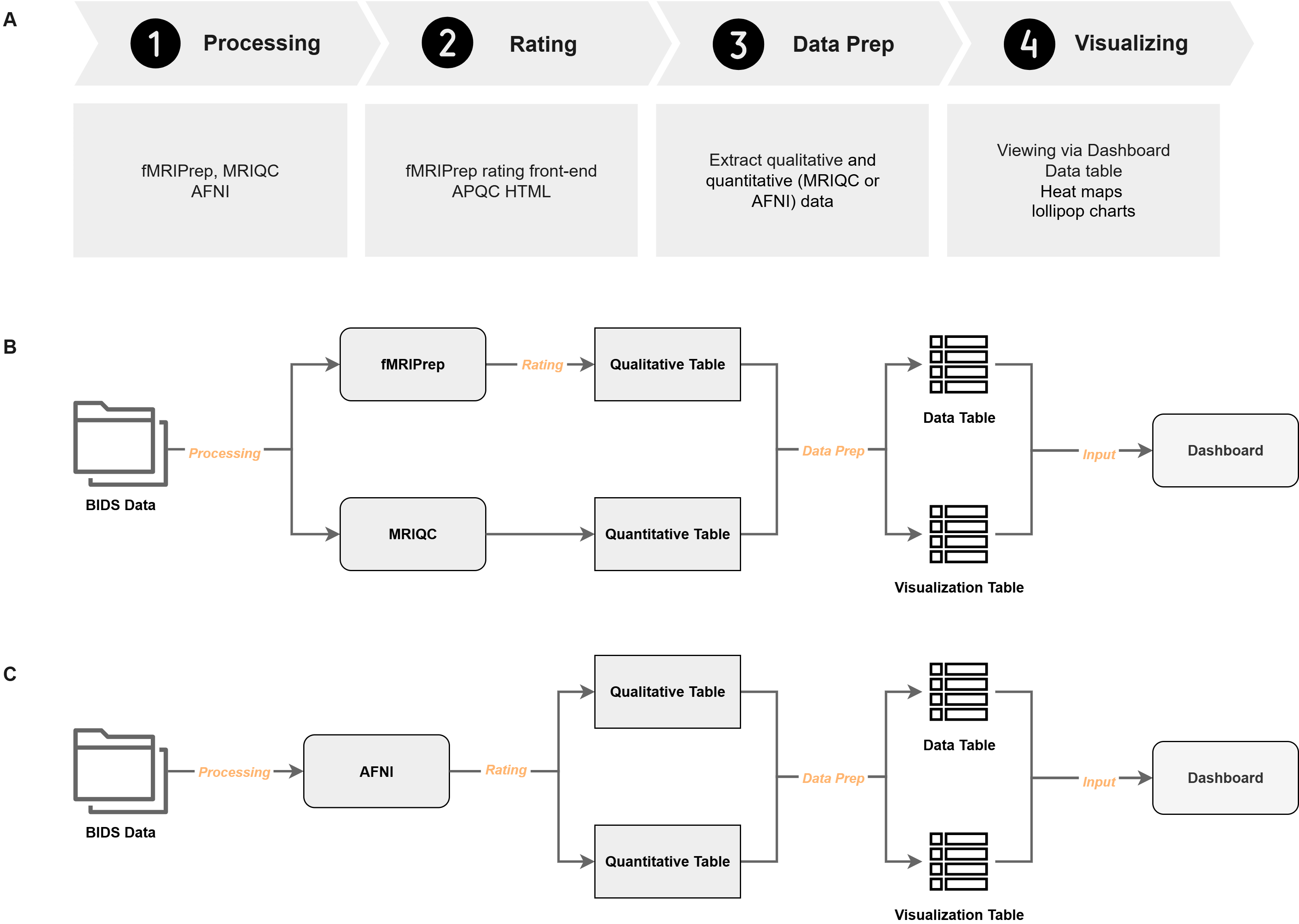
fMRI-QCtoolkit is a modular Python package for fMRI (functional Magnetic Resonance Imaging) quality control (QC), integrating quantitative metrics from MRIQC, fMRIPrep, and AFNI, along with manual scoring. The package includes an interactive dashboard with customizable filters and visualizations, a lightweight front-end for manual rating for fMRIPrep, and supports batch-level scoring for both fMRIPrep and AFNI outputs.
Install
Python 3.11 or newer is required. Create or activate a virtual environment, then install from PyPI:
pip install fmri-qctoolkit
The example data used in the commands below is not part of the PyPI package. To run the examples, or to work on the code, clone the repository and install it in development mode:
git clone https://github.com/QiuyuYu3/fMRI-QCtoolkit.git
cd fMRI-QCtoolkit
pip install -e .[dev]
Usage
STEP1: Rating
After the completion of preprocessing, perform qualitative scoring on the derivatives.
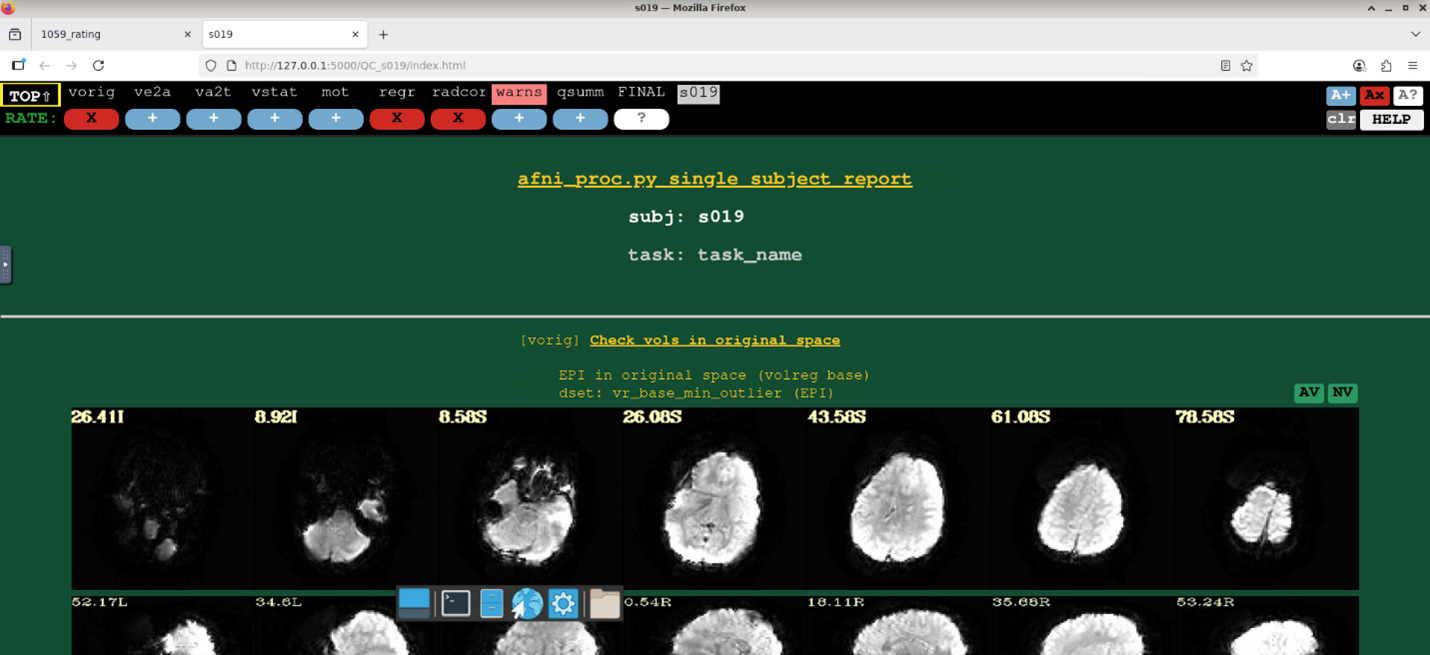
AFNI
AFNI provides scripts for browsing multiple subjects' QC files. However, using firefox on HPC (High-performance computing) systems may result in issues interacting with buttons, so this using open_apqc.py is another option (while ensuring the required Python packages are activated in the environment).
The directory structure of AFNI derivatives is as follows:
.
└── AFNI_derivatives/
    ├── sub-001/
    │   └── ses-01/
    │       └── cards_output/
    │           └── sub-001.results/
    │               ├── QC_sub-001
    │               └── ...
    ├── sub-002
    ├── sub-003
    └── ...
Input Arguments:
fmriqc rating afni: Indicate which rating program.--input-dir: Root directory, containing results that preprocessed from different participants.--subjects: Support input multiple participants IDs.--task: Rating program will searchtaskininput-dirto find theQC_{subj}--prefix: The prefix of participants IDs.
Example Synatx:
fmriqc rating afni --input-dir /PATH/AFNI_derivatives --subjects "003,009" --task ses-01/cards --prefix sub-
Although I've tried to make the scoring criteria flexible, it may still not support all pathfinding scenarios. Therefore, you can also try script version.
fMRIPrep
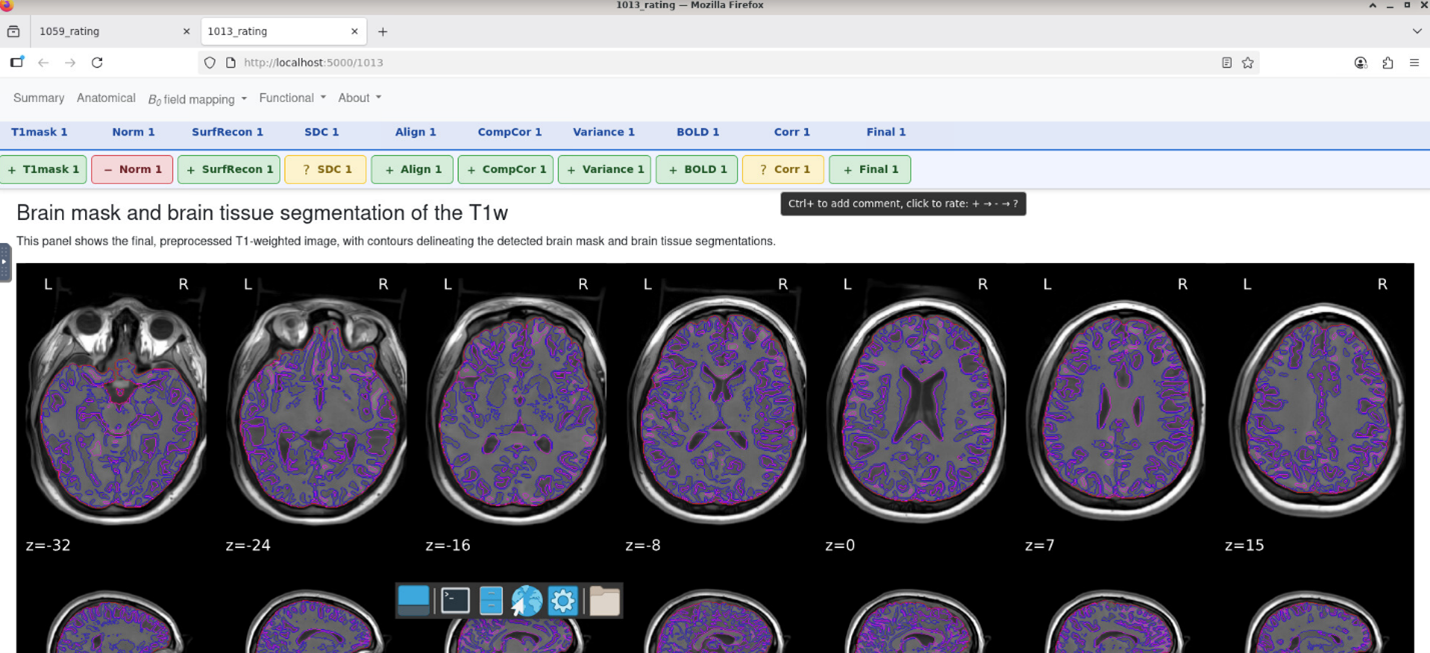
The rating module in fMRI-QCtoolkit is based on the HTML reports generated by fMRIPrep (e.g., sub-{ID}.html).
Each QC item maps directly to specific sections of the original fMRIPrep report.
- Brain mask and brain tissue segmentation of the T1w (T1mask)
- Spatial normalization of the anatomical T1w reference (Norm)
- Surface reconstruction (SurfRecon)
- Susceptibility distortion correction (SDC)
- Alignment of functional and anatomical MRI data (coregistration) (Align)
- Brain mask and (anatomical/temporal) CompCor ROIs (CompCor)
- Variance explained by t/aCompCor components (Variance)
- BOLD Summary (BOLD)
- Correlations among nuisance regressors (Corr)
The interface is divided into two parts:
- Upper panel: navigate modules with a left-click; scroll horizontally with the mouse wheel.
- Lower panel: interactive rating area, similar to AFNI’s APQC HTML.
- Left-click to rate, Ctrl+click to add comments.
- Rating buttons toggle between: good (+, green), bad (×, red), and other (?, yellow).
- Results are saved automatically as CSV files (subject-level and task-level). Upon reopening the program with the same code, it will automatically retrieve the previous scores by extracting the subject-level CSV file.
The directory structure of fMRIPrep derivatives is as follows:
.
└── fMRIPrep_derivatives/
    ├── sub-001
    ├── sub-001.html
    ├── sub-002
    ├── sub-002.html
    ├── sub-003
    ├── sub-003.html
    ├── dataset_description.json
    ├── desc-aparcaseg_dseg.tsv
    ├── desc-aseg_dseg.tsv
    └── ...
Input Arguments:
fmriqc rating fmriprep: Indicate which rating program.--input-dir: Root directory, containing results that preprocessed from different participants.--subjects: Support input multiple participants IDs.--output-dir: Path for exporting the scoring CSV file.--no-browser: Only print the links, without opening browser tabs (useful on HPC; see Access Links).
Example Synatx:
fmriqc rating fmriprep --input-dir /PATH/fMRIPrep_derivatives --output-dir /PATH/Output_dir --subjects "1013,1026"
STEP2: Data Preparation
By extracting information from qualitative rating files, fmriqc prep program then generates two dataframes to put into the dashboard.
AFNI
After finishing preprocessing and rating, both quantitative and qualitative rating information are saved in QC_{subj}/extra_info/out.ss_review.{subj}.json.
Input Arguments:
fmriqc prep afni: Indicate which rating program.--input-dir: Root directory, containing results that preprocessed from different participants.--output-dir: Path for exportingdf_final.csvandlollipop_chart_data.csvfiles.--task: Prep program will searchtaskininput-dirto find theQC_{subj}/extra_info/out.ss_review.{subj}.jsonacross all participants. Each run covers one session: if a subject matches in more than one place (for exampleses-01/rest_outputandses-02/rest_output), narrow--tasktoses-01/rest.--prefix: The prefix of participants IDs.
Example Synatx:
fmriqc prep afni --input-dir /PATH/AFNI_derivatives --task ses-01/kidvid --output-dir /PATH/Output_dir --prefix sub-
fMRIPrep
After finishing rating procedure, merge the qualitative rating files with quantitative file (group_bold.tsv) that generates by MRIQC, and output two dataframes to put into dashboard.
Input Arguments:
fmriqc prep fmriprep: Indicate which rating program.--bold-file: Inputgroup_bold.tsvfile that generated by MRIQC.--rating-dir: Path for storing fMRIPrep qualitative scores.--task: Indicate which task's rating data you want to use.--output-dir: Path for exportingdf_final.csvandlollipop_chart_data.csvfiles.
Example Synatx:
fmriqc prep fmriprep --bold-file examples/example_data/fmriprep/group_bold.tsv --rating-dir examples/example_data/fmriprep/ --task rest --output-dir examples/example_data/fmriprep/
STEP3: Viewing and Filtering Results via Dashboard
Visualize, filter, and export selected data.
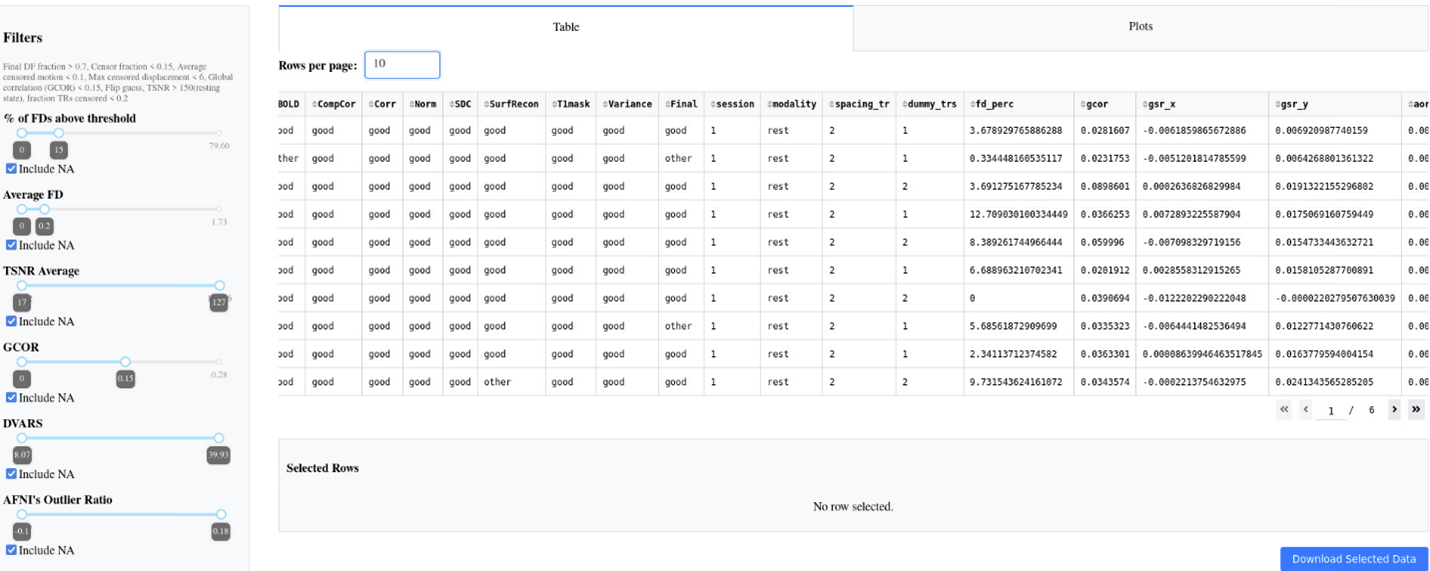
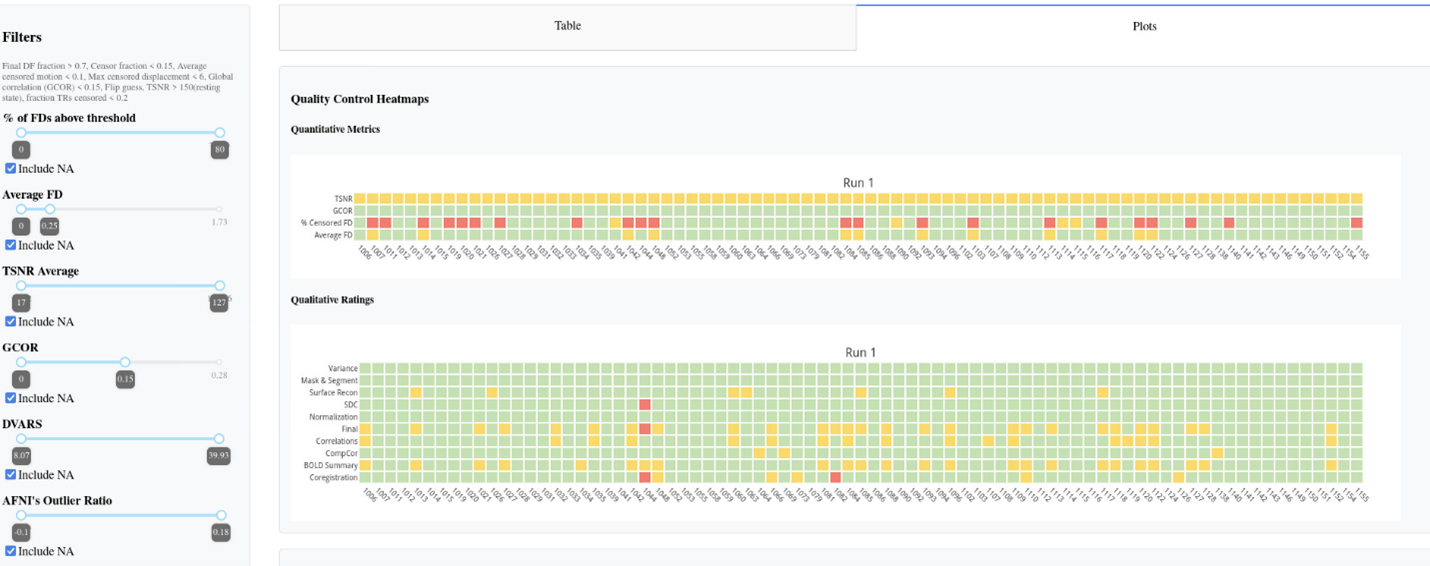
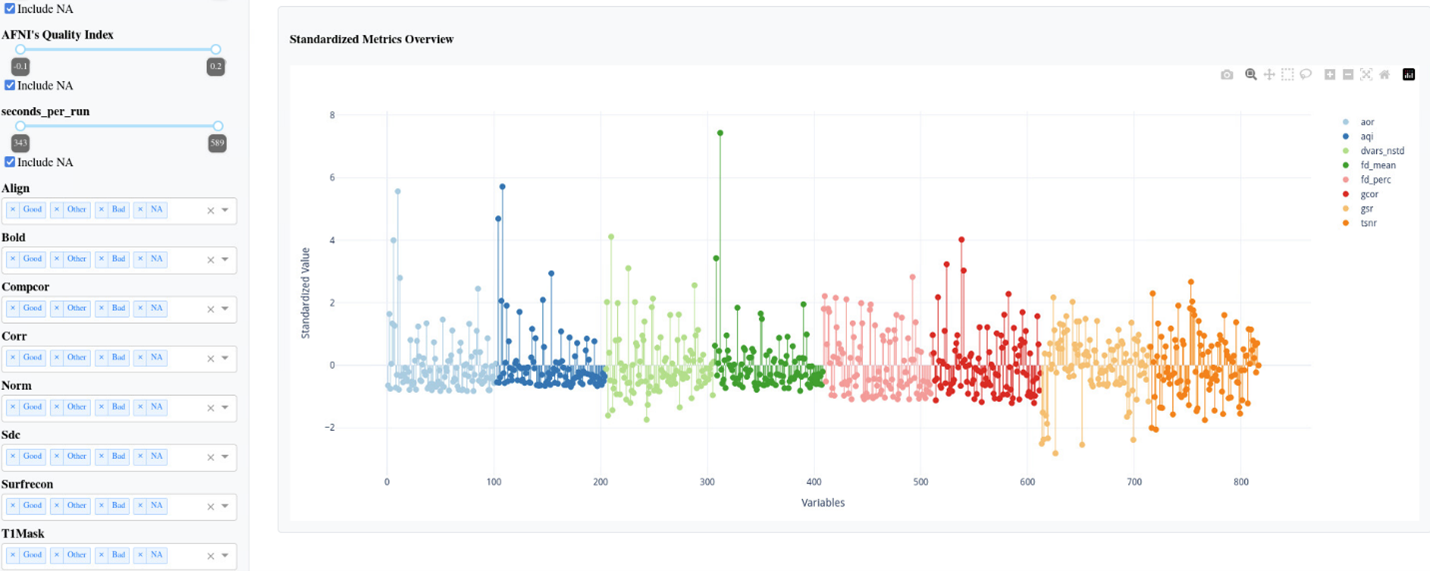
The left side of the dashboard features filter sidebars where users can select the desired ranges. The two central tabs display data tables and visualizations (heatmaps and lollipop charts). After selecting rows in the data table, the blue download button below allows exporting the corresponding data frame.
AFNI
Input Arguments:
fmriqc dashboard afni: Indicate which rating program.--data-file: Input the merged dataframe.--lollipop-file: Input the data for lollipop chart.--task: Specify the task name to be used when downloading data.
Example Synatx:
fmriqc dashboard afni --data-file /PATH/Output_dir/df_final.csv --lollipop-file /PATH/Output_dir/lollipop_chart_data.csv --task kidvid
fMRIPrep
Input Arguments:
fmriqc dashboard fmriprep: Indicate which rating program.--data-file: Input the merged dataframe.--lollipop-file: Input the data for lollipop chart.--task: Specify the task name to be used when downloading data and filtering task in the merged dataframe.
Example Synatx:
fmriqc dashboard fmriprep --data-file examples/example_data/fmriprep/df_final.csv --lollipop-file examples/example_data/fmriprep/lollipop_chart_data.csv --task rest
Access Links
fmriqc rating fmriprep and fmriqc dashboard start a local web server that only answers requests carrying a session token. The terminal prints one link per subject (or one for the dashboard), for example:
INFO - http://localhost:5003/0030?token=Xk3v9QpL2mR7tYwZ8aBcD1eF4gH6jK0n
On your own computer, the rating tabs open automatically. Otherwise, click or paste the printed link. After the first visit, the token is kept in a browser cookie and dropped from the address bar. A new token is created every time the server starts, so after a restart (or after closing the browser) use the newly printed link. An "Access denied" page means the link is missing or out of date.
Running on HPC. Start the server on the cluster with --no-browser, then forward its port from your own computer and open the printed link there:
# Server on the login node
ssh -N -L 5003:127.0.0.1:5003 user@hpc.example.edu
# Server on a compute node (e.g. node123 inside an srun/salloc session)
ssh -N -L 5003:127.0.0.1:5003 -J user@hpc.example.edu user@node123
The local port may differ from the remote one (-L 8888:127.0.0.1:5003); change the port in the link accordingly and keep the token. Other users on the same node cannot open the pages without the token.
fmriqc dashboard --host can bind to a non-loopback address, in which case the token is the only protection. With --host 0.0.0.0 the printed link uses this machine's hostname. --debug is refused on such a host.
Training Materials
We have summarized the AFNI QC training documentation based on existing literature and included several case studies (still under revision).
Summary
Citation
Coming soon!
Reference
- Cox R. W. (1996). AFNI: software for analysis and visualization of functional magnetic resonance neuroimages. Computers and biomedical research, an international journal, 29(3), 162–173. https://doi.org/10.1006/cbmr.1996.0014
- Cox, R. W., & Hyde, J. S. (1997). Software tools for analysis and visualization of fMRI data. NMR in biomedicine, 10(4-5), 171–178. https://pubmed.ncbi.nlm.nih.gov/9430344/
- Esteban, O., Birman, D., Schaer, M., Koyejo, O. O., Poldrack, R. A., & Gorgolewski, K. J. (2017). MRIQC: Advancing the automatic prediction of image quality in MRI from unseen sites. PloS one, 12(9), e0184661. https://doi.org/10.1371/journal.pone.0184661
- Esteban, O., Ciric, R., Finc, K. et al. Analysis of task-based functional MRI data preprocessed with fMRIPrep. Nat Protoc 15, 2186–2202 (2020). https://doi.org/10.1038/s41596-020-0327-3
- Harris, C.R., Millman, K.J., van der Walt, S.J. et al. Array programming with NumPy. Nature 585, 357–362 (2020). https://doi.org/10.1038/s41586-020-2649-2
- Kruchten, N., Seier, A., & Parmer, C. (2025). An interactive, open-source, and browser-based graphing library for Python (Version 6.3.1) [Computer software]. https://doi.org/10.5281/zenodo.14503524
- Pallets. (2025). Flask (Version 3.1.1) [Computer software]. PyPI. https://palletsprojects.com/
- Parmer, C., Duval, P., & Johnson, A. (2025). A data and analytics web app framework for Python, no JavaScript required. (Version 3.2.0) [Computer software]. https://doi.org/10.5281/zenodo.14182630
- Ramírez, S. (2025). Typer (Version 0.19.2) [Computer software]. https://github.com/fastapi/typer
- Reynolds, R. C., Taylor, P. A., & Glen, D. R. (2023). Quality control practices in FMRI analysis: Philosophy, methods and examples using AFNI. Frontiers in Neuroscience, 16, 1073800. https://doi.org/10.3389/fnins.2022.1073800
- The pandas development team. pandas-dev/pandas: Pandas [Computer software]. https://doi.org/10.5281/zenodo.3509134
1 maintainer

Metadata
1 maintainer
Release files for fmri-qctoolkit 1.0.0
For a detailed explanation of source distributions (sdists) and built distributions (wheels), please see the package formats documentation.
Source distribution (sdist)
| File | Size | Uploaded | Provenance | |
|---|---|---|---|---|
| fmri_qctoolkit-1.0.0.tar.gz | 150.1 kB | Without provenance | Details |
Built distribution (wheel)
| File | Interpreter | ABI | Platform | Reset |
|---|---|---|---|---|
| fmri_qctoolkit-1.0.0-py3-none-any.whl | Python 3 | none | any | Details |
Total release size: 206.1 kB
Release files / fmri_qctoolkit-1.0.0.tar.gz
| Download URL | fmri_qctoolkit-1.0.0.tar.gz |
|---|---|
| Size | 150.1 kB |
| Tags | Source |
|
SHA-256 checksum How to use checksums |
f95c083e6b192f56f9db60694695f9fc7769ceed85ca6f27eb905bb35c4d880a
|
|
BLAKE2b-256 checksum How to use checksums |
f859143f36687dee1e0f9e0feae625000bf67cf41ad52442dd5aa823e81126f2
|
| Upload date | |
|
Uploaded using Trusted Publishing? What is trusted publishing? |
No |
| Uploaded via |
twine/7.0.0 CPython/3.11.17
|
Release files / fmri_qctoolkit-1.0.0-py3-none-any.whl
| Download URL | fmri_qctoolkit-1.0.0-py3-none-any.whl |
|---|---|
| Size | 56.0 kB |
| Tags | Python 3 |
|
SHA-256 checksum How to use checksums |
972bce5072ea780de8738a6bb3278be4c4e1403d82708053d6432939493e7de4
|
|
BLAKE2b-256 checksum How to use checksums |
2bdde5589fcbb2b45419606199fc0f484941b1ac0b0ccfb898951acbb204d0ff
|
| Upload date | |
|
Uploaded using Trusted Publishing? What is trusted publishing? |
No |
| Uploaded via |
twine/7.0.0 CPython/3.11.17
|
Security for fmri-qctoolkit 1.0.0
Provenance
Provenance describes where a file came from. On PyPI, provenance is shared via attestations, which provide a verifiable record of the build or publishing details. View details, limitations and caveats.
No provenance found
None of the files in this release were uploaded with provenance metadata.
A note on package security
PyPI is a repository for distributing packages, not a service for auditing them. While third-party security researchers and our staff do their best to detect and remove malicious packages, PyPI cannot guarantee the quality, security or suitability of any given package.
To learn more about protecting yourself from malicious actors, visit our package security documentation.













