

Ping your FileMaker solution — every reference echoes back. One engine, two interfaces: an explorer for you (drop a Database Design Report, DDR, in the browser) and a queryable index for your AI (built from a DDR or from a FileMaker 26 Save a Copy as XML export).
Live at fmsonar.com · 
pipx install fmsonar · repo/engine name: fm-ddr-analyzer
The problems this solves
- "Where is this actually used?" A FileMaker solution's only complete map is a design export: the Database Design Report, or a Save a Copy as XML export in FileMaker 26's format. Both are huge XML files (a DDR is often 400+ MB of UTF-16). Answering one cross-reference question by hand means text-searching that file and hoping you didn't miss a calculated name, a trigger, or a button parameter.
- Your AI assistant can work with the raw XML — expensively. It works; we measured it. But every question costs a fresh pass and a hand-written parser, an analysis needs dozens of questions, and the hard-won structure is thrown away afterwards. An index turns that repeated cost into one parse, whichever export fed it, and millisecond queries, at roughly a third of the time and tokens. It's a projection, not the whole export: ~98% of references resolve as typed edges, text-only usage (ExecuteSQL, calculated names) is caught by full-text search, and COVERAGE.md states exactly what isn't captured — for those cases the raw XML is still there, and the AI skill says when to go back to it.
- A design export is a client's entire schema — table names, business logic, everything. Sending that to someone else's server is a confidentiality decision most client work doesn't allow. fmsonar.com is a web page, not a web service: parsing runs in your browser, and no DDR bytes are transmitted — verifiably (watch the network tab, or go offline and it still works), not as a promise. Self-hosting the single-file app removes even that dependency. See SECURITY.md.
One engine answers all three. It parses the export (DDR or Save a Copy as XML) once into a normalized index (entities, reference edges, full-text) — then every question is instant.
Which tool for which problem
| You want to… | Use | You need |
|---|---|---|
| Explore a solution visually — search, call chains, health report | fmsonar.com (browser) | nothing — no install, no upload; reads a DDR |
| Query from the shell, script it, export reports | fmsonar CLI |
Python 3.10+ and pipx; reads a DDR or a Save a Copy as XML export |
| Let your AI assistant answer cross-reference questions | CLI + the Claude Code skill | the CLI (above) + Claude Code |
The three build on each other in that order — start in the browser, install the CLI when you want it scriptable, add the skill when your AI should use it too.
Sibling tool — fmstyle: fmsonar tells you where things are used; fmstyle keeps the calculations themselves readable. A deterministic FileMaker calculation formatter with the same shape (browser, CLI via
pipx install fmstyle, Claude Code skill) and the same kind of hard guarantee: it never changes what a calculation computes. Source, MIT.
One index, two ways in
Use the DDR when you want the browser, or a multi-file index with every cross-file reference resolved. Use Save a Copy as XML when no one should have to open FileMaker Pro: a nightly or CI job, or an AI agent that exports and indexes on its own.
| Database Design Report | Save a Copy as XML | |
|---|---|---|
| Made with | FileMaker Pro (advanced tools on): Tools → Database Design Report → XML | an export in FileMaker 26's format (2.3.0.0 or 2.3.0.1, "Include details for analysis tools" on): Tools → Save a Copy as XML or the script step of that name in FileMaker Pro, or FileMaker Server's FMDeveloperTool on a closed file; a full-access account either way |
| Read by | the browser and the CLI | the CLI only |
| Cross-file references | resolved | resolved when exported from Pro with every file open (measured on one file of a two-file lab); empty from FMDeveloperTool |
The measured differences between the two routes are in COVERAGE.md ("SaXML next to the DDR").
Path 1 — Explore in the browser (no install)
- In FileMaker Pro (advanced tools on): Tools → Database Design Report → XML, all files.
- Open fmsonar.com.
- Drag the DDR folder onto the page.
Parsing runs entirely client-side in a Web Worker — nothing is uploaded. Seconds later the whole solution is explorable: every name and line of code searchable, references inbound and outbound, complete scripts readable, call chains as diagrams, a health report, shareable single-entity HTML exports, and copy-any-script-back-to-FileMaker as a pasteable snippet.
Prefer to self-host? The whole app is one file — serve fm_ddr/web/index.html
as a static page; it works identically.
Path 2 — The CLI
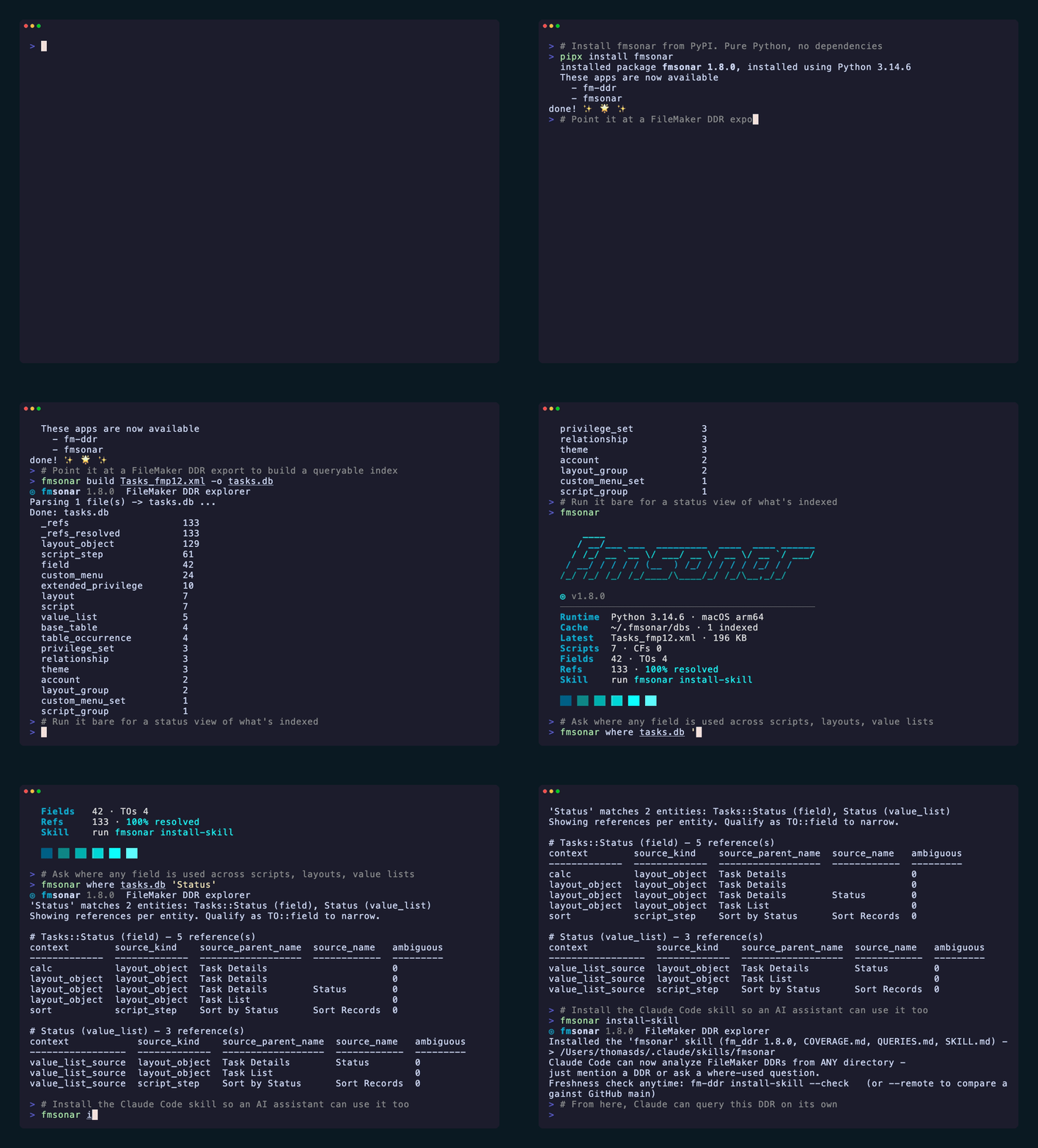
Prerequisites: Python 3.10+ and pipx. On macOS, pipx comes from Homebrew:
brew install pipx
Install fmsonar (pure standard library, no dependencies):
pipx install fmsonar
Run fmsonar on its own for a status splash — version, the fmsonar databases
in the current folder, the newest solution's entity and reference counts, and whether the Claude
skill is installed. (Piped output stays plain text.)
Build the index once, from either input:
# From a DDR: the Summary.xml manifest of a multi-file solution, or a single *_fmp12.xml
fmsonar build /path/to/DDR/Summary.xml -o solution.db

# From a Save a Copy as XML export, made without opening FileMaker Pro
# (FileMaker Server's FMDeveloperTool, on a copy of the closed file)
FMDeveloperTool --saveAsXML Solution.fmp12 <account> <password> -t Solution_saxml.xml -include_details
fmsonar build Solution_saxml.xml -o solution.db
Running build again on the same source with the same fmsonar keeps the index
and prints Unchanged: in well under a second; --rebuild builds anyway.
Good to know when building from Save a Copy as XML:
- One export per file. Pass the per-file exports of a multi-file solution
together. Pro's multi-file summary (
XMLv2_Summary) is refused, and so is a partial-catalog_listexport that lacks a section every file writes or a catalog it refers to. Exports of the two supported versions build together. Claris lists the Save a Copy as XML step as supported on FileMaker Server and Cloud; fmsonar has measured exports from FileMaker Pro and FMDeveloperTool only. - Cross-file references. FMDeveloperTool leaves references into other files empty (external table occurrences, cross-file calls), so those stay unresolved, also when the other files' exports are built into the same index (measured). A Save a Copy as XML from FileMaker Pro with every file open fills them (measured on one file of a two-file lab; FileMaker Server not yet measured). For a fully resolved multi-file index, build from the DDR.
- Calculations without a reference list. A whole export holds some
calculations with no reference list of their own, mostly on layout objects
(on a large solution several percent of the calculation references on layout
objects).
build,statsandlistgive the count, andwhere, when it finds no reference, prints the name's full-text mentions beside the 0. - Locale. Every export measured so far is English; an export with another locale builds with a warning that points at the few rules that read English step text (listed in COVERAGE.md).
- Password and history. FMDeveloperTool takes the account password as an
argument, so it is visible in the process list while the export runs; use a
dedicated export account. A SaXML-built index stores each object's
last-change stamp, including the developer's FileMaker user and account
name; the HTML
reportleaves them out (SECURITY.md).
Then query it. Each command is copy-paste safe on its own:
| Command | Answers |
|---|---|
fmsonar where solution.db "CONTACT::email" |
where is this field / script / layout / TO / custom function used |
fmsonar search solution.db "GetContainerAttribute" |
full-text across every calc, script step (Insert Text literals included), and name |
fmsonar investigate solution.db "Some Script" |
one-shot script report: callers, layout launch params, callees, $$global hygiene, full body |
fmsonar report solution.db -o solution.html |
self-contained interactive HTML viewer |
fmsonar stats solution.db |
entity counts + reference-resolution health |
fmsonar list |
the fmsonar databases in a folder (the current one by default): which solution, built when, by which parser, stale or not — pass a folder to scan elsewhere, e.g. one you keep every client's index in |
fmsonar mutations solution.db --like adder |
which scripts create/delete records — with context clues and confidence tiers, never a guess (record ops carry no table in the DDR) |
fmsonar trigger-map solution.db --inputs "LI::Amount_c" --set-flag "LI::Picked_flag" --table LI --recompute "Recompute Order" |
caching/"keep X in sync" tickets: every entry point that can change a cached value's inputs, classified from the transitive call chain (a trigger that writes nothing relevant itself can still be the biggest stamp-point via a callee) |
fmsonar sql solution.db "SELECT * FROM v_unused_fields LIMIT 20" |
anything — see QUERIES.md for the recipe book |
Because the output is plain SQLite, anything can query it — sqlite3,
Datasette, DB Browser, or an AI.
From a clone, without installing: replace fmsonar with python3 -m fm_ddr.cli
in any command above. For development, python3 tools/compare_resolution.py OLD.db NEW.db
compares the resolved references of two indexes of the same DDR (lost, changed, gained),
the regression check run before every parser release.
Path 3 — Your AI assistant
Prerequisite: Path 2 (the CLI on your PATH). Then give Claude Code the skill — one command, works from any directory afterwards:
fmsonar install-skill
The skill teaches the assistant the schema, the query recipes, and — learned the hard way, see the eval story — the investigation protocol: survey before deep-reading, climb to callers, sweep the globals a script writes, read layout bodies for UI mechanisms, report real FileMaker ids.
Then, wherever you're working, point it at either export: "analyze the DDR in
~/Desktop/MyDDR — which scripts write to CTC::email?" or "index the Save a
Copy as XML export in ~/exports and do the same". Claude Code builds the index
next to the export (<export name>.db, where fmsonar build puts it without
-o) and answers with SQL-backed evidence. Other AI tools (Cursor, Copilot):
they read AGENTS.md next to a built database.
Updating
A pipx install doesn't auto-update. Versions are bumped on every release, so:
pipx upgrade fmsonar
fmsonar install-skill
The second command refreshes the Claude Code skill to match. Check for skill
drift anytime with fmsonar install-skill --check (offline, against your
installed version) or --remote (against GitHub main). Installed from the git
URL instead of PyPI? Use pipx reinstall fmsonar. A git clone updates with
git pull. Every index is stamped with the parser version that built it —
querying through a stale index warns loudly instead of silently missing newer
reference types.
Performance and scope
- Input: DDR XML (one file, several, or a
Summary.xmlmanifest), or FileMaker 26 Save a Copy as XML exports in the CLI. Both parsers (Python CLI and the browser's JS twin, parity-tested edge by edge) stream with SAX, so file size doesn't matter. Measured: a 510 MB 9-file production solution builds in ~26 s; the 416 MB main file parses in-browser in ~7 s using ~80 MB of memory; a 448 MB FileMaker 26 export of one file builds in ~28 s using ~230 MB. - Output: one
.dbSQLite file —entities, a genericrefsedge table (the heart of "where used"), and an FTS5 full-text index as a catch-all. - General-purpose: no solution-specific assumptions; validated against multiple unrelated production solutions.
Data model
One database holds a whole solution: all files of a multi-file solution share
one entity space. Cross-file references resolve on a DDR build of every file
(and on a Save a Copy as XML export made from Pro with every file open).
ddr_run holds one row
per build: the source format (ddr or saxml), its version, and the fmsonar
version that built the index (parser_version). build always writes a fresh
database for one export of one solution.
| Table | What it holds |
|---|---|
ddr_run |
One parse run (source path, source format ddr or saxml, root version, FileMaker version of a SaXML export, timestamp, label) |
files |
Each FileMaker file in the run |
entities |
Every named thing — one row per kind (see below) |
refs |
Every "source uses target" edge; target_entity_id resolved after load |
text_index |
FTS5 mirror of names + calcs + step text (catch-all search) |
v_usage |
Friendly view over refs with readable source/target names |
v_unused_fields, v_orphan_scripts, v_unresolved, v_dangling (DDR-marked defects, v1.13.0) |
Health hints |
v_data_sources |
Which file each external data source name points at (v1.13.0) |
Entity kinds: base_table, field, table_occurrence, relationship,
layout, layout_group, script, script_group, script_step,
custom_function, value_list, privilege_set, account, extended_privilege,
custom_menu, custom_menu_set, external_data_source, theme.
Reference contexts (refs.context): calc, step_target (the field a step
writes to — e.g. Set Field), join_predicate, perform_script, go_to_layout,
trigger, layout_object (a field object, or since v1.16.0 a merge field of a
text object or button label), field_reference, value_list_source,
value_list_field, sort, to_reference, function_ref, layout_context
(a layout's own context table occurrence, v1.12.0), step_table, portal,
value_list_context (the table occurrence a step acts on, a portal shows, a
related-values list starts from, v1.14.0), part_break (a sub-summary part's
break field, Save a Copy as XML only, v1.15.0), import_field, export_field,
find_request (an Import Records mapped field, an Export Records field, a
field in a stored find request, v1.15.1), summary_source (the field a summary
field summarizes and its restart field, v1.16.0).
How references resolve
Every edge is captured raw during parse (target name + FileMaker id), then
resolve.sql fills target_entity_id by matching against entities. On real
solutions ~98% resolve; the rest are genuinely unresolvable and expected:
perform_scriptto scripts in other files (external),go_to_layoutwith a calculated destination,layout_objectfields that are globals / unbound,layout_contextrefs of layouts whose table occurrence was deleted (the DDR writes an empty TO name; a real defect, reported as unresolved).
Built-in FileMaker functions are intentionally not stored as edges (only
CustomFunctionRef chunks become custom_function edges); use FTS to find
built-in usage.
Accuracy
Validated against a production solution's independently documented DDR summary — every catalog count matches (base tables, table occurrences, relationships, layouts, value lists, custom functions). A committed micro-fixture plus a full test suite (structural counts, resolution semantics, UTF-16 round-trip, edge-by-edge Python↔JS parity under torture chunking) runs in CI on every push.
Both inputs give the same database — the same tables, views, entity kinds and
reference contexts, so every query and the skill work unchanged;
ddr_run.source_format records which export fed it, and the content differs
only where the exports differ. The Save a Copy as XML parse is measured against
the DDR parse, not against the file: tools/compare_resolution.py compares the
two indexes of one file (it prints a cross-source banner on such a pair). On
the lab file the pair differs by two lost keys; on a real solution's main file
exported both ways a day apart, every lost, changed and gained key falls in one
of the classes listed in COVERAGE.md ("Expected differences
between a DDR index and a SaXML index").
The tool is also A/B tested against raw text search on real production tickets, and the losses shape the roadmap. The full story: The tests that shaped fmsonar.
Roadmap
- Phase 1 — Cross-reference engine. SAX parser → SQLite, generic edge
table, FTS fallback, CLI (
build/where/search/sql/stats). - Phase 2 — Interactive HTML.
reportcommand emits a self-contained page (data embedded, no server): searchable entity list with kind filters, click any field/script/TO to see inbound ("referenced by") and outbound ("references") edges grouped by the OTHER entity's kind (Scripts / Layouts / Fields / Custom functions / Relationships / ...), with the usage context folded into each group header, and click-through navigation. - Correctness hardening.
whereresolves through the TO before filtering (no more leaf-name over-matching), ambiguous picks are flagged (refs.ambiguous,v_ambiguous), VL field sources and sort fields are captured, non-DDR input errors clearly, andbuildwarns on low resolution. See COVERAGE.md for the explicit captured / not-captured matrix. - Multi-file solutions.
build Summary.xml(or list the XMLs) ingests all files into one DB; the web app accepts multi-drop. Cross-file references resolve via explicit FileReference markers only — external Perform Script, and field refs through external table occurrences (98.8% resolution measured on a 9-file production solution). External refs whose file is absent stay unresolved instead of silently mis-linking to same-id local objects. - Explorer UX. FMPerception-style flow in the browser: drop the whole
DDR folder (every
*_fmp12.xmlloads, cross-file links resolve), filter by file, and click a script to read it as full step text — document order, block indentation (If/Loop/Else), comment steps dimmed, step/comment/call counts, copy per line / selection / whole script. Works in the web app, the exported report, and the CLI report alike. - Call chain diagram. Toggle any script's detail between Steps and a layered SVG call chain: callers flow in from the left (green), called scripts to the right (orange), the full chain in both directions (cycle-safe; each script appears once), externals dashed, per-level fan-out capped with "+N more", every node clickable to re-root.
- Navigate like an app. Browser Back/Forward work while exploring;
every entity has a deep link (
#e123) that also works inside exported reports;#healthopens the health report directly. - Search in code. Enter-search scans every calculation and script step; results show highlighted snippets and clicking a step match opens the script scrolled to that exact line.
- Sort the entity list. A compact "Sort" popover on the list orders by Name or Referenced-by (and, when scripts are soloed, Steps / Calls / Complexity); sorting by a metric shows that number inline on each row. Lighter than a full table — the list stays the single browse surface.
- Solution health report. Unused-field and orphan-script candidates, unresolved and ambiguous references, hotspots and biggest scripts — every list clickable, each downloadable as CSV, with the coverage caveats printed on the page. The call chain is downloadable as a standalone SVG.
- Call chain, expanded. Edge semantics (solid Perform / long-dash PSoS / dotted trigger / dash-dot button, with tooltips), call-count weights (×N), entry-point badges, hover-highlight of connected nodes, in-chain search (matches surface out of "+N more"), click → steps preview below the chain with Re-root / Open fully, drag-pan + wheel-zoom (double-click resets), Copy as Mermaid, Download SVG, and a print stylesheet (Cmd+P → clean PDF of chain, script text, or health report).
- Share one insight. Every entity has a Share button that downloads
a small self-contained static HTML (no JavaScript inside): the script's
steps, its call chain exactly as arranged on screen, and its references.
Kilobytes — safe to mail or Slack without sharing the whole schema. For
whole-solution sharing, drop an exported report on a shared drive and use
deep links (
report.html#e123). - Copy-link button. One-click copy of an entity's deep link for the shared-drive workflow.
- Union impact graph. Select several scripts and see one merged call graph with shared dependencies emphasized — "the five scripts I'm about to change, and everything they touch". Its own session.
- Annotations. Mark entities (deprecated / refactor / reviewed) with notes; persisted per solution, exportable, embedded in shared reports. Viewer-wide, not chain-only; pairs with the health report.
- Signed helper installer. Replace the unsigned zip / curl|bash install paths with a signed + notarized .pkg (Developer ID) so macOS installs the snippet watcher without any Gatekeeper friction. Parked until a dedicated signing session.
- Diff of two exports: not in fmsonar. fmsonar answers questions about
one export of one solution; comparing two exports of different states
(what changed between deploys) is outside its scope.
tools/compare_resolution.pycompares two indexes of the same export built by two parser versions: it is the parser's regression check, not a change report. - Copy as FM snippet (web + CLI). In the web app, every script has a
"Copy FM snippet" button that re-streams the source file, extracts that
script's raw steps, and copies fmxmlsnippet XML as text (byte-identical to
FileMaker's own clipboard copy). Browsers cannot write FileMaker's private
clipboard flavor, so paste needs a one-time bridge. Pick any: the bundled
helpers in
helpers/(macOS.command, Windows.ps1— also downloadable from the app after copying),fm-ddr clip(converts clipboard text in place), or FmClipTools if you already use it. - Copy as FM snippet (CLI, macOS).
fm-ddr snippet DDR.xml "Script Name" --cliptransforms a script's DDR steps into FileMaker's clipboard format and places it on the private XMSS pasteboard flavor — paste straight into Script Workspace. The transform reproduces FileMaker's own copied output byte-for-byte (268/268 steps on the reference script) and is paste-verified in Script Workspace; see SNIPPET_FORMAT.md. Browsers cannot set the XMSS flavor, so the web app cannot paste directly: CLI only. DDR input only for now; a Save a Copy as XML file is refused with a message. - Edit → patch (idea). Make selected changes in the viewer and emit them as input for the FileMaker upgrade tool to apply. Shares the raw-XML prerequisite with snippet copy; parked until the read-only explorer has proven itself.
- Health report: dead fields, orphan scripts, missing references, TO sprawl.
Project structure
fm-ddr-analyzer/
├── README.md
├── QUERIES.md          # canonical cross-reference SQL recipes (for humans + AI)
├── tools/compare_resolution.py  # dev: resolved-reference diff of two indexes of one DDR
└── fm_ddr/
    ├── web/index.html  # zero-install client-side web app (JS parser + viewer)
    ├── __init__.py
    ├── parse.py        # SAX streaming parser -> SQLite
    ├── schema.sql      # entities / refs / FTS schema
    ├── resolve.sql     # reference resolution + convenience views
    ├── report.py       # self-contained interactive HTML generator
    └── cli.py          # build / where / search / sql / stats / report
Tech stack
| Concern | Choice | Why |
|---|---|---|
| Parsing | xml.sax (expat) |
Streams 400 MB UTF-16-LE files; ignores line structure |
| Storage | SQLite | Portable, queryable by AI/tools, no server |
| Search | FTS5 | Catch-all text search where structured extraction is incomplete |
| Language | Python 3.10+, stdlib only | No dependencies to install |
Thomas De Smet · tdesmet@oogi.io · MIT
FileMaker and Claris are trademarks of Claris International Inc. fmsonar is an independent tool, not affiliated with or endorsed by Claris. See SECURITY.md for the privacy and threat model.
1 maintainer

Metadata
1 maintainer
Release files for fmsonar 1.16.1
For a detailed explanation of source distributions (sdists) and built distributions (wheels), please see the package formats documentation.
Source distribution (sdist)
| File | Size | Uploaded | Provenance | Actions |
|---|---|---|---|---|
| fmsonar-1.16.1.tar.gz | 239.8 kB | Without provenance | Details for fmsonar-1.16.1.tar.gz |
Built distribution (wheel)
| File | Interpreter | ABI | Platform | Actions Reset |
|---|---|---|---|---|
| fmsonar-1.16.1-py3-none-any.whl | Python 3 | none | any | Details for fmsonar-1.16.1-py3-none-any.whl |
Total release size: 410.4 kB
Release files / fmsonar-1.16.1.tar.gz
| Download URL | fmsonar-1.16.1.tar.gz |
|---|---|
| Size | 239.8 kB |
| Tags | Source |
|
SHA-256 checksum How to use checksums |
10d2f2fdff1b80da42ca015ff16416510c713e00d0263540841f3dcd2b4a5965
|
|
BLAKE2b-256 checksum How to use checksums |
d0b52fa3b3859000ce015cd5ab2bce7ea9ee017e2a923c5f17f997c0df7bbb93
|
| Upload date | |
|
Uploaded using Trusted Publishing? What is trusted publishing? |
No |
| Uploaded via |
twine/6.2.0 CPython/3.12.6
|
Release files / fmsonar-1.16.1-py3-none-any.whl
| Download URL | fmsonar-1.16.1-py3-none-any.whl |
|---|---|
| Size | 170.6 kB |
| Tags | Python 3 |
|
SHA-256 checksum How to use checksums |
5a038726d2dfb180d04165035239c11772c853771e1b681eaaf1227eaf125403
|
|
BLAKE2b-256 checksum How to use checksums |
f821ec33d07c192269d93ce58a10e12ff72910273ee7388c294102eb81508946
|
| Upload date | |
|
Uploaded using Trusted Publishing? What is trusted publishing? |
No |
| Uploaded via |
twine/6.2.0 CPython/3.12.6
|
Security for fmsonar 1.16.1
Provenance
Provenance describes where a file came from. On PyPI, provenance is shared via attestations, which provide a verifiable record of the build or publishing details. View details, limitations and caveats.
No provenance found
None of the files in this release were uploaded with provenance metadata.
A note on package security
PyPI is a repository for distributing packages, not a service for auditing them. While third-party security researchers and our staff do their best to detect and remove malicious packages, PyPI cannot guarantee the quality, security or suitability of any given package.
To learn more about protecting yourself from malicious actors, visit our package security documentation.














