

A deterministic formatter and shareable style engine for FileMaker code. Think prettier / gofmt for FileMaker calculations: a team or solo developer defines their house style once, and every calculation — written by a human or by an LLM — comes out formatted the same way, every time.
Three ways to use it: the web app at fmstyle.dev (paste, format, copy — nothing uploaded), the CLI (
pipx install fmstyle), and a Claude Code skill. Repo/engine name: fm-code-formatter.
Sibling of fmsonar (same philosophy: pure-stdlib Python core, zero dependencies, nothing leaves the machine).
Why
- Consistency is a style pack, not a habit. FileMaker style usually lives in
people's heads or in prose guidelines. fmstyle splits a guideline into its two
natural halves:
- the mechanical half (
fmstyle.json) — indentation, Let/While shape, line width, naming patterns — enforced deterministically by this tool; - the advisory half — philosophy, intent, naming semantics — prose that lives alongside it, written for humans and for LLMs to read.
- the mechanical half (
- The LLM era is coming to FileMaker. Claris has signalled LLM/agent
integration (Claude Code extensions and other models coding inside FileMaker).
Prompting a model to "always format Let like this" mostly works; a deterministic
post-pass always does. fmstyle is the harness: the model writes the logic,
fmstyle formatfixes the shape,fmstyle lintchecks the rules. Useful today (paste / pipe / pre-commit), ready for a future agent integration. - Safety you can trust. A formatter that can silently change semantics is
worthless. fmstyle verifies that the output re-tokenizes to the exact same
code tokens and comments as the input and refuses to emit anything otherwise
(
FormatSafetyError). If it can't parse an expression, it changes nothing.
What works today
- Works on any calculation — Let, While, Case, If, Substitute, ExecuteSQL, JSON functions, custom functions, plain operator expressions… (Let/While simply have the strictest mandatory shapes). Script steps are not parsed yet — see roadmap.
- Full tokenizer + parser + printer for FileMaker calculation expressions:
operators (incl.
≤ ≥ ≠ ¶), strings with escapes, field names with spaces (Invoice Lines::Amount 2),${quoted names},$var/$$var,//and nestable/* */comments,Substitute-style[...]argument lists. - Configurable Let / While / Case layout, width-aware inline-vs-exploded decisions, comment preservation.
- Deterministic + idempotent (
format(format(x)) == format(x), tested). - Token-preservation safety check on every format.
- Configurable via
fmstyle.json(indent, width, blank lines, keyword casing, result-variable name, naming pattern) — including per-function layout rules: any function name can be given its own shape (layout) and explode behaviour (multiline) under"functions". - Lint rules:
let-explicit-result,variable-naming(more to come). - CLI:
fmstyle format(stdin/files,--write,--check) andfmstyle lint— CI- and pre-commit-ready, exit codes included.
Web app (no install)
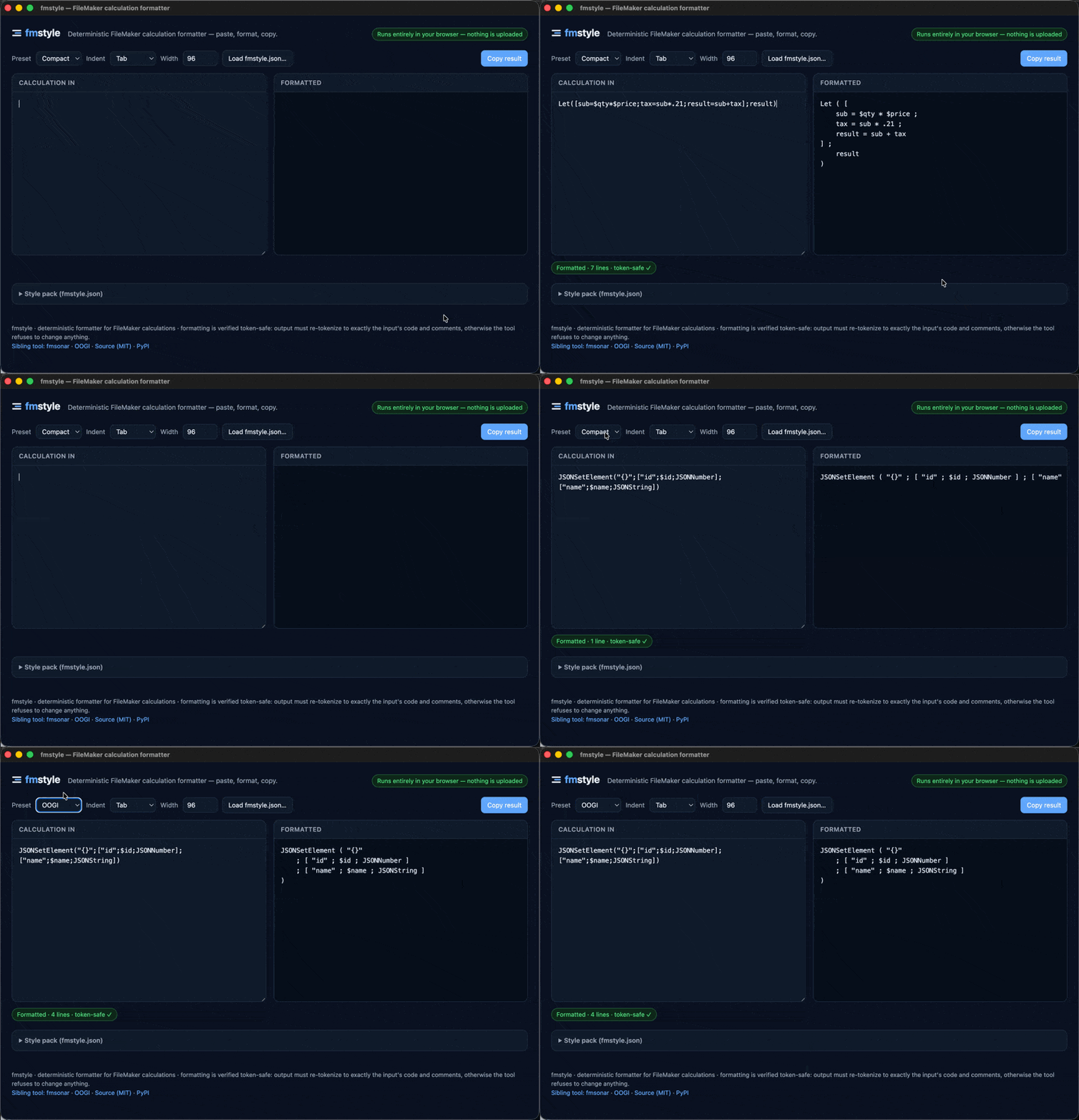
Live at fmstyle.dev — or open fmstyle/web/index.html locally. Paste a
calculation, it formats live, copy the result. Load your fmstyle.json to format in
your house style; quick controls for indent and width. Everything runs entirely
client-side — nothing is uploaded (no network requests, no CDN, no analytics).
The page embeds a JS port of the Python engine. Parity is enforced by fixtures:
tests/gen_parity_fixtures.py renders every case through the Python reference,
node tests/test_parity.mjs replays them through the JS engine extracted from the
HTML and requires byte-identical output (formatting + lint findings).
Install (the CLI)
pipx install fmstyle # or: pip install fmstyle
Pure standard library, Python 3.10+, no dependencies.

Run fmstyle on its own for a status splash: version, available presets, the
resolved style pack (./fmstyle.json or a --preset), the active lint-rule
count, and whether the Claude skill is installed. (Piped output stays plain text.)
Use it from your AI assistant (Claude Code skill)
Same three-way engine as fmsonar: one
deterministic core, reachable from the browser, the shell, and an AI assistant.
The package ships a Claude Code skill so the assistant supplies the logic and
fmstyle supplies the shape:
fmstyle install-skill       # copies the skill to ~/.claude/skills/fmstyle
fmstyle install-skill --check   # freshness check after an upgrade
Once installed, when the assistant writes or edits a FileMaker calculation it runs
it through fmstyle format before presenting it, so the output matches the house
style rather than approximating it — and the token-safe check means it can trust
the result without re-reading it for correctness.
Usage
# format from clipboard / stdin
pbpaste | fmstyle format | pbcopy

# format files, fail CI when not formatted
fmstyle format --check calcs/*.fmcalc

# guideline checks
fmstyle lint mycalc.fmcalc

# as a library (this is what an LLM harness calls)
python3 -c "from fmstyle import format_calc; print(format_calc('Let([x=1;result=x];result)'))"
Configuration (fmstyle.json)
Drop an fmstyle.json in your project and fmstyle format / fmstyle lint
pick it up automatically (no --preset needed). Scaffold one from a preset:
fmstyle init --preset oogi   # writes fmstyle.json, then edit to taste
fmstyle init                 # empty file = the built-in defaults
A style pack has two honest halves — formatting (top level: mechanical layout, every team has some answer and any answer is valid) and lint (opinionated practice rules, each individually opt-in):
{
  "indent": "tab",
  "width": 96,
  "let_blank_lines": false,
  "keyword_case": "lower",
  "comments": "preserve",
  "decimal_separator": "auto",
  "wrap": { "operator_position": "trailing" },
  "spacing": {
    "inside_parens": true,
    "before_paren": true,
    "inside_brackets": true,
    "before_semicolon": true,
    "around_operators": true
  },
  "functions": {
    "let":   { "layout": "let",   "multiline": "always" },
    "while": { "layout": "while", "multiline": "always" },
    "case":  { "layout": "pairs" },
    "jsonsetelement": { "layout": "leading", "multiline": "always" }
  },
  "lint": {
    "let-explicit-result": { "result_name": "result" },
    "variable-naming":     { "pattern": "^[_a-z][A-Za-z0-9]*$" },
    "mixed-decimal-separators": true
  }
}
EU vs US decimal notation (decimal_separator)
FileMaker writes number literals in the locale baked into the file at
creation: a Belgian, French, German or Dutch solution has 0,21 throughout
its calculations, a US one 0.21. fmstyle handles both:
"auto"(default) accepts both notations and preserves whatever each literal used — an EU calculation formats to EU notation, a US one to US notation, same as Prettier'sendOfLine: "auto". The one genuinely ambiguous pattern — 1–3 leading digits, a comma, exactly three digits (1,234is one thousand in US notation, one-point-two in EU) — fails loudly and asks you to pin this setting."comma"— for projects that are known EU — also reads1,234as a decimal. Pin this in an EU project's pack."period"is the pre-1.3 behavior: commas never join numbers.
Why doesn't 1,235 pass when an unambiguous 0,21 sits right next to it?
Because fmstyle judges each literal locally and predictably rather than
inferring from surrounding code — and relaxing a hard error later is
backward-compatible, while taking back a silent guess is not. Note the
deliberate asymmetry: period literals are never flagged (that would break
every 3.142-style constant in existing US packs), so a pasted EU-grouped
1.234 meaning one thousand passes silently — enable the
mixed-decimal-separators lint rule to catch exactly that kind of stray.
Literals that start with their separator gain a leading zero (,21 → 0,21)
— the only rewrite fmstyle ever makes to a literal, and it never changes what
the calculation computes.
With no lint section, no practice rules run: bare fmstyle formats your code
but has no opinions you didn't give it. Prefer a calculation as the Let
result instead of an explicit result variable? That's a valid style — just
don't enable let-explicit-result. Wrapped operators at line ends
("a" &) instead of line starts? wrap.operator_position: "trailing".
Tight parens (If(x; y))? Turn off the spacing pads. Inline comments moved
above the code? comments: "above".
The full dimension taxonomy — every knob, its values, and which dimensions are
(for now) fixed — lives in fmstyle/skill/style-pack.md,
which doubles as the authoring instructions an AI assistant follows to build a
team's pack from their guide, their code samples, or a short interview. An
org's pack is just this JSON file, versioned in their repo. (0.2.x keys like
result_name and space_before_semicolon still work as legacy shorthands.)
Presets
Named, ready-made style packs — pick one in the web app's toolbar or via
fmstyle --preset <name> (a --config file overrides preset keys;
fmstyle presets lists them):
| Preset | Highlights |
|---|---|
oogi |
tab indent, blank-line Let blocks, leading-semicolon JSONSetElement; lint: explicit result, camelCase locals |
compact |
tab indent, compact Let blocks (no blank lines), no lint opinions |
Adding a preset is a PR with one dict in fmstyle/presets.py (and the matching
entry in the web app). Presets should describe a real, adoptable convention.
Community edition (vision). The end game is a community preset governed in
the open: proposals per rule ("blank lines in Let: yes/no"), public voting, a
versioned result. If enough teams adopt it, FileMaker gets what gofmt gave Go — one
format, fewer debates. The deterministic engine is the prerequisite; the governance
can start as GitHub issues + reactions.
Per-function rules — every FileMaker (or custom) function name can get its own
entry under "functions", so how each call formats is a config edit, not a code
change:
| Option | Values | Meaning |
|---|---|---|
layout |
args (default) |
one argument per line when exploded |
pairs |
condition ; result pairs per line (Case-style) | |
let / while |
the mandatory Let / While block shapes | |
leading |
first arg on the header line, leading-semicolon rest (JSONSetElement) | |
multiline |
auto (default) |
explode only when the call exceeds width |
always |
always explode, even when it would fit |
(force_multiline: [...] is still accepted as a legacy shorthand for
multiline: "always".)
Validated against real solutions
tools/corpus_audit.py replays every calculation from a
fmsonar SQLite database through the
formatter. Measured on two independent production solutions (a 4-file and a 9-file
multi-file solution), ~89–95% of calculations format cleanly; the exact figure
varies by solution and by how the DDR was exported.
The remainder is almost entirely DDR-export artifacts (several calcs concatenated
into one layout-object entry, <Field Missing> placeholders) which the formatter
correctly refuses rather than mangles. The audit drove real grammar fixes:
~/#/dotted/unicode names ($$~DISABLETRIGGERS, dotted custom-function
namespaces, Fee 5¢ Surcharge), repetition references (field[11]), x = not y
assignments, trailing semicolons (Case ( a ; b ; )), and commented-out calcs. It
also inventories which built-in and custom functions a solution uses
(--functions) — input for choosing per-function rules.
Roadmap
- Calculation formatter + first lint rules + CLI.
- Web app — single client-side HTML page, JS port parity-tested byte-for-byte
against Python. Paste → format → copy; load your
fmstyle.json; live lint; light/dark. - LLM harness packaging — a Claude Code skill (
fmstyle install-skill) and PyPI packaging (the wheel bundles the web app + skill). - Copy as FM object — wrap output as
fmxmlsnippetwhere applicable (custom functions, Set Variable steps) so paste lands as a real object. - Script-step formatting & linting — via Save-as-XML: script naming, error-handling blocks, comment headers.
- More lint rules — custom function headers,
Whilecounter conventions, magic-number detection, configurable per org. - Community preset + voting — public per-rule proposals and voting.
- Whole-solution style report — pipe every calculation from a fmsonar
SQLite DB through
fmstyle lintfor a solution-wide style/health report.
Known limitations
- Calculation expressions only — no script steps yet (see roadmap).
- Reserved/ambiguous names: a bare multi-word field reference is accepted verbatim;
a field literally named like a keyword (
and) needs${and}. - Comments in unusual positions (e.g. between an operator and its operand) are preserved but may move to the nearest line boundary; if preservation is ever impossible the tool refuses rather than guesses.
- Function names are kept in the author's casing (no canonical-case rewrite yet).
Contributing
Two engines are kept in lockstep: the Python reference (fmstyle/) and a JS port
embedded in fmstyle/web/index.html (between the fmstyle-engine-start/end
markers). After changing either, regenerate fixtures and run both suites — see
CONTRIBUTING.md.
Tech stack
| Concern | Choice | Why |
|---|---|---|
| Language | Python 3.10+, stdlib only | Zero install friction |
| Parsing | hand-written lexer + recursive descent | FM calc grammar is small; full control over verbatim tokens |
| Safety | token-stream equality check | the formatter can't change the computation without the check catching it |
| Config | JSON dataclass | trivially shareable as an org style pack |
Project structure
fmstyle/
├── README.md
├── LICENSE
├── CONTRIBUTING.md
├── pyproject.toml
├── fmstyle/
│   ├── web/index.html  # zero-install client-side web app (JS engine + UI)
│   ├── skill/SKILL.md  # packaged Claude Code skill
│   ├── __init__.py     # format_calc / lint_calc API + safety check
│   ├── lexer.py        # verbatim tokenizer (comments, spaced names, ${...})
│   ├── parser.py       # recursive descent -> small AST
│   ├── printer.py      # deterministic layout engine (Let/While/Case shapes)
│   ├── config.py       # Style dataclass <- fmstyle.json
│   ├── presets.py      # named style packs
│   ├── rules.py        # lint rules
│   └── cli.py          # fmstyle format / lint / presets / install-skill
├── tools/
│   └── corpus_audit.py # replay every calc from a fmsonar DB through the formatter
└── tests/
    ├── test_fmstyle.py          # exact-output, idempotence, safety, lint tests
    ├── gen_parity_fixtures.py   # Python reference -> parity_fixtures.json
    ├── parity_fixtures.json     # generated JS<->Python parity cases
    └── test_parity.mjs          # node: JS engine must match Python byte-for-byte
License
MIT — see LICENSE.
FileMaker is a trademark of Claris International Inc. This project is independent and not affiliated with or endorsed by Claris.
1 maintainer

Download files
Download the file for your platform. If you're not sure which to choose, learn more about installing packages.
Source Distribution
Built Distribution
Filter files by name, interpreter, ABI, and platform.
If you're not sure about the file name format, learn more about wheel file names.
Copy a direct link to the current filters
File details
Details for the file fmstyle-1.3.0.tar.gz.
File metadata
- Download URL: fmstyle-1.3.0.tar.gz
- Upload date:
- Size: 59.1 kB
- Tags: Source
- Uploaded using Trusted Publishing? No
- Uploaded via:
twine/6.2.0 CPython/3.12.6
File hashes
| Algorithm | Hash digest | |
|---|---|---|
| SHA256 |
0cd3510bc0dd94303373de7c5266288a0845a8937dbf98ace08c7cee67ff7389
|
|
| MD5 |
1b8ebe4c5e4c1de5ad8e5788e0bb0cf5
|
|
| BLAKE2b-256 |
3797a0b1fa7c992268fdcd40c41b10b09eee2fd337da7e74d5f99465d70f2537
|
File details
Details for the file fmstyle-1.3.0-py3-none-any.whl.
File metadata
- Download URL: fmstyle-1.3.0-py3-none-any.whl
- Upload date:
- Size: 51.6 kB
- Tags: Python 3
- Uploaded using Trusted Publishing? No
- Uploaded via:
twine/6.2.0 CPython/3.12.6
File hashes
| Algorithm | Hash digest | |
|---|---|---|
| SHA256 |
99c64419d7d99ed5ef4e6469e19ca5d27ef04563e6f108a9b032cac344e052ab
|
|
| MD5 |
3afdfba64419ad89f789cf3ae0ce0e6a
|
|
| BLAKE2b-256 |
fda00d9749a3eaa770c66051527fc4eaf1142faa126f6f30b159bc9c936e4f36
|














