
This release is a pre-release and may not be stable for production use.




Table of Contents
- Overview
- Installation
- Graphical User Interface
- Command Line Interface
- API
- Project Architecture
- Development
- Contributing
- Changelog
- License
👀 Overview
FMU Manipulation Toolbox is a python package which helps to analyze, modify or combine Functional Mock-up Units (FMUs) without recompilation. It is highly customizable and comes with a Python API.
FMU Manipulation Toolbox can be used in different ways:
- Using a Graphical User Interface: suitable for end users
- Using a Command Line Interface: useful for scripting and automation
- Using a Python API: the most efficient option for automation (CI/CD, transformation scripts, ...)
Major features:
- Analyze FMU content: list ports and their attributes, check compliance of
ModelDescription.xmlwith XSD, etc. - Alter FMU by modifying its
modelDescription.xmlfile. NOTE: manipulating this file can be risky. When possible, it is preferable to communicate with the FMU developer and adapt the FMU generation process. - Add binary interfaces. Typical use case is porting 32-bit FMUs to 64-bit systems (or vice versa).
- Combine FMUs into FMU Containers and allow your favourite FMI tool to orchestrate complex assembly of FMUs.
FMI versions 2.0 and 3.0 are supported.
⚙️ Installation
Two options available to install FMU Manipulation Toolbox:
- (Easiest option) Install from PyPI:
pip install fmu-manipulation-toolbox. This will install the latest version of FMU Manipulation Toolbox and all its dependencies. See PyPI page. - Compile and install from GitHub repository. You will need
- pip ≥ 21.3. The Python dependencies are declared in
pyproject.tomland installed bypip install .(see Development). - C compiler with C23 support (for the container) or C99 (for remoting)
- CMake ≥ 3.21
- pip ≥ 21.3. The Python dependencies are declared in
By default, pip install fmu-manipulation-toolbox only installs the CLI and Python API (no GUI toolkit
required). If you also want the Graphical User Interfaces (fmutoolbox, fmutool-gui, fmueditor,
fmucontainer-gui), install the gui extra, which pulls in PySide6:
pip install "fmu-manipulation-toolbox[gui]"
To let an AI agent assemble FMU containers for you through a
Model Context Protocol server
(fmutool-mcp, or the Container Builder's AI Assistant menu), install the mcp
extra:
pip install "fmu-manipulation-toolbox[mcp]"
Supported platforms
FMU Manipulation Toolbox is packaged for:
- Windows 10/11 (primary platform)
- Linux (Ubuntu 22.04)
- Darwin
🖥️ Graphical User Interface
FMU Manipulation Toolbox is released with a GUI. It requires the gui extra
(pip install "fmu-manipulation-toolbox[gui]") to pull in PySide6.
You can launch it with the following command fmutoolbox
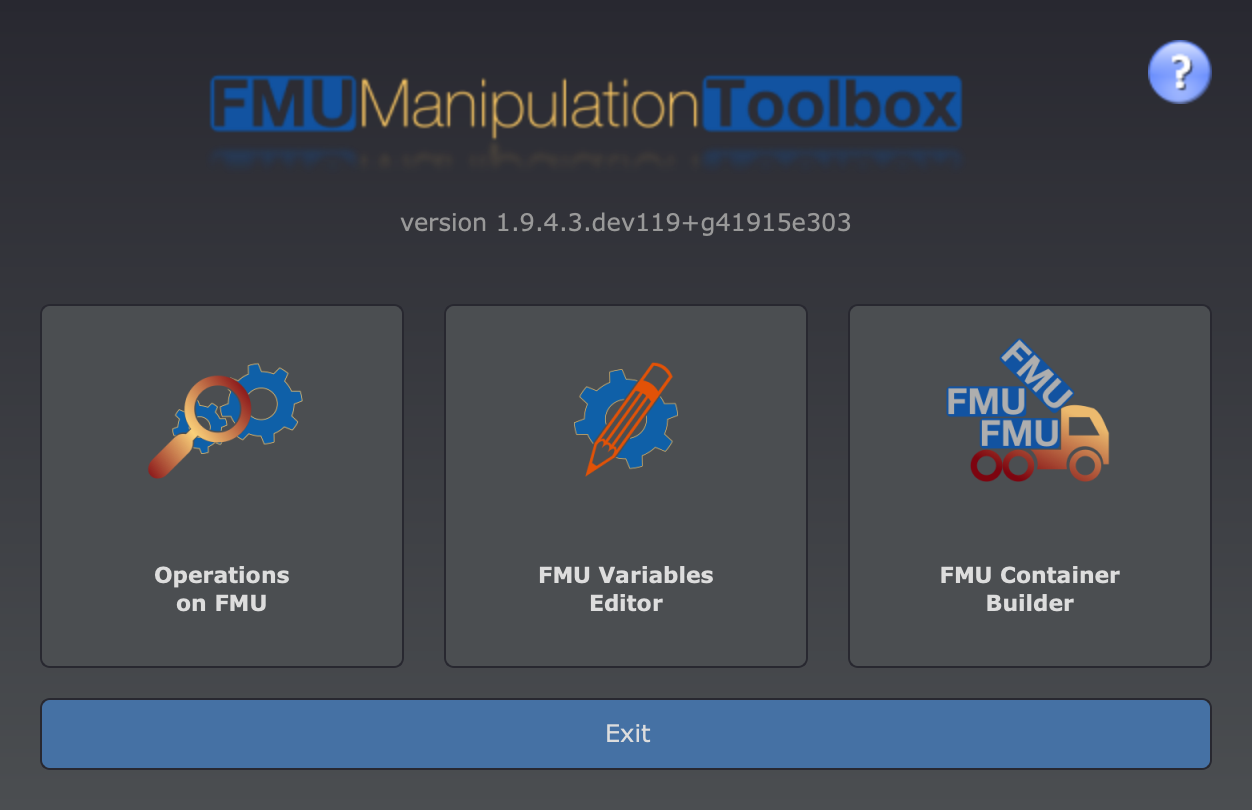
Button color descriptions:
- red: remove information from the
modelDescription.xml - orange: alter
modelDescription.xml - green: add component into the FMU or check it
- violet: extract and save
- blue: filter actions scope or exit
Original FMU is never modified. Use Save button to get modified copy of the original FMU.
🔧 Command Line Interface
FMU Manipulation Toolbox comes with the following commands:
fmutool: a versatile analysis and manipulation tool for FMUs.fmutool-gui: a graphical interface forfmutool.fmucontainer: to combine FMUs inside FMU Containers.fmusplit: to extract FMUs from a FMU Container.- (experimental)
datalog2pcap: to convert logs from FMU containers to PCAP files.
🚀 API
You can write your own FMU manipulation scripts. Once you have installed the fmutool module,
adding the import statement lets you access the API:
from fmu_manipulation_toolbox.operations import ...
Remove Top-Level Bus (if any)
Given an FMU with the following I/O structure
├── Parameters
│   ├── Foo
│   │   ├── param_A
│   ├── Bar
├── Generator
│   ├── Input_A
│   ├── Output_B
The following transformation will result in:
├── Foo
│   ├── param_A
├── Bar
├── Input_A
├── Output_B
Note: removing the top-level bus can lead to name collisions!
The following code will do this transformation:
from fmu_manipulation_toolbox.operations import FMU, OperationStripTopLevel

fmu = FMU(r"bouncing_ball.fmu")
operation = OperationStripTopLevel()
fmu.apply_operation(operation)
fmu.repack(r"bouncing_ball-modified.fmu")
Extract Names and Write a CSV
The following code will dump all FMU scalar names into a CSV:
from fmu_manipulation_toolbox.operations import FMU, OperationSaveNamesToCSV

fmu = FMU(r"bouncing_ball.fmu")
operation = OperationSaveNamesToCSV(r"bouncing_ball.csv")
fmu.apply_operation(operation)
The produced CSV contains 2 columns so it can be reused in the next transformation. The 2 columns are identical.
name;newName;valueReference;causality;variability
h;h;0;local;continuous
der(h);der(h);1;local;continuous
v;v;2;local;continuous
der(v);der(v);3;local;continuous
g;g;4;parameter;fixed
e;e;5;parameter;tunable
Read CSV and Rename FMU Ports
The CSV file should contain 2 columns:
- the current name
- the new name
from fmu_manipulation_toolbox.operations import FMU, OperationRenameFromCSV

fmu = FMU(r"bouncing_ball.fmu")
operation = OperationRenameFromCSV(r"bouncing_ball-modified.csv")
fmu.apply_operation(operation)
fmu.repack(r"bouncing_ball-renamed.fmu")
Available Operations
All operations are located in operations.py:
| Operation | Description |
|---|---|
OperationStripTopLevel |
Remove the top-level bus from the FMU I/O structure |
OperationMergeTopLevel |
Merge the top-level bus into the FMU I/O structure |
OperationSaveNamesToCSV |
Dump all scalar names into a CSV file |
OperationRenameFromCSV |
Rename FMU ports according to a CSV mapping |
OperationRemoveRegexp |
Remove variables matching a regular expression |
OperationKeepOnlyRegexp |
Keep only variables matching a regular expression |
OperationSummary |
Print a summary of the FMU |
OperationRemoveSources |
Remove source files embedded in the FMU |
OperationTrimUntil |
Trim variable names up to a given separator |
📖 Full documentation is available on the documentation website.
🏗️ Project Architecture
fmu_manipulation_toolbox/      # Python package
├── cli/                       #   Command Line Interface modules
├── gui/                       #   Graphical User Interface (PySide6)
├── resources/                 #   Pre-built binaries, XSD schemas, icons
├── operations.py              #   FMU operations (rename, filter, etc.)
├── container/                 #   FMU Container builder (writes container.txt for the C runtime)
├── assembly.py                #   Assembly description parsing
├── checker.py                 #   FMU compliance checker
├── remoting.py                #   32/64-bit remoting support
└── ...
container/                     # C source code for FMU Container runtime
remoting/                      # C source code for Remoting (client/server)
fmi/                           # FMI C headers (2.0 & 3.0)
tests/                         # Test suite (pytest)
docs/                          # Documentation source (MkDocs Material)
Key design points:
- Pure Python manipulation: analyzing and altering FMUs is done entirely in Python — no compilation required.
- Native C code: the FMU Container runtime is implemented in C (C23) and the Remoting feature in C (C99). These are compiled with CMake and shipped as pre-built binaries in
resources/. - FMI 2.0 & 3.0: both FMI standards are supported across all features.
🧑💻 Development
Prerequisites
- Python ≥ 3.10
- C compiler with C23 support (for the container) or C99 (for remoting) — only needed for building the container/remoting binaries
- CMake ≥ 3.21 — only needed for building the C code
Setup
# Clone the repository
git clone https://github.com/grouperenault/fmu_manipulation_toolbox.git
cd fmu_manipulation_toolbox

# Install the package in editable mode, with every extra (GUI, MCP, tests); needs pip >= 21.3
pip install -e ".[all]"
Note: the tests run against the installed package: without this step, pytest stops with
ModuleNotFoundError: No module named 'fmu_manipulation_toolbox'.pip install -r requirements.txtis equivalent (the file only contains-e .[all]). If you only need the CLI/API dependencies, usepip install -e .(add[gui],[mcp]and/or[test]as needed, e.g.pip install -e ".[gui,test]").
Building C code (optional)
The container and remoting binaries can be built with CMake:
cd container
mkdir -p build && cd build
cmake ..
cmake --build .
Same process applies for the remoting/ directory.
Running tests
cd tests
pytest
With coverage report:
pytest --cov=fmu_manipulation_toolbox --cov-report=html
Building documentation locally
The documentation uses MkDocs Material:
pip install mkdocs-material
mkdocs serve
Then open http://127.0.0.1:8000 in your browser.
🤝 Contributing
Contributions are welcome! Please read the Contributing Guide for details on how to report issues, suggest improvements, and interact with the development team.
Note: For legal reasons, pull requests cannot be accepted. If you have ideas for improvements, please create an issue or get in touch with the development team.
📋 Changelog
See the Changelog for a detailed list of changes across versions.
📄 License
This project is licensed under the BSD-2-Clause license. See LICENSE.txt for details.
Copyright © 2024-2026 Renault SAS
1 maintainer

Metadata
1 maintainer
Release files for fmu-manipulation-toolbox 2.0b1
For a detailed explanation of source distributions (sdists) and built distributions (wheels), please see the package formats documentation.
Source distribution (sdist)
| File | Size | Uploaded | Provenance | Actions |
|---|---|---|---|---|
| fmu_manipulation_toolbox-2.0b1.tar.gz | 872.8 kB | With provenance | Details for fmu_manipulation_toolbox-2.0b1.tar.gz |
Built distribution (wheel)
| File | Interpreter | ABI | Platform | Actions Reset |
|---|---|---|---|---|
| fmu_manipulation_toolbox-2.0b1-py3-none-any.whl | Python 3 | none | any | Details for fmu_manipulation_toolbox-2.0b1-py3-none-any.whl |
Total release size: 1.9 MB
Release files / fmu_manipulation_toolbox-2.0b1.tar.gz
| Download URL | fmu_manipulation_toolbox-2.0b1.tar.gz |
|---|---|
| Size | 872.8 kB |
| Tags | Source |
|
SHA-256 checksum How to use checksums |
4d12ce134f69a963097cd2c0a60c36e8de1e0a18f3a36385717eda171445a5c5
|
|
BLAKE2b-256 checksum How to use checksums |
c51c0354a560521e895222a4393bbf7209a69ca969c4ad622c15dc422ec2c7ca
|
| Upload date | |
|
Uploaded using Trusted Publishing? What is trusted publishing? |
Yes |
| Uploaded via |
twine/7.0.0 CPython/3.13.14
|
Provenance
Provenance describes where a file came from. On PyPI, provenance is shared via attestations, which provide a verifiable record of the build or publishing details. View details, limitations and caveats.


PyPI Publish Attestation
PyPI verified that this artifact, at this checksum, originated from the publisher listed below.
Signed by GitHub Actions, verified by PyPI on Oct 13, 2026.
Transparency logRelease files / fmu_manipulation_toolbox-2.0b1-py3-none-any.whl
| Download URL | fmu_manipulation_toolbox-2.0b1-py3-none-any.whl |
|---|---|
| Size | 1.0 MB |
| Tags | Python 3 |
|
SHA-256 checksum How to use checksums |
13210bd66b9c6a3bd6484d4f6e20771dacba0b8077a3cd2dbf4b27355f56ac64
|
|
BLAKE2b-256 checksum How to use checksums |
db95abe6266663588c392b180fde8383e73a593ec2b6ae1b2a0e1a2dfc5f18a6
|
| Upload date | |
|
Uploaded using Trusted Publishing? What is trusted publishing? |
Yes |
| Uploaded via |
twine/7.0.0 CPython/3.13.14
|
Provenance
Provenance describes where a file came from. On PyPI, provenance is shared via attestations, which provide a verifiable record of the build or publishing details. View details, limitations and caveats.
PyPI Publish Attestation
PyPI verified that this artifact, at this checksum, originated from the publisher listed below.
Signed by GitHub Actions, verified by PyPI on Oct 13, 2026.
Transparency logSecurity for fmu-manipulation-toolbox 2.0b1
Provenance
Provenance describes where a file came from. On PyPI, provenance is shared via attestations, which provide a verifiable record of the build or publishing details. View details, limitations and caveats.
Full provenance
All 2 files in this release have been uploaded with provenance metadata.
Attestation for fmu_manipulation_toolbox-2.0b1.tar.gz
PyPI Publish Attestation
PyPI verified that this artifact, at this checksum, originated from the publisher listed below.
Signed by GitHub Actions, verified by PyPI on Oct 13, 2026.
Transparency logA note on package security
PyPI is a repository for distributing packages, not a service for auditing them. While third-party security researchers and our staff do their best to detect and remove malicious packages, PyPI cannot guarantee the quality, security or suitability of any given package.
To learn more about protecting yourself from malicious actors, visit our package security documentation.














