














foamlib is a modern Python package that provides an elegant, streamlined interface for interacting with OpenFOAM. It's designed to make OpenFOAM-based workflows more accessible, reproducible, and precise for researchers and engineers.
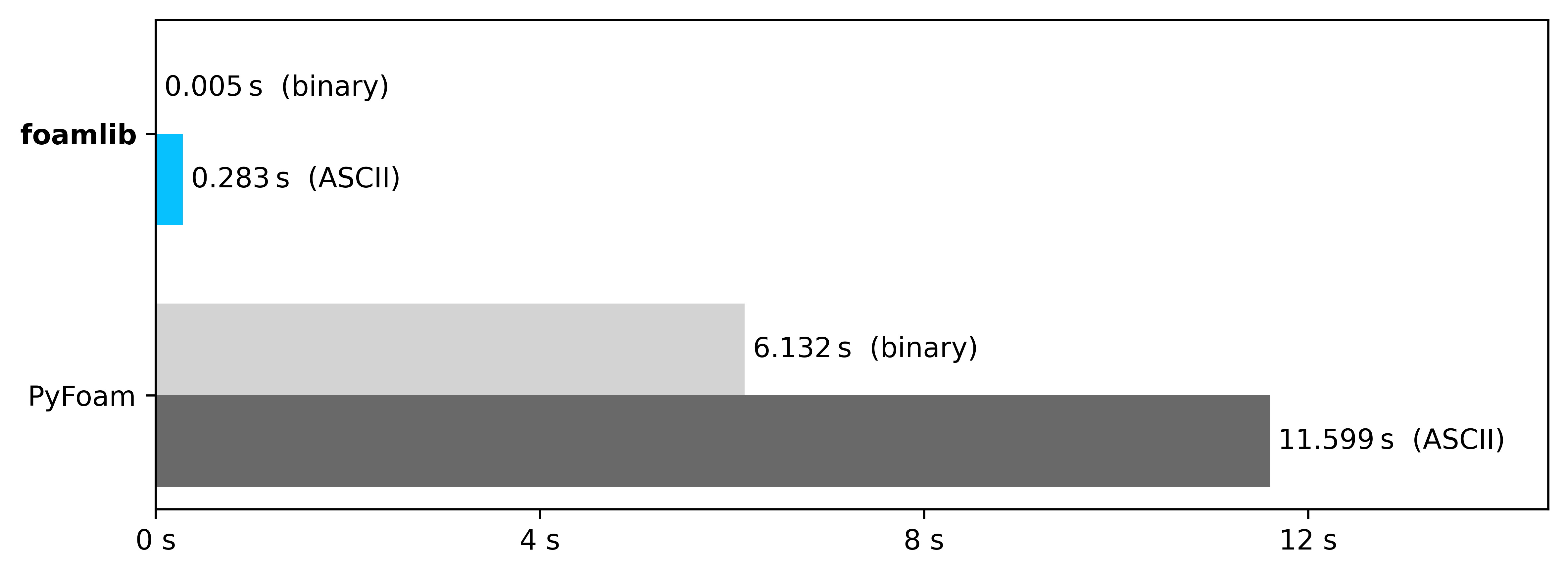
Loading a volVectorField with one million cells1
👋 Introduction
foamlib is a Python package designed to simplify and streamline OpenFOAM workflows. It provides:
- 🗄️ Effortless file handling: Read and write OpenFOAM configuration and field files via intuitive
dict-like Python classes - ⚡ High performance: Powered by our custom parser with seamless support for both ASCII and binary formats with or without compression
- 🔄 Async support: Run exactly as many cases in parallel as your hardware can handle with foamlib's
asynciointegration - 🎯 Type safety: A rigorously typed API for the best coding experience
- ⚙️ Workflow automation: Reduce boilerplate code for pre/post-processing and simulation management
- 🧩 Fully compatible: Works with OpenFOAM from both openfoam.com and openfoam.org
- And more!
Compared to PyFoam and other similar tools like fluidfoam, fluidsimfoam, and Ofpp, foamlib offers significant advantages in performance, usability, and modern Python compatibility.
🧱 Core components
foamlib provides these key classes for different aspects of OpenFOAM workflow automation:
📄 File handling
FoamFile- Read and edit OpenFOAM configuration files as if they were PythondictsFoamFieldFile- Handle field files with support for ASCII and binary formats (with or without compression)
📁 Case management
FoamCase- Configure, run, and access results of OpenFOAM casesAsyncFoamCase- Asynchronous version for running multiple cases concurrentlyAsyncSlurmFoamCase- Specialized for Slurm-based HPC clusters
📦 Installation
Choose your preferred installation method:
| ✨ pip | pip install foamlib |
| 🐍 conda | conda install -c conda-forge foamlib |
| 🍺 Homebrew | brew install gerlero/openfoam/foamlib |
| 🐳 Docker | docker pull microfluidica/foamlib |
🚀 Quick start
Here's a simple example to get you started:
import os
from pathlib import Path
from foamlib import FoamCase

# Clone and run a case
my_case = FoamCase(
    Path(os.environ["FOAM_TUTORIALS"]) / "incompressible/simpleFoam/pitzDaily"
).clone("myCase")
my_case.run()

# Access results
latest_time = my_case[-1]
pressure = latest_time["p"].internal_field
velocity = latest_time["U"].internal_field

print(f"Max pressure: {max(pressure)}")
print(f"Velocity at first cell: {velocity[0]}")

# Clean up
my_case.clean()
📚 More usage examples
🐑 Clone a case
import os
from pathlib import Path
from foamlib import FoamCase

pitz_tutorial = FoamCase(
    Path(os.environ["FOAM_TUTORIALS"]) / "incompressible/simpleFoam/pitzDaily"
)
my_pitz = pitz_tutorial.clone("myPitz")
🏃 Run the case and access results
# Run the simulation
my_pitz.run()

# Access the latest time step
latest_time = my_pitz[-1]
p = latest_time["p"]
U = latest_time["U"]

print(f"Pressure field: {p.internal_field}")
print(f"Velocity field: {U.internal_field}")
🧹 Clean up and modify settings
# Clean the case
my_pitz.clean()

# Modify control settings
my_pitz.control_dict["writeInterval"] = 10
my_pitz.control_dict["endTime"] = 2000
📝 Batch file modifications
# Make multiple file changes efficiently
with my_pitz.fv_schemes as f:
    f["gradSchemes"]["default"] = f["divSchemes"]["default"]
    f["snGradSchemes"]["default"] = "uncorrected"
🔢 Direct field file access without FoamCase
import numpy as np
from foamlib import FoamFieldFile

# Read field data directly
U = FoamFieldFile("0/U")
print(f"Velocity field shape: {np.shape(U.internal_field)}")
print(f"Boundaries: {list(U.boundary_field)}")
⏳ Run multiple cases in parallel
In an asyncio context (e.g. asyncio REPL or Jupyter notebook):
from foamlib import AsyncFoamCase

case1 = AsyncFoamCase("path/to/case1")
case2 = AsyncFoamCase("path/to/case2")

await AsyncFoamCase.run_all([case1, case2])
Note: outside of an asyncio context, you can use asyncio.run().
🎯 Full optimization run on a Slurm-based HPC cluster
import os
from pathlib import Path
from foamlib import AsyncSlurmFoamCase
from scipy.optimize import differential_evolution

# Set up base case for optimization
base = AsyncSlurmFoamCase(
    Path(os.environ["FOAM_TUTORIALS"]) / "incompressible/simpleFoam/pitzDaily"
)


async def objective_function(x):
    """Objective function for optimization."""
    async with base.clone() as case:
        # Set inlet velocity based on optimization parameters
        case[0]["U"].boundary_field["inlet"].value = [x[0], 0, 0]

        # Run with fallback to local execution if Slurm unavailable
        await case.run(fallback=True)

        # Return objective (minimize velocity magnitude at outlet)
        return abs(case[-1]["U"].internal_field[0][0])


# Run optimization with parallel jobs
result = differential_evolution(
    objective_function,
    bounds=[(-1, 1)],
    workers=AsyncSlurmFoamCase.map,  # Enables concurrent evaluations
    polish=False,
)
print(f"Optimal inlet velocity: {result.x[0]}")
📄 Create Python-based run/Allrun scripts
#!/usr/bin/env python3
"""Run the OpenFOAM case in this directory."""

from pathlib import Path
from foamlib import FoamCase

# Initialize case from this directory
case = FoamCase(Path(__file__).parent)

# Adjust simulation parameters
case.control_dict["endTime"] = 1000
case.control_dict["writeInterval"] = 100

# Run the simulation
print("Starting OpenFOAM simulation...")
case.run()
print("Simulation completed successfully!")
📘 Documentation
For more details on how to use foamlib, check out the documentation.
🙋 Support
If you have any questions or need help, feel free to open a discussion.
If you believe you have found a bug in foamlib, please open an issue.
🧑💻 Contributing
You're welcome to contribute to foamlib! Check out the contributing guidelines for more information.
🖋️ Citation
foamlib has been published in the Journal of Open Source Software!
If you use foamlib in your research, please remember to cite our paper:
Gerlero, G. S., & Kler, P. A. (2025). foamlib: A modern Python package for working with OpenFOAM. Journal of Open Source Software, 10(109), 7633. https://doi.org/10.21105/joss.07633
📋 BibTeX
@article{foamlib,
    author = {Gerlero, Gabriel S. and Kler, Pablo A.},
    doi = {10.21105/joss.07633},
    journal = {Journal of Open Source Software},
    month = may,
    number = {109},
    pages = {7633},
    title = {{foamlib: A modern Python package for working with OpenFOAM}},
    url = {https://joss.theoj.org/papers/10.21105/joss.07633},
    volume = {10},
    year = {2025}
}
👟 Footnotes
[1] foamlib 1.7.3 vs. PyFoam 2026.6 (Python 3.14.6) on an M3 MacBook Air. Benchmark script.
1 maintainer

Metadata
1 maintainer
Release files for foamlib 1.8.1
For a detailed explanation of source distributions (sdists) and built distributions (wheels), please see the package formats documentation.
Source distribution (sdist)
| File | Size | Uploaded | |
|---|---|---|---|
| foamlib-1.8.1.tar.gz | 69.6 kB | Details |
Built distribution (wheel)
| File | Interpreter | ABI | Platform | Reset |
|---|---|---|---|---|
| foamlib-1.8.1-py3-none-any.whl | Python 3 | none | any | Details |
Total release size: 150.3 kB
Release files / foamlib-1.8.1.tar.gz
| Download URL | foamlib-1.8.1.tar.gz |
|---|---|
| Size | 69.6 kB |
| Tags | Source |
|
SHA-256 checksum How to use checksums |
44af7467c176682c8401519e5a587a2b769bdd5b0f0ca2c3cd755dafe2b7fe01
|
|
BLAKE2b-256 checksum How to use checksums |
3d7bf771ee2099ddaf6b504b01fa830d26ddf0984421483a1b1ba09998fa3804
|
| Upload date | |
|
Uploaded using Trusted Publishing? What is trusted publishing? |
Yes |
| Uploaded via |
uv/0.12.9 {"installer":{"name":"uv","version":"0.12.9","subcommand":["publish"]},"python":null,"implementation":{"name":null,"version":null},"distro":{"name":"Ubuntu","version":"24.04","id":"noble","libc":null},"system":{"name":null,"release":null},"cpu":null,"openssl_version":null,"setuptools_version":null,"rustc_version":null,"ci":true}
|
Release files / foamlib-1.8.1-py3-none-any.whl
| Download URL | foamlib-1.8.1-py3-none-any.whl |
|---|---|
| Size | 80.7 kB |
| Tags | Python 3 |
|
SHA-256 checksum How to use checksums |
81622d528f5b94e0ffe05c395fb401ce5a06e021260d7cf199f3cff115790897
|
|
BLAKE2b-256 checksum How to use checksums |
16e14402662623bca750712acdd8167f2af2c200fd41c1aa768770fb19b7fbc7
|
| Upload date | |
|
Uploaded using Trusted Publishing? What is trusted publishing? |
Yes |
| Uploaded via |
uv/0.12.9 {"installer":{"name":"uv","version":"0.12.9","subcommand":["publish"]},"python":null,"implementation":{"name":null,"version":null},"distro":{"name":"Ubuntu","version":"24.04","id":"noble","libc":null},"system":{"name":null,"release":null},"cpu":null,"openssl_version":null,"setuptools_version":null,"rustc_version":null,"ci":true}
|














