
This library provides functionality to measure focus levels in images
Verified details
These details have been verified by PyPIProject links
GitHub Statistics
Maintainers

Project description
focus_response v0.1.4
A Python library for detecting focus regions in images using Ring Difference Filters (RDF) and Kernel Density Estimation (KDE).
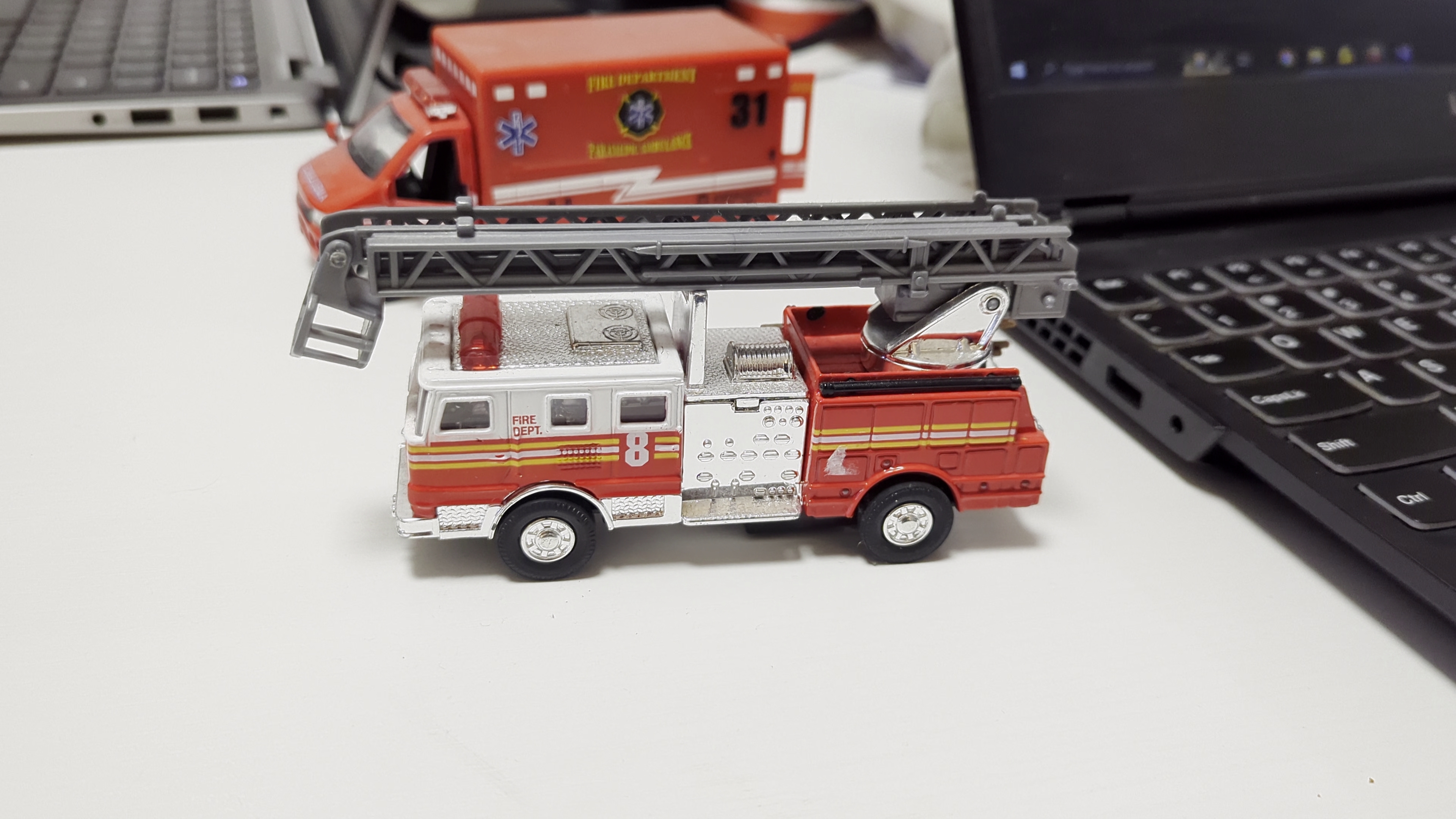
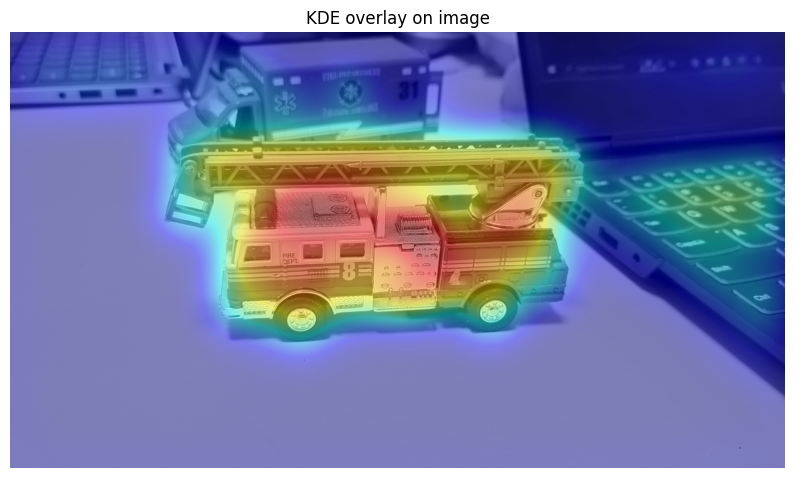
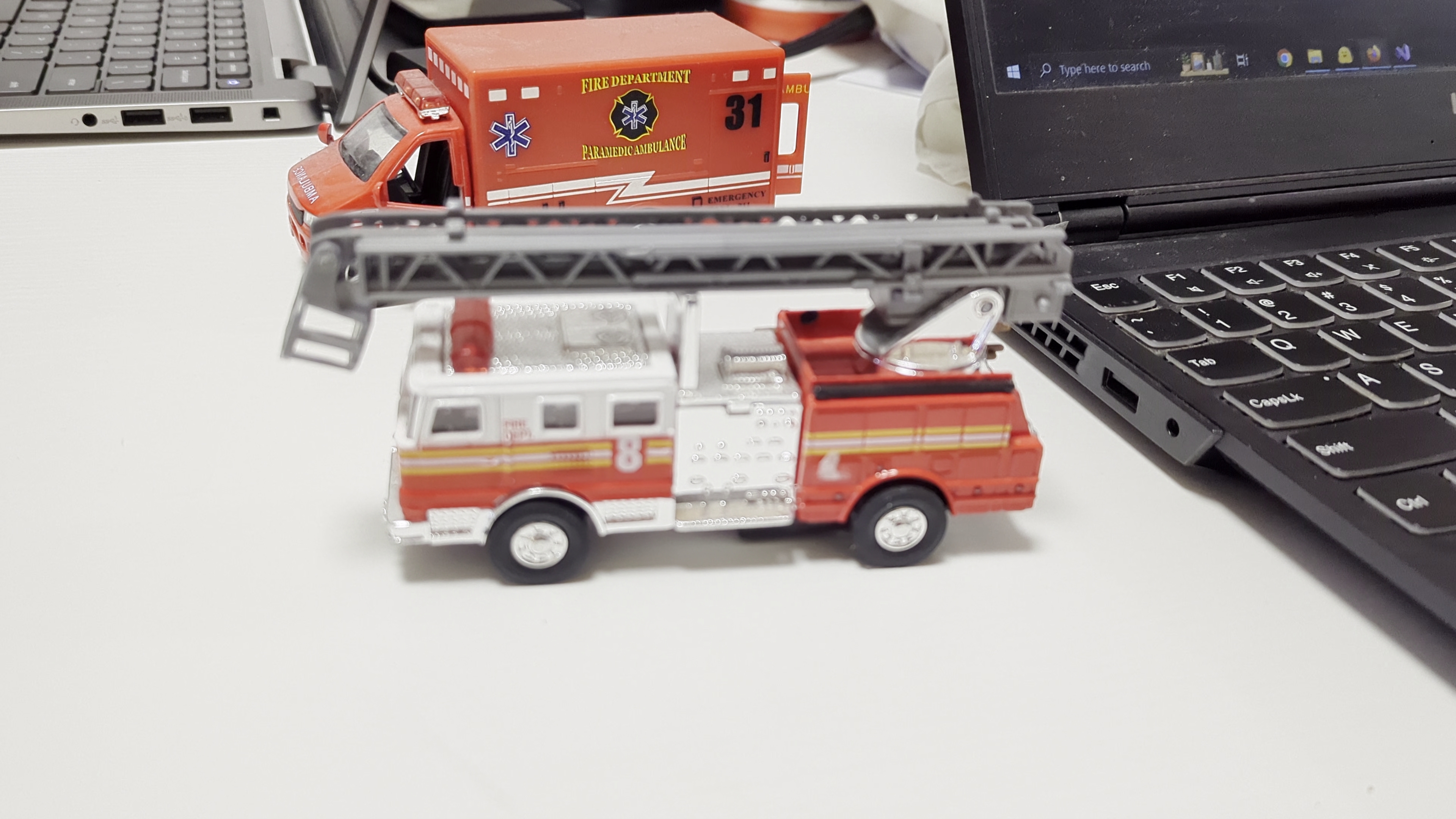
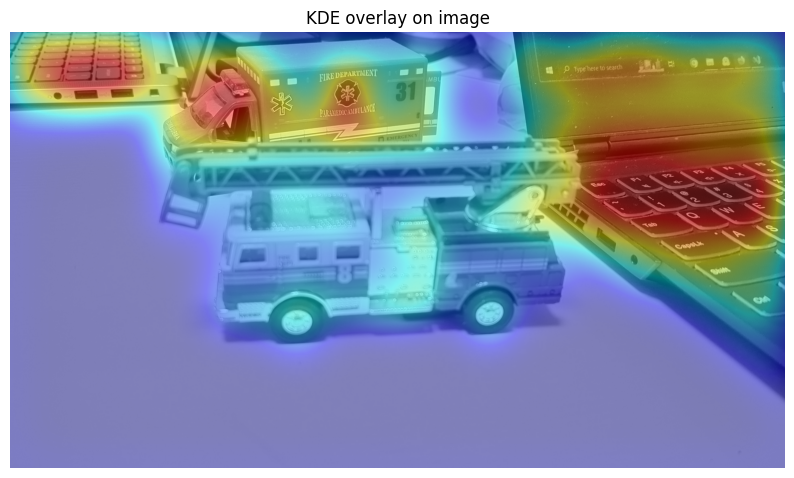
Above outputs were generated using:
detect_focus_regions(image_path, normalize="mad",top_percent=30, bandwidth_px =100)
Installation
pip install focus_response
Usage
Single Image Processing
Process a single image to detect focus regions:
from focus_response import detect_focus_regions

# Basic usage - detect focus regions in an image
results = detect_focus_regions(
    image_path="path/to/image.jpg",
    radii=[(1, 3)],              # Single scale: inner radius=1, outer radius=3
    top_percent=25.0,             # Use top 25% of focus pixels for KDE
    bandwidth_px=10.0,            # KDE smoothing bandwidth in pixels
    power=2,                      # Squared differences (2) or absolute (1)
    normalize="p99",              # Normalization: 'none', 'p99', or 'mad'
    include_strength=False,       # Weight KDE by focus intensity
    show_visualizations=True,     # Display visualization plots
    border_mode='reflect'         # Border handling: 'reflect', 'replicate', 'constant'
)

# Access results
fused_map = results['fused']              # RDF focus map (same size as input)
density_map = results['density']          # KDE density map (0-1 normalized)
threshold = results['threshold']          # Focus threshold value
individual_maps = results['individual_maps']  # List of RDF maps per scale
fuse_time = results['fuse_time']          # RDF computation time (seconds)
kde_time = results['kde_time']            # KDE computation time (seconds)
total_time = results['total_time']        # Total processing time (seconds)
Output Format (Single Image):
fused:np.ndarrayof shape(H, W)with dtypefloat32- Combined RDF focus mapdensity:np.ndarrayof shape(H, W)with dtypefloat32- KDE density map normalized to [0, 1]threshold:float- The focus value threshold used for selecting top pixelsindividual_maps:list[np.ndarray]- Individual RDF maps for each scalefuse_time:float- Time spent computing RDF (seconds)kde_time:float- Time spent computing KDE (seconds)total_time:float- Total processing time (seconds)
Batch Processing
Process multiple images efficiently with parallel processing:
from focus_response import batch_process_images, get_image_files, save_results

# Get all images from a folder
image_paths = get_image_files(
    folder_path="path/to/images",
    extensions=('.jpg', '.jpeg', '.png', '.bmp', '.tiff', '.tif'),
    recursive=False  # Set True to search subdirectories
)

print(f"Found {len(image_paths)} images")

# Batch process all images
results = batch_process_images(
    image_paths=image_paths,
    radii=[(1, 3), (2, 5), (3, 7)],  # Multi-scale processing
    top_percent=25.0,
    bandwidth_px=10.0,
    power=2,
    normalize="p99",
    include_strength=False,
    max_workers=None,                 # Auto-detect CPU count
    use_processes=True,               # Use processes (default) or threads (False)
    progress_callback=None,           # Optional: callback(completed, total, path)
    batch_size=None,                  # Process all at once (None) or in batches
    output_folder=None,               # Set to save results incrementally (returns empty dict)
    save_arrays=True,                 # Save .npy arrays (when output_folder is set)
    save_visualizations=False,        # Save .png visualizations (when output_folder is set)
    border_mode='reflect'             # Border handling: 'reflect', 'replicate', 'constant'
)

# Save results manually (if output_folder not specified above)
save_results(
    results=results,
    output_folder="output",
    save_arrays=True,                 # Save raw .npy arrays
    save_visualizations=True,         # Save .png visualizations
    clear_results=False               # Clear results dict after saving to free memory
)

print(f"Processed {len(results)} images successfully!")
Output Format (Batch Processing):
The batch_process_images function returns a dictionary mapping image paths to their processing results.
Note: When output_folder is specified, results are saved to disk incrementally and the function returns an empty dictionary to conserve memory. Results are automatically saved after processing each batch.
{
    'path/to/image1.jpg': {
        'fused': np.ndarray,              # Shape (H, W), dtype float32
        'density': np.ndarray,            # Shape (H, W), dtype float32, range [0, 1]
        'threshold': float,               # Focus threshold value
        'individual_maps': list[np.ndarray],  # Per-scale RDF maps
        'fuse_time': float,               # RDF time in seconds
        'kde_time': float,                # KDE time in seconds
        'total_time': float               # Total time in seconds
    },
    'path/to/image2.jpg': { ... },
    ...
}
Saved Output Structure (when using save_results or output_folder):
output/
├── filter_arrays/          # Raw RDF fused maps (.npy files)
│   ├── image1_filter.npy   # np.ndarray, shape (H, W), dtype float32
│   └── image2_filter.npy
├── kde_arrays/             # Raw KDE density maps (.npy files)
│   ├── image1_kde.npy      # np.ndarray, shape (H, W), dtype float32, range [0, 1]
│   └── image2_kde.npy
├── filter_vis/             # RDF visualizations (optional .png files)
│   ├── image1_filter.png   # Grayscale visualization (0-255)
│   └── image2_filter.png
└── kde_vis/                # KDE visualizations (optional .png files)
    ├── image1_kde.png      # Colored heatmap using COLORMAP_JET
    └── image2_kde.png
Advanced: Using Individual Components
You can also use the individual processing components:
import cv2
from focus_response import fuse_rdf_sum, kde_on_fused, visualize_kde_density

# Load image
img = cv2.imread("path/to/image.jpg", cv2.IMREAD_GRAYSCALE)

# Step 1: Compute RDF focus map
fused, maps = fuse_rdf_sum(
    img=img,
    radii=[(1, 3), (2, 5)],
    power=2,
    use_numba=False,
    normalize="p99",
    parallel=True,
    downsample=None,                  # Optional: downsample factor (e.g., 2 or 4) for large images
    border_mode='reflect'             # Border handling: 'reflect', 'replicate', 'constant'
)

# Step 2: Apply KDE to get density map
density, threshold = kde_on_fused(
    fused=fused,
    top_percent=25.0,
    bandwidth_px=10.0,
    include_strength=False,
    clip_percentile=99.5,
    normalize=True
)

# Step 3: Visualize results
visualize_kde_density(img, fused, density, show_on="image")  # Overlay on original
visualize_kde_density(img, fused, density, show_on="focus")  # Overlay on focus map
Development
# Install in development mode
pip install -e ".[dev]"

# Run tests
pytest

# Format code
black .

# Lint
flake8
References
- Surh, J., Jeon, H. G., Park, Y., Im, S., Ha, H., & So Kweon, I. (2017). Noise robust depth from focus using a ring difference filter. In Proceedings of the IEEE conference on computer vision and pattern recognition (pp. 6328-6337).
License
MIT License - see LICENSE file for details.
Project details
Verified details
These details have been verified by PyPIProject links
GitHub Statistics
Maintainers


Download files
Download the file for your platform. If you're not sure which to choose, learn more about installing packages.
Source Distribution
Built Distribution
Filter files by name, interpreter, ABI, and platform.
If you're not sure about the file name format, learn more about wheel file names.
Copy a direct link to the current filters
File details
Details for the file focus_response-0.1.5.tar.gz.
File metadata
- Download URL: focus_response-0.1.5.tar.gz
- Upload date:
- Size: 26.7 kB
- Tags: Source
- Uploaded using Trusted Publishing? Yes
- Uploaded via: twine/6.1.0 CPython/3.13.7
File hashes
| Algorithm | Hash digest | |
|---|---|---|
| SHA256 |
419c84708708513c4567f31107ca0564d0dfee7aca03595ccb491abec19a9edf
|
|
| MD5 |
46c47d9fee9fc9a42a6633585cd7c3f8
|
|
| BLAKE2b-256 |
29ed75e5c39a289949610e2abd486a552b12954fc3c9f8f5638cb7a361ce8a90
|
Provenance
The following attestation bundles were made for focus_response-0.1.5.tar.gz:
Publisher:
python-publish.yml on rishik18/focus_response
-
Statement:
-
Statement type:
https://in-toto.io/Statement/v1 -
Predicate type:
https://docs.pypi.org/attestations/publish/v1 -
Subject name:
focus_response-0.1.5.tar.gz -
Subject digest:
419c84708708513c4567f31107ca0564d0dfee7aca03595ccb491abec19a9edf - Sigstore transparency entry: 623194071
- Sigstore integration time:
-
Permalink:
rishik18/focus_response@d7f6f30e64074b63a02c2a1f8b259befbdb4d7ab -
Branch / Tag:
refs/tags/v0.1.5 - Owner: https://github.com/rishik18
-
Access:
public
-
Token Issuer:
https://token.actions.githubusercontent.com -
Runner Environment:
github-hosted -
Publication workflow:
python-publish.yml@d7f6f30e64074b63a02c2a1f8b259befbdb4d7ab -
Trigger Event:
release
-
Statement type:
File details
Details for the file focus_response-0.1.5-py3-none-any.whl.
File metadata
- Download URL: focus_response-0.1.5-py3-none-any.whl
- Upload date:
- Size: 20.7 kB
- Tags: Python 3
- Uploaded using Trusted Publishing? Yes
- Uploaded via: twine/6.1.0 CPython/3.13.7
File hashes
| Algorithm | Hash digest | |
|---|---|---|
| SHA256 |
fdcc2a07db0b405d5b68596d34244962891b856e4156e9a46acffdd655bde248
|
|
| MD5 |
c4dbcb020af261e5145b155bfdbdb925
|
|
| BLAKE2b-256 |
25e04088b0acfd55d67d6b9ff31cf598005ee9884b25963b245964735d02a78f
|
Provenance
The following attestation bundles were made for focus_response-0.1.5-py3-none-any.whl:
Publisher:
python-publish.yml on rishik18/focus_response
-
Statement:
-
Statement type:
https://in-toto.io/Statement/v1 -
Predicate type:
https://docs.pypi.org/attestations/publish/v1 -
Subject name:
focus_response-0.1.5-py3-none-any.whl -
Subject digest:
fdcc2a07db0b405d5b68596d34244962891b856e4156e9a46acffdd655bde248 - Sigstore transparency entry: 623194075
- Sigstore integration time:
-
Permalink:
rishik18/focus_response@d7f6f30e64074b63a02c2a1f8b259befbdb4d7ab -
Branch / Tag:
refs/tags/v0.1.5 - Owner: https://github.com/rishik18
-
Access:
public
-
Token Issuer:
https://token.actions.githubusercontent.com -
Runner Environment:
github-hosted -
Publication workflow:
python-publish.yml@d7f6f30e64074b63a02c2a1f8b259befbdb4d7ab -
Trigger Event:
release
-
Statement type:






