



FocusTUI: Your Deep Focus Session Buddy. (WIP)
Are you struggling to maintain focus in a world full of distractions?
Say hello to FocusTUI - the minimalist, distraction-free focus session tracker that works straight from your terminal, no internet required. FocusTUI empowers you to create and track customized focus sessions with a highly personalized touch, ensuring you stay on track with your work, studies, or creative projects.
Disclaimer: The image displayed represents a potential appearance and features of FocusTUI. Actual app appearance and functionality may vary.
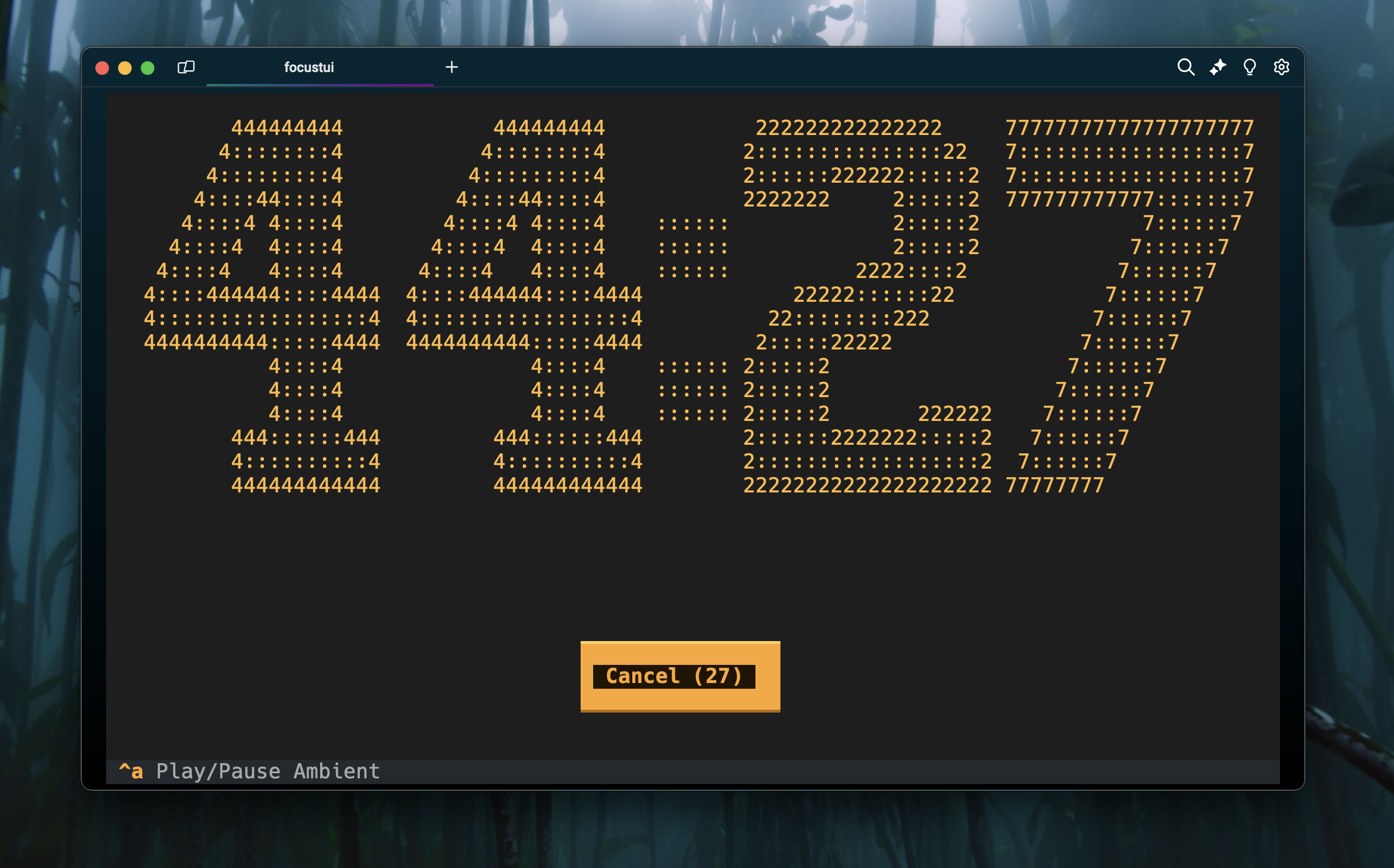
Key Features:
- Cross-Platform: Works seamlessly on every operating system and in any terminal. No matter where you are, FocusTUI is there to support your focus.
- Statistics from Historical Data (coming soon): Gain insights into your productivity with comprehensive statistics generated from your past focus sessions. Understand your patterns and optimize your workflow.
- Custom Focus Queues (coming soon): Create and manage your own focus queues, with sessions categorized and tailored to your needs. Whether it’s deep work, light tasks, or breaks, FocusTUI adjusts to you.
- Custom Themes (coming soon): Personalize your experience with custom themes. Choose the colors that help you stay focused, or design your own.
- Custom Sounds: Import your own alarms, ambient sounds, and other audio cues to create the perfect atmosphere for your focus sessions.
Needed Tools
For Windows:
- Python Installation:
- If you don’t have it installed, download Python from the official website.
- During installation, make sure to check the checkbox that says “Add Python to PATH”.
- Install
Scoop:- Scoop is a command-line installer for Windows. If you don’t have it installed, follow the instructions on the Scoop official website.
- Install
pipx:
scoop install pipx
pipx ensurepath
For macOS:
- Install
Homebrew:- Homebrew is a package manager for macOS. If you don’t have it installed, follow the instructions on the Homebrew official website.
- Install
pipx:
brew install pipx
pipx ensurepath
For Linux:
- Install
pipx:- Install pipx using your package manager.
FocusTUI Installation (every OS)
Once you have pipx installed, you can easily install FocusTUI:
- Install
FocusTUI:
pipx install focustui
Run the App
After installation, you can start FocusTUI by typing:
focustui
Note for macOS users: The first time you open the app, it may take up to 1 minute. I’m not sure why, but during this initial launch, the app creates folders, files, a database, and moves sounds to the app folder. This delay only happens on the first launch. Apologies for the inconvenience.
1 maintainer

Metadata
1 maintainer
Release files for focustui 0.1.20
For a detailed explanation of source distributions (sdists) and built distributions (wheels), please see the package formats documentation.
Source distribution (sdist)
| File | Size | Uploaded | |
|---|---|---|---|
| focustui-0.1.20.tar.gz | 47.0 MB | Details |
Built distribution (wheel)
| File | Interpreter | ABI | Platform | Reset |
|---|---|---|---|---|
| focustui-0.1.20-py3-none-any.whl | Python 3 | none | any | Details |
Total release size: 92.5 MB
Release files / focustui-0.1.20.tar.gz
| Download URL | focustui-0.1.20.tar.gz |
|---|---|
| Size | 47.0 MB |
| Tags | Source |
|
SHA-256 checksum How to use checksums |
50262582d5546736537243421c4cbc96d110b62a448ff4647971581624b03ed1
|
|
BLAKE2b-256 checksum How to use checksums |
68205a3f6f35f8f020f17fc7387e9ebaf2db4b4eb5d67c68a0f3822f179080d1
|
| Upload date | |
|
Uploaded using Trusted Publishing? What is trusted publishing? |
No |
| Uploaded via |
twine/5.1.1 CPython/3.12.6
|
Release files / focustui-0.1.20-py3-none-any.whl
| Download URL | focustui-0.1.20-py3-none-any.whl |
|---|---|
| Size | 45.5 MB |
| Tags | Python 3 |
|
SHA-256 checksum How to use checksums |
ec01db1d89a67078e236e950b400b7c4ef6d44f5fe41a68209dcd42d5d54fc90
|
|
BLAKE2b-256 checksum How to use checksums |
dcca9dfe8d209857d6a8ba978668160ab5b3df818fae686bb3dbd473eb1c729b
|
| Upload date | |
|
Uploaded using Trusted Publishing? What is trusted publishing? |
No |
| Uploaded via |
twine/5.1.1 CPython/3.12.6
|














