
Foilstack
Open-source card scanning, inventory and listing export. Drop in your card
scans — loose images or a .zip of them — and get back an identified, priced
inventory and a CSV your marketplace will accept.
Runs on your own machine. Your scans never leave the host.
Status: early. The matching pipeline works end to end; expect rough edges.
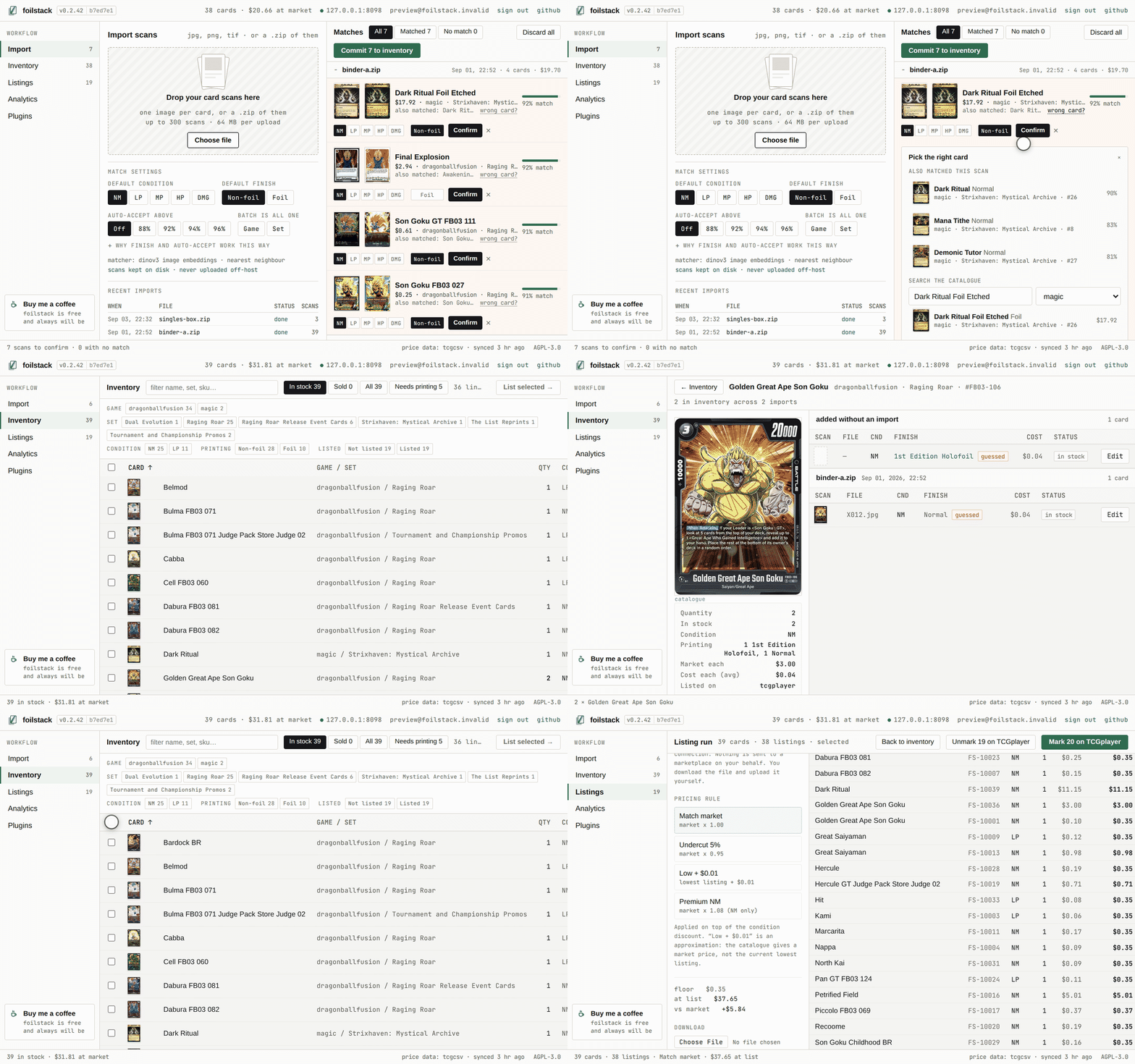
Scans in, priced CSV out. Your scan on the left, the catalogue's guess beside it, and the score between them — because the top match is evidence, not an answer.
What it does
- Import — card images, one image per card, any filenames: drop them in
loose or as a single
.zip. - Match — every image is encoded and searched against a catalogue of reference card images. High-confidence matches are accepted automatically; everything else waits in a review queue with its runners-up.
- Inventory — condition, quantity, cost, market price, suggested list price, margin.
- Export — a CSV for TCGplayer or eBay, which you upload yourself.
Why the review queue matters
Reprints share artwork. A vector search over card images gives you a name you can trust and a printing you cannot — the same illustration may appear in a dozen sets at wildly different prices, separated on the physical card only by a set symbol a few pixels wide.
So the top match is shown next to its rivals with their scores, rather than
presented as an answer. Auto-accept is off until you turn it on, so out of
the box every scan waits for you in the queue. Turn it on and a scan skips the
queue only if it clears the percentage you picked and beats its runner-up by
0.04 — a high score alone is not evidence when the second-place card is the
same artwork in a different printing. All of it is deliberately conservative:
a missed auto-accept costs you one click, a wrong one puts a real card on sale
at another card's price.
When the catalogue is wrong about all of its guesses, search it by name and pick the right card yourself — from the queue before committing, or from the inventory row afterwards. You are holding the card and can read the name off it, which is information the encoder never had.
Quick start
git clone https://github.com/foilstack/foilstack.git
cd foilstack
cp .env.example .env
docker compose up -d
That starts Postgres, the encoder and the web app. Migrations run automatically
on every start, so an upgrade is git pull && docker compose up -d --build and
nothing else.
The default encoder is a gated model. Accept the terms for DINOv3 and put an
HF_TOKENin your.envbefore the first run, or the encoder fails to load with a 401 that looks like a network problem.
Then build a catalogue. Start small — one game, a few hundred cards — to check the whole path works before committing hours to encoding:
docker compose exec web foilstack ingest --source tcgcsv --game pokemon --limit 300
docker compose exec web foilstack embed
ingest pulls catalogue rows and image URLs; embed downloads each reference
image and encodes it. Two commands because they fail for different reasons and
take very different amounts of time — a network blip during encoding should not
cost you the ingest.
Ingest every game you intend to scan. Nearest-neighbour search can only
answer with a card that is in the catalogue, so scanning Magic against a
Pokemon-only catalogue returns Pokemon. foilstack plugins lists the games a
source can fetch.
Open http://localhost:8090.
Running it for other people
There is no login screen by default: one implicit owner holds everything, and
you never invent a password for a tool only you can reach. Set
FOILSTACK_MULTI_USER=true and a real secret key and every scan, job and
inventory row belongs to exactly one account — enforced by a NOT NULL column
and a test suite that drives the real app and asserts a stranger gets nothing.
docs/accounts.md — registration control, invite codes, storage quotas, sign-in rate limiting.
Backups
A service, not a cron job you have to remember. The backup sidecar starts with
everything else, dumps the database on a schedule, verifies what it wrote,
mirrors your scans beside it, and drops a BACKUP_FAILING file when a run
produces nothing usable. Checking for that file is the whole of your monitoring.
docs/backups.md — retention, copying off the machine, restoring.
Prices
Prices sync daily from TCGCSV and are stored per printing, so a foil is priced as a foil — which matters more than it sounds. Base Set Charizard is 1st Edition Holofoil at $10,000, Unlimited Holofoil at $2,146 and Holofoil at $855; ticking "foil" chooses between none of them.
Price history is the one thing here that cannot be rebuilt: upstream mirrors only the current day, so a day the sync does not run is a day of history gone for good.
docs/prices.md — the sync protocol, how history is stored, naming a printing.
Extending it
Source plugins fetch the catalogue and run code, so you add one deliberately and there is no registry. Export plugins are TOML column mappings — adding a marketplace means writing a file a reviewer can read in ten seconds and be certain does nothing else.
Encoding the catalogue
The encoder runs on CPU by default so the stack starts anywhere — about one card a second, which is more than a day for a full Magic catalogue. If you have an NVIDIA GPU, an overlay turns it on:
docker compose -f docker-compose.yml -f docker-compose.gpu.yml up -d --build
docs/encoder.md — picking the right CUDA wheels, checking which device it actually loaded on, and filling the catalogue.
This project redistributes no card data
The catalogue is fetched from upstream, on your machine, by a plugin you chose. We ship the code that knows how to ask — not the prices, and not the images.
The one exception is the animation above, which shows a handful of card thumbnails because a demo of a card tool with no cards in it would be useless. No card data ships in any form the application reads.
Contributing
AGENTS.md has the working notes: how the pieces fit, the conventions, and the handful of mistakes this codebase has already made once.
uv sync --extra dev
uv run pre-commit install --hook-type pre-commit --hook-type pre-push
uv run pytest -q
Most of the suite needs nothing but Python. tests/test_isolation.py builds a
throwaway Postgres database and drives the real app against it — it skips
cleanly if there is no server, so start one before trusting a green run on
anything touching accounts:
docker compose up -d postgres && uv run pytest -q
The pre-push hook runs the suite and refuses a push if anything skipped, for the same reason.
Supporting this
foilstack is free, AGPL, and costs you nothing to run. If it saves you an afternoon of typing card names into a spreadsheet:
The link is in the sidebar of every install, self-hosted ones included.
Licence
AGPL-3.0. The bundled JetBrains Mono subsets under
src/foilstack/web/static/fonts/ are licensed separately, under the SIL Open
Font License 1.1 — see OFL.txt beside them.
The network clause is the point: if you host this as a service for other people, those people are entitled to the source, including your changes.
Running it for yourself or inside your own business triggers nothing. A shop using this in the back office owes no one anything. The obligation begins when you offer it as a service to others.
1 maintainer

Metadata
1 maintainer
Release files for foilstack 0.2.61
For a detailed explanation of source distributions (sdists) and built distributions (wheels), please see the package formats documentation.
Source distribution (sdist)
| File | Size | Uploaded | |
|---|---|---|---|
| foilstack-0.2.61.tar.gz | 5.1 MB | Details |
Built distribution (wheel)
| File | Interpreter | ABI | Platform | Reset |
|---|---|---|---|---|
| foilstack-0.2.61-py3-none-any.whl | Python 3 | none | any | Details |
Total release size: 10.0 MB
Release files / foilstack-0.2.61.tar.gz
| Download URL | foilstack-0.2.61.tar.gz |
|---|---|
| Size | 5.1 MB |
| Tags | Source |
|
SHA-256 checksum How to use checksums |
27b16b621788bc2c5ca6a131fd2064d8ef7132f51b11678e973048fcac65fd84
|
|
BLAKE2b-256 checksum How to use checksums |
279aee83dd3c51708fa7ed834277077cf6442085b5a1de0b761b2d56c7f596a9
|
| Upload date | |
|
Uploaded using Trusted Publishing? What is trusted publishing? |
Yes |
| Uploaded via |
twine/7.0.0 CPython/3.13.14
|
Provenance
Provenance describes where a file came from. On PyPI, provenance is shared via attestations, which provide a verifiable record of the build or publishing details. View details, limitations and caveats.


PyPI Publish Attestation
PyPI verified that this artifact, at this checksum, originated from the publisher listed below.
Signed by GitHub Actions, verified by PyPI on Sep 8, 2026.
Transparency logRelease files / foilstack-0.2.61-py3-none-any.whl
| Download URL | foilstack-0.2.61-py3-none-any.whl |
|---|---|
| Size | 4.8 MB |
| Tags | Python 3 |
|
SHA-256 checksum How to use checksums |
7bcdef46c95000997ffa56902bd73e6498b0b92286d6a8451d0cc080cc679fc1
|
|
BLAKE2b-256 checksum How to use checksums |
659dba90620057300d43d41fd7dd781f1245b89ecf08d39c03d0bb223c776569
|
| Upload date | |
|
Uploaded using Trusted Publishing? What is trusted publishing? |
Yes |
| Uploaded via |
twine/7.0.0 CPython/3.13.14
|
Provenance
Provenance describes where a file came from. On PyPI, provenance is shared via attestations, which provide a verifiable record of the build or publishing details. View details, limitations and caveats.
PyPI Publish Attestation
PyPI verified that this artifact, at this checksum, originated from the publisher listed below.
Signed by GitHub Actions, verified by PyPI on Sep 8, 2026.
Transparency log













