
Organize cluttered directories with ease

Project description
FolderFlow




Your Digital Butler for Instant File Organization
Stop wasting time sorting files manually. FolderFlow automatically organizes your cluttered folders with beautiful CLI feedback and smart duplicate detection!
What Problem Does It Solve?
Ever downloaded hundreds of files and ended up with a chaotic Downloads folder? Tired of manually sorting vacation photos, work documents, and random PDFs? FolderFlow solves this!
Real-World Use Cases
- Messy Downloads Folder: Organize 1000+ mixed files in seconds
- Student Projects: Sort code files, documents, and resources automatically
- Photo Management: Separate images, videos, and raw files instantly
- Work Files: Keep documents, spreadsheets, and presentations organized
- Desktop Cleanup: Transform desktop chaos into organized bliss
- Archive Management: Organize old backup folders with recursive mode
Features
Core Functionality
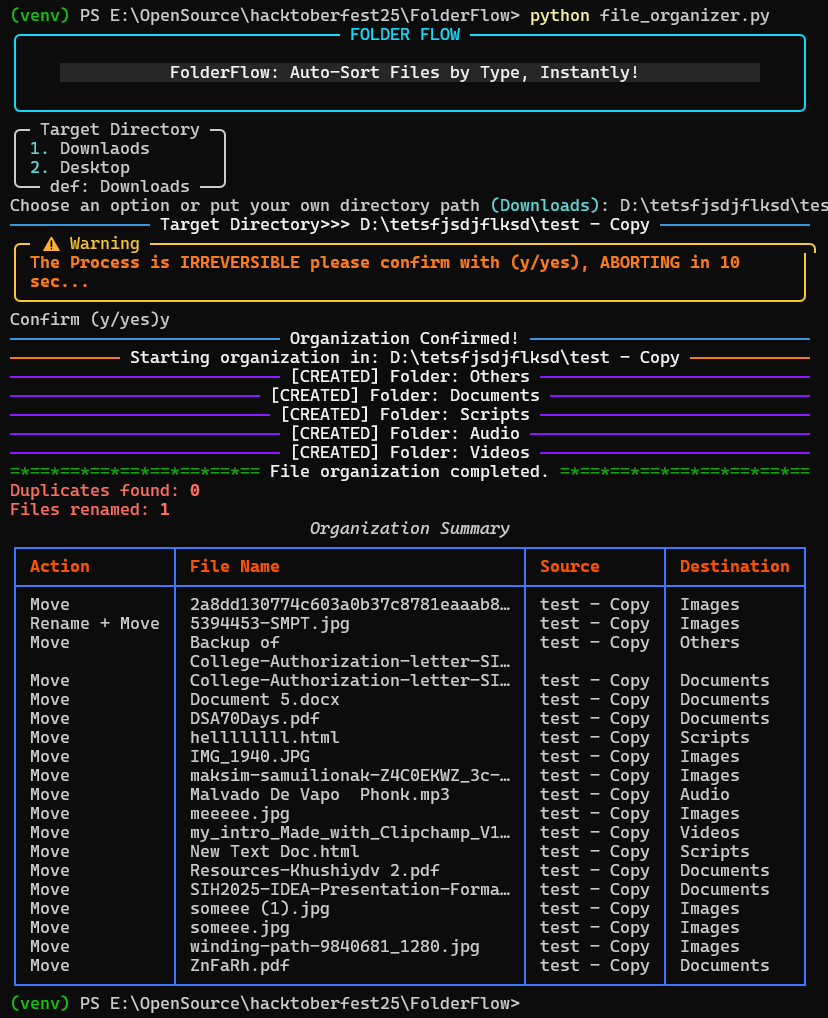
- Beautiful Rich CLI - Color-coded output with tables and progress indicators
- Smart Categorization - 16 file type categories (Images, Videos, Documents, etc.)
- Duplicate Detection - SHA256 hash-based duplicate identification
- Automatic Renaming - Renames files intelligently to avoid conflicts (file.txt file(1).txt)
- Recursive Mode - Organize entire directory trees, not just top-level files
- Quick Presets - One-click organization for Desktop/Downloads folders
- Safety First - 10-second confirmation timeout prevents accidental organization
- Summary Reports - Detailed table showing all file movements
- Customizable - Easily add new file type categories
Supported File Types
| Category | Extensions |
|---|---|
| Images | .jpg, .jpeg, .png, .gif, .svg, .bmp, .tiff, .webp, .ico |
| Videos | .mp4, .mov, .avi, .mkv, .flv, .wmv, .webm |
| Documents | .pdf, .doc, .docx, .txt, .ppt, .pptx, .odt, .rtf, .md |
| Archives | .zip, .rar, .tar, .gz, .7z, .bz2, .xz, .iso |
| Scripts | .py, .sh, .js, .html, .css, .ts, .jsx, .tsx, .php, .rb, .java, .c, .cpp |
| Audio | .mp3, .wav, .flac, .aac, .ogg, .m4a, .wma |
| Fonts | .ttf, .otf, .woff, .woff2 |
| Executables | .exe, .msi, .bat, .apk, .app, .deb, .rpm |
| Spreadsheets | .xls, .xlsx, .ods, .csv |
| Databases | .db, .sqlite, .sql, .mdb, .accdb |
| Notebooks | .ipynb, .rmd |
| Design Files | .psd, .ai, .xd, .sketch, .fig |
| Logs | .log, .out |
| Configs | .ini, .cfg, .yaml, .yml, .toml, .env |
Quick Start
Get organized in 30 seconds!
# 1. Clone the repository
git clone https://github.com/VarunBhattacharya/FolderFlow.git
cd FolderFlow

# 2. Install dependencies
pip install -r requirements.txt

# 3. Run FolderFlow
python file_organizer.py

# 4. Choose Downloads or Desktop (or enter custom path)
# 5. Confirm with 'y' within 10 seconds
# 6. Watch the magic happen!
Installation
Prerequisites
- Python 3.8+ (tested on 3.8, 3.9, 3.10, 3.11, 3.12, 3.13)
- pip (Python package manager)
- Required Libraries:
rich- For beautiful terminal output with colors, tables, and panels
Note: This project requires the
richlibrary and is not limited to Python's standard library.
Step-by-Step Installation
Option 1: Standard Installation
git clone https://github.com/VarunBhattacharya/FolderFlow.git
cd FolderFlow
pip install -r requirements.txt
Option 2: Direct Download
- Download the latest release
- Extract the ZIP file
- Open terminal in the extracted folder
- Run:
pip install -r requirements.txt
Usage
python file_organizer.py
Follow the beautiful CLI prompts:
- Choose preset (Downloads/Desktop) or enter custom path
- Review target directory
- Confirm organization (type
yoryeswithin 10 seconds) - View results in the summary table
Screenshots
Customization
Adding New File Categories
Open file_organizer.py and modify the file_types dictionary:
file_types = {
    'Images': ['.jpg', '.jpeg', '.png', '.gif', '.svg', '.bmp', '.tiff', '.webp', '.ico'],
    # Add your custom category:
    'Ebooks': ['.epub', '.mobi', '.azw3'],
    'Virtual Machines': ['.ova', '.vmdk', '.vdi'],
}
Customizing Presets
Edit the default_directory_paths() function in utils.py to add your favorite folders:
def default_directory_paths():
    home_dir = expanduser("~")
    desktop_path = home_dir + "\\Desktop"
    downloads_path = home_dir + "\\Downloads"
    return desktop_path, downloads_path
Testing
FolderFlow includes comprehensive unit tests to ensure reliability.
Run Tests
python -m unittest test.py
Test Coverage
- File movement validation
- Folder creation verification
- Duplicate detection
- Error handling for missing files
- Temporary directory cleanup
Contributing
We contributions! FolderFlow is part of Hacktoberfest 2025 and welcomes developers of all skill levels.
How to Contribute
-
Fork the repository
-
Create a feature branch
git checkout -b feature/amazing-feature
-
Make your changes
-
Run tests to ensure nothing breaks
python -m unittest test.py
-
Commit with clear messages
git commit -m "Add: Feature description"
-
Push to your fork
git push origin feature/amazing-feature
-
Open a Pull Request
Contribution Ideas
Beginner-Friendly
- Add more file type categories
- Fix typos or improve documentation
- Add docstrings to functions
- Create example screenshots
Intermediate
- Add configuration file support (JSON/YAML)
- Implement
--dry-runmode - Add file size filtering options
- Create a progress bar for large folders
- Add colorblind-friendly themes
Advanced
- Build a GUI version (tkinter/PyQt)
- Implement watch mode (auto-organize on file creation)
- Add undo/rollback functionality
- Organize by date (Year/Month folders)
- Multi-language support
- Create installer/package for Windows/Mac/Linux
Check out our Contributors Guide for more details!
Project Stats
 file_organizer.py    # Main organization logic (187 lines)
 utils.py             # CLI utilities & styling (106 lines)
 test.py              # Unit tests
 requirements.txt     # Dependencies (rich library)
 CONTRIBUTORS.md      # Hall of fame
 README.md            # You are here!
Total Lines of Code: ~300+
Dependencies: 1 (rich for beautiful CLI)
Test Coverage: Core functionality covered
License
This project is licensed under the MIT License - see the LICENSE file for details.
TL;DR: You can use, modify, and distribute this project freely!
Contributors
Thanks to all the amazing people who have contributed to FolderFlow!
See the full list in CONTRIBUTORS.md
Acknowledgments
- Built with using Rich for beautiful terminal output
- Inspired by the chaos of Downloads folders everywhere
- Created for Hacktoberfest 2025
Support & Contact
- Found a bug? Open an issue
- Have a suggestion? Start a discussion
- Like the project? Star it on GitHub!
Made with and by the FolderFlow Community
Star this repo if FolderFlow helped organize your digital life!
FAQ
Q: Will FolderFlow delete my files?
A: No! FolderFlow only moves files, never deletes them. All files remain safe.
Q: What happens if two files have the same name?
A: FolderFlow checks if they're duplicates using SHA256 hash. Duplicates are skipped; different files are renamed (e.g., file(1).txt).
Q: Can I undo organization?
A: Currently, no automatic undo. We recommend testing on a backup folder first. Undo feature is planned for future releases!
Q: Does it work on Windows/Mac/Linux?
A: Yes! FolderFlow is cross-platform (though default presets are Windows-optimized).
Q: Is my data safe?
A: FolderFlow operates locally on your machine. No data is sent anywhere. It's open source—review the code yourself!
Release history Release notifications | RSS feed

Download files
Download the file for your platform. If you're not sure which to choose, learn more about installing packages.
Source Distribution
Built Distribution
Filter files by name, interpreter, ABI, and platform.
If you're not sure about the file name format, learn more about wheel file names.
Copy a direct link to the current filters
File details
Details for the file folderflow-0.1.0.tar.gz.
File metadata
- Download URL: folderflow-0.1.0.tar.gz
- Upload date:
- Size: 15.5 kB
- Tags: Source
- Uploaded using Trusted Publishing? No
- Uploaded via: twine/6.2.0 CPython/3.13.7
File hashes
| Algorithm | Hash digest | |
|---|---|---|
| SHA256 |
99eb1fbeabfa5005051dc3b4df414dbf8ab941c67a7b913f20de2b19d330814c
|
|
| MD5 |
98ac9e8c2c5c5e6b804ebf305ff3d174
|
|
| BLAKE2b-256 |
301e62526bde2979479a2c019c1435c28a515e8bde6d0981fe38c0f3027c365e
|
File details
Details for the file folderflow-0.1.0-py3-none-any.whl.
File metadata
- Download URL: folderflow-0.1.0-py3-none-any.whl
- Upload date:
- Size: 12.5 kB
- Tags: Python 3
- Uploaded using Trusted Publishing? No
- Uploaded via: twine/6.2.0 CPython/3.13.7
File hashes
| Algorithm | Hash digest | |
|---|---|---|
| SHA256 |
5c974b6a3af6da12be8ab838a057e3a74ede9f8373e891e37586e2389e1ac140
|
|
| MD5 |
181dd7a5c7eee434aa608fe7735c5bf2
|
|
| BLAKE2b-256 |
1bde4f868ab5fa8dcb76cfd26e683f834068bc78817cf7250a459053d66cb0bd
|






