
folio
folio turns your coding agent into the librarian of a knowledge library: fast, good-looking HTML pages and Markdown records that live inside any project (lab notes, study notes, a project's docs) or stand on their own. Every document has one genre, and the genre fixes its job, its voice, its format and its checks. Documents link to each other like a Zettelkasten, and maps give a reader the way in.
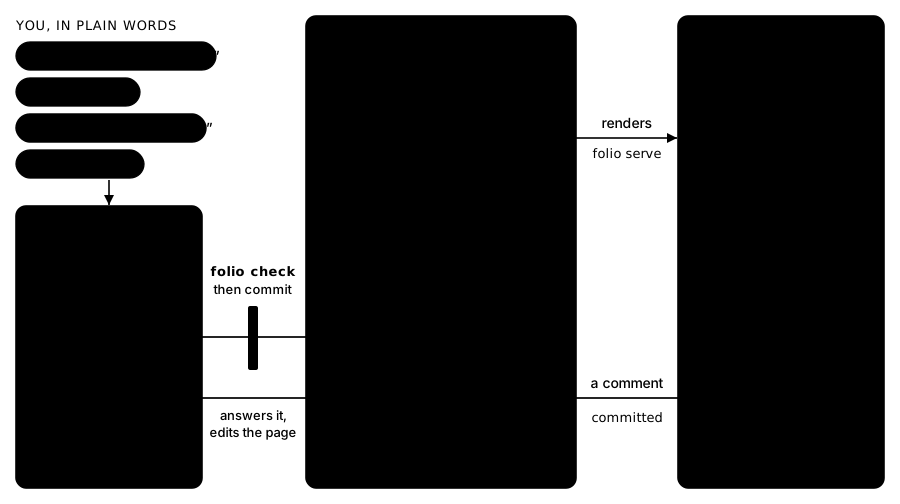
You do not run folio yourself. You install it by handing your agent a setup prompt, and from then on you ask in plain words: "add a concept for X", "tidy the maps", "go through my comments", "build the site". The agent follows folio's seven skills, calls the folio command, and runs the gate before every commit. folio is the method and the checks that keep an agent-written library honest and consistent, plus the shell that makes it pleasant to read.
Install
Paste this into your coding agent, in the project where the library should live:
Install folio here: run `uv tool install folio-kb` (or `pipx install folio-kb`), then `folio init`, then read .agents/skills/set-up/SKILL.md and follow it.
The agent asks you at most three questions in one message (what the library is for, where it lives, which packs to switch on), creates the library and leaves the gate passing. A longer version of the prompt is in SETUP.md. folio needs Python 3.10 or later.
What a library looks like
A library is a folder with a folio.yaml. It can be a project's docs/, a notes folder, or a whole repository.
docs/
  folio.yaml            the charter: name, purpose, reader, packs, home maps
  content/
    index.html          the home page
    concepts/<slug>/    one folder per genre
    maps/
    journal/2026/       one Markdown file per entry
  assets/               figures, refs.bib, data
  .folio/               generated indices, committed and checked
.agents/skills/         the seven skills, at the project root
Each document keeps its facts in metadata and its prose in the body. The shell draws the header and the link panels from the metadata and the generated indices, so nothing is written twice.
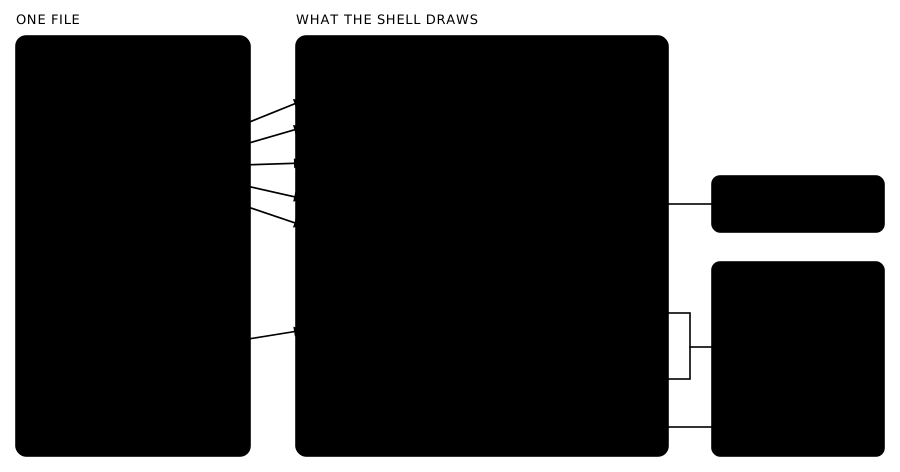
Pages are plain HTML in git, readable with no build step. folio serve shows them locally with search, link previews, concept popovers, light and dark themes, and a comment panel; folio export writes a static site.
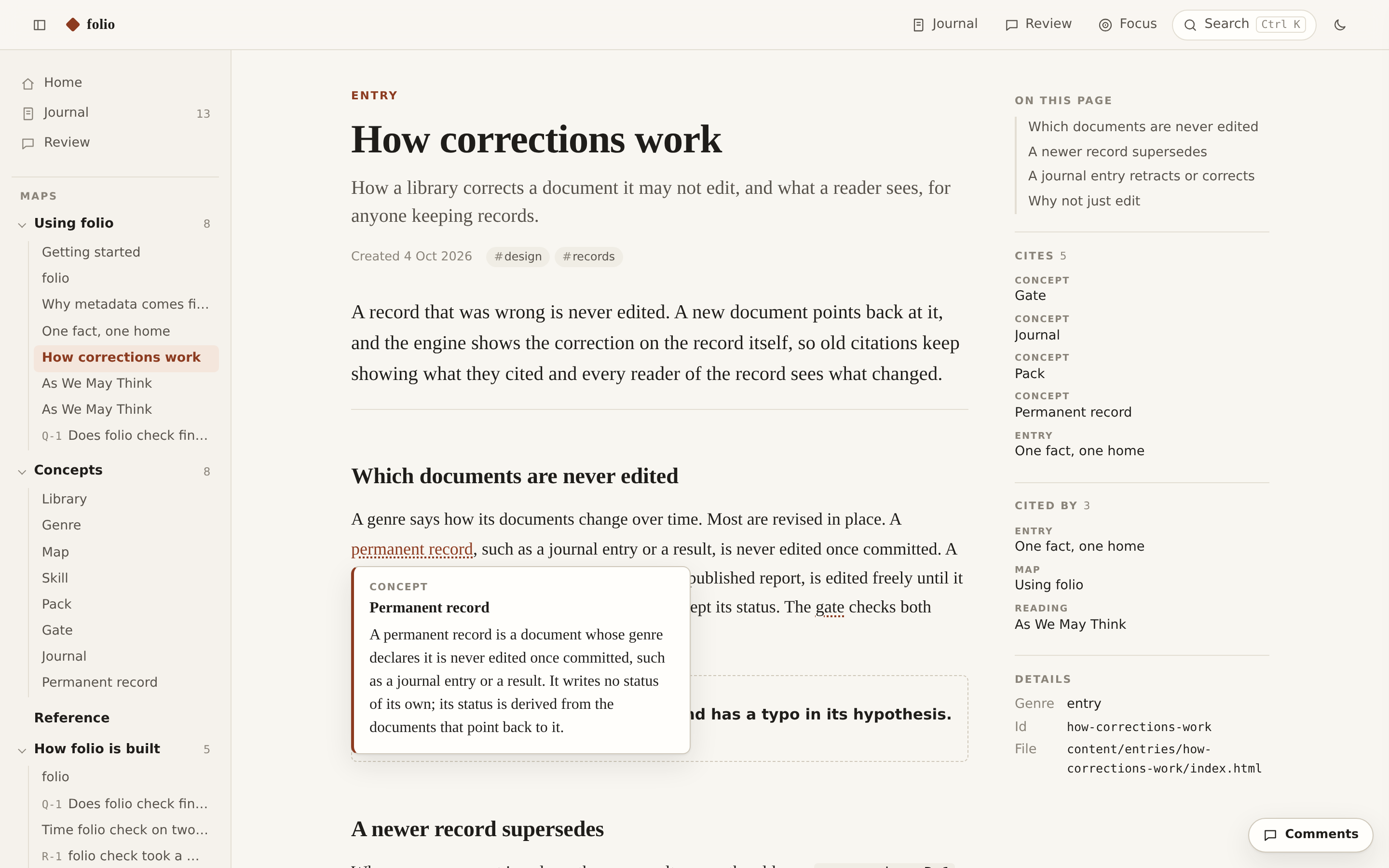
Hover a link to preview the document it points to; hover a concept to read its definition without leaving the page. Readers can also comment on any rendered page, and the agent answers on the page itself.
Genres and packs
| Where | Genres | For |
|---|---|---|
| Core | concept, note, entry, map, guide, project, journal, paper | Any library: definitions, ideas, arguments, reading paths, tutorials, the state of some work, the dated record, LaTeX papers with frozen versions. |
| knowledge-base pack | source, reading, survey | Keeping what you read: a verified citation with the original beside it, your close reading of it, and comparisons across works. Workflows: ingest, quiz. |
| lab pack | question, protocol, result, claim, report | Work tested against evidence: ranked questions, protocols locked before they run, one home per measured number, claims, plain-English reports. Workflows: record-a-result, write-a-report. |
A pack is switched on in the charter and rewrites nothing. A library can override a genre, add a variant for a second audience, or add genres, workflows and packs of its own.
The seven skills
| Skill | Use it to |
|---|---|
| set-up | Create a library in a project or a new repository, write its charter, and leave the gate passing. |
| configure | Change the charter: packs, home maps, a genre's limits, a new genre, a variant, a workflow. |
| write | Add or revise any document in its genre's voice, link its concepts, flag what goes beyond its sources, put it on a map. |
| organise | Move, merge, promote and retire documents and maps with every link, comment and date intact; run health passes. |
| address | Answer the comments readers left on rendered pages, on the page they were left on. |
| publish | Export the static site; build a paper and freeze versions of it. |
| run | Follow a workflow from a pack or the library, step by step. |
The gate
folio check # every problem in one pass; changes nothing; exit 0 only when there is no error
It runs offline, and CI runs the same command. It checks that every link resolves, every document meets its genre's card, no placeholder is left, records that must never change have not changed, nothing is orphaned, one fact keeps one home, and the generated indices are current.
Learn more
- Documentation: pierg.github.io/folio. It is itself a folio library, kept in
docs/, with a guide, the concepts, and a worked example from each pack. - The specification:
docs/spec/.model.mdis the contract the rest builds on; when anything disagrees with it, it wins. - Contributing: CONTRIBUTING.md. Changes: CHANGELOG.md.
License
MIT. See LICENSE.
1 maintainer

Metadata
1 maintainer
Release files for folio-kb 0.1.0
For a detailed explanation of source distributions (sdists) and built distributions (wheels), please see the package formats documentation.
Source distribution (sdist)
| File | Size | Uploaded | |
|---|---|---|---|
| folio_kb-0.1.0.tar.gz | 243.9 kB | Details |
Built distribution (wheel)
| File | Interpreter | ABI | Platform | Reset |
|---|---|---|---|---|
| folio_kb-0.1.0-py3-none-any.whl | Python 3 | none | any | Details |
Total release size: 486.9 kB
Release files / folio_kb-0.1.0.tar.gz
| Download URL | folio_kb-0.1.0.tar.gz |
|---|---|
| Size | 243.9 kB |
| Tags | Source |
|
SHA-256 checksum How to use checksums |
b960e4622bdd4807e215c3e191eb9ebbcdb3ec30ab98ab3f09a32ede898231ef
|
|
BLAKE2b-256 checksum How to use checksums |
7b7b2cc2c8063b8039716d94f0d0bf2833f1a352c50d0fb270f34a86e189135c
|
| Upload date | |
|
Uploaded using Trusted Publishing? What is trusted publishing? |
Yes |
| Uploaded via |
twine/7.0.0 CPython/3.13.14
|
Provenance
Provenance describes where a file came from. On PyPI, provenance is shared via attestations, which provide a verifiable record of the build or publishing details. View details, limitations and caveats.


PyPI Publish Attestation
PyPI verified that this artifact, at this checksum, originated from the publisher listed below.
Signed by GitHub Actions, verified by PyPI on Oct 5, 2026.
Transparency logRelease files / folio_kb-0.1.0-py3-none-any.whl
| Download URL | folio_kb-0.1.0-py3-none-any.whl |
|---|---|
| Size | 243.0 kB |
| Tags | Python 3 |
|
SHA-256 checksum How to use checksums |
cba53cf0d9ee621c4a9f652126908471196ad51794f19a8f7032eac3b594df24
|
|
BLAKE2b-256 checksum How to use checksums |
980a0818e756a30710d4b07ac473e7908c701a5437fde281c485a258c54516c5
|
| Upload date | |
|
Uploaded using Trusted Publishing? What is trusted publishing? |
Yes |
| Uploaded via |
twine/7.0.0 CPython/3.13.14
|
Provenance
Provenance describes where a file came from. On PyPI, provenance is shared via attestations, which provide a verifiable record of the build or publishing details. View details, limitations and caveats.
PyPI Publish Attestation
PyPI verified that this artifact, at this checksum, originated from the publisher listed below.
Signed by GitHub Actions, verified by PyPI on Oct 5, 2026.
Transparency log












