
FollowLink
Overview
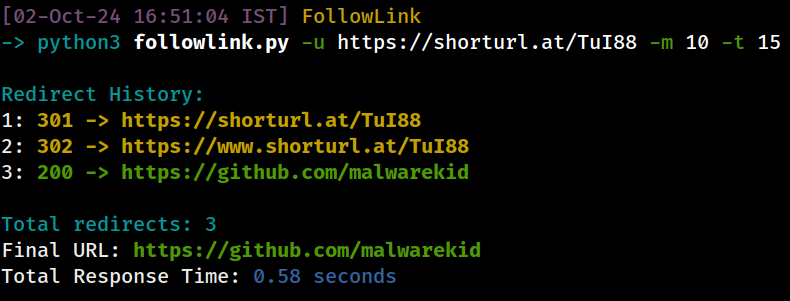
FollowLink is a Python-based command-line tool that allows you to follow and analyze URL redirects. It tracks the history of HTTP redirects, color-codes the HTTP status codes for easy identification, and calculates the total response time. This tool is useful for inspecting shortened URLs or URLs with multiple redirects.
Features
- Max Redirects: Specify the maximum number of redirects to follow.
- Timeout Control: Set timeout for each request to avoid long waits.
- Status Code Coloring:
- Green: 2xx (Success responses)
- Yellow: 3xx (Redirections)
- Red: 4xx (Client errors)
- Magenta: 5xx (Server errors)
- Detailed Redirect History: Displays each redirect step with status codes and URLs.
- Final URL & Time: Outputs the final destination URL and total response time.
How to Use
-
Clone the Repository:
git clone https://github.com/malwarekid/FollowLink.git && cd FollowLink
-
Run the Tool:
python3 followlink.py -u <URL> [-m <max_redirects>] [-t <timeout>]
Example:
python3 followlink.py -u https://bit.ly/3kF6Gk8 -m 10 -t 15
-
Command-Line Parameters:
-uor--url: The URL to follow (required).-mor--max_redirects: Maximum number of redirects (default: 5).-tor--timeout: Timeout for each request in seconds (default: 10).
Example Output
Redirect History:
1: 301 -> http://example.com/redirect1
2: 302 -> http://example.com/redirect2
3: 200 -> http://example.com/final

Total redirects: 3
Final URL: 200 -> http://example.com/final
Total Response Time: 2.34 seconds
Requirements
- Python 3.x
requestslibrarycoloramalibrary
Installation
Install the required dependencies:
pip install -r requirements.txt
Example
To use the tool:
python3 followlink.py -u https://bit.ly/3kF6Gk8 -m 10 -t 15
This will follow the redirects for the provided URL, display the status codes, final destination, and total response time.
Contributors
License
This project is licensed under the MIT License - see the LICENSE file for details.
Notes
Feel free to contribute, report issues, or provide feedback. Don't forget to follow Instagram me on GitHub. Happy URL Tracking!
1 maintainer

Metadata
1 maintainer
Release files for followlink 1.0
For a detailed explanation of source distributions (sdists) and built distributions (wheels), please see the package formats documentation.
Source distribution (sdist)
| File | Size | Uploaded | |
|---|---|---|---|
| followlink-1.0.tar.gz | 4.3 kB | Details |
Built distribution (wheel)
| File | Interpreter | ABI | Platform | Reset |
|---|---|---|---|---|
| followlink-1.0-py3-none-any.whl | Python 3 | none | any | Details |
Total release size: 9.2 kB
Release files / followlink-1.0.tar.gz
| Download URL | followlink-1.0.tar.gz |
|---|---|
| Size | 4.3 kB |
| Tags | Source |
|
SHA-256 checksum How to use checksums |
682d89943c968f937d4f7605b752a2e2d374d2510a148d51ef0d2959e3be175d
|
|
BLAKE2b-256 checksum How to use checksums |
15fcd59a376c21098493b552762d48fa5465ffc540e85dbef11abdddcf6e71c4
|
| Upload date | |
|
Uploaded using Trusted Publishing? What is trusted publishing? |
No |
| Uploaded via |
twine/5.1.1 CPython/3.11.9
|
Release files / followlink-1.0-py3-none-any.whl
| Download URL | followlink-1.0-py3-none-any.whl |
|---|---|
| Size | 4.8 kB |
| Tags | Python 3 |
|
SHA-256 checksum How to use checksums |
bf9088753cf1d780afe9dcc0978ad9691594fbb28784661bfea22b61b222f380
|
|
BLAKE2b-256 checksum How to use checksums |
88205ee4c14b7d522eeda248246dc0bb599a24a0b849f4aded2065f51bbd7f68
|
| Upload date | |
|
Uploaded using Trusted Publishing? What is trusted publishing? |
No |
| Uploaded via |
twine/5.1.1 CPython/3.11.9
|













