
FootsiesGym





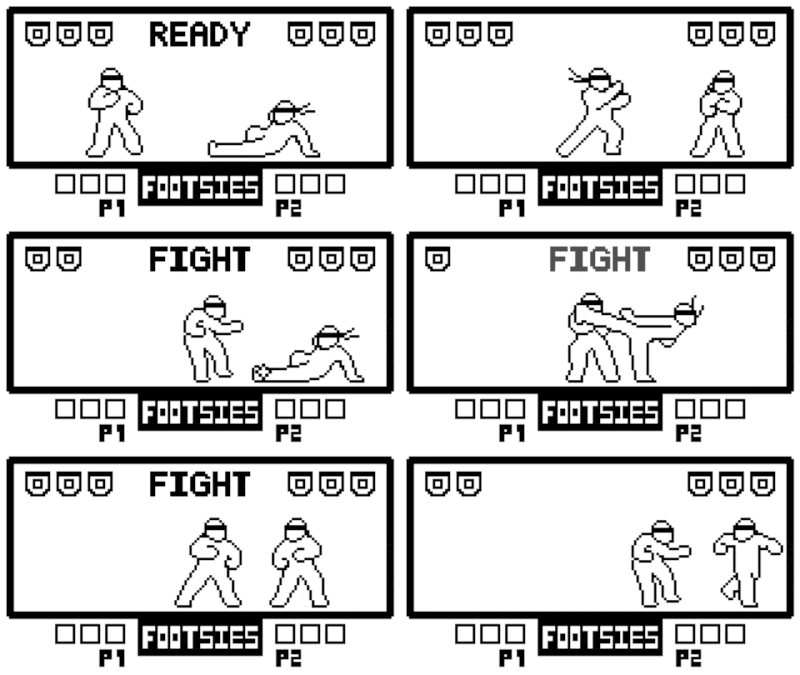
FootsiesGym is a two-player zero-sum reinforcement learning benchmark. It uses the Footsies fighting game by HiFight. For more data, refer to the paper: FootsiesGym: A Fighting Game Benchmark for Two-Player Zero-Sum Imperfect-Information Games.
The environment is a PettingZoo ParallelEnv. It can run the game with one of two backends:
- Unity (default): the original game. The environment controls it through gRPC. FootsiesGym downloads the game binaries automatically.
- C/CUDA: a port of the game in C. Its results are bit-identical to the Unity game. It runs in the Python process, on the CPU or on an NVIDIA GPU.
Documentation
| Topic | Location |
|---|---|
| Configuration, actions, observations, rewards, framework classes | footsiesgym/README.md |
| C/CUDA backend: use, JAX training loops, design, tests | footsiesgym/c/README.md |
| C source code | csrc/README.md |
| Unity game server: architecture, platforms, manual start | binaries/README.md |
| Training examples | experimentation/README.md |
| Benchmark scripts | benchmarking/README.md |
Installation
FootsiesGym needs Python 3.12 or newer. These steps use uv.
uv add footsies-gym                     # the Unity and C backends, numpy
uv add "footsies-gym[cuda]"             # also JAX on NVIDIA GPUs
To run the examples, tests and benchmarks of this repository:
git clone https://github.com/como-research/FootsiesGym.git
cd FootsiesGym
uv sync --all-extras                    # or select extras: uv sync --extra cuda --extra dev
| Extra | Contents | Necessary for |
|---|---|---|
| (none) | numpy, gRPC, PettingZoo | The Unity backend, the C backend on the CPU, tensor_type="numpy" |
jax |
JAX (CPU) | tensor_type="jax", functional=True |
cuda |
JAX with CUDA (Linux) | JAX on an NVIDIA GPU |
dev |
pytest, black, isort, matplotlib, pandas | The tests, the benchmark figures |
Install other packages yourself: PyTorch for tensor_type="torch", and ray[rllib] for wrap_rllib. For the dependencies of the training examples, refer to experimentation/README.md.
The C backend compiles its library on first use. It needs gcc or clang. For device="cuda", it also needs the NVIDIA driver and nvcc.
Quick Start
import footsiesgym

env = footsiesgym.make()           # downloads and starts the game server

obs, infos = env.reset()
while True:
    actions = {agent: env.action_space(agent).sample() for agent in env.agents}
    obs, rewards, terminateds, truncateds, infos = env.step(actions)
    if terminateds["p1"] or truncateds["p1"]:
        obs, infos = env.reset()
With num_envs > 1, the environment runs many games at the same time. Each value is then an array, and its first axis has the length num_envs. When a game ends, step() starts a new game in its position:
env = footsiesgym.make(num_envs=64)
C/CUDA Backend
env = footsiesgym.make(backend="c", num_envs=16384, num_threads=24)                      # CPU, numpy
env = footsiesgym.make(backend="c", num_envs=65536, device="cuda", tensor_type="torch")  # GPU, PyTorch
env = footsiesgym.make(backend="c", num_envs=4096, functional=True)                      # pure functions for jitted JAX loops
For more data, refer to footsiesgym/c/README.md.
Configuration
Give the options to make() as keyword arguments or in a config dictionary:
| Key | Default | Description |
|---|---|---|
backend |
"grpc" |
"grpc" (the Unity game server) or "c" |
num_envs |
1 |
Number of games that run at the same time |
tensor_type |
"numpy" |
Type of the returned arrays: "numpy", "torch" or "jax" |
device |
"cpu" |
"cpu", "cuda" or "cuda:N" (only for backend="c") |
max_t |
4000 |
Number of steps in an episode before truncation |
frame_skip |
4 |
Number of game frames in each step |
action_delay |
8 |
Number of frames before a selected action starts |
headless |
True |
Runs the Unity server headless or in a window (only for backend="grpc") |
For all options, and for the actions, observations and rewards, refer to footsiesgym/README.md.
Rendering
Only the Unity backend can render. Set headless=False to show the game in a window. With backend="c", this setting raises an error.
env = footsiesgym.make(headless=False)
To watch at game speed, wait frame_skip / 60 seconds between steps, as in play_unity.py.
Throughput
 |
 |
| Linux | macOS |
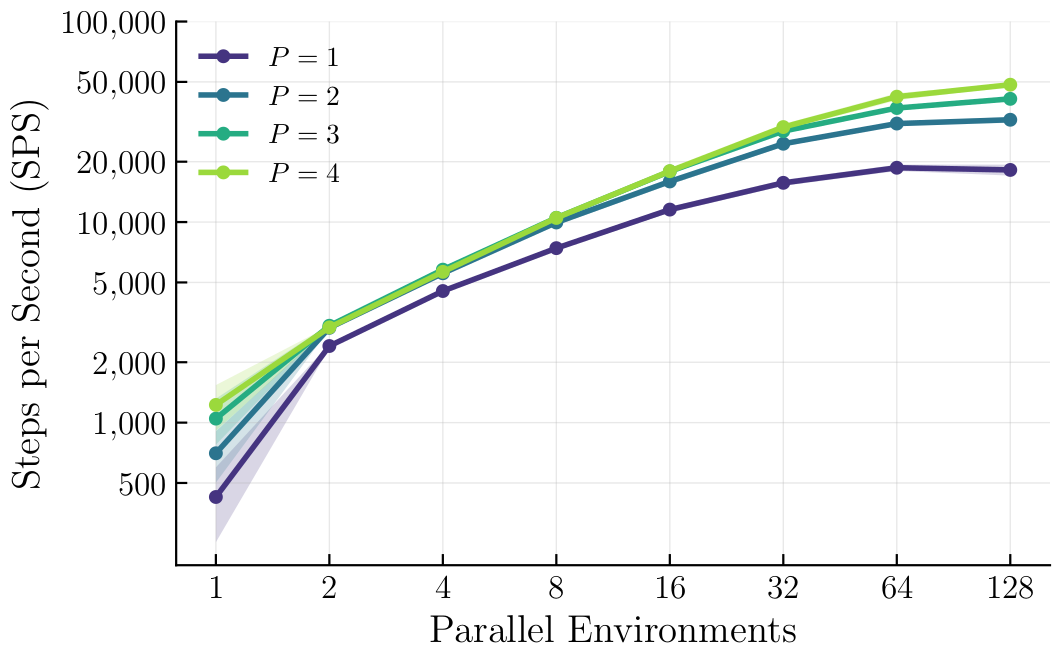
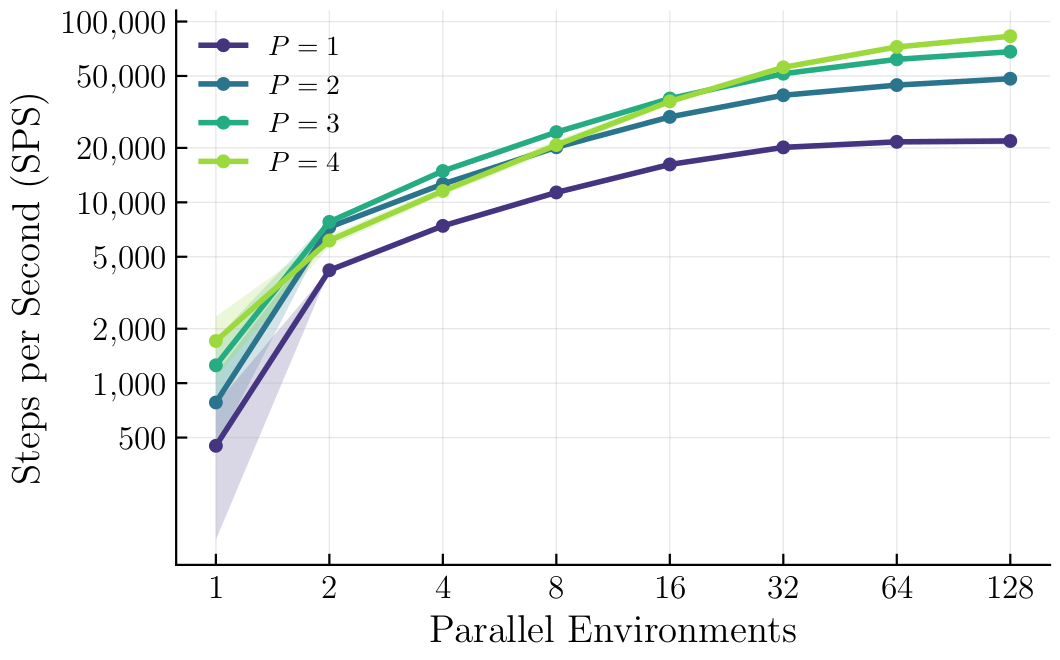
The figures show the Unity backend: environment steps per second for each value of num_envs, with $P$ game-server processes in parallel.
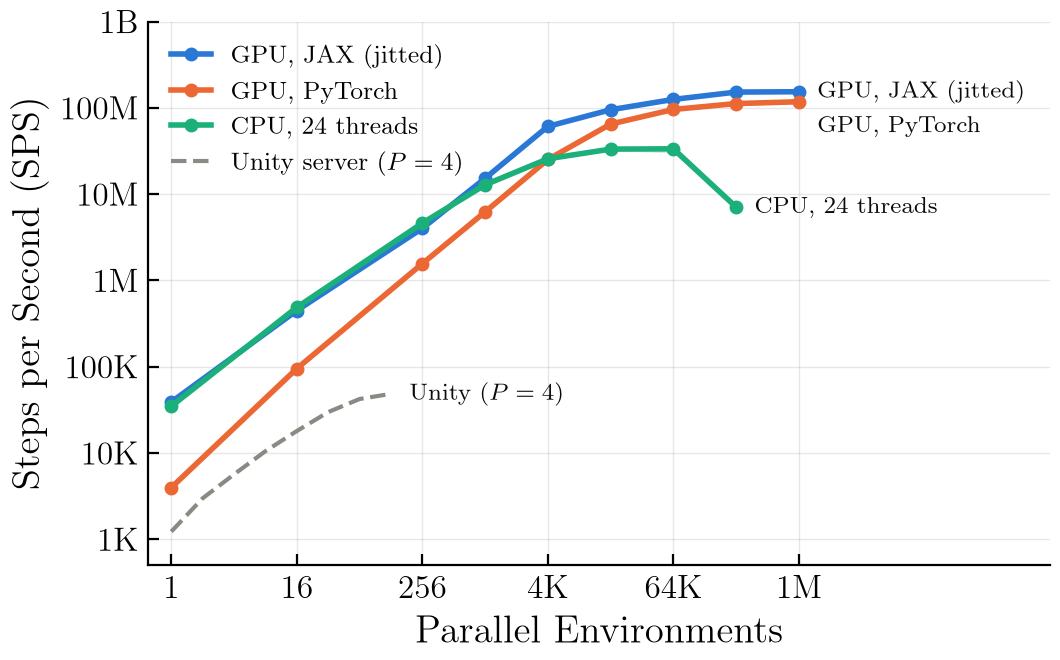
The second figure shows the C backend on one RTX 3090 and on the 24 cores of a Threadripper 3960X. On the GPU, jitted JAX gives approximately 154M steps per second with 1M games. PyTorch gives approximately 118M. On the CPU, the C backend gives approximately 33M steps per second with 16K to 64K games. With more games, the data does not fit in the CPU cache, and the speed decreases. The dashed line is the best Unity configuration.
To get these results again, refer to benchmarking/. The benchmarks need the dev extra.
Development
uv sync --all-extras
uv run pytest -m "not slow"   # the fast tests
uv run pytest                 # all tests: the slow tests start the Unity game server
uv build                      # the wheel and the source distribution
If an extra or a GPU is not available, pytest skips the tests that need it. For the tests of the C backend, refer to footsiesgym/c/README.md.
Citation
@article{mcdonald2026footsiesgym,
  title={FootsiesGym: A Fighting Game Benchmark for Two-Player Zero-Sum Imperfect-Information Games},
  author={McDonald, Chase and Tsang, Nathan and Kerr, Wesley N},
  journal={arXiv preprint arXiv:2607.06514},
  year={2026}
}
License
GNU General Public License v3.0. FootsiesGym is based on the open-source Footsies game by HiFight.
1 maintainer

Metadata
1 maintainer
Release files for footsies-gym 1.1.0
For a detailed explanation of source distributions (sdists) and built distributions (wheels), please see the package formats documentation.
Source distribution (sdist)
| File | Size | Uploaded | Provenance | Actions |
|---|---|---|---|---|
| footsies_gym-1.1.0.tar.gz | 121.2 kB | Without provenance | Details for footsies_gym-1.1.0.tar.gz |
Built distribution (wheel)
| File | Interpreter | ABI | Platform | Actions Reset |
|---|---|---|---|---|
| footsies_gym-1.1.0-py3-none-any.whl | Python 3 | none | any | Details for footsies_gym-1.1.0-py3-none-any.whl |
Total release size: 252.9 kB
Release files / footsies_gym-1.1.0.tar.gz
| Download URL | footsies_gym-1.1.0.tar.gz |
|---|---|
| Size | 121.2 kB |
| Tags | Source |
|
SHA-256 checksum How to use checksums |
c231e010999e74769580e65f51972f59c11cfb90abe5ef40f11228c4957d0702
|
|
BLAKE2b-256 checksum How to use checksums |
4e68a1c35d64ab269e565bf5bf511e04d8e87b3a4259e2ceb5c853368dc6c353
|
| Upload date | |
|
Uploaded using Trusted Publishing? What is trusted publishing? |
No |
| Uploaded via |
twine/7.0.0 CPython/3.13.12
|
Release files / footsies_gym-1.1.0-py3-none-any.whl
| Download URL | footsies_gym-1.1.0-py3-none-any.whl |
|---|---|
| Size | 131.6 kB |
| Tags | Python 3 |
|
SHA-256 checksum How to use checksums |
036e8c68cc525fdbd8efcad6a5a4b8ddb7a169952a10bf0ab295876ee6dee9b3
|
|
BLAKE2b-256 checksum How to use checksums |
181e7b98df85bfaed0abd59f6a6b9631cd94c31a72b33fb2dea7853e2cdf59b3
|
| Upload date | |
|
Uploaded using Trusted Publishing? What is trusted publishing? |
No |
| Uploaded via |
twine/7.0.0 CPython/3.13.12
|
Security for footsies-gym 1.1.0
Provenance
Provenance describes where a file came from. On PyPI, provenance is shared via attestations, which provide a verifiable record of the build or publishing details. View details, limitations and caveats.
No provenance found
None of the files in this release were uploaded with provenance metadata.
A note on package security
PyPI is a repository for distributing packages, not a service for auditing them. While third-party security researchers and our staff do their best to detect and remove malicious packages, PyPI cannot guarantee the quality, security or suitability of any given package.
To learn more about protecting yourself from malicious actors, visit our package security documentation.














