
ForecastOps




ForecastOps is a local-first observability and evaluation layer for production forecasts. It works with the forecasting code you already have.
Add one line after .predict(), then run fops ui.
import forecastops as fops

forecast = model.predict(future)

run = fops.capture(
    forecast,
    project="site-traffic",
    series_id="homepage",
    cutoff=train_df["ds"].max(),
    actuals=actuals_df,
)
fops ui
ForecastOps stores forecast artifacts locally as Parquet, writes run metadata to DuckDB, computes horizon-aware metrics, generates static HTML reports, and serves a read-only local UI. It does not train forecasting models, require a cloud account, or upload raw forecast data.
Install
From PyPI:
pip install forecastops
From source:
git clone https://github.com/Parisi-Labs/forecastops.git
cd forecastops
pip install -e .
Quickstart
python -m venv .venv
source .venv/bin/activate
pip install -e .
python examples/generic_dataframe.py
fops report --latest
fops ui
Open http://127.0.0.1:4784 after starting the UI.
Local UI
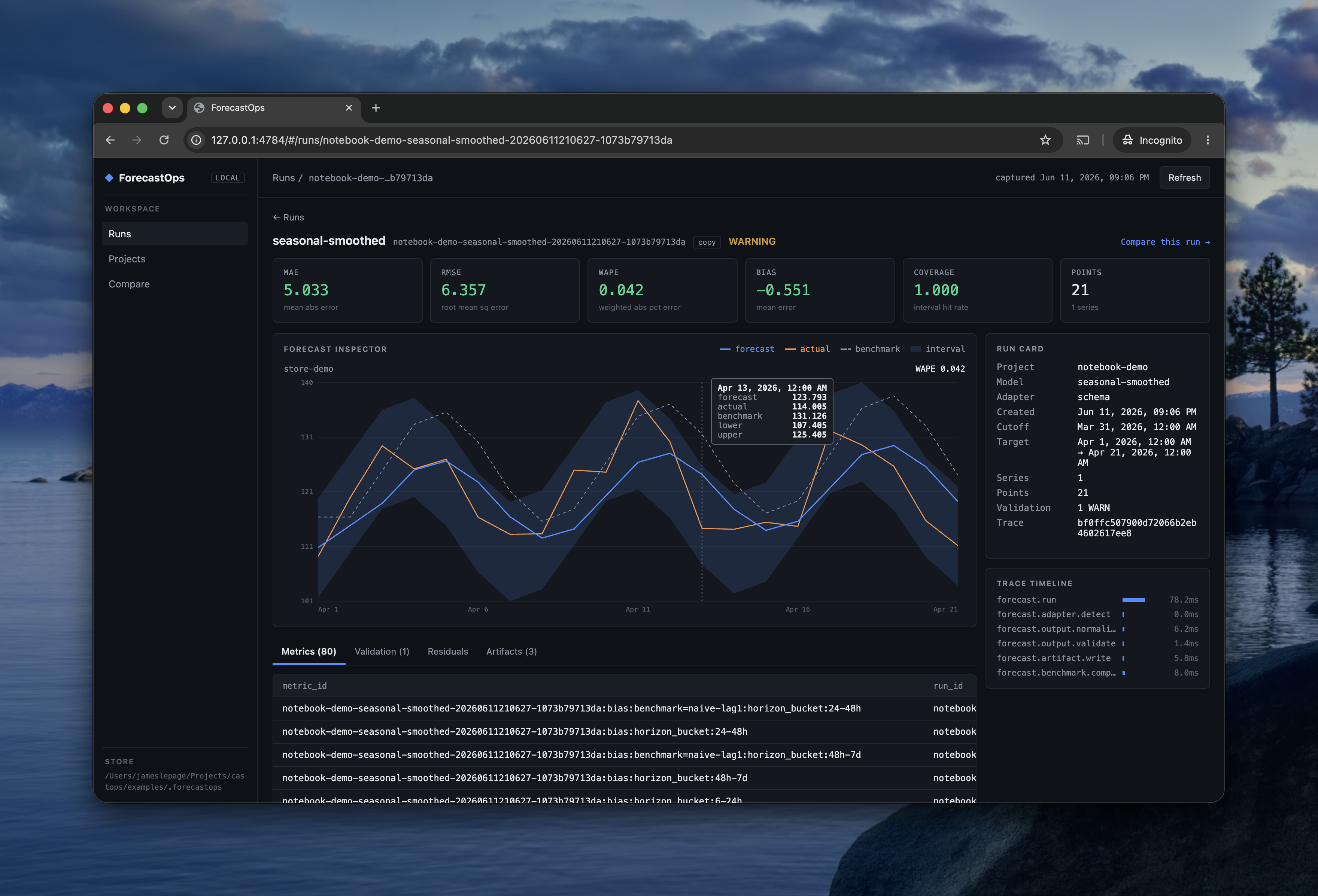
fops ui serves a read-only explorer for the local store:
- Runs — every captured run with horizon, points, MAE, WAPE, bias, coverage, coverage gap, skill, and validation status; filterable and sortable.
- Run detail — headline metrics, a forecast inspector with one chart per series, and a diagnostics cockpit: residual distribution, error by horizon, per-series worst offenders, and per-regime breakdowns — plus metrics, validation, residuals, artifacts, and the capture trace timeline.
- Projects — runs grouped by project with error trends across captures.
- Groups — experiment and backtest groups with run counts and mean error; open a group to see per-metric mean ± std and stability across its runs.
- Compare — metric deltas and regressions between any two runs, backed
by
fops diff.
Core Concepts
capture: normalize forecasts from existing workflows.ForecastSchema: map arbitrary dataframe columns to canonical semantics.validate: catch schema, timestamp, duplicate, interval, and leakage issues.evaluate: compute MAE, RMSE, WAPE, sMAPE, bias, coverage, coverage gap, interval width, pinball loss (for quantile forecasts), and count — sliced by horizon and by any categorical columns you keep (e.g. region, holiday_flag, event_type).compare: calculate benchmark metrics and skill.backtest: evaluate a rolling-origin forecast panel as one grouped run set, with per-cutoff and aggregate (mean/std) metrics.diff: compare two captured runs.diagnose: a machine-readable diagnosis of a run — overall metrics, skill, worst horizons/series/regimes, validation, and artifact URIs — for agents and scripts (fops diagnose <run_id>).- groups: tag related runs with
capture(group=...)(or abacktest) and browse them together in the UI. - local store:
.forecastops/forecastops.duckdbplus Parquet artifacts. - UI: local read-only browser explorer for runs, metrics, residuals, validation, artifacts, and run differences.
Metric Conventions
ForecastOps stores metric values as machine-readable ratios or forecast-unit values, not display-formatted percentages:
- MAE and RMSE are in the same units as the forecast target.
- WAPE is a ratio, so
0.12means 12% weighted absolute percentage error. - sMAPE is the full symmetric MAPE ratio
2 * abs(yhat - actual) / (abs(actual) + abs(yhat)), with values in[0, 2]. - Bias is mean signed error,
mean(yhat - actual). Positive bias means the forecast overestimated actuals; negative bias means it underestimated them. - Coverage is the empirical interval hit rate. When
interval_levelis available as either a ratio (0.9) or percentage (90), ForecastOps also emitscoverage_gap = coverage - interval_level. A positive gap means overcoverage; a negative gap means undercoverage.
Privacy Defaults
ForecastOps is local-first by default:
- binds the UI to
127.0.0.1and refuses other hosts unless you pass--allow-remote - makes no outbound network calls
- stores raw forecast points in the configured local store
- emits OpenTelemetry only when explicitly enabled
- avoids raw forecast points in telemetry
Development
pip install -e ".[dev]"
pytest
ruff check .
mypy forecastops
License
Apache-2.0. See LICENSE.
1 maintainer

Release files for forecastops 0.3.0
For a detailed explanation of source distributions (sdists) and built distributions (wheels), please see the package formats documentation.
Source distribution (sdist)
| File | Size | Uploaded | |
|---|---|---|---|
| forecastops-0.3.0.tar.gz | 88.8 kB | Details |
Built distribution (wheel)
| File | Interpreter | ABI | Platform | Reset |
|---|---|---|---|---|
| forecastops-0.3.0-py3-none-any.whl | Python 3 | none | any | Details |
Total release size: 169.9 kB
Release files / forecastops-0.3.0.tar.gz
| Download URL | forecastops-0.3.0.tar.gz |
|---|---|
| Size | 88.8 kB |
| Tags | Source |
|
SHA-256 checksum How to use checksums |
7783c1bf37750c982dcf517ecfcc0ebf5be6ce374c96fe6044f1cb08e8649940
|
|
BLAKE2b-256 checksum How to use checksums |
ff4c350e631a6b0fac149cbd89acb3b537bc8e41456e6457faa8f1c274fd9d9a
|
| Upload date | |
|
Uploaded using Trusted Publishing? What is trusted publishing? |
Yes |
| Uploaded via |
twine/6.1.0 CPython/3.13.12
|
Provenance
Provenance describes where a file came from. On PyPI, provenance is shared via attestations, which provide a verifiable record of the build or publishing details. View details, limitations and caveats.


PyPI Publish Attestation
PyPI verified that this artifact, at this checksum, originated from the publisher listed below.
Signed by GitHub Actions, verified by PyPI on Jun 25, 2026.
Transparency logRelease files / forecastops-0.3.0-py3-none-any.whl
| Download URL | forecastops-0.3.0-py3-none-any.whl |
|---|---|
| Size | 81.1 kB |
| Tags | Python 3 |
|
SHA-256 checksum How to use checksums |
82764d14b2eec36710f47a23d8c2587571ac5079cc9844a32d084b26dde6b9f6
|
|
BLAKE2b-256 checksum How to use checksums |
719b61c5e4a98d8c237d9f1b08eb3489cde9b20ec17a7130a97c5559d26dd2da
|
| Upload date | |
|
Uploaded using Trusted Publishing? What is trusted publishing? |
Yes |
| Uploaded via |
twine/6.1.0 CPython/3.13.12
|
Provenance
Provenance describes where a file came from. On PyPI, provenance is shared via attestations, which provide a verifiable record of the build or publishing details. View details, limitations and caveats.
PyPI Publish Attestation
PyPI verified that this artifact, at this checksum, originated from the publisher listed below.
Signed by GitHub Actions, verified by PyPI on Jun 25, 2026.
Transparency log













