
Foreman
What actually matters first this morning, across every place your work lives.
Foreman answers that one question, every day, from a single terminal window. Reads your GitHub, Linear, Jira, and Slack. Synthesizes them into one priority surface. Learns how you actually work. Reviews PRs line by line. Triages tickets. All local, all on your own machine.


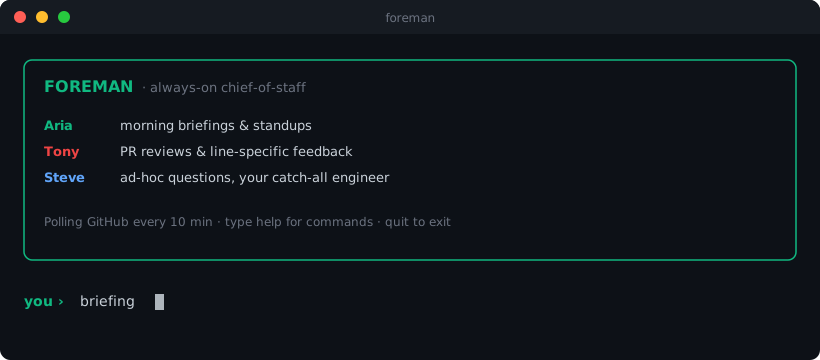
Why this exists
Senior engineers spend 30 to 60 minutes every morning reconstructing context across GitHub, Linear, Jira, and Slack. What changed overnight, what's blocked on me, what's urgent, what can wait, how much focus time I have before my first meeting. Existing tools either show you everything (notifiers) or show you nothing useful (digest emails). Neither learns your patterns.
Foreman is a small team of specialized AI agents. Each one owns a domain. They share a memory of how you work. They surface only the things you'd actually want surfaced.
It runs locally. Your data never leaves your machine.
The morning briefing
One command, one answer. Aria reads your live state across every source you've configured and tells you what actually matters today, with a concrete first action.
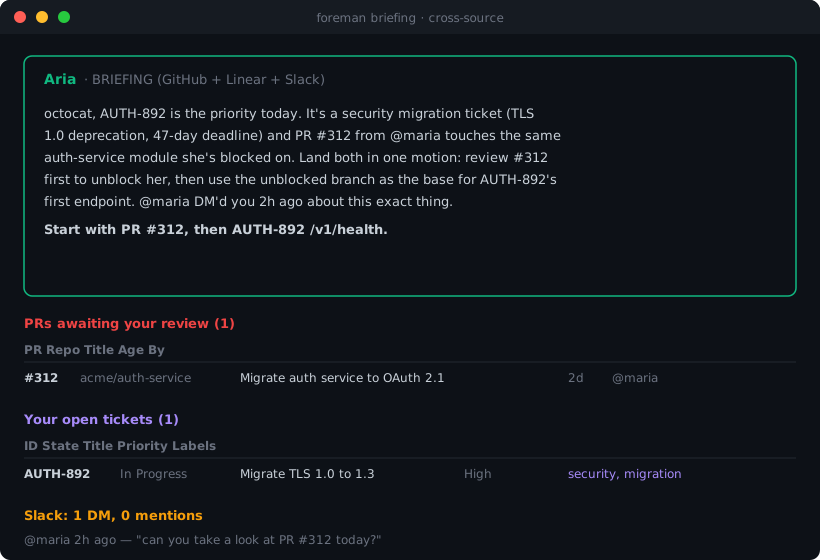
The narrative is generated each run from your real state. It's not a templated digest. When a PR, a ticket, and a DM are about the same problem, Aria sees the link and tells you. That cross-source synthesis is the moat.
Foreman learns how you work
This is the part that makes it not-a-notifier.
Every briefing, PR review, ticket triage, and ad-hoc question logs to a local SQLite. Run foreman learn and a synthesis pass extracts patterns about how you actually work. Those patterns feed every future briefing, so the longer you use it, the sharper it gets.
A typical pattern set after a couple weeks of real use:
· You review PRs from @sarah within 3 hours on average; longer for other authors.
· You treat labels {security, migration, cve} as drop-everything regardless of priority field.
· You ignore ~80% of #engineering-general mentions but reply to all DMs within an hour.
· You don't close stale PRs until prompted.
· You tend to query for information without acting between queries.
Aria then uses these to sharpen the briefing. Instead of "you have 3 open PRs" you get something like "the run-ingestion PR is 61 days old and has no reviewer; the blocker is likely a missing decision, not missing time. Past pattern says you don't close stale PRs without a nudge — close the two abandoned ones now while you're here."
That's the difference between a tool that lists your inbox and a chief of staff that knows you.
Real PR reviews
Tony reads the unified diff and produces a focused review with file:line references, prioritized by what actually breaks production. Bugs, missing error handling, security, breaking API changes, missing tests.
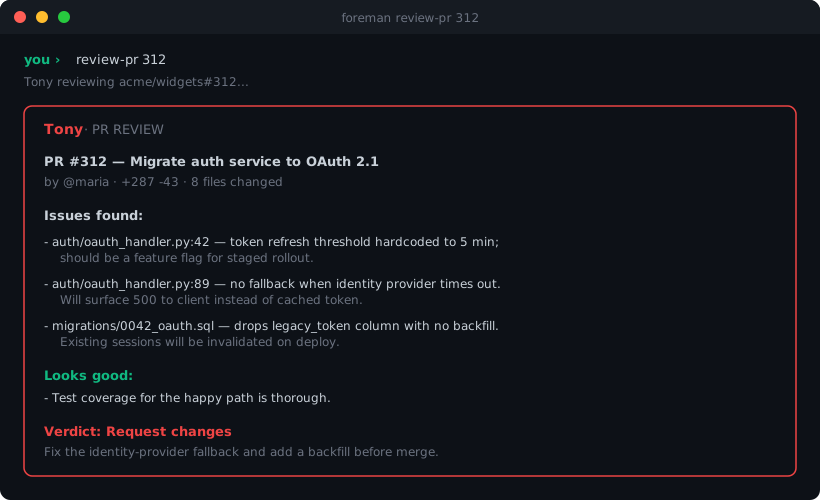
You stay in the loop. Tony tees up the context so you're not starting cold.
Ticket triage with a real plan
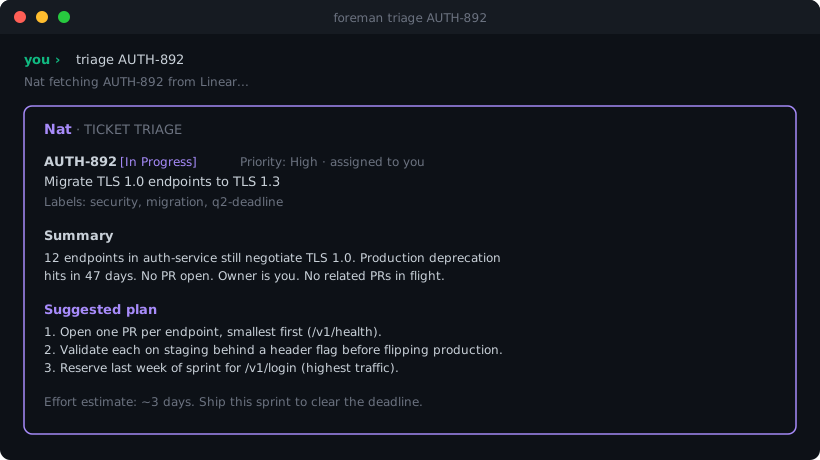
Nat reads a Linear or Jira ticket and produces a structured triage: a summary, a concrete plan with verb-and-target steps, and an effort estimate. Security and migration labels get escalated automatically.
Slack digest, not Slack noise
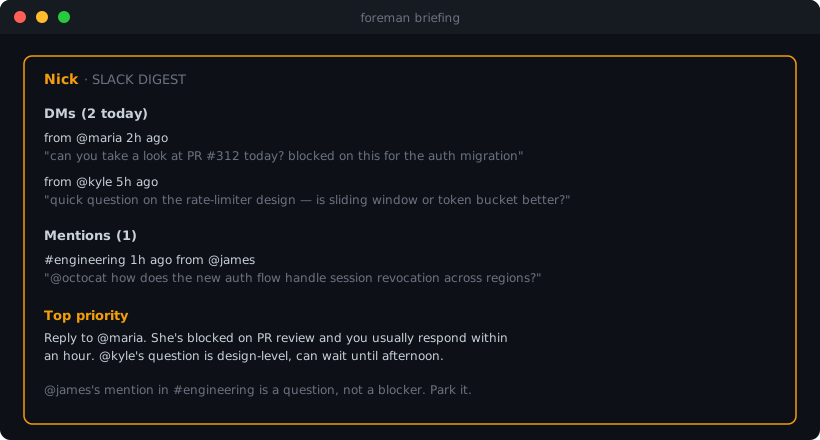
Nick distinguishes "FYI ping" from "needs your input" from "blocking someone right now." Real Slack OAuth, no cookie scraping.
Ask anything
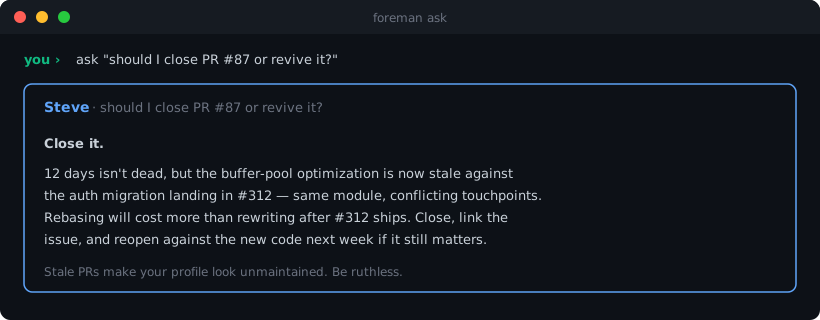
Steve has read access to your live state across every connector. Senior-engineer voice, no fluff. Gives a recommendation, not options.
Meet the team
| Agent | Color | Domain |
|---|---|---|
| Aria | 🟢 emerald | Daily briefings, standups, cross-source synthesis, memory-aware prioritization |
| Tony | 🔴 red | PR reviews with line-specific feedback |
| Nat | 🟣 violet | Linear + Jira triage, security and migration escalation |
| Nick | 🟡 amber | Slack DMs, mentions, urgency scoring |
| Steve | 🔵 blue | Catch-all questions, your fallback engineer |
Each agent has its own scoped tool set, its own memory namespace, and a clear domain it refuses to leave. They are not prompt-prefix personas. They're real specialized agents.
Quick start
pip install foreman-cli
Requires Python 3.11+.
You'll need:
- Anthropic API key: console.anthropic.com. $5 lasts roughly 1000 briefings on Sonnet.
- GitHub Personal Access Token: github.com/settings/personal-access-tokens/new with
Contents: ReadandPull requests: Read. - Linear API key (optional): linear.app/settings/account/security.
- Jira API token + email (optional): id.atlassian.com/manage-profile/security/api-tokens.
- Slack User OAuth Token (optional): api.slack.com/apps → create app → User Token Scopes:
im:read im:history users:read search:read.
Create a .env in your working directory:
ANTHROPIC_API_KEY=sk-ant-...
GITHUB_TOKEN=github_pat_...
GITHUB_USER=your-github-username

# Optional connectors below
LINEAR_API_KEY=lin_api_...
JIRA_BASE_URL=https://your-org.atlassian.net
JIRA_EMAIL=you@example.com
JIRA_API_TOKEN=...
SLACK_USER_TOKEN=xoxp-...
Then:
foreman doctor      # verify config + connectors
foreman run         # always-on REPL with background polling
Commands
foreman briefing              Aria's morning briefing across every configured source
foreman standup               standup notes from yesterday's activity
foreman review-pr <n>         Tony reviews a PR (auto-detects repo)
foreman triage <id>           Nat triages a Linear or Jira ticket (auto-detects source)
foreman digest                Nick's Slack DM digest
foreman ask "..."             Steve answers anything
foreman learn                 Synthesize patterns from your activity (memory layer)
foreman history               Recent agent activity
foreman run                   Always-on REPL: type any of the above, or just ask Steve
Inside foreman run, a background poller checks GitHub every 10 minutes and surfaces new PRs inline plus as macOS notifications.
How it works
┌─────────────────────────────────────────────────────────────┐
│                       foreman process                       │
│                                                             │
│  ┌─────────┐ ┌─────────┐ ┌─────────┐ ┌─────────┐ ┌────────┐ │
│  │ GitHub  │ │ Linear  │ │  Jira   │ │  Slack  │ │  ...   │ │
│  └────┬────┘ └────┬────┘ └────┬────┘ └────┬────┘ └────┬───┘ │
│       └───────────┴───────────┴───────────┴───────────┘     │
│                            ▼                                │
│            ┌─────────────────────────────┐                  │
│            │    Event Bus (asyncio)      │                  │
│            └──────────────┬──────────────┘                  │
│                           ▼                                 │
│   ┌──────────────────────────────────────────────────┐      │
│   │  Memory (SQLite)  ◄── episodic log + patterns    │      │
│   └────────────────────────┬─────────────────────────┘      │
│                            ▼                                │
│            ┌────────┬─────────┬─────────┬─────────┐         │
│            │  Aria  │  Tony   │  Nat    │  Nick   │ Steve   │
│            └────┬───┴────┬────┴────┬────┴────┬────┴────┬────┘
│                 ▼        ▼         ▼         ▼         ▼    │
│            ┌─────────────────────────────────────────┐      │
│            │      Rich TUI + macOS notifications     │      │
│            └─────────────────────────────────────────┘      │
└─────────────────────────────────────────────────────────────┘
Architecture rationale (why SQLite not JSONL, why specialized agents not a megaprompt, why local-first) lives in docs/architecture.md.
Connectors
| Connector | Auth | Status |
|---|---|---|
| GitHub | Personal Access Token | ✅ shipped |
| Linear | API key | ✅ shipped |
| Jira | API token + email | ✅ shipped |
| Slack | User OAuth token | ✅ shipped |
| Google Calendar | OAuth | shipping next |
| Sentry | Auth token | shipping next |
Adding a connector is a single file in foreman/connectors/ plus registration. Adding an agent is a single file in foreman/agents/ plus a versioned prompt in foreman/llm/prompts/.
Privacy and local-first
- Every token (GitHub, Linear, Jira, Slack, Anthropic) lives in
.envon your machine. They never leave. - All state — briefings, reviews, learned patterns, activity history — is stored in a single SQLite file at
~/Library/Application Support/foreman/foreman.db. - LLM calls go directly from your machine to Anthropic. There is no Foreman-operated server in the middle.
- No telemetry. No analytics. No "anonymous usage data."
Roadmap
- ✅ v0.1–0.5: GitHub connector, Aria, Tony, Steve, memory log, daemon mode
- ✅ v0.6–0.7: Linear, Slack, PyPI release
- ✅ v0.8: Memory synthesis (Foreman starts learning your patterns), Jira connector, cross-source briefings (you are here)
- 🔜 v0.9: Google Calendar (time-budget awareness), Sentry (production-risk axis)
- 🔜 v1.0: Automatic nightly memory synthesis, prioritization engine with explicit "why this matters" reasons, brew-installable, public-launch ready
Contributing
Issues and PRs welcome. If you're a senior engineer who wants Foreman to surface things it doesn't currently, open an issue describing the signal and how you'd want it framed. That drives the roadmap more than my guesses.
License
MIT. See LICENSE.
1 maintainer

Metadata
1 maintainer
Release files for foreman-cli 0.8.0
For a detailed explanation of source distributions (sdists) and built distributions (wheels), please see the package formats documentation.
Source distribution (sdist)
| File | Size | Uploaded | |
|---|---|---|---|
| foreman_cli-0.8.0.tar.gz | 83.4 kB | Details |
Built distribution (wheel)
| File | Interpreter | ABI | Platform | Reset |
|---|---|---|---|---|
| foreman_cli-0.8.0-py3-none-any.whl | Python 3 | none | any | Details |
Total release size: 132.7 kB
Release files / foreman_cli-0.8.0.tar.gz
| Download URL | foreman_cli-0.8.0.tar.gz |
|---|---|
| Size | 83.4 kB |
| Tags | Source |
|
SHA-256 checksum How to use checksums |
5308e480bf50e1b286a18150533fbd94a2b576fe17600409a437af3c588e4be3
|
|
BLAKE2b-256 checksum How to use checksums |
ef0210b1facfeccca28cd2cfbb68cf132869198a71a8c7481e01658daeda53d1
|
| Upload date | |
|
Uploaded using Trusted Publishing? What is trusted publishing? |
No |
| Uploaded via |
uv/0.11.8 {"installer":{"name":"uv","version":"0.11.8","subcommand":["publish"]},"python":null,"implementation":{"name":null,"version":null},"distro":{"name":"macOS","version":null,"id":null,"libc":null},"system":{"name":null,"release":null},"cpu":null,"openssl_version":null,"setuptools_version":null,"rustc_version":null,"ci":null}
|
Release files / foreman_cli-0.8.0-py3-none-any.whl
| Download URL | foreman_cli-0.8.0-py3-none-any.whl |
|---|---|
| Size | 49.3 kB |
| Tags | Python 3 |
|
SHA-256 checksum How to use checksums |
3a9aa1833130f2873cbb1898d4d37cfe31c9c9f2ac308cd83b550182a5a62517
|
|
BLAKE2b-256 checksum How to use checksums |
d6f683a0c2238e77567aa395d141db1bbf50771743a601f3a3e4a755dfc5b7d4
|
| Upload date | |
|
Uploaded using Trusted Publishing? What is trusted publishing? |
No |
| Uploaded via |
uv/0.11.8 {"installer":{"name":"uv","version":"0.11.8","subcommand":["publish"]},"python":null,"implementation":{"name":null,"version":null},"distro":{"name":"macOS","version":null,"id":null,"libc":null},"system":{"name":null,"release":null},"cpu":null,"openssl_version":null,"setuptools_version":null,"rustc_version":null,"ci":null}
|














