




One sentence
foreman-plane is a governance plane that runs outside the agent harness. DeepSeek Harness, Claude Code, Codex and any CLI agent are interchangeable execution bodies. What the plane owns is the part a session cannot own: dispatch, dependency gating, objective acceptance and an append-only ledger.
A promise the agent forgot is not a promise. The verdict is derived from files on disk, so it outlives the session that produced it.
It is sized for one person, one machine, one state directory — a personal tool, not an enterprise platform. See Scope.
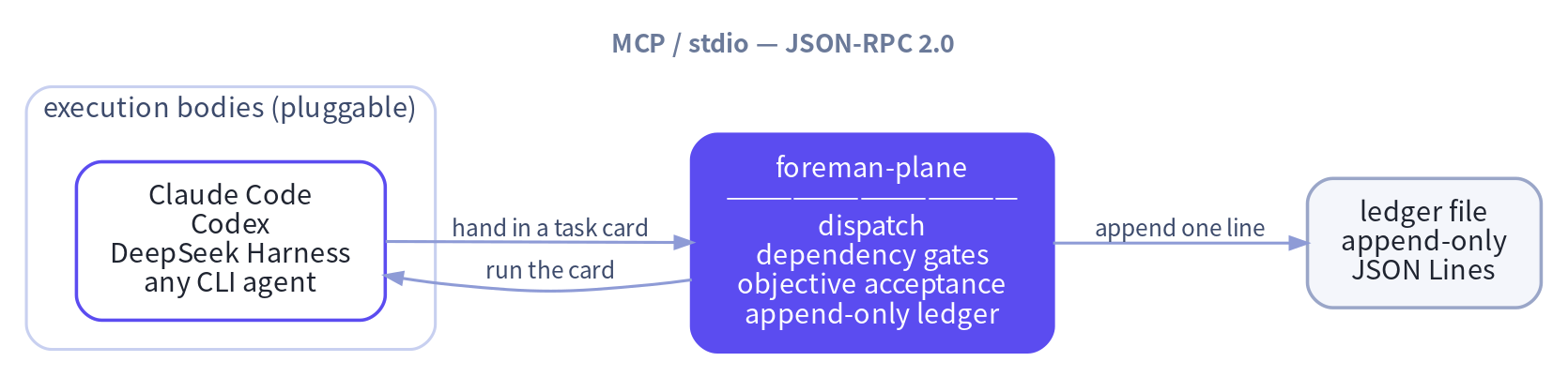
┌──────────────────┐        ┌──────────────────────┐
│ execution bodies │        │ foreman-plane        │
│ Claude Code      │ ─────▶ │ dispatch             │
│ Codex            │        │ dependency gates     │
│ DeepSeek Harness │ ◀───── │ objective acceptance │
│ any CLI agent    │        │ append-only ledger   │
└──────────────────┘        └──────────────────────┘
  MCP / stdio — JSON-RPC 2.0, one JSON object per line
- Cross session — the ledger outlives every conversation.
- Cross instance — several agents share one task graph.
- Cross day — a task dispatched today can be resumed tomorrow by any body.
- Zero intrusion — the plane is a plain process, no agent framework has to be patched.
Zero third-party dependencies. Python ≥ 3.10, standard library only.
Why foreman-plane?
| Capability | What it changes |
|---|---|
| Two-level dependency gate | A card with [depends_on] cannot start until every upstream is terminal, passed and accepted. [needs_api] is the soft level: a missing artefact is reported, the task still runs. |
| Objective acceptance | Pass and fail are computed from the artefact — min_bytes, sha256, contains, exit_code. A task that promises a report but writes no file fails. |
| No ghost dispatch | A card stopped by the gate writes a blocked event and no dispatch event, so the ledger can never show a task that never ran. |
| Append-only ledger | One JSON line per decision. History is never rewritten or deleted, and it can be queried, diffed and audited by something that is not an LLM. |
| Pluggable execution bodies | The plane picks no model and does not care which command runs a card. Swap the command, keep the governance. |
| Unparsed dependencies are fatal | A dependency marker that cannot be parsed refuses the dispatch. It is never silently dropped. |
Scope — a personal tool, not an enterprise platform
foreman-plane is deliberately small. It is designed for one person, one machine, one state directory — not for a team, a fleet or a regulated org. Saying this out loud is part of the design: a tool that pretends to be a platform costs you more in configuration than it saves.
What it is
- A plain process. Start it when you need it, stop it when you are done.
- One directory of state (
FOREMAN_HOME) and one append-only JSONL ledger. - A handful of interchangeable CLI agents, a few repositories, one task graph.
- State you can read with
catandjq— no service account, no proprietary store.
What it is not, and is not going to grow into
| Not this | Why — and what to use instead |
|---|---|
| A multi-tenant platform | No tenancy, no RBAC, no SSO, no audit export. One FOREMAN_HOME belongs to one person. |
| A durable workflow engine | No daemon, no queue broker, no timers, no HA, no retries at scale. For resumable long-running workflows use Temporal, Airflow or Argo Workflows. |
| A database | The ledger is a JSONL file — fast and auditable at the scale of one person's tasks, not a sharded store with a query planner. |
| An enterprise audit product | No retention policy engine, no signed reports, no compliance controls. |
| A place for business logic | The plane decides nothing. Your agent owns the work; the plane owns the sequence, the gate and the verdict. |
| A dashboard | The whole surface is CLI, MCP stdio and a Python API. There is no UI and no web server. |
Why this is a feature
The tool fits in one directory, starts in milliseconds, and can be read end to end with a text editor. If your requirement is "our forty-person org needs approval workflows with SLA clocks and a Postgres-backed audit trail", this is the wrong tool and you should not spend an afternoon on it. If it is "my agents keep forgetting what they promised last week and I want a ledger that says so", it is exactly the right size.
Where it stops and something else starts
| If you need | Use |
|---|---|
| Durability across days, HA, thousands of concurrent tasks | Temporal / Airflow / Argo Workflows |
| A team-wide approval and audit product | Jira / ServiceNow / a workflow platform with a real admin model |
| Human task tracking and reporting | Beads, or a plain issue tracker |
| A single-machine, dependency-aware, model-free task ledger for your own agents | foreman-plane |
What it feels like
You:
Finish these reports first, then let the downstream job merge them.foreman-plane: Three cards. The downstream one carries
[depends_on], so it cannot even start while the upstream files are missing. When everything is done the artefacts get checked again, a missing field meansfail, and the ledger records which file fell short.
Install
pip install foreman-plane
You get two identical commands — use whichever you like:
foreman-plane --help   # canonical
gongtou --help          # short alias (工头)
There is deliberately no foreman command. That name is already taken by
other projects — an AI orchestration engine on npm, an infrastructure manager
on GitHub — and two packages shipping the same binary name is a real conflict
on PATH. The Python package is foreman_plane, so it does not collide with
the unrelated foreman library on PyPI either.
Or run it straight from a checkout:
cd foreman-plane
export PYTHONPATH="$PWD/src"
export FOREMAN_HOME="$PWD/.foreman"
Ready to run it? Deployment below is the step-by-step: where the plane keeps its state, which command executes a card, the first card you hand in, and how to wire it into your harness.
Deployment
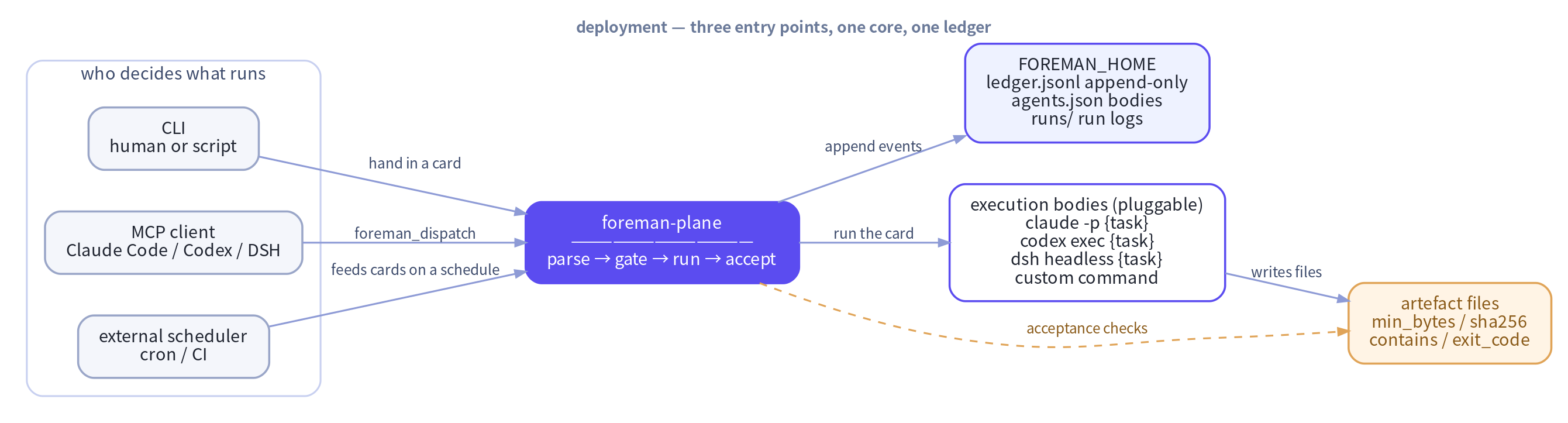
foreman-plane is a plain process, not a service. There is no daemon, no port, no database and no scheduler. "Deploying" it is three decisions, not a deployment guide:
| Decision | Where | Default |
|---|---|---|
| Where the plane keeps its state | FOREMAN_HOME |
$HOME/.foreman |
| Which command executes a card | ${FOREMAN_HOME}/agents.json |
the built-in generic — empty, so it fails until you define it |
| Who may hand in cards | the caller: a person, a script or an MCP client | — |
Step 0 — check the install
pip install foreman-plane
foreman-plane --help
foreman-plane config
foreman-plane and gongtou are the same program. The module entry points are
python -m foreman_plane.cli and python -m foreman_plane.mcp_server.
foreman-plane config prints the effective home, the ledger path, the run directory
and the known execution bodies. Nothing is written yet.
Step 1 — give the plane a home
export FOREMAN_HOME=/var/lib/foreman
foreman-plane config
Everything the plane owns lives under FOREMAN_HOME:
| Path | Written by | Purpose |
|---|---|---|
ledger.jsonl |
the plane | the append-only audit ledger — the source of truth |
runs/ |
the plane | one log file per run: stdout, stderr, exit code |
agents.json |
you | the execution bodies |
FOREMAN_HOME resolves as: the environment variable → $HOME/.foreman →
<cwd>/.foreman. It works even when HOME is not set. The home and runs/
are created automatically; agents.json is only read, never written for you.
Step 2 — pick an execution body
cat > /var/lib/foreman/agents.json <<'JSON'
{
  "agents": {
    "dsh":    {"command": "dsh headless {task}"},
    "claude": {"command": "claude -p {task}"},
    "codex":  {"command": "codex exec {task}"},
    "mybot":  {"command": "mybot run --prompt {task}"}
  }
}
JSON
Two placeholders are available: {task} — replaced with the whole task card —
and {workdir} — replaced with the working directory. A template without
{task} is refused: the plane will not guess what the agent should be
told, so the run ends with exit_code: 127 before anything starts.
The command is executed as a subprocess — no shell, so there is no quoting to
get wrong — in the working directory you pass to dispatch, under a
wall-clock limit of FOREMAN_TIMEOUT seconds (default 900).
The names claude, codex, dsh and generic already exist; your
agents.json overrides or extends them. generic has an empty command, so a
card dispatched to it ends with exit_code: 127 — the plane never guesses an
agent for you.
Step 3 — hand in your first card
Every card needs an [id]; a card without one is refused
(task_id_missing).
cat > /tmp/card.md <<'MD'
[id] T-20261109-01
[acceptance] reports/report.md::min_bytes=200::contains=Conclusion

Read the notes and write a summary. End it with a "Conclusion" section.
MD

foreman-plane dispatch --file /tmp/card.md --agent dsh --workdir /srv/work
The command runs the card to completion and then reports the verdict:
task_id: T-20261109-01
ok: true
verdict: pass
acceptance_ok: true
exit_code: 0
--json prints the whole receipt instead. Exit codes: 0 success, 2 blocked
by the gate, 3 artefact acceptance failed, 1 anything else.
Step 4 — let an orchestrator drive it
This is the usual deployment: an agent decides what to run, the plane guarantees when and whether. The agent talks MCP over stdio — one JSON object per line, no port, no daemon to keep alive.
DeepSeek Harness — no plugin code, just point the profile at the server:
# ~/.dsh/profiles/headless/cordis.patch.yml
mcp:
  servers:
    - name: foreman
      command: python3
      args:
        - -m
        - foreman_plane.mcp_server
      env:
        FOREMAN_HOME: /var/lib/foreman
Claude Code, Codex or any MCP client:
{
  "mcpServers": {
    "foreman": {
      "command": "python3",
      "args": ["-m", "foreman_plane.mcp_server"],
      "env": { "FOREMAN_HOME": "/var/lib/foreman" }
    }
  }
}
The orchestrator gets three tools: foreman_dispatch, foreman_status,
foreman_cancel.
Who decides what gets dispatched
The plane never decides. It has no planner, no model, no priority queue and no scheduler. It executes the cards it is handed and refuses the ones whose hard dependencies are not met yet.
decides → writes a card → hands it in (CLI / MCP) → plane gates, runs, accepts
A blocked card is not woken up automatically: once the upstream passes,
the orchestrator (or you) submits the card again. blocked is deliberately
not dispatched, so a blocked task stays re-dispatchable — otherwise the task
graph would deadlock and the upstream could never unblock it.
Configuration reference
| Variable | Default | Meaning |
|---|---|---|
FOREMAN_HOME |
$HOME/.foreman |
plane home: ledger, run logs, agents.json |
FOREMAN_TIMEOUT |
900 |
execution timeout in seconds |
FOREMAN_AGENT |
generic |
default execution body |
FOREMAN_ACTOR |
foreman |
actor recorded in the ledger |
What foreman-plane does not do
- No daemon, no scheduler, no cron, no HTTP API, no port to open.
- It does not choose an agent, a model or a priority.
- It does not retry a blocked card for you.
- It does not believe the model about the outcome — only files.
For where this stops being the right tool, see Scope.
Troubleshooting
| Symptom | What it means | Fix |
|---|---|---|
exit 2, dependency_pending |
the upstream has not finished yet | wait for it, then submit the card again |
exit 2, dependency_unaccepted |
the upstream ran but its artefact failed | fix the upstream, then re-submit |
exit 2, dependency_unknown |
that upstream id was never dispatched | check the id |
exit 2, dependency_unparsed |
the [depends_on] marker could not be parsed |
fix the card — the plane refuses to guess |
exit 2, dependency_cycle |
the dependency graph loops | break the cycle |
exit 2, duplicate_task |
that id already has a dispatch event |
a new id, --force, or foreman-plane ledger replan |
exit 2, task_id_missing |
the card has no [id] |
add one |
| exit 3 | the artefact is missing, too small or missing the marker | read the run log in runs/ |
exit_code: 127, no such agent, or its command template is empty |
the agent name is not in agents.json |
add the agent, or use one of the built-ins |
exit_code: 127, command template has no {task} placeholder |
the template forgot the placeholder | add {task} |
exit_code: 127, executable is not on PATH |
the command cannot be found | fix agents.json or PATH |
The CLI exit code and the agent's exit code are different things: exit 2
and exit 3 are the CLI's, while exit_code: in the receipt is the
execution body's. Every failed run — including the ones that never started —
leaves a log under ${FOREMAN_HOME}/runs/, and the receipt carries the tail
of stderr.
The task card
A task card is plain text. Four markers may appear anywhere in it:
| Marker | Meaning |
|---|---|
[id] |
task id, shaped like T-YYYYMMDD-NN |
[depends_on] |
hard dependency: the upstream must be terminal, passed and accepted |
[needs_api] |
soft dependency: the artefact only has to exist, not be finished |
[acceptance] |
acceptance artefact plus optional objective criteria |
[id] T-20261109-20
[depends_on] T-20261109-01
[needs_api] T-20261109-01#/var/lib/foreman/api/order_book.json
[acceptance] reports/order_book_20261109.md::min_bytes=200::contains=Conclusion

Read order_book.json, produce the report and add a Conclusion section.
The half-width bracketed form above is the canonical one. The full-width
variants such as 【id】 and the colon forms such as id: are still accepted,
as are full-width spaces and colons. What never happens is a silent drop —
a dependency marker that cannot be parsed refuses the dispatch with
dependency_unparsed.
What the plane guarantees
How one card runs
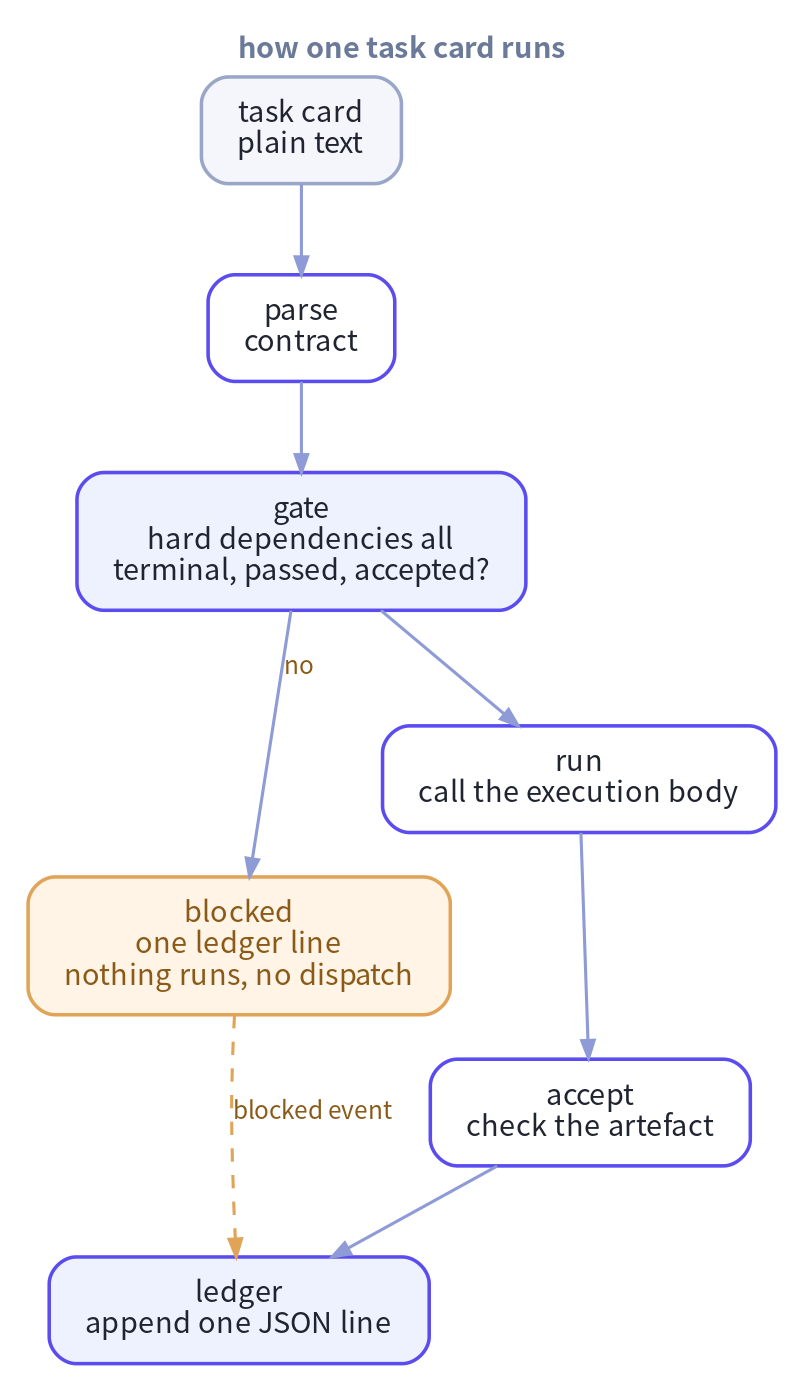
  task card
    │
    ├─ parse ──▶ contract: id / hard dependencies / soft dependencies / acceptance criteria
    │
    ├─ gate ───▶ every hard dependency terminal, passed and accepted?
    │              ├─ no  ──▶ blocked: one ledger line, nothing runs, no dispatch event
    │              └─ yes
    │                   ▼
    ├─ run ────▶ call the execution body: Claude Code / Codex / DSH / any command
    │
    ├─ accept ─▶ check the artefact: min_bytes / sha256 / contains / exit_code
    │
    └─ ledger ─▶ append one JSON line: dispatch / running / done / blocked / …
Hard gate — a task never runs too early
A card with [depends_on] is released only when every upstream task is
terminal, verdict=pass and artefact acceptance passed. Otherwise the plane
writes a blocked event and stops. There is no dispatch event for a task
that did not run, so the ledger cannot show a ghost dispatch.
[depends_on] T-20261109-01  →  upstream done, verdict=pass   →  released
                             →  upstream still running        →  blocked(dependency_pending)
                             →  upstream unknown               →  blocked(dependency_unknown)
                             →  upstream verdict=fail          →  blocked(dependency_failed)
                             →  unparsable dependency marker   →  blocked(dependency_unparsed)
Soft gate — a task may start without a missing artefact
[needs_api] marks artefacts that must be ready but do not have to be
finished. A missing artefact is reported as needs_api_pending and the task
still runs.
Objective acceptance — the artefact decides, not the model
[acceptance] reports/report.md::min_bytes=200::sha256=<hex>::contains=Conclusion
Supported criteria: min_bytes, sha256, contains, exit_code. All
criteria are ANDed, relative paths resolve against the working directory, and
an unknown criterion fails closed.
Append-only audit trail
Every decision is one JSON line in ${FOREMAN_HOME}/ledger.jsonl:
{"ts":"2026-11-09T09:41:02.113456+00:00","event":"dispatch","task_id":"T-20261109-20","actor":"foreman","depends_on":["T-20261109-01"],"needs_api":[],"acceptance":"reports/report.md::min_bytes=200","needs_api_pending":false,"detail":{}}
Event types: dispatch, running, blocked, done, cancelled, replan.
History is never rewritten or deleted.
MCP tools
| Tool | Purpose |
|---|---|
foreman_dispatch |
dispatch a task card: parse, gate, run, accept |
foreman_status |
ledger status of one task or of everything |
foreman_cancel |
cancel a task; unknown ids are rejected |
The tool names keep their foreman_ prefix: they are a namespace inside MCP,
not a binary name, so the CLI rename does not touch them.
CLI
foreman-plane dispatch --file TASK.md [--agent NAME] [--workdir DIR] [--force] [--json]
foreman-plane status   [--task-id ID] [--json]
foreman-plane ledger   list | show | ready | blocked | cancel | replan
foreman-plane verify   --acceptance "<acceptance string>"
foreman-plane mcp
foreman-plane config
Exit codes: 0 success, 2 blocked by the gate, 3 artefact acceptance failed,
1 anything else.
Development
PYTHONPATH=src python3 -m unittest discover -s tests -v
The specification lives in docs/SPEC.md, the wire contract in
docs/PROTOCOL.md.
License
MIT — see LICENSE.
1 maintainer

Metadata
1 maintainer
Release files for foreman-plane 0.2.0
For a detailed explanation of source distributions (sdists) and built distributions (wheels), please see the package formats documentation.
Source distribution (sdist)
| File | Size | Uploaded | Provenance | Actions |
|---|---|---|---|---|
| foreman_plane-0.2.0.tar.gz | 788.4 kB | Without provenance | Details for foreman_plane-0.2.0.tar.gz |
Built distribution (wheel)
| File | Interpreter | ABI | Platform | Actions Reset |
|---|---|---|---|---|
| foreman_plane-0.2.0-py3-none-any.whl | Python 3 | none | any | Details for foreman_plane-0.2.0-py3-none-any.whl |
Total release size: 821.2 kB
Release files / foreman_plane-0.2.0.tar.gz
| Download URL | foreman_plane-0.2.0.tar.gz |
|---|---|
| Size | 788.4 kB |
| Tags | Source |
|
SHA-256 checksum How to use checksums |
815f23807d05a2f7ee4cd739d9b28e924596c07bd4242b9471712c4030edca82
|
|
BLAKE2b-256 checksum How to use checksums |
c11e7f998613a5a4f5f4b78b35dceb58fcc8c2ee332ef7c626de8192cd034ea2
|
| Upload date | |
|
Uploaded using Trusted Publishing? What is trusted publishing? |
No |
| Uploaded via |
twine/7.0.0 CPython/3.10.12
|
Release files / foreman_plane-0.2.0-py3-none-any.whl
| Download URL | foreman_plane-0.2.0-py3-none-any.whl |
|---|---|
| Size | 32.8 kB |
| Tags | Python 3 |
|
SHA-256 checksum How to use checksums |
e5ddefa9e5ac398294f8578860bc68a7abf9418981aa2ec9009bef473ede89e9
|
|
BLAKE2b-256 checksum How to use checksums |
9536d5ffa56704159e67d0fe4f6dbec606d70890d25690a32d540d0271fffd91
|
| Upload date | |
|
Uploaded using Trusted Publishing? What is trusted publishing? |
No |
| Uploaded via |
twine/7.0.0 CPython/3.10.12
|
Security for foreman-plane 0.2.0
Provenance
Provenance describes where a file came from. On PyPI, provenance is shared via attestations, which provide a verifiable record of the build or publishing details. View details, limitations and caveats.
No provenance found
None of the files in this release were uploaded with provenance metadata.
A note on package security
PyPI is a repository for distributing packages, not a service for auditing them. While third-party security researchers and our staff do their best to detect and remove malicious packages, PyPI cannot guarantee the quality, security or suitability of any given package.
To learn more about protecting yourself from malicious actors, visit our package security documentation.














