
A Python package to generate 3D forest stands for radiative transfer and ecological simulations.

Project description
Forest Stand Generator 3D v 0.1.0 (Python Package)

1. Overview
The Forest Stand Generator is a Python package designed to create 3D forest stand scenes suitable for radiative transfer simulations, ecological modeling, and forestry research. This package allows users to generate physically plausible trees with customizable trunks, crowns, and leaf distributions, and to arrange multiple trees on a plot using configurable placement strategies. It is designed to be scalable, modular, and easy to integrate into scientific workflows.
Key Highlights:
- Generate individual trees with configurable trunk height, radius, crown shape, crown dimensions, and leaf properties.
- Distribute multiple trees across a plot using uniform or random spacing strategies.
- Support for leaf area index (LAI) and leaf angle distributions for realistic canopy modeling.
- Export and visualize 3D forest scenes suitable for further analysis or rendering.
2. Features
Tree-Level Modeling
- Parametric tree representation with trunk and crown geometry.
- Trunk modeled as a cylindrical volume with configurable height and radius.
- Crown represented using simple geometric shapes:
sphere,sphere_w_LH(Upper Hemisphere),cylinderandcone. - Leaf generation based on Leaf Area Index (LAI) and individual leaf radius parameters (mean, sd, max, min).
- Randomized leaf position and orientation within the crown volume.
- Support for different leaf angle distributions:
uniform/spherical,planophile(horizontal),erectophile(vertical)
Stand-Level Modeling
- Generation of forest stands within a rectangular plot.
- Configurable number of trees.
- Tree placement strategies:
uniformgrid placement,randomplacement with minimum spacing constraints. - Support for per-tree parameter distributions to introduce structural variability for heterogeneous forest stands.
Visualization and Export
- 3D Interactive Plots: Plotly-based visualization with rotation, pan, and zoom; allows observing any side view by rotating the scene.
- 2D Top Views: Plan view of tree footprints and leaf coverage.
- Data Export: JSON (hierarchical geometry) and CSV (flattened, tabular geometry) formats for use in external visualization or radiative transfer tools.
Software Design
- Modular architecture separating tree generation, stand generation, scene export and 3D/2D scene visualizations.
- Fully written in Python 3.10+ (Python 3.12.5) with type hints.
- Public classes and functions are documented using clear and informative docstrings.
- Designed for scalability and extensibility, allowing future versions such as, new crown shapes, leaf shapes or placement algorithms.
- Used Ruff for linting to enforce coding standards and code formatting.
3. Installation
Requirements
- Python 3.10 or newer
pip(Python package installer)
Installation from Source
Clone the repository from the gitHub repository and install the package in editable mode:
git clone https://github.com/Prasadmadhusanka/Forest-Stand-Generator-3D.git
cd Forest-Stand-Generator-3D
pip install -e .
Verifying the Installation
After installation, verify that the package is installed correctly:
import forest_stand_generator_3D

# Check version
print(forest_stand_generator_3D.__version__)
# Output: 0.1.0
If no errors occur, the package is ready to use.
4. Usage
This section demonstrates how to use the Forest Stand Generator package to create individual trees and complete forest stands. All examples assume the package is installed and imported as:
import forest_stand_generator_3D as fsg
4.1 Generating a Single Tree
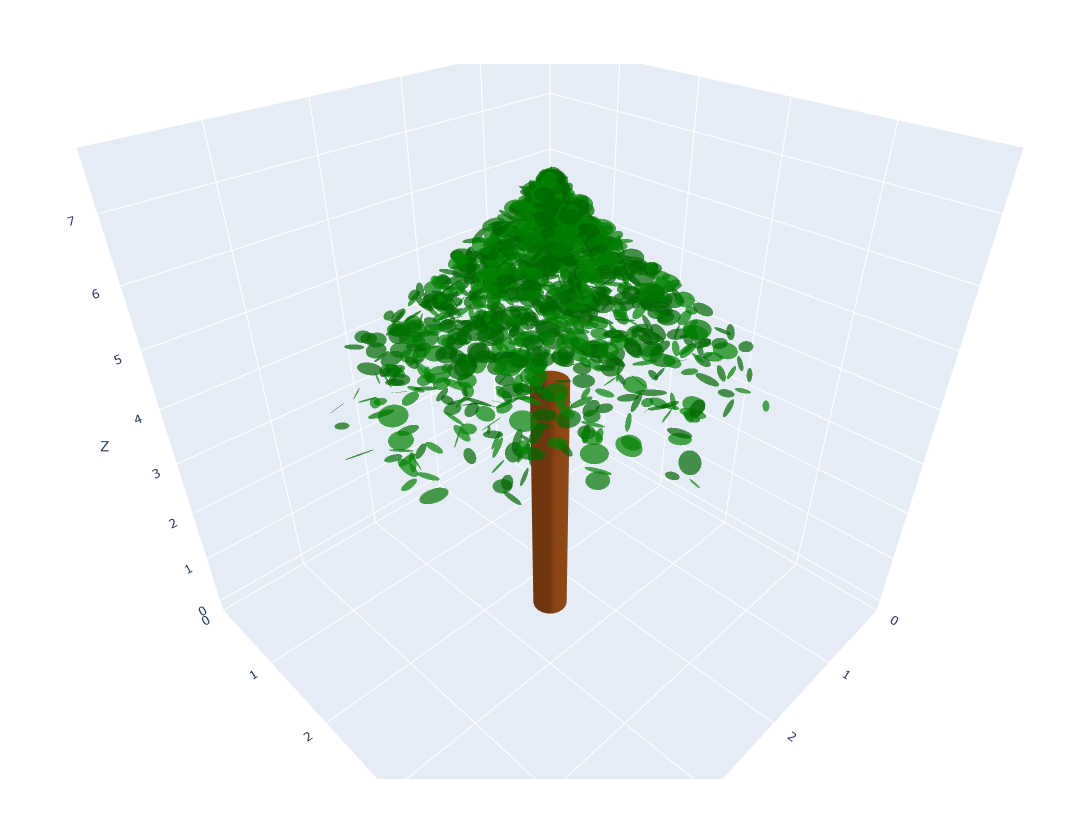
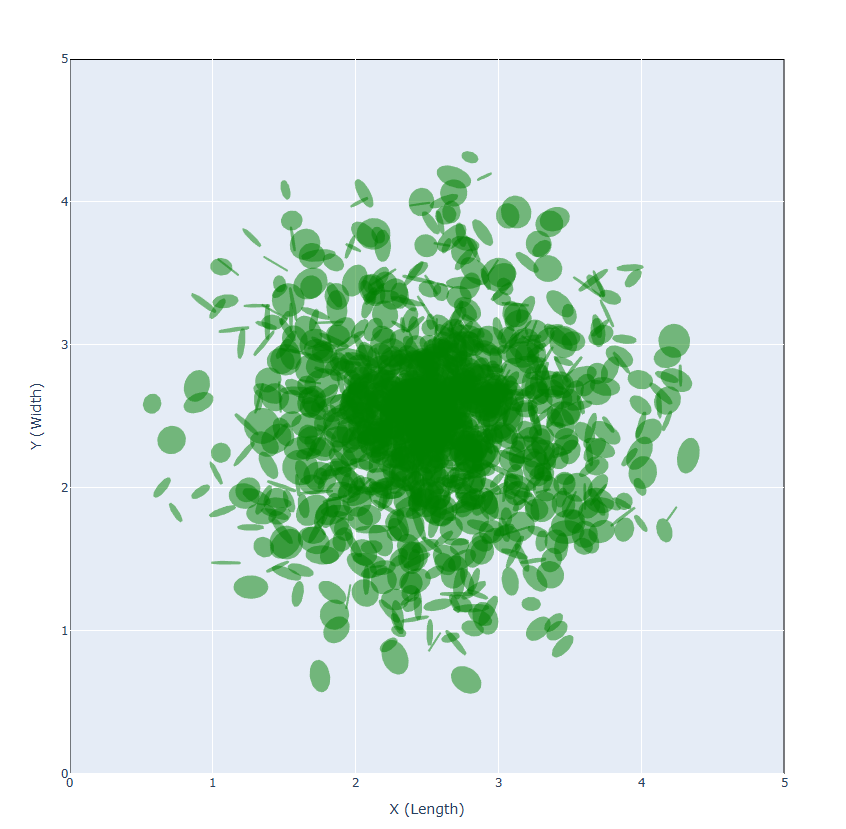
You can generate an individual tree with configurable trunk, crown, and leaf parameters using the generate_stand function. The tree can be visualized in both 3D and 2D using the plot_forest_standand plot_forest_top_view functions, respectively.
from forest_stand_generator_3D.stand import generate_stand
from forest_stand_generator_3D.visualization import plot_forest_stand, plot_forest_top_view

tree_params_dict =     {
        "trunk_height": 4.5,
        "trunk_radius": 0.18,
        "crown_shape": "cone",  # options: "sphere", "sphere_w_LH", "cylinder" or "cone"
        "crown_height": 3.0,
        "crown_radius": 2.0,
        "lai": 2.5,
        "leaf_radius_params": {"mean": 0.09, "sd": 0.02, "min": 0.05, "max": 0.12},
        "leaf_angle_distribution": "uniform"   # options: "uniform"/ "spherical", "planophile" or "erectophile"
    }

# Define stand parameters
plot_width = 5
plot_length = 5
n_trees = 1
placement = "uniform"   # options: "uniform" or "random"
min_spacing = 1.0       # only used if placement="random"

# Generate a stand with one tree for demonstration
single_tree_stand = generate_stand(
    plot_width=plot_width,
    plot_length=plot_length,
    n_trees=n_trees,
    placement=placement,
    min_spacing=min_spacing,
    tree_params=tree_params_dict
)

# Visualize the tree in 3D
plot_forest_stand(single_tree_stand, plot_width=plot_width, plot_length=plot_length)

# Visualize the tree in 2D
plot_forest_top_view(single_tree_stand, plot_width=plot_width, plot_length=plot_length)
The 3D and 2D visualizations for an individual tree are shown below.
- When
crown_shape = "sphere"andcrown_heightis equal tocrown_radius, a spherical crown is generated. - When
crown_shape = "sphere"andcrown_heightis not equal tocrown_radius, an ellipsoidal crown is generated. - When
crown_shape = "sphere_w_LH"andcrown_heightis equal tocrown_radius, a spherical upper hemispherical crown is generated. - When
crown_shape = "sphere_w_LH"andcrown_heightis not equal tocrown_radius, an ellipsoidal upper hemispherical crown is generated.
By changing the n_trees (eg: n_trees=15) in the code above, you can generate a homogeneous forest stand with trees having identical parameters.
4.2 Generating a Heterogeneous Forest Stand
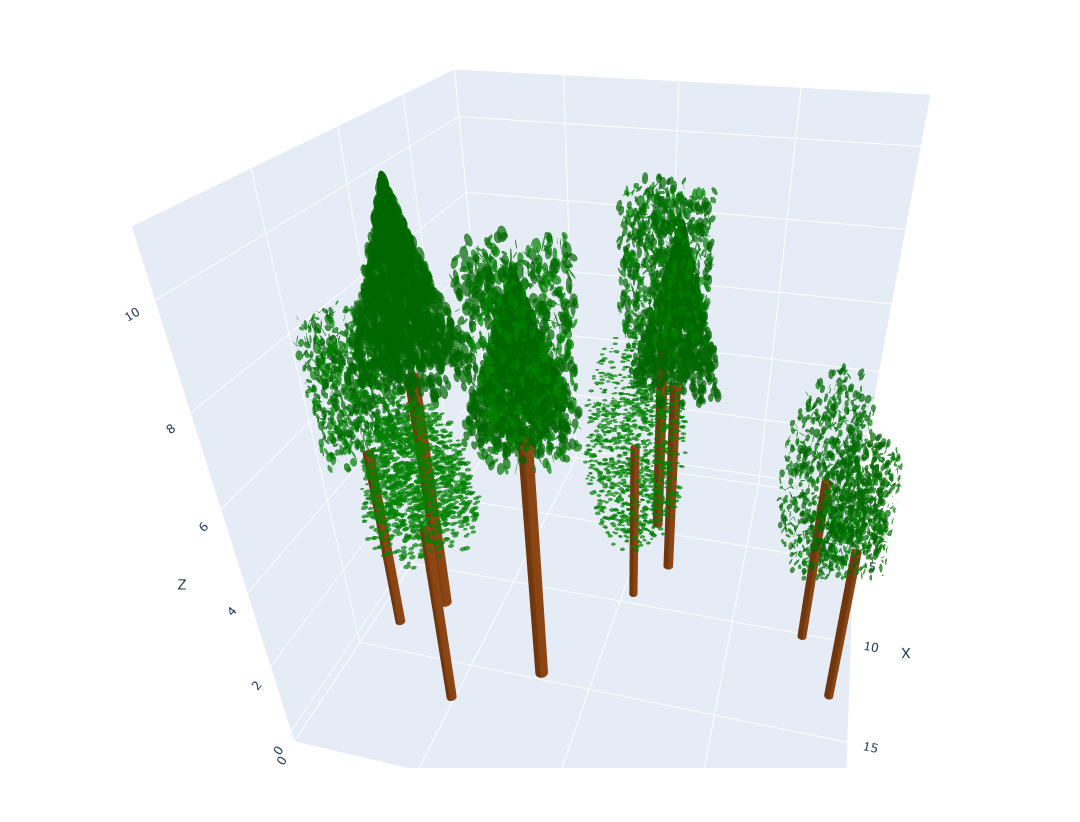
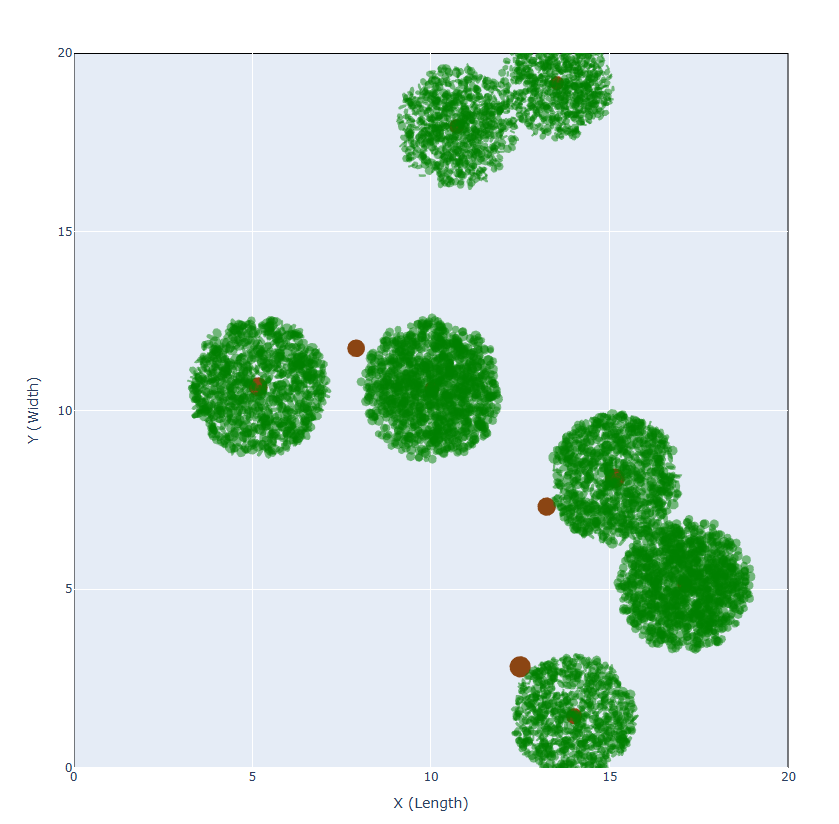
You can generate multiple trees with uniform or random placement using the generate_stand function. The forest stand can be visualized in both 3D and 2D using the plot_forest_standand plot_forest_top_view functions, respectively.
from forest_stand_generator_3D.stand import generate_stand
from forest_stand_generator_3D.visualization import plot_forest_stand, plot_forest_top_view

import json
import requests

# Raw GitHub URL: A JSON file containing the tree parameter list for 10 trees can be obtained from this URL.
url = "https://raw.githubusercontent.com/Prasadmadhusanka/Forest-Stand-Generator-3D/main/examples/10_trees.json"

response = requests.get(url)
response.raise_for_status()  # raises error if download fails

tree_params_list = response.json()

# Define stand parameters
plot_width = 20
plot_length = 20
n_trees = len(tree_params_list)
placement = "random"   # options: "uniform" or "random"
min_spacing = 1.0       # only used if placement="random"

# Generate the heterogeneous forest stand
forest_stand = generate_stand(
    plot_width=plot_width,
    plot_length=plot_length,
    n_trees=n_trees,
    placement=placement,
    min_spacing=min_spacing,
    tree_params=tree_params_list
)

# Visualize the tree in 3D
plot_forest_stand(forest_stand, plot_width=plot_width, plot_length=plot_length)

# Visualize the tree in 2D
plot_forest_top_view(forest_stand, plot_width=plot_width, plot_length=plot_length)
The JSON file contains 10 trees with the following compositions:
based on crown shape
| Crown Shape | Number of Trees |
|---|---|
| Sphere | 2 |
| Sphere_w_LH | 2 |
| Cone | 3 |
| Cylinder | 3 |
based on leaf angle distribution
| Leaf Angle Distribution | Number of Trees |
|---|---|
| Uniform / Spherical | 5 |
| Planophile | 2 |
| Erectophile | 3 |
In the 2D top-view plane, for three trees with an Erectophile leaf distribution, all leaves are not visible because their normals are oriented vertically along the z-axis.
The 3D and 2D visualizations for forest stand are shown below.
4.3 Exporting Forest Stands
You can export the generated forest stand data to CSV or JSON for further analysis or reproducibility.
from forest_stand_generator_3D.export import export_forest_stand_to_csv, export_forest_stand_to_json

# Export to CSV
export_forest_stand_to_csv(forest_stand, "forest_stand.csv")

# Export to JSON
export_forest_stand_to_json(forest_stand, "forest_stand.json")
-
JSON export preserves all tree parameters in a hierarchical structure, ensuring reproducibility.
-
CSV export provides a simple tabular view for data analysis.
5. Package Structure
The Forest Stand Generator 3D python package is organized in a modular way to separate concerns for tree generation, forest stand generation, visualization, and data export. Below is the directory structure and description of each component:
Package Structure
Forest-Stand-Generator-3D/
├── src/
│   └── forest_stand_generator_3D/      # Main package
│       ├── __init__.py                 # Public API and version
│       ├── tree.py                     # Tree generation
│       ├── stand.py                    # Forest stand generation
│       ├── visualization.py            # 3D/2D visualization
│       ├── export.py                   # Export to CSV/JSON
│       └── data_validation.py          # Tree & stand parameter validation
├── tests/                              # Unit tests
│   ├── test_tree.py
│   └── test_stand.py
├── examples/                           # Example scripts & input data
│   ├── demo_scene.py
│   ├── 01_tree.json
│   ├── 10_trees.json
│   └── 20_trees.json
├── .gitignore                          # Git ignore rules
├── pyproject.toml                      # Package metadata and dependencies
├── LICENSE                             # MIT LICENSE
└── README.md                           # Project documentation
Module Descriptions
-
__init__.py
Imports all user-facing functions from different modules and defines__all__for public API. Optionally, contains the package__version__. -
tree.py- Generates individual trees with trunk, crown, and leaves with different sizes.
- Supports various crown shapes (
sphere,sphere_w_LH,cone,cylinder) and leaf angle distributions (uniform,spherical,planophile,erectophile).
-
stand.py- Main module for forest stand generation.
- Implements
generate_stand()which handles uniform and random tree placement, enforces minimum spacing, and integrates individual trees usinggenerate_tree().
-
visualization.py- Provides 3D visualization of forest stands using Plotly.
- Includes functions:
plot_forest_stand()— 3D interactive viewplot_forest_top_view()— 2D top-down view
-
export.py- Exports forest stand data to CSV or JSON.
- Ensures reproducibility and facilitates downstream analysis.
-
data_validation.py- Validates all tree and stand parameters.
- Ensures numerical values are positive, categorical options are valid, and spacing constraints are met.
-
tests/- Contains unit and integration tests for validating tree and stand generation.
-
examples/demo_scene.py- Demonstrates full workflow: loading parameters, generating a stand, visualizing, and exporting data.
Architectural Highlights
- Modular design: separates tree generation, stand placement, visualization, and exporting.
- Scalable: supports a single tree or large forest stands.
- Extensible: new crown shapes, leaf distributions, leaf shapes, or placement strategies can be added easily.
- Validation first: parameter validation prevents invalid trees or overlapping trunks.
- Public API:
__init__.pyexposes all key functions for ease of use.
6. Documentation
The Forest Stand Generator 3D python package is fully documented to make it easy for users and developers to understand and extend its functionality.
6.1 Docstrings
- All public functions and classes include detailed docstrings.
- Docstrings follow a clear structure, specifying:
- Purpose of the function/class
- Input parameters and expected types
- Return values
- Exceptions raised (if any)
- Notes or usage tips
Example:
def generate_stand(
    plot_width: float,
    plot_length: float,
    n_trees: int,
    placement: str,
    min_spacing: float,
    tree_params: Union[Dict, List[Dict]],
) -> List[Dict]:
    """
    Generate a forest stand (collection of trees) on a rectangular plot.

    Parameters
    ----------
    plot_width : float
        Width of the rectangular plot (x-direction, in meters or desired units).
    plot_length : float
        Length of the rectangular plot (y-direction, in meters or desired units).
    n_trees : int
        Total number of trees to generate.
    placement : str
        Placement strategy for trees. Options:
        - "uniform": trees are placed on a regular grid. Grid spacing is validated
          to ensure that tree trunk circles on the ground do not intersect.
        - "random": trees are placed randomly while enforcing minimum spacing
          between trunk centers and preventing trunk overlap.
    min_spacing : float
        Minimum allowed distance between tree centers when placement="random".
        The actual enforced distance between two trees is:
            max(min_spacing, r1 + r2),
        where r1 and r2 are the trunk radii of the two trees.
        Ignored when placement="uniform".
    tree_params : dict or list of dict
        Parameters for tree generation, passed to `generate_tree`.
        - dict: the same parameters are applied to all trees.
        - list of dicts: a separate parameter set for each tree.
          Length must equal n_trees.

    Returns
    -------
    List[Dict]
        List of tree dictionaries. Each dictionary represents a generated tree
        with its spatial position and structural attributes.

    Notes
    -----
    - Tree positions represent the center of the trunk at ground level
      (x, y, z = 0.0).
    - For both placement modes, tree trunk circles on the ground are guaranteed
      not to intersect.
    - For "uniform" placement, a ValueError is raised if the plot is too small
      to accommodate all trees without trunk overlap.
    - For "random" placement, if the requested number of trees cannot be placed
      due to spacing constraints, fewer trees may be generated and a warning
      is printed.
    """
In the program, you can view these docstrings using the help() function or the .__doc__ attribute.
# Check the docstring

help(generate_stand)

# OR

print(generate_stand.__doc__)
6.2 Example Scripts
The examples/demo_scene.py script demonstrates:
-
Loading tree parameters from JSON files.
-
Generating forest stands with
generate_standfunction. -
Visualizing in 3D (
plot_forest_stand) and top-down 2D (plot_forest_top_view). -
Exporting to CSV or JSON.
7. Contributing
We welcome contributions to the Forest Stand Generator 3D python package! Contributions can include:
- Bug fixes.
- New features (e.g., additional crown shapes, leaf distributions, leaf shapes, or placement strategies).
- Improvements to visualization.
- Documentation enhancements.
- Tests and validation scripts.
7.1 How to Contribute
-
Fork the repository
Click the "Fork" button on GitHub to create your own copy of the repository.
-
Clone your fork
git clone https://github.com/your-username/Forest-Stand-Generator-3D.git
cd Forest-Stand-Generator-3D
- Create and checkout to new branch
git checkout -b feature/my-new-feature
- Install the package in editable mode
pip install -e .
- Make your changes
-
Follow the existing code style.
-
Update docstrings and documentation as needed.
-
Add unit tests and integration tests for new features.
- Run tests
pytest file_name.py
- Commit and push your changes
git add .
git commit -m "Add feature description"
git push origin feature/my-new-feature
- Submit a pull request
-
Open a PR on the main repository.
-
Include a clear description of changes, motivation, and testing.
7.2 Coding Standards
-
Use type hints for all function signatures.
-
Include docstrings for all public functions.
-
Write unit tests and integration tests for any new functionality.
7.3 Reporting Issues
If you encounter any bugs, unexpected behavior, or have feature requests:
-
Open an issue on GitHub.
-
Provide clear steps to reproduce the problem.
-
Include Python version, package version, and any relevant code snippets.
8. Copyright & Licenses
- License: MIT License
- Copyright: Prasad Madushanka Dauglas Dambure Liyanage
License Summary
This project is released under the MIT License, which permits you to:
- Use, copy, modify, merge, publish, distribute, sublicense, and/or sell copies of the software.
- Include the software in your own projects (commercial or non-commercial).
Conditions:
- The copyright notice and license text must be included in all copies or substantial portions of the software.
- The software is provided "as is", without warranty of any kind.
For full details, see the MIT License or include a LICENSE file in your repository.
Release history Release notifications | RSS feed


Download files
Download the file for your platform. If you're not sure which to choose, learn more about installing packages.
Source Distribution
Built Distribution
Filter files by name, interpreter, ABI, and platform.
If you're not sure about the file name format, learn more about wheel file names.
Copy a direct link to the current filters
File details
Details for the file forest_stand_generator_3d-0.1.3.tar.gz.
File metadata
- Download URL: forest_stand_generator_3d-0.1.3.tar.gz
- Upload date:
- Size: 26.4 kB
- Tags: Source
- Uploaded using Trusted Publishing? No
- Uploaded via: twine/6.2.0 CPython/3.10.19
File hashes
| Algorithm | Hash digest | |
|---|---|---|
| SHA256 |
fd4413a3cb34e28818a5712f949ff13c96b26502bb6e21c0558c5fdc69b5089d
|
|
| MD5 |
35f66dc64d92a748be1a579f4b7eeb6e
|
|
| BLAKE2b-256 |
1da3ae24e83a1ae307268b6ae40cc2b4484703806331e3791541b0dbf50eef70
|
File details
Details for the file forest_stand_generator_3d-0.1.3-py3-none-any.whl.
File metadata
- Download URL: forest_stand_generator_3d-0.1.3-py3-none-any.whl
- Upload date:
- Size: 20.0 kB
- Tags: Python 3
- Uploaded using Trusted Publishing? No
- Uploaded via: twine/6.2.0 CPython/3.10.19
File hashes
| Algorithm | Hash digest | |
|---|---|---|
| SHA256 |
98758f7cd04f23d120229f0c0475afd6c4af4f549939da605abde129680a76bb
|
|
| MD5 |
f5a4ca6352492ae4883702612857e377
|
|
| BLAKE2b-256 |
3ffd2fcb04f594cfe6b24f6099c99f9c4eab5b4b2483af6ca6e88c732306804e
|






