
Memory for your AI. It forgets the junk, keeps what matters.
Verified details
These details have been verified by PyPIProject links
GitHub Statistics
Maintainers

Project description
forget
Memory for your AI. It forgets the junk, keeps what matters.




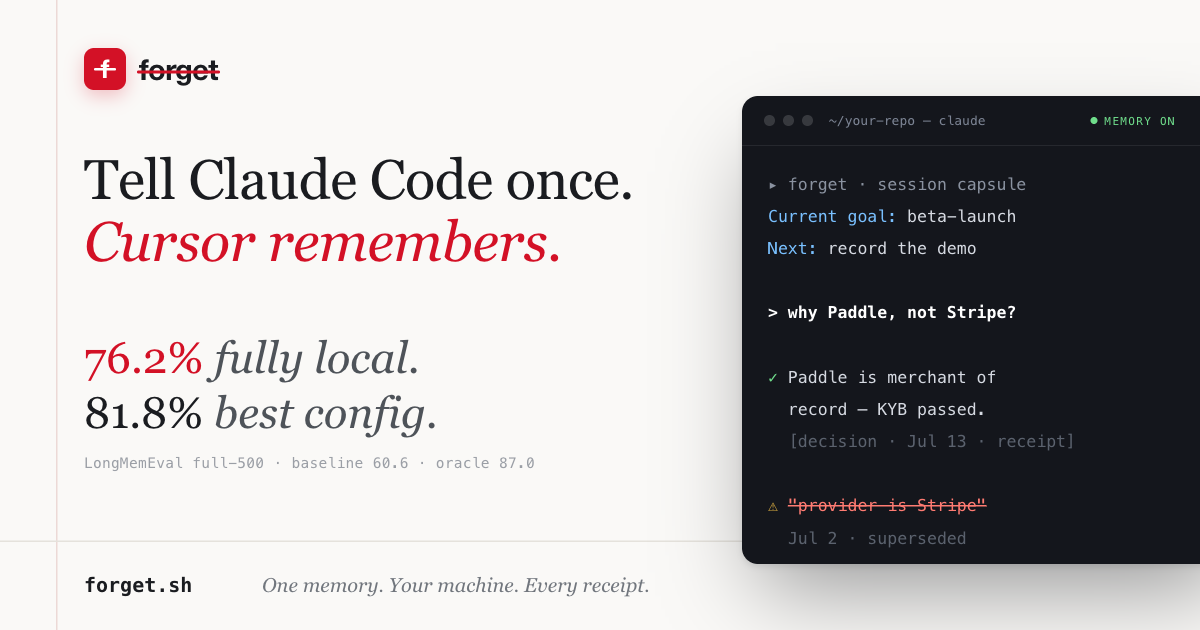
On LongMemEval, the standard long-term-memory benchmark (full 500-question set, GPT-4o reader and judge):
| configuration | accuracy |
|---|---|
| GPT-4o full-context, no memory system (paper baseline) | 60.6% |
| Forget, fully local memory pipeline (Qwen 14B observer) | 76.2% |
| Forget, best configuration (GPT-4o observer) | 81.8% |
| GPT-4o oracle — evidence sessions handed to the reader (paper ceiling) | 87.0% |
Knowledge-update questions, where memory products usually fail: 92.3%
(best config). Our weakest category, so you don't have to dig for it:
single-session-preference, 43.3%. Per-question outputs and run configs are
in research/longmemeval/runs/.
Every LLM session starts from zero. Forget gives your AI a long-term memory that it actually maintains: an observation gate decides what is worth keeping at all, stale facts get retired non-destructively when new ones supersede them, and a consolidation loop keeps the store honest while you sleep.
The secret is in the name. Good memory is not storing everything — it is forgetting well.
- Forget re-explaining. Your AI remembers your decisions, preferences, and context across sessions and across tools.
- Forget asking. Memory arrives on its own: a context capsule opens each session, relevant memories are pushed mid-conversation, and a conflict alert fires if you're about to act on a fact that was later corrected.
- Forget context limits. Durable facts live outside the window and come back only when relevant.
- Forget trusting us. Everything runs on your machine, in one SQLite file you own. End-to-end encrypted sync is next — built so that we cannot read what we carry. (Why this matters →)
- Forget nothing — that matters.
How it works
conversation ──▶ observation gate ──▶ durable facts (SQLite)
                     │                     │
                     ▼                     ▼
               "junk, skip it"      search ◀── temporal rerank
                                           │
              consolidation loop ◀── supersede (non-destructive)
- Observation gate — extraction keeps only durable, useful facts. Questions, chit-chat, and assistant filler never become "memories".
- Supersede / confirm — when a fact changes, the old memory is demoted
and linked to its replacement, not deleted; when an unverified claim gets
its receipt,
confirm_memorypromotes it. History stays auditable. - Trust labels — every memory carries provenance (who vouches for it) and recall returns a permission: green (user-stated or tool-observed) = safe to act on, yellow (agent-inferred) = verify first, red (superseded) = reference only.
- Temporal rerank — recent facts outrank stale ones at recall time.
- Consolidation — a background pass merges, dedupes, and retires.
- Single file — everything lives in one SQLite database. No vector DB, no external services. Dependencies: FastAPI and httpx. That's it.
Quickstart
pip install 'forget-ai[server]'
forget-server install-service   # login service (launchd/systemd) — survives reboots
# or, to try it in the foreground first:
forget-server run
forget-server status tells you what's true; forget-server uninstall-service
removes it. The server binds to localhost only. Data lives at
~/.forget/mem1.sqlite3, created 0600 in a private directory — set
MEM1_DB_PATH to put it elsewhere.
Store and recall:
curl -X POST localhost:8000/v1/memories/ \
  -H 'Content-Type: application/json' \
  -d '{"text": "We settled on Paddle for payments.", "user_id": "me"}'

curl -X POST localhost:8000/v1/memories/search/ \
  -H 'Content-Type: application/json' \
  -d '{"query": "what did we pick for payments?", "user_id": "me"}'
Connect your AI (MCP)
Forget speaks MCP over streamable HTTP at /mcp — 42 tools including
search_memories, add_memory, supersede_memory, confirm_memory, and
prepare_context_autopilot.
Connect the local server started above without hand-editing config files:
npx forget-connect
The CLI preserves other MCP servers, backs up existing files once, installs
the marked instruction layer (Claude Code / Codex / Claude Desktop), and —
for Claude Code — installs the hooks layer: a session-start context
capsule, per-turn push recall with conflict-zone alerts, and session capture
feeding a usage-outcome flywheel. Hooks are fail-open (a stopped server
never blocks a session), preserve any foreign hooks byte-for-byte, and are
skippable with --no-hooks. npx forget-connect doctor diagnoses config,
rules, hooks, and the MCP connection; disconnect reverses everything.
The legacy hosted service remains reachable with
npx forget-connect --hosted --user-id <memory-user> --app-id <project>
while it is phased out in favor of local-first.
Manual configuration — prefer the scoped endpoint
/mcp/<app>/http/<user> so each user × client pair keeps its own memory
pool (the connect CLI configures this for you; plain /mcp falls back to a
server-side default scope of your OS username and says so in each write):
Claude Code
{ "mcpServers": { "forget": { "type": "http", "url": "http://localhost:8000/mcp/claude-code/http/<your-username>" } } }
Codex (~/.codex/config.toml)
[mcp_servers.forget]
url = "http://localhost:8000/mcp/codex/http/<your-username>"
Claude Desktop (bridge via mcp-remote, claude_desktop_config.json)
{ "mcpServers": { "forget": { "command": "npx",
  "args": ["-y", "mcp-remote@latest", "http://localhost:8000/mcp/claude-desktop/http/<your-username>"] } } }
Tip — make agents actually use it.
npx forget-connecthandles this: it installs both the instruction rules and the hooks that push memory into sessions unasked. If you configure manually instead, at minimum add to your global instruction file (~/.claude/CLAUDE.md,~/.codex/AGENTS.md): "ALWAYS callsearch_memoriesonforgetFIRST — before any shell command — whenever the user refers to their own past decisions."
Security
Forget is local-first: with no configuration it binds to localhost and accepts unauthenticated requests. Before exposing it to a network, set:
FORGET_REQUIRE_AUTH=true
FORGET_API_KEY=<your key>        # sent as "Authorization: Bearer <key>"
Compatibility
The REST surface and MCP tool names are API-compatible with mem0 and OpenMemory clients — point an existing client at Forget and it works.
Sync — end-to-end encrypted (in design)
The engine is local today. What's next is multi-device sync that cannot betray you: memories — and their embeddings — are encrypted on your device before they touch a server. The server stores ciphertext and nothing else. Not us, not an acquirer, not a subpoena.
The reasoning is in MANIFESTO.md; the key hierarchy, record format, and device-auth design are in docs/vault-design.md.
Building AI for therapy, law, or health? Your users' memories are your liability. We're taking design partners — founder@multi-turn.ai.
License
Apache-2.0.
Project details
Verified details
These details have been verified by PyPIProject links
GitHub Statistics
Maintainers
Release history Release notifications | RSS feed


Download files
Download the file for your platform. If you're not sure which to choose, learn more about installing packages.
Source Distribution
Built Distribution
Filter files by name, interpreter, ABI, and platform.
If you're not sure about the file name format, learn more about wheel file names.
Copy a direct link to the current filters
File details
Details for the file forget_ai-0.3.3.tar.gz.
File metadata
- Download URL: forget_ai-0.3.3.tar.gz
- Upload date:
- Size: 2.0 MB
- Tags: Source
- Uploaded using Trusted Publishing? Yes
- Uploaded via: twine/6.1.0 CPython/3.13.14
File hashes
| Algorithm | Hash digest | |
|---|---|---|
| SHA256 |
5243be9857434f8230f5aea0bd324faa97c75441acd77cef1505e79efc624d8e
|
|
| MD5 |
059ed6825000151d51dde9e51b0c7d34
|
|
| BLAKE2b-256 |
42629fbfa0f14e1a307caca006f4359cb929f59d48843988aaaf86ed892dd085
|
Provenance
The following attestation bundles were made for forget_ai-0.3.3.tar.gz:
Publisher:
publish.yml on multi-turn-inc/forget
-
Statement:
-
Statement type:
https://in-toto.io/Statement/v1 -
Predicate type:
https://docs.pypi.org/attestations/publish/v1 -
Subject name:
forget_ai-0.3.3.tar.gz -
Subject digest:
5243be9857434f8230f5aea0bd324faa97c75441acd77cef1505e79efc624d8e - Sigstore transparency entry: 2281292600
- Sigstore integration time:
-
Permalink:
multi-turn-inc/forget@bab767394db19f41c683b424b2bdefcb2b13b4ce -
Branch / Tag:
refs/tags/v0.3.3 - Owner: https://github.com/multi-turn-inc
-
Access:
public
-
Token Issuer:
https://token.actions.githubusercontent.com -
Runner Environment:
github-hosted -
Publication workflow:
publish.yml@bab767394db19f41c683b424b2bdefcb2b13b4ce -
Trigger Event:
push
-
Statement type:
File details
Details for the file forget_ai-0.3.3-py3-none-any.whl.
File metadata
- Download URL: forget_ai-0.3.3-py3-none-any.whl
- Upload date:
- Size: 262.2 kB
- Tags: Python 3
- Uploaded using Trusted Publishing? Yes
- Uploaded via: twine/6.1.0 CPython/3.13.14
File hashes
| Algorithm | Hash digest | |
|---|---|---|
| SHA256 |
320476b6f4910c0c9e74e015260110b5c65c976e848389967c97afb2d2aa4903
|
|
| MD5 |
61c4e6ccd9c89ef31add1da8127f65de
|
|
| BLAKE2b-256 |
3559b8859eaf94b3cf50ce010d6b9899bb747e94a137f634e6329cfb29b5a3cc
|
Provenance
The following attestation bundles were made for forget_ai-0.3.3-py3-none-any.whl:
Publisher:
publish.yml on multi-turn-inc/forget
-
Statement:
-
Statement type:
https://in-toto.io/Statement/v1 -
Predicate type:
https://docs.pypi.org/attestations/publish/v1 -
Subject name:
forget_ai-0.3.3-py3-none-any.whl -
Subject digest:
320476b6f4910c0c9e74e015260110b5c65c976e848389967c97afb2d2aa4903 - Sigstore transparency entry: 2281292613
- Sigstore integration time:
-
Permalink:
multi-turn-inc/forget@bab767394db19f41c683b424b2bdefcb2b13b4ce -
Branch / Tag:
refs/tags/v0.3.3 - Owner: https://github.com/multi-turn-inc
-
Access:
public
-
Token Issuer:
https://token.actions.githubusercontent.com -
Runner Environment:
github-hosted -
Publication workflow:
publish.yml@bab767394db19f41c683b424b2bdefcb2b13b4ce -
Trigger Event:
push
-
Statement type:






