
Handprint text recognition in form documents.
Verified details
These details have been verified by PyPIProject links
GitHub Statistics
Maintainers

Project description
formHTR
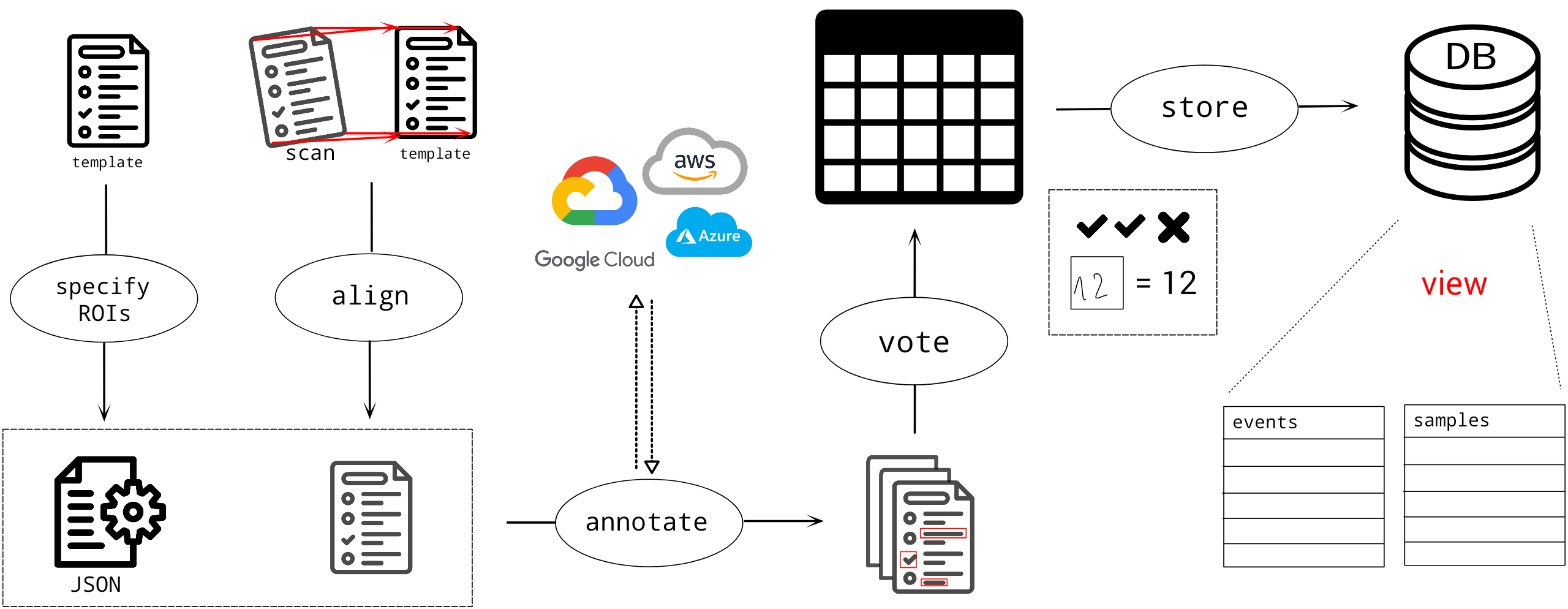
Handprint text recognition in form documents.

Installation
pip
pip install formhtr
The tool also requires the zbar shared library installed (used by pyzbar).
For PDF-related tooling, qpdf is also required.
System dependencies:
- macOS (Homebrew):
brew install zbar qpdf - Debian/Ubuntu:
sudo apt-get install libzbar0 qpdf - Fedora:
sudo dnf install zbar qpdf
You can verify runtime requirements with:
formhtr doctor
conda (dev)
conda env create -f conda_env.yaml
Usage
Run formhtr --help for full CLI help.
Quickstart
# 1) Verify system dependencies
formhtr doctor

# 2) Create ROI config for a template
formhtr select-rois --pdf-file template.pdf --output-file config.json

# 3) Optionally annotate ROI types and variable names
formhtr annotate-rois --pdf-file template.pdf --config-file config.json --output-file config_annotated.json

# 4) Process a scanned logsheet into XLSX
formhtr process-logsheet \
  --pdf-logsheet scan.pdf \
  --pdf-template template.pdf \
  --config-file config_annotated.json \
  --output-file output.xlsx \
  --google google_credentials.json \
  --amazon amazon_credentials.json \
  --azure azure_credentials.json
Create ROIs
This functionality is split (for now) into two separate scripts.
select ROIs
Find and define locations of regions of interest (ROIs) in the given PDF.
Generally, it is possible to draw ROIs (rectangles) manually but also to detect them automatically. The coordinates of ROIs are stored in a JSON file.
The tool is supposed to be run from the command line, as the control commands are entered there.
Control commands
- Press
qorEscto exit editing and save the config file. - Press
rto remove the last rectangle.
Run formhtr select-rois -h for details.
annotate ROIs
Specify the type of content for each rectangle.
The workflow is designed in a way that you can navigate over specified ROIs and assign them the expected type of their content. This is done by pressing appropriate control commands.
Control commands
- Press
qorEscto exit editing and save the config file. - Press
hto add "Handwritten" type to the current ROI. - Press
cto add "Checkbox" type to the current ROI. - Press
bto add "Barcode" type to the current ROI. - Press
rordto delete the type from the current ROI. - Press
vto enter the variable name. - Press an arrow to navigate through ROIs (only left and right for now).
Run formhtr annotate-rois -h for details.
process logsheet
Extract values from specified ROIs.
This is the crucial step that applies various techniques to extract the information as precisely as possible. It can process one logsheet at a time, given the template and config files.
Run formhtr process-logsheet -h for details.
Credentials
The processing of logsheets is using external services requiring credentials to use them. Here we specify structure that is expected for credentials, always in JSON format.
{
  "type": "service_account",
  "project_id": "theid",,
  "private_key_id": "thekey",
  "private_key": "-----BEGIN PRIVATE KEY-----anotherkey-----END PRIVATE KEY-----\n"
  "client_email": "emailaddress",
  "client_id": "id",
  "auth_uri": "https://accounts.google.com/o/oauth2/auth",
  "token_uri": "https://oauth2.googleapis.com/token",
  "auth_provider_x509_cert_url": "https://www.googleapis.com/oauth2/v1/certs",
  "client_x509_cert_url": "someurl",
  "universe_domain": "googleapis.com"
}
Amazon
{
    "ACCESS_KEY": "YOUR_KEY_ID_HERE",
    "SECRET_KEY": "YOUR_ACCESS_KEY_HERE",
    "REGION": "YOUR_REGION_NAME_HERE"
}
Microsoft
{
    "SUBSCRIPTION_KEY": "YOURKEYHERE",
    "ENDPOINT": "https://ENDPOINT"
}
Project details
Verified details
These details have been verified by PyPIProject links
GitHub Statistics
Maintainers
Release history Release notifications | RSS feed


Download files
Download the file for your platform. If you're not sure which to choose, learn more about installing packages.
Source Distribution
Built Distribution
Filter files by name, interpreter, ABI, and platform.
If you're not sure about the file name format, learn more about wheel file names.
Copy a direct link to the current filters
File details
Details for the file formhtr-0.2.0.tar.gz.
File metadata
- Download URL: formhtr-0.2.0.tar.gz
- Upload date:
- Size: 186.6 kB
- Tags: Source
- Uploaded using Trusted Publishing? Yes
- Uploaded via: twine/6.1.0 CPython/3.13.12
File hashes
| Algorithm | Hash digest | |
|---|---|---|
| SHA256 |
74ff967ac149cf4567bc78f071dd7210af3f7b1a2dc514c8b730650c8290b74f
|
|
| MD5 |
afcaa6fc16d2a48b2d242933fadb83ef
|
|
| BLAKE2b-256 |
9d08f648b8cf4433f35ab2d0b248cc9cebfbb77985e2d2430c5c8349eb17b58a
|
Provenance
The following attestation bundles were made for formhtr-0.2.0.tar.gz:
Publisher:
publish_pypi.yml on grp-bork/formHTR
-
Statement:
-
Statement type:
https://in-toto.io/Statement/v1 -
Predicate type:
https://docs.pypi.org/attestations/publish/v1 -
Subject name:
formhtr-0.2.0.tar.gz -
Subject digest:
74ff967ac149cf4567bc78f071dd7210af3f7b1a2dc514c8b730650c8290b74f - Sigstore transparency entry: 1263236900
- Sigstore integration time:
-
Permalink:
grp-bork/formHTR@0a8ca46d91420000071bfe7ac825c0cfd36c10cc -
Branch / Tag:
refs/tags/v0.2.0 - Owner: https://github.com/grp-bork
-
Access:
public
-
Token Issuer:
https://token.actions.githubusercontent.com -
Runner Environment:
github-hosted -
Publication workflow:
publish_pypi.yml@0a8ca46d91420000071bfe7ac825c0cfd36c10cc -
Trigger Event:
release
-
Statement type:
File details
Details for the file formhtr-0.2.0-py3-none-any.whl.
File metadata
- Download URL: formhtr-0.2.0-py3-none-any.whl
- Upload date:
- Size: 192.9 kB
- Tags: Python 3
- Uploaded using Trusted Publishing? Yes
- Uploaded via: twine/6.1.0 CPython/3.13.12
File hashes
| Algorithm | Hash digest | |
|---|---|---|
| SHA256 |
d21edd11bcedb0083cbe6c1cdc3e7daf2b450fbc98dbe7b874e40f130adebeb1
|
|
| MD5 |
3f2d5c0ca6564dd887bf9d97e58b45a2
|
|
| BLAKE2b-256 |
546e6fa35870ac66ce79d195692ffe13cbb792a092f81b4e477d72de74a5982c
|
Provenance
The following attestation bundles were made for formhtr-0.2.0-py3-none-any.whl:
Publisher:
publish_pypi.yml on grp-bork/formHTR
-
Statement:
-
Statement type:
https://in-toto.io/Statement/v1 -
Predicate type:
https://docs.pypi.org/attestations/publish/v1 -
Subject name:
formhtr-0.2.0-py3-none-any.whl -
Subject digest:
d21edd11bcedb0083cbe6c1cdc3e7daf2b450fbc98dbe7b874e40f130adebeb1 - Sigstore transparency entry: 1263236904
- Sigstore integration time:
-
Permalink:
grp-bork/formHTR@0a8ca46d91420000071bfe7ac825c0cfd36c10cc -
Branch / Tag:
refs/tags/v0.2.0 - Owner: https://github.com/grp-bork
-
Access:
public
-
Token Issuer:
https://token.actions.githubusercontent.com -
Runner Environment:
github-hosted -
Publication workflow:
publish_pypi.yml@0a8ca46d91420000071bfe7ac825c0cfd36c10cc -
Trigger Event:
release
-
Statement type:






