
Foronoi
Fortune's algorithm for Voronoi diagrams.


Foronoi is a Python implementation of the Fortune’s algorithm based on the description of “Computational Geometry: Algorithms and Applications” by de Berg et al.
This algorithm is a sweep line algorithm that scans top down over the cell points and traces out the lines via breakpoints in between parabola’s (arcs). When lines converge, a circle event happens which inserts a new vertex.
Documentation can be found here.
Pip Installation
pip install foronoi
Manual Installation
First, clone the repository and then install the package.
git clone https://github.com/Yatoom/voronoi.git
cd foronoi
python setup.py install
Note: you need to use sudo python3 setup.py install on most Linux distributions.
Example usage
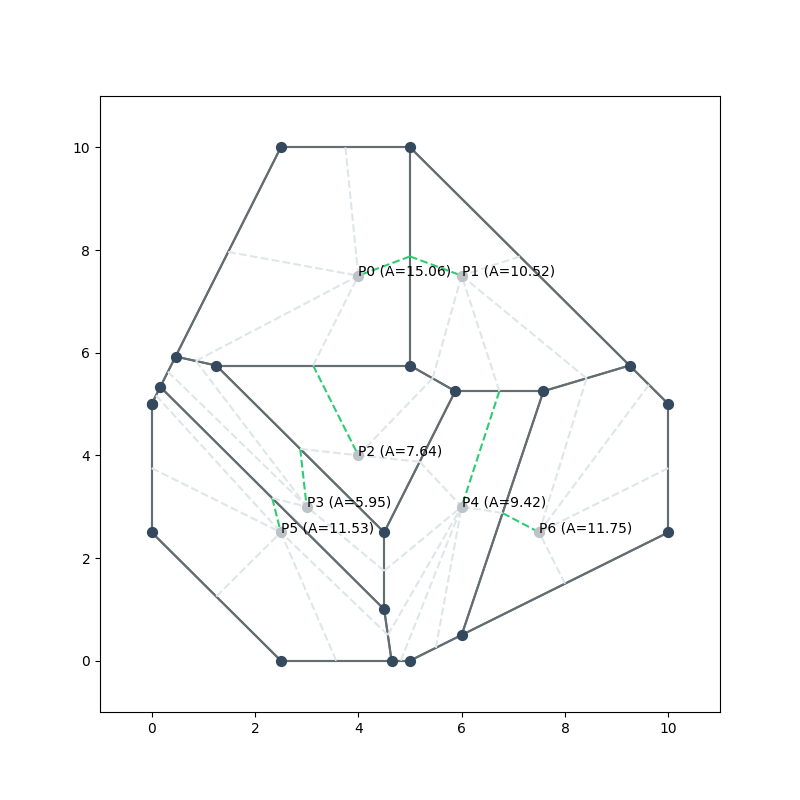
Example that uses a polygon as a bounding box.
from foronoi import Voronoi, Polygon, Visualizer, VoronoiObserver

# Define some points (a.k.a sites or cell points)
points = [
    (2.5, 2.5),
    (4, 7.5),
    (7.5, 2.5),
    (6, 7.5),
    (4, 4),
    (3, 3),
    (6, 3),
]

# Define a bounding box / polygon
polygon = Polygon([
    (2.5, 10),
    (5, 10),
    (10, 5),
    (10, 2.5),
    (5, 0),
    (2.5, 0),
    (0, 2.5),
    (0, 5),
])

# Initialize the algorithm
v = Voronoi(polygon)

# Attach a Voronoi Observer that monitors and visualizes the construction of
# the Voronoi Diagram step-by-step. See for more information
# examples/quickstart.py or examples/observers.py.
v.attach_observer(VoronoiObserver())

# Create the diagram
v.create_diagram(points=points)

# Get properties. See more examples in examples/quickstart.py
edges = v.edges
vertices = v.vertices
arcs = v.arcs
points = v.points

# Plotting
# Note: plot_border_to_site() indicates with dashed line to which site a border
# belongs. The site's first edge is colored green.
Visualizer(v, canvas_offset=1)\
    .plot_sites(show_labels=True)\
    .plot_edges(show_labels=False)\
    .plot_vertices()\
    .plot_border_to_site()\
    .show()
Calculate the shell size for each point
for point in v.sites:
    print(f"{point.xy} \t {point.area()}")
Output:
(2.5, 2.5) 	 11.529761904761905
(4, 7.5) 	 15.064062500000006
(7.5, 2.5) 	 11.75
(6, 7.5) 	 10.520833333333329
(4, 4) 	     7.640625
(3, 3) 	     5.946354166666666
(6, 3) 	     9.423363095238095
More examples can be found in the voronoi/examples folder.
Get coordinates of the cell borders for a point
vertices = v.sites[0].get_vertices()
coords = [(vertex.x, vertex.y) for vertex in vertices]
print(coords)
Output:
[(0.167, 5.333), (4.5, 1.0), (4.643, 0.0), (2.5, 0), (0, 2.5), (0, 5)]
Testing
To run unit tests, run the following comand.
python3 -m "nose" foronoi/tests/unit.py
1 maintainer

Metadata
1 maintainer
Release files for foronoi 1.0.3
For a detailed explanation of source distributions (sdists) and built distributions (wheels), please see the package formats documentation.
Source distribution (sdist)
| File | Size | Uploaded | Provenance | Actions |
|---|---|---|---|---|
| foronoi-1.0.3.tar.gz | 34.8 kB | Without provenance | Details for foronoi-1.0.3.tar.gz |
Built distribution (wheel)
| File | Interpreter | ABI | Platform | Actions Reset |
|---|---|---|---|---|
| foronoi-1.0.3-py3-none-any.whl | Python 3 | none | any | Details for foronoi-1.0.3-py3-none-any.whl |
Total release size: 77.4 kB
Release files / foronoi-1.0.3.tar.gz
| Download URL | foronoi-1.0.3.tar.gz |
|---|---|
| Size | 34.8 kB |
| Tags | Source |
|
SHA-256 checksum How to use checksums |
c70c2a6689375fd93fadadd2b84eda1f32b320ac9c2fa12b2b557ed301c2d76d
|
|
BLAKE2b-256 checksum How to use checksums |
18897163de683df0f2905e7c8660594cead449c363b93592a0638411077c6e76
|
| Upload date | |
|
Uploaded using Trusted Publishing? What is trusted publishing? |
No |
| Uploaded via |
twine/3.4.1 importlib_metadata/3.10.0 pkginfo/1.7.0 requests/2.25.1 requests-toolbelt/0.9.1 tqdm/4.60.0 CPython/3.8.5
|
Release files / foronoi-1.0.3-py3-none-any.whl
| Download URL | foronoi-1.0.3-py3-none-any.whl |
|---|---|
| Size | 42.6 kB |
| Tags | Python 3 |
|
SHA-256 checksum How to use checksums |
61abc687faf3d8b81df080d1f8651e269ffc2d1c2788a3f323ffa2b5bb51c8b9
|
|
BLAKE2b-256 checksum How to use checksums |
f749d481d1745cdcde9a074483fd1489ed5ce31e3e9b192b7ae91a00a3e4fbd2
|
| Upload date | |
|
Uploaded using Trusted Publishing? What is trusted publishing? |
No |
| Uploaded via |
twine/3.4.1 importlib_metadata/3.10.0 pkginfo/1.7.0 requests/2.25.1 requests-toolbelt/0.9.1 tqdm/4.60.0 CPython/3.8.5
|
Security for foronoi 1.0.3
Provenance
Provenance describes where a file came from. On PyPI, provenance is shared via attestations, which provide a verifiable record of the build or publishing details. View details, limitations and caveats.
No provenance found
None of the files in this release were uploaded with provenance metadata.
A note on package security
PyPI is a repository for distributing packages, not a service for auditing them. While third-party security researchers and our staff do their best to detect and remove malicious packages, PyPI cannot guarantee the quality, security or suitability of any given package.
To learn more about protecting yourself from malicious actors, visit our package security documentation.














