
Fortune Cat
Like the cow, but it's a cat (and has many more options). You can change the animal in a config file (to specify with -c) or with a dedicated file (-d).
Take a look here if you would like to have a cat to decor your cat command.
Requirements
Python 3.0+, necessary for a simpler unicode manipulation.
Examples
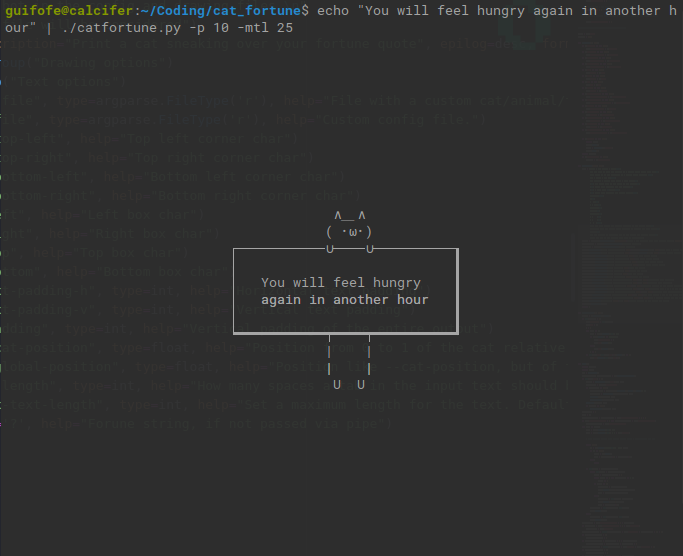

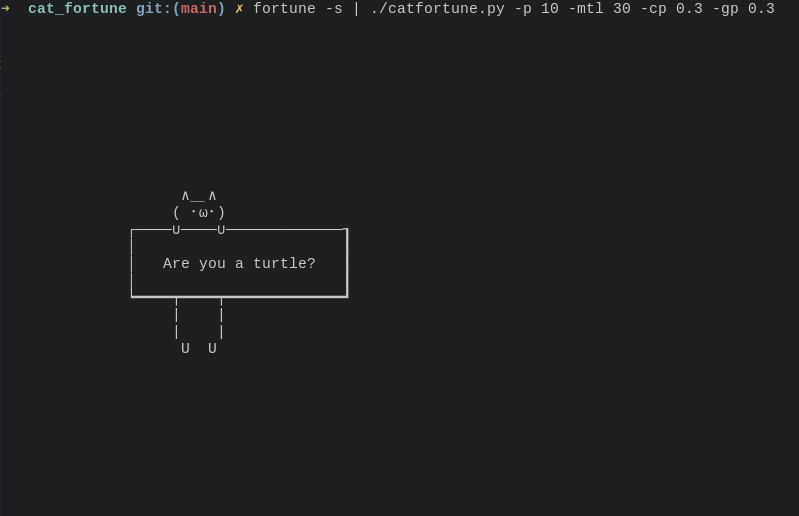
How to use
Be sure to have Python3 and to make the script executable (chmod +x ./catfortune.py)
You can use it
- With a pipe:
fortune | ./catfortune.py [OPTIONS] - With a string:
./catfortune.py [OPTIONS] "Hello"
Options
Usage: catfortune.py OPTIONS [text]
You can rename the file and/or remove the extension if you want
File Options
| Command | Description |
|---|---|
-d, --drawing-file FILE |
File with a custom cat/animal/thinghy |
-c, --config-file FILE |
Custom config file. |
Drawing Options
| Command | Description |
|---|---|
-tl, --top-left STR |
Top left corner character |
-tr, --top-right STR |
Top right corner char |
-bl, --bottom-left STR |
Bottom left corner char |
-br, --bottom-right STR |
Bottom right corner char |
-l, --left STR |
Left box char |
-r, --right STR |
Right box char |
-t, --top STR |
Top box char |
-b, --bottom STR |
Bottom box char |
-p, --padding INT |
Vertical padding of the entire output |
-cp, --cat-position FLOAT |
Position from 0 to 1 of the cat relative to the box. 0 = all to the left, 1 = all to the right, 0.5 = center |
-gp, --global-position INT |
Position like --cat-position, but of the entire output relative to the terminal |
Text Options
| Command | Description |
|---|---|
-tph, --text-padding-h INT |
Horizontal text padding |
-tpv, --text-padding-v INT |
Vertical text padding |
-tb, --tab-length INT |
How many spaces a tab in the input text should be. Default = 2 |
-mtl, --max-text-length INT |
Set a maximum length for the text. Default is 0, that means it will only adapt to the terminal |
Other
| Command | Description |
|---|---|
-h, --help |
Print a guide to the script |
Configuration files
Drawing file
It's the file where you can create a custom cat. Specify its path with the option -d.
- The first line must be the number of characters of the longest line of the drawing.
- The orher lines are those of the drawing. There must be
OUTPUTas one of the lines: it separates the top and the bottom part of the ASCII art.
Example:
8
  ∧_∧
 ( ・ω・)
─∪────∪─
OUTPUT
━┯━━━━┯━
 |    |
 |    |
  U  U
Config File
Specify its path with -c. It contains the same arguments as the command line options. You must specify them in a single line.
You can optionally specify a custom drawing after the first line, with the same format as the drawing file. The latter will have precedence over the ASCII art in the config file.
Example:
-tl ┌ -tph 3 -tpv 5 -l |
8
  ∧_∧
 ( -.-)
─∪────∪─
OUTPUT
━┯━━━━┯━
 |    |
 |    |
  U  U
1 maintainer

Metadata
1 maintainer
Release files for fortune-cat 1.1
For a detailed explanation of source distributions (sdists) and built distributions (wheels), please see the package formats documentation.
Source distribution (sdist)
| File | Size | Uploaded | |
|---|---|---|---|
| fortune-cat-1.1.tar.gz | 5.5 kB | Details |
Built distribution (wheel)
| File | Interpreter | ABI | Platform | Reset |
|---|---|---|---|---|
| fortune_cat-1.1-py3-none-any.whl | Python 3 | none | any | Details |
Total release size: 23.7 kB
Release files / fortune-cat-1.1.tar.gz
| Download URL | fortune-cat-1.1.tar.gz |
|---|---|
| Size | 5.5 kB |
| Tags | Source |
|
SHA-256 checksum How to use checksums |
40c5c6446dec8cc0b6e9f93aa0ef0314cb0ae51d4cd69d1e67be60c67c11f787
|
|
BLAKE2b-256 checksum How to use checksums |
beb49c37b79cbe7662823b3942fcf0ca738182dd6dc48b79d3e10a2fd6e094ef
|
| Upload date | |
|
Uploaded using Trusted Publishing? What is trusted publishing? |
No |
| Uploaded via |
twine/3.2.0 pkginfo/1.6.1 requests/2.25.0 setuptools/51.0.0 requests-toolbelt/0.9.1 tqdm/4.54.1 CPython/3.6.9
|
Release files / fortune_cat-1.1-py3-none-any.whl
| Download URL | fortune_cat-1.1-py3-none-any.whl |
|---|---|
| Size | 18.1 kB |
| Tags | Python 3 |
|
SHA-256 checksum How to use checksums |
fe8c6bf9dfbb9df3fd58056f3dac21d01d2dbb2e7005eb73964cdb362880c239
|
|
BLAKE2b-256 checksum How to use checksums |
25e7d266636f1ad672dc4ff8fcae102e8bc07de5f46b1452e1b9798395933077
|
| Upload date | |
|
Uploaded using Trusted Publishing? What is trusted publishing? |
No |
| Uploaded via |
twine/3.2.0 pkginfo/1.6.1 requests/2.25.0 setuptools/51.0.0 requests-toolbelt/0.9.1 tqdm/4.54.1 CPython/3.6.9
|













