
A cat that will show a fortune message when piped to it.

Project description
Fortune Cat
Like the cow, but it's a cat (and has many more options). You can change the animal in a config file (to specify with -c) or with a dedicated file (-d).
Take a look here if you would like to have a cat to decor your cat command.
Requirements
Python 3.0+, necessary for a simpler unicode manipulation.
Examples
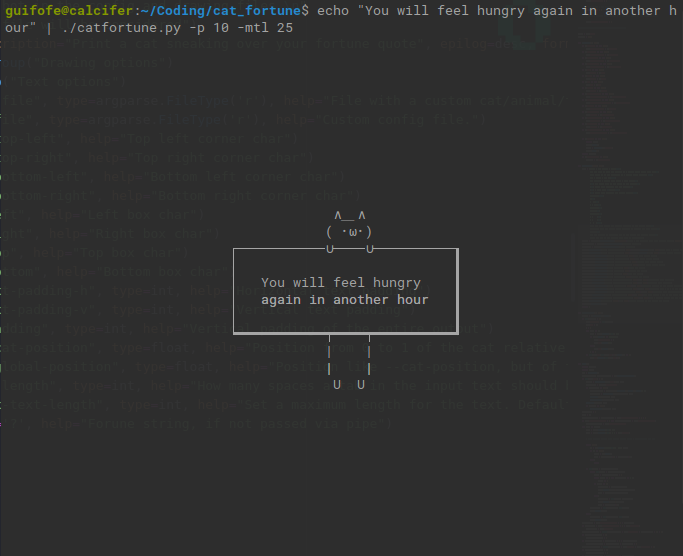

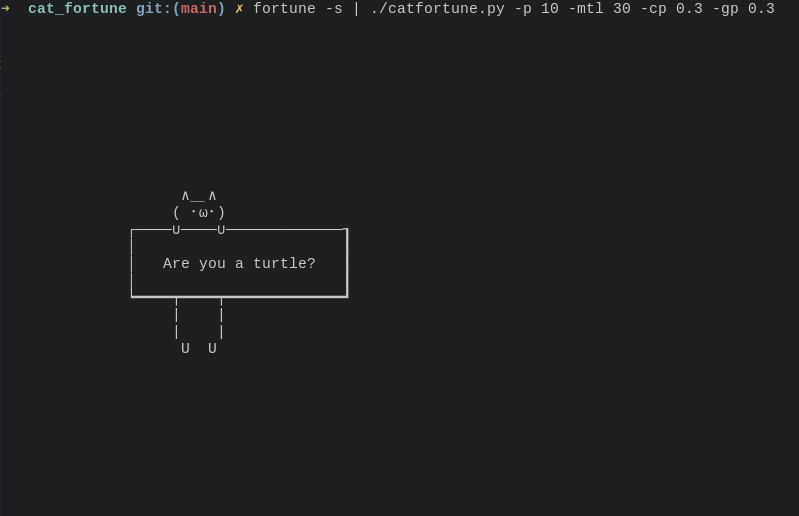
How to use
Be sure to have Python3 and to make the script executable (chmod +x ./catfortune.py)
You can use it
- With a pipe:
fortune | ./catfortune.py [OPTIONS] - With a string:
./catfortune.py [OPTIONS] "Hello"
Options
Usage: catfortune.py OPTIONS [text]
You can rename the file and/or remove the extension if you want
File Options
| Command | Description |
|---|---|
-d, --drawing-file FILE |
File with a custom cat/animal/thinghy |
-c, --config-file FILE |
Custom config file. |
Drawing Options
| Command | Description |
|---|---|
-tl, --top-left STR |
Top left corner character |
-tr, --top-right STR |
Top right corner char |
-bl, --bottom-left STR |
Bottom left corner char |
-br, --bottom-right STR |
Bottom right corner char |
-l, --left STR |
Left box char |
-r, --right STR |
Right box char |
-t, --top STR |
Top box char |
-b, --bottom STR |
Bottom box char |
-p, --padding INT |
Vertical padding of the entire output |
-cp, --cat-position FLOAT |
Position from 0 to 1 of the cat relative to the box. 0 = all to the left, 1 = all to the right, 0.5 = center |
-gp, --global-position INT |
Position like --cat-position, but of the entire output relative to the terminal |
Text Options
| Command | Description |
|---|---|
-tph, --text-padding-h INT |
Horizontal text padding |
-tpv, --text-padding-v INT |
Vertical text padding |
-tb, --tab-length INT |
How many spaces a tab in the input text should be. Default = 2 |
-mtl, --max-text-length INT |
Set a maximum length for the text. Default is 0, that means it will only adapt to the terminal |
Other
| Command | Description |
|---|---|
-h, --help |
Print a guide to the script |
Configuration files
Drawing file
It's the file where you can create a custom cat. Specify its path with the option -d.
- The first line must be the number of characters of the longest line of the drawing.
- The orher lines are those of the drawing. There must be
OUTPUTas one of the lines: it separates the top and the bottom part of the ASCII art.
Example:
8
  ∧_∧
 ( ・ω・)
─∪────∪─
OUTPUT
━┯━━━━┯━
 |    |
 |    |
  U  U
Config File
Specify its path with -c. It contains the same arguments as the command line options. You must specify them in a single line.
You can optionally specify a custom drawing after the first line, with the same format as the drawing file. The latter will have precedence over the ASCII art in the config file.
Example:
-tl ┌ -tph 3 -tpv 5 -l |
8
  ∧_∧
 ( -.-)
─∪────∪─
OUTPUT
━┯━━━━┯━
 |    |
 |    |
  U  U
Release history Release notifications | RSS feed

Download files
Download the file for your platform. If you're not sure which to choose, learn more about installing packages.
Source Distribution
Built Distribution
Filter files by name, interpreter, ABI, and platform.
If you're not sure about the file name format, learn more about wheel file names.
Copy a direct link to the current filters
File details
Details for the file fortune-cat-1.1.tar.gz.
File metadata
- Download URL: fortune-cat-1.1.tar.gz
- Upload date:
- Size: 5.5 kB
- Tags: Source
- Uploaded using Trusted Publishing? No
- Uploaded via: twine/3.2.0 pkginfo/1.6.1 requests/2.25.0 setuptools/51.0.0 requests-toolbelt/0.9.1 tqdm/4.54.1 CPython/3.6.9
File hashes
| Algorithm | Hash digest | |
|---|---|---|
| SHA256 |
40c5c6446dec8cc0b6e9f93aa0ef0314cb0ae51d4cd69d1e67be60c67c11f787
|
|
| MD5 |
c8166a966b6ab425b6b8ed34d50c2c0c
|
|
| BLAKE2b-256 |
beb49c37b79cbe7662823b3942fcf0ca738182dd6dc48b79d3e10a2fd6e094ef
|
File details
Details for the file fortune_cat-1.1-py3-none-any.whl.
File metadata
- Download URL: fortune_cat-1.1-py3-none-any.whl
- Upload date:
- Size: 18.1 kB
- Tags: Python 3
- Uploaded using Trusted Publishing? No
- Uploaded via: twine/3.2.0 pkginfo/1.6.1 requests/2.25.0 setuptools/51.0.0 requests-toolbelt/0.9.1 tqdm/4.54.1 CPython/3.6.9
File hashes
| Algorithm | Hash digest | |
|---|---|---|
| SHA256 |
fe8c6bf9dfbb9df3fd58056f3dac21d01d2dbb2e7005eb73964cdb362880c239
|
|
| MD5 |
ec3947020cccb25526d26e6eccad44f4
|
|
| BLAKE2b-256 |
25e7d266636f1ad672dc4ff8fcae102e8bc07de5f46b1452e1b9798395933077
|






