
Fotura

A Python CLI for importing, organizing, and uploading your photos.

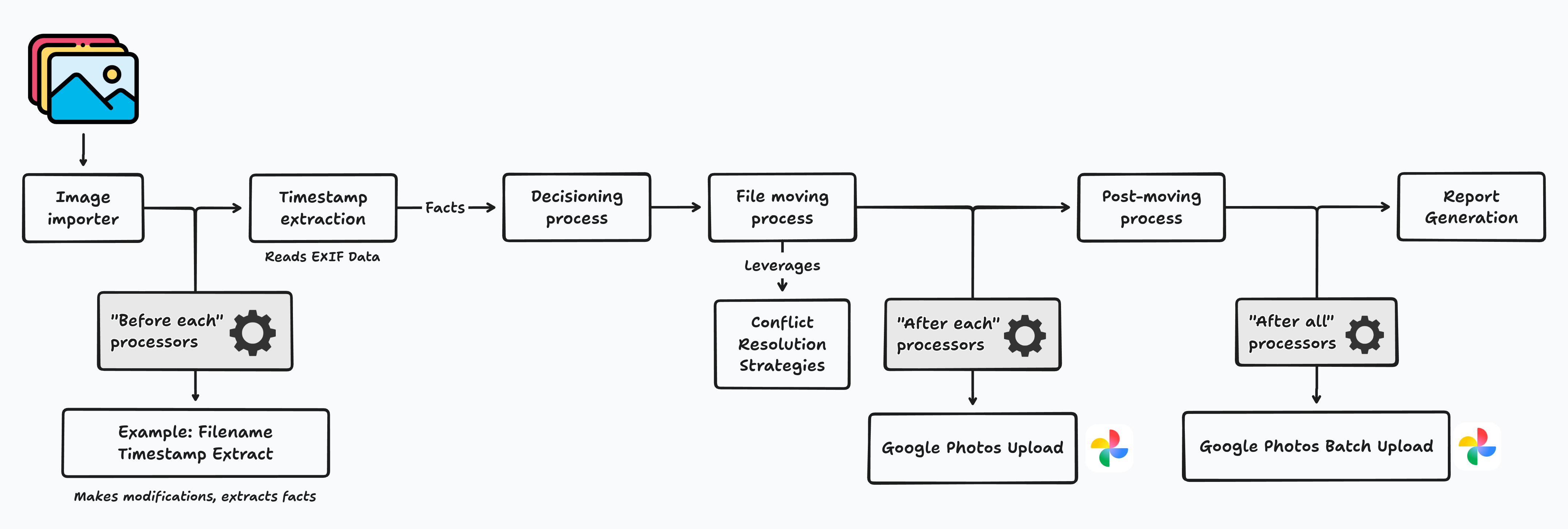
Fotura moves photos from a source directory into a clean, date-organised folder structure. It extracts timestamps from EXIF metadata and filenames, resolves conflicts, and can upload directly to Google Photos, all from a single command.
Installation
pipx install fotura
Usage
fotura import ~/Pictures/unsorted ~/Pictures/organized
Always preview first with --dry-run:
fotura import ~/Pictures/unsorted ~/Pictures/organized --dry-run --open-report
To process multiple photos at once, use --concurrency (default: 1, maximum: 5).
fotura import ~/Pictures/unsorted ~/Pictures/organized --concurrency 2
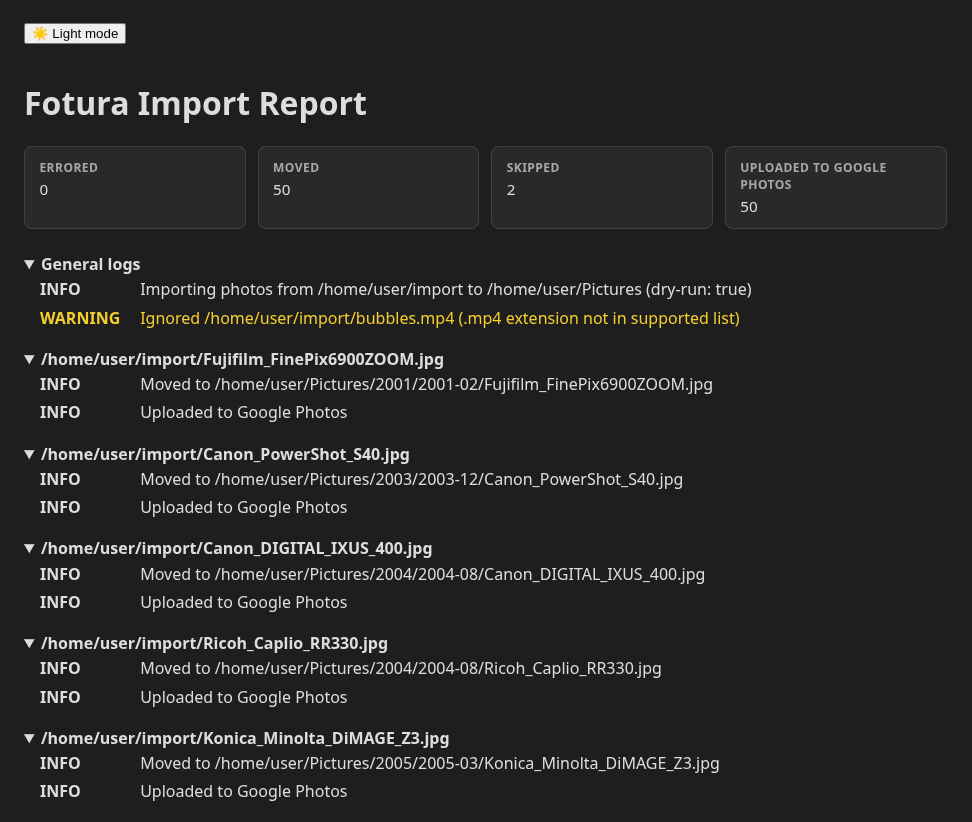
Reports are generated for each import, viewable using your browser:
Processors
Processors extend the import pipeline. Specify them with --before-each, --after-each, or --after-all. Multiple processors can be chained by repeating the flag.
Before-each processors run prior to a photo being moved. They extract facts, such as a timestamp from a filename, which inform how the photo is routed and processed.
Filename Timestamp Extract
Extracts timestamps from WhatsApp and Android filenames and writes them back into EXIF metadata.
fotura import --before-each "filename_timestamp_extract" ~/Pictures/unsorted ~/Pictures/organized
Video Timestamp Extract
Extracts the creation timestamp stored in MP4, M4V, MOV, 3GP, and 3G2 video containers. The timestamp is used to route the video without modifying the file.
Choose media types with the repeatable --include option. Photos are selected by
default; select videos alone or explicitly select both:
# Videos only
fotura import ~/Videos/unsorted ~/Videos/organized --include videos --before-each "video_timestamp_extract"

# Photos and videos
fotura import ~/Pictures/unsorted ~/Pictures/organized --include photos --include videos
Google Photos Upload
Uploads in parallel after the full import completes, using the Google Photos batch API for efficiency.
fotura import --after-all "google_photos_upload" ~/Pictures/unsorted ~/Pictures/organized
fotura import --after-all "google_photos_upload:concurrency=3,batch_size=20" ~/Pictures/unsorted ~/Pictures/organized
| Parameter | Default | Range | Description |
|---|---|---|---|
concurrency |
2 | 1–5 | Parallel byte uploads |
batch_size |
10 | 1–50 | Photos per batch creation request |
The Google Photos processor is resumable. Interrupted or failed uploads can be retried without re-uploading photos that already succeeded:
fotura processor resume google_photos_upload
Supported file types
Photos
| Format | Extensions | Cameras |
|---|---|---|
| JPEG | .jpg, .jpeg |
All |
| TIFF | .tiff, .tif |
All |
| Sony ARW | .arw |
Sony Alpha |
| Nikon RAW | .nef |
Nikon |
| Canon RAW | .cr2 |
Canon |
| Olympus RAW | .orf |
Olympus |
| Pentax RAW | .pef |
Pentax |
| Adobe DNG | .dng |
Various |
| Generic RAW | .raw |
Various (TIFF-based only) |
| Fuji RAF | .raf |
Fuji |
Videos
| Format | Extensions |
|---|---|
| Video | .mp4, .m4v, .mov, .3gp, .3g2 |
Options
| Option | Description |
|---|---|
--dry-run |
Preview changes without moving files |
--open-report |
Open the HTML report in a browser after import |
--before-each |
Processor to run per photo before moving |
--after-each |
Processor to run per photo after moving |
--after-all |
Processor to run once after all photos are processed |
--include |
Media type to import (photos, videos); repeat for both |
--conflict-strategy |
How to handle filename collisions (keep_both, skip) |
--target-path-format |
Date format for the target directory structure |
Path format
Photos are organised into %Y/%Y-%m by default (e.g. 2023/2023-05). Override with --target-path-format using Python date format codes:
| Style | Format | Example |
|---|---|---|
| Year / Month | %Y/%m |
2008/05/example.jpg |
| Year / Month name | %Y/%B |
2008/May/example.jpg |
| Year-Month flat | %Y-%m |
2008-05/example.jpg |
| Year / Month / Day | %Y/%m/%d |
2008/12/25/example.jpg |
| Daily folders | %Y/%Y-%m/%Y-%m-%d |
2008/2008-05/2008-05-30/example.jpg |
Conflict resolution
The default conflict strategy is keep_both.
keep_both: appends a numeric suffix to the incoming file (photo_1.jpg,photo_2.jpg, …)skip: leaves the existing file in place and skips the incoming one
Coming soon
- Stripping location data from EXIF.
- Flagging low-quality images (blurry, over/under-exposed, duplicates).
- Image labelling via a multimodal LLM.
Development
See Development.
1 maintainer

Download files
Download the file for your platform. If you're not sure which to choose, learn more about installing packages.
Source Distribution
Built Distribution
Filter files by name, interpreter, ABI, and platform.
If you're not sure about the file name format, learn more about wheel file names.
Copy a direct link to the current filters
File details
Details for the file fotura-0.1.0.tar.gz.
File metadata
- Download URL: fotura-0.1.0.tar.gz
- Upload date:
- Size: 27.9 kB
- Tags: Source
- Uploaded using Trusted Publishing? Yes
- Uploaded via:
twine/7.0.0 CPython/3.13.14
File hashes
| Algorithm | Hash digest | |
|---|---|---|
| SHA256 |
595ee99ae578933fe9621360e1792c9d198b2d4526a55226dd9136e4f1a1a74c
|
|
| MD5 |
fd7aabfb6962baedf52b5fcc355247f3
|
|
| BLAKE2b-256 |
0fc8bb7a987fa84527fdc66a6c60764951a0122bad15a5dccacd4dcd1b627646
|
Provenance
The following attestation bundles were made for fotura-0.1.0.tar.gz:
Publisher:
main.yml on jg23497/fotura
-
Statement:
-
Statement type:
https://in-toto.io/Statement/v1 -
Predicate type:
https://docs.pypi.org/attestations/publish/v1 -
Subject name:
fotura-0.1.0.tar.gz -
Subject digest:
595ee99ae578933fe9621360e1792c9d198b2d4526a55226dd9136e4f1a1a74c - Sigstore transparency entry: 2636232030
- Sigstore integration time:
-
Permalink:
jg23497/fotura@e519c003a38de8f9da9e6f73aeb13f6f30e3a114 -
Branch / Tag:
refs/tags/v0.1.0 - Owner: https://github.com/jg23497
-
Access:
public
-
Token Issuer:
https://token.actions.githubusercontent.com -
Runner Environment:
github-hosted -
Publication workflow:
main.yml@e519c003a38de8f9da9e6f73aeb13f6f30e3a114 -
Trigger Event:
push
-
Statement type:
File details
Details for the file fotura-0.1.0-py3-none-any.whl.
File metadata
- Download URL: fotura-0.1.0-py3-none-any.whl
- Upload date:
- Size: 46.2 kB
- Tags: Python 3
- Uploaded using Trusted Publishing? Yes
- Uploaded via:
twine/7.0.0 CPython/3.13.14
File hashes
| Algorithm | Hash digest | |
|---|---|---|
| SHA256 |
33c3f931e6f985cce97f597f943b7b2cf2dc8f25b6db2a6c219091d35fe189fc
|
|
| MD5 |
c4198f536a65df66ddf48f2568d727a3
|
|
| BLAKE2b-256 |
92552e3bbe85916a3552de17ece7d3ff87acf7c618bb29e3b4dec3ec209d7ca0
|
Provenance
The following attestation bundles were made for fotura-0.1.0-py3-none-any.whl:
Publisher:
main.yml on jg23497/fotura
-
Statement:
-
Statement type:
https://in-toto.io/Statement/v1 -
Predicate type:
https://docs.pypi.org/attestations/publish/v1 -
Subject name:
fotura-0.1.0-py3-none-any.whl -
Subject digest:
33c3f931e6f985cce97f597f943b7b2cf2dc8f25b6db2a6c219091d35fe189fc - Sigstore transparency entry: 2636232109
- Sigstore integration time:
-
Permalink:
jg23497/fotura@e519c003a38de8f9da9e6f73aeb13f6f30e3a114 -
Branch / Tag:
refs/tags/v0.1.0 - Owner: https://github.com/jg23497
-
Access:
public
-
Token Issuer:
https://token.actions.githubusercontent.com -
Runner Environment:
github-hosted -
Publication workflow:
main.yml@e519c003a38de8f9da9e6f73aeb13f6f30e3a114 -
Trigger Event:
push
-
Statement type:













