
A set of command line tools to inspect, manipulate and convert font files
Verified details
These details have been verified by PyPIProject links
GitHub Statistics
Maintainers

Project description
FoundryTools-CLI
FoundryTools-CLI is a command line interface for the FoundryTools library, which provides a set of tools for working with font files. It is designed to be used from the command line, allowing users to perform various operations on font files without the need for a graphical user interface.
The CLI provides a range of commands for manipulating font files, including converting between different font formats, extracting and modifying font metadata, and performing various font-related operations. It is built on top of the FoundryTools library, which provides a comprehensive set of tools for working with font files in Python.
The CLI is designed to be easy to use and provides a consistent interface for working with different font formats. It is suitable for both developers and font designers who need to perform various operations on font files from the command line. The CLI is also extensible, allowing users to add their own commands and functionality as needed.
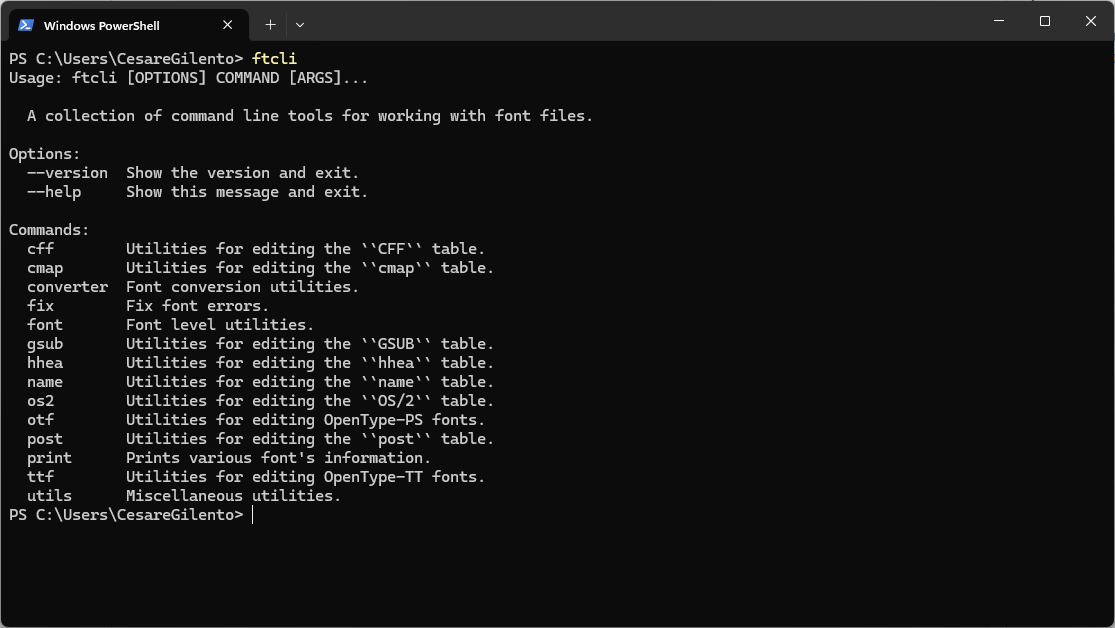
The command line interface is built with click and tables are rendered by rich.
Installation
FoundryTools-CLI requires Python 3.10 or later.
IMPORTANT: If you have Python 2.x installed in your system, you may have to use python3
(instead of python) in the commands below.
pip
FoundryTools-CLI releases are available on the Python Package Index (PyPI), so it can be installed with pip:
python -m pip install foundrytools-cli
Editable mode
If you would like to contribute to the development, you can clone the repository from GitHub, install the package in 'editable' mode and modify the source code in place. We strongly recommend using a virtual environment.
# clone the repository:
git clone https://github.com/ftCLI/foundrytools-cli.git
cd foundrytools-cli

# create new virtual environment named e.g. ftcli-venv, or whatever you prefer:
python -m venv ftcli-venv

# to activate the virtual environmtnet in macOS and Linux, do:
. ftcli-venv/bin/activate

# to activate the virtual environment in Windows, do:
ftcli-venv\Scripts\activate.bat

# install in 'editable' mode
python -m pip install -e .
Documentation
FoundryTools-CLI is a Terminal app where commands are logically organized into subcommands.
Please refer to the user documentation.
License
FoundryTools-CLI is available under the MIT license
Credits
To Sergiev. May You rest in peace.
Project details
Verified details
These details have been verified by PyPIProject links
GitHub Statistics
Maintainers
Release history Release notifications | RSS feed


Download files
Download the file for your platform. If you're not sure which to choose, learn more about installing packages.
Source Distribution
Built Distribution
Filter files by name, interpreter, ABI, and platform.
If you're not sure about the file name format, learn more about wheel file names.
Copy a direct link to the current filters
File details
Details for the file foundrytools_cli-2.1.0.tar.gz.
File metadata
- Download URL: foundrytools_cli-2.1.0.tar.gz
- Upload date:
- Size: 37.6 kB
- Tags: Source
- Uploaded using Trusted Publishing? Yes
- Uploaded via: twine/6.1.0 CPython/3.13.7
File hashes
| Algorithm | Hash digest | |
|---|---|---|
| SHA256 |
3dc0b97fcb03c7868b4af5fd98d986b0bffac33d6e88f6342bc01b2558703fe2
|
|
| MD5 |
4112034ab6ad5beef61d09192d133409
|
|
| BLAKE2b-256 |
0164f59dcfd014dc846acec4102989b286c83b8e5bfda8c03ee3f754f883f575
|
File details
Details for the file foundrytools_cli-2.1.0-py3-none-any.whl.
File metadata
- Download URL: foundrytools_cli-2.1.0-py3-none-any.whl
- Upload date:
- Size: 54.0 kB
- Tags: Python 3
- Uploaded using Trusted Publishing? Yes
- Uploaded via: twine/6.1.0 CPython/3.13.7
File hashes
| Algorithm | Hash digest | |
|---|---|---|
| SHA256 |
3df8495e5f4335d14130e1a3dba80fd643dadbfe3606a3ce1fdf18acbb20d95d
|
|
| MD5 |
78ee33f6e9a682c995f3b8eaecf1a31f
|
|
| BLAKE2b-256 |
3b20d09b5a2f6e0efaa6033aacf9dc0d92efa3edb9f00fdcee3a09867a8481ff
|






