
A powerful graph-based RAG framework (foxHippoRAG distribution) that enables LLMs to identify and leverage connections within new knowledge for improved retrieval.
Verified details
These details have been verified by PyPIProject links
GitHub Statistics
Maintainers

Project description
foxHippoRAG: From RAG to Memory
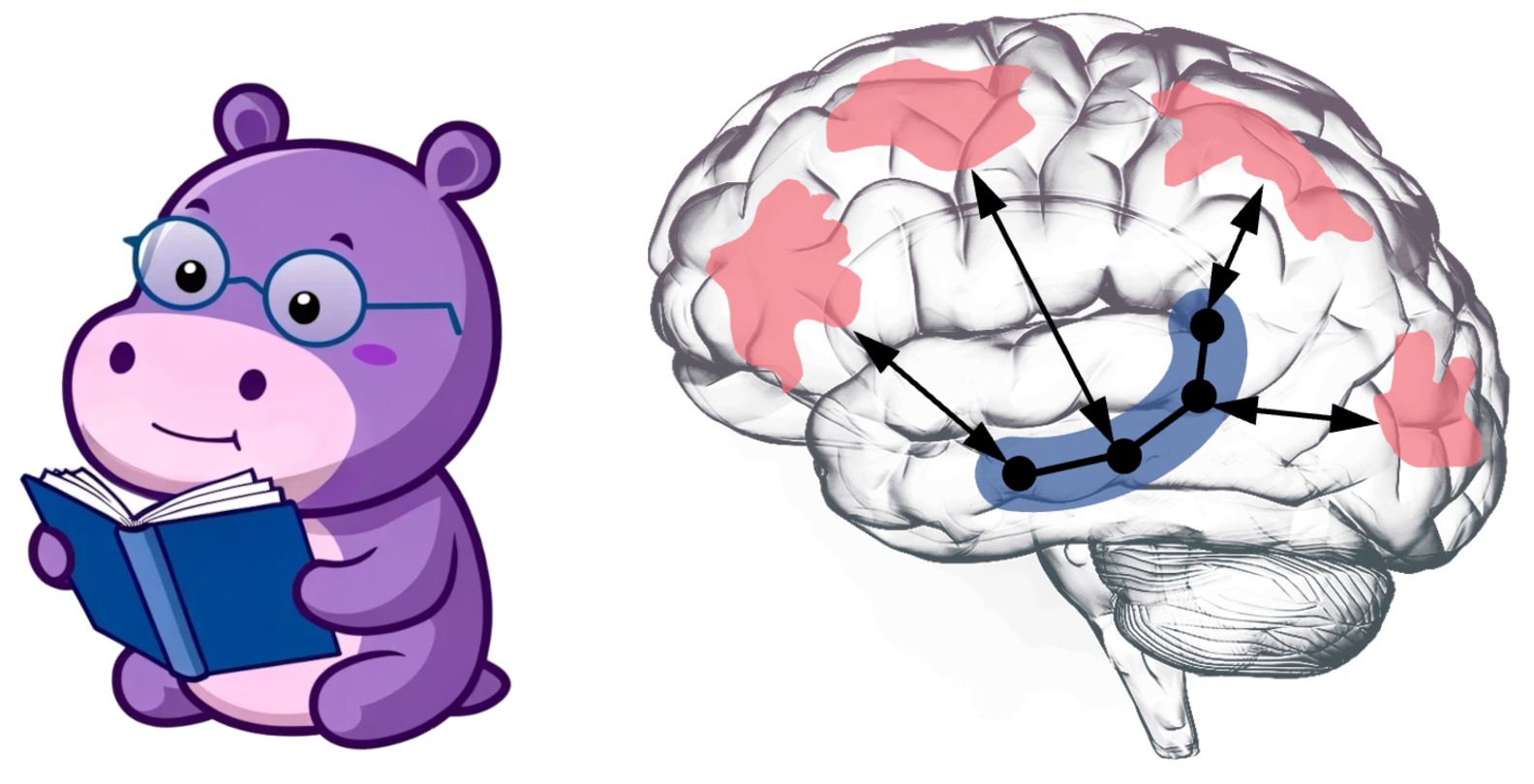
Github | 爱发电 or afdian | Blog
foxHippoRAG 是一个强大的记忆框架,用于增强大型语言模型识别和利用新知识中连接的能力——这反映了人类长期记忆的关键功能。
foxHippoRAG is a powerful memory framework designed to enhance the ability of large language models to recognize and utilize connections in new knowledge - this reflects the key function of human long-term memory.
我们的实验表明,foxHippoRAG 在甚至最先进的 RAG 系统中也能提高关联性(多跳检索)和意义构建(整合大型复杂上下文的过程),同时不牺牲它们在简单任务上的性能
Our experiments have shown that foxHippoRAG can enhance relevance (multi-hop retrieval) and meaning construction (the process of integrating large and complex contexts) even in the most advanced RAG systems, without sacrificing their performance in simple tasks.
与之前的版本一样,foxHippoRAG 在在线过程中保持成本和延迟效率,同时与其他基于图的解决方案(如 GraphRAG、RAPTOR 和 LightRAG)相比,离线索引使用的资源显著减少
Like the previous version, foxHippoRAG maintains cost and latency efficiency during the online process. Moreover, compared with other graph-based solutions (such as GraphRAG, RAPTOR, and LightRAG), it significantly reduces the resources used for offline indexing.
本仓库旨在优化 HippoRAG 的内存框架,以提高其在复杂任务上的性能,添加了大量异步处理和并行计算,以提高效率,组成独立发行版,命名为 foxHippoRAG
This repository aims to optimize the memory framework of HippoRAG to enhance its performance in complex tasks. It incorporates a large number of asynchronous processing and parallel computing techniques to increase efficiency. It has been developed into an independent distribution and is named foxHippoRAG.
本项目添加了高速处理选项以适配日常需求,并添加了更多功能以支持更多场景。
This project has added high-speed processing options to meet daily requirements, and has also incorporated more functions to support a wider range of scenarios.
本项目小狐狸有意维护,可以参见foxHippoRAG作为代码托管,可以参见Blog追踪最新动态。
This project is maintained by Little Fox. You can refer to foxHippoRAG for code hosting and Blog for tracking the latest updates.
HippoRAG 项目测试
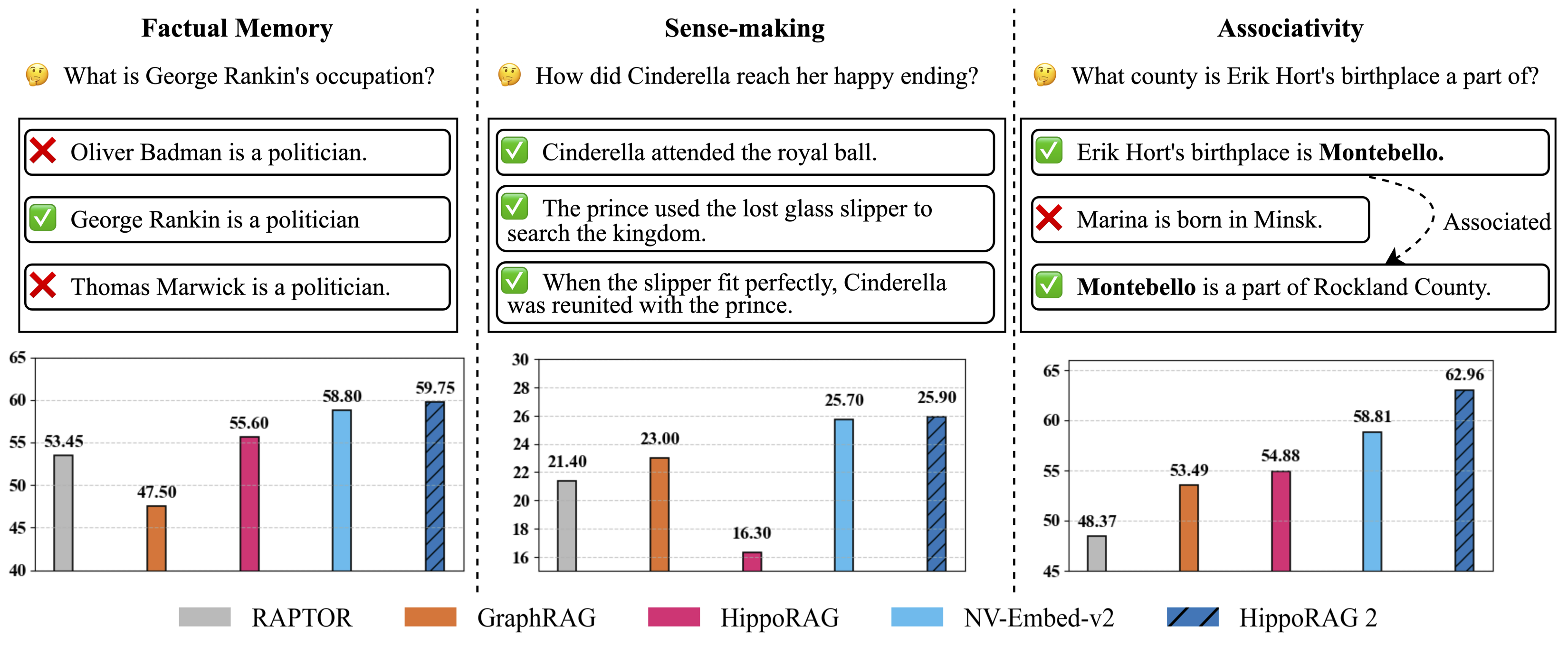
Figure 1: Evaluation of continual learning capabilities across three key dimensions: factual memory (NaturalQuestions, PopQA), sense-making (NarrativeQA), and associativity (MuSiQue, 2Wiki, HotpotQA, and LV-Eval). foxHippoRAG surpasses other methods across all categories, bringing it one step closer to true long-term memory.
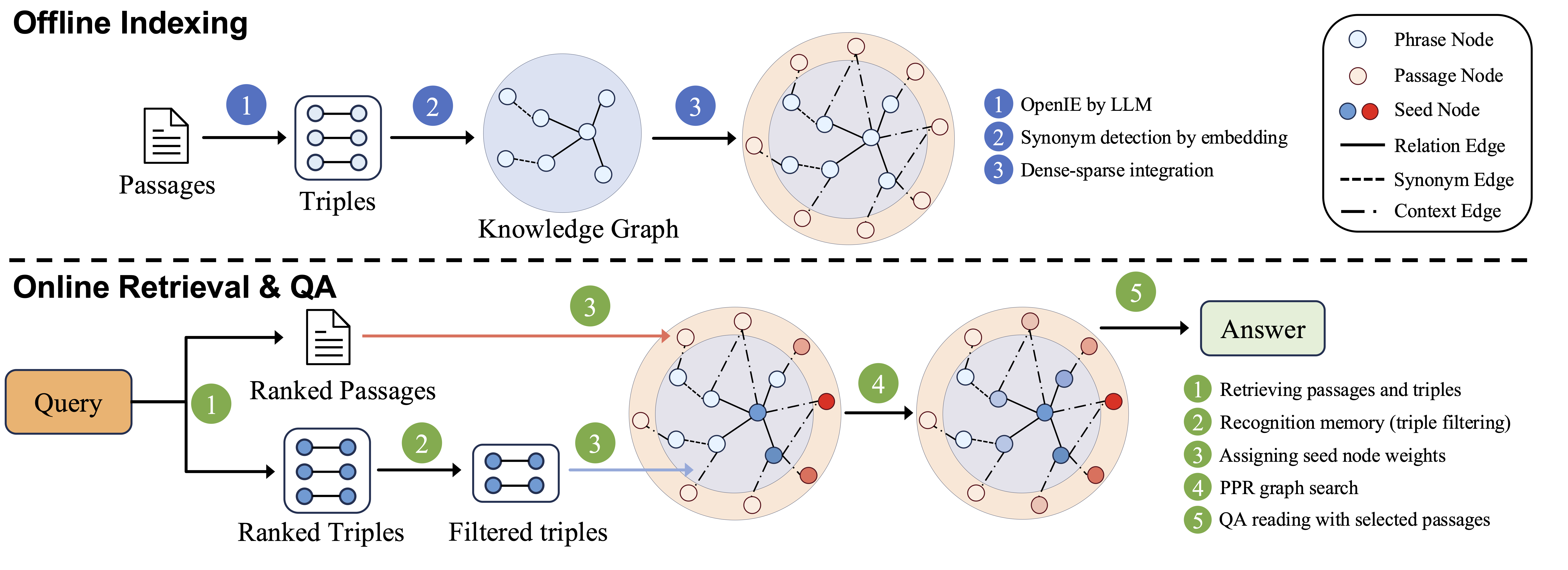
Figure 2: foxHippoRAG methodology.
Check out our papers to learn more:
- HippoRAG: Neurobiologically Inspired Long-Term Memory for Large Language Models [NeurIPS '24].
- From RAG to Memory: Non-Parametric Continual Learning for Large Language Models [ICML '25].
Installation
conda create -n foxhipporag python=3.10
conda activate foxhipporag
pip install foxHippoRAG
Initialize the environmental variables and activate the environment:
export CUDA_VISIBLE_DEVICES=0,1,2,3
export HF_HOME=<path to Huggingface home directory>
export OPENAI_API_KEY=<your openai api key>   # if you want to use OpenAI model

conda activate foxhipporag
Quick Start
OpenAI Models
This simple example will illustrate how to use foxHippoRAG with any OpenAI model:
from foxhipporag import foxHippoRAG

# Prepare datasets and evaluation
docs = [
    "Oliver Badman is a politician.",
    "George Rankin is a politician.",
    "Thomas Marwick is a politician.",
    "Cinderella attended the royal ball.",
    "The prince used the lost glass slipper to search the kingdom.",
    "When the slipper fit perfectly, Cinderella was reunited with the prince.",
    "Erik Hort's birthplace is Montebello.",
    "Marina is bom in Minsk.",
    "Montebello is a part of Rockland County."
]

save_dir = 'outputs'# Define save directory for foxHippoRAG objects (each LLM/Embedding model combination will create a new subdirectory)
llm_model_name = 'gpt-4o-mini' # Any OpenAI model name
embedding_model_name = 'nvidia/NV-Embed-v2'# Embedding model name (NV-Embed, GritLM or Contriever for now)

#Startup a foxHippoRAG instance
foxhipporag = foxHippoRAG(save_dir=save_dir,
                    llm_model_name=llm_model_name,
                    embedding_model_name=embedding_model_name)

#Run indexing
foxhipporag.index(docs=docs)

#Separate Retrieval & QA
queries = [
    "What is George Rankin's occupation?",
    "How did Cinderella reach her happy ending?",
    "What county is Erik Hort's birthplace a part of?"
]

retrieval_results = foxhipporag.retrieve(queries=queries, num_to_retrieve=2)
qa_results = foxhipporag.rag_qa(retrieval_results)

#Combined Retrieval & QA
rag_results = foxhipporag.rag_qa(queries=queries)

#For Evaluation
answers = [
    ["Politician"],
    ["By going to the ball."],
    ["Rockland County"]
]

gold_docs = [
    ["George Rankin is a politician."],
    ["Cinderella attended the royal ball.",
    "The prince used the lost glass slipper to search the kingdom.",
    "When the slipper fit perfectly, Cinderella was reunited with the prince."],
    ["Erik Hort's birthplace is Montebello.",
    "Montebello is a part of Rockland County."]
]

rag_results = foxhipporag.rag_qa(queries=queries,
                              gold_docs=gold_docs,
                              gold_answers=answers)
Example (OpenAI Compatible Embeddings)
If you want to use LLMs and Embeddings Compatible to OpenAI, please use the following methods.
foxhipporag = foxHippoRAG(save_dir=save_dir,
    llm_model_name='Your LLM Model name',
    llm_base_url='Your LLM Model url',
    embedding_model_name='Your Embedding model name',
    embedding_base_url='Your Embedding model url')
Local Deployment (vLLM)
This simple example will illustrate how to use foxHippoRAG with any vLLM-compatible locally deployed LLM.
- Run a local OpenAI-compatible vLLM server with specified GPUs (make sure you leave enough memory for your embedding model).
export CUDA_VISIBLE_DEVICES=0,1
export VLLM_WORKER_MULTIPROC_METHOD=spawn
export HF_HOME=<path to Huggingface home directory>

conda activate foxhipporag  # vllm should be in this environment

# Tune gpu-memory-utilization or max_model_len to fit your GPU memory, if OOM occurs
vllm serve meta-llama/Llama-3.3-70B-Instruct --tensor-parallel-size 2 --max_model_len 4096 --gpu-memory-utilization 0.95
- Now you can use very similar code to the one above to use
foxHippoRAG:
save_dir = 'outputs'# Define save directory for foxHippoRAG objects (each LLM/Embedding model combination will create a new subdirectory)
llm_model_name = # Any OpenAI model name
embedding_model_name = # Embedding model name (NV-Embed, GritLM or Contriever for now)
llm_base_url= # Base url for your deployed LLM (i.e. http://localhost:8000/v1)

foxhipporag = foxHippoRAG(save_dir=save_dir,
                    llm_model_name=llm_model,
                    embedding_model_name=embedding_model_name,
                    llm_base_url=llm_base_url)

# Same Indexing, Retrieval and QA as running OpenAI models above
Testing
When making a contribution to foxHippoRAG, please run the scripts below to ensure that your changes do not result in unexpected behavior from our core modules.
These scripts test for indexing, graph loading, document deletion and incremental updates to a foxHippoRAG object.
OpenAI Test
To test foxHippoRAG with an OpenAI LLM and embedding model, simply run the following. The cost of this test will be negligible.
export OPENAI_API_KEY=<your openai api key>

conda activate foxhipporag

python tests_openai.py
Local Test
To test locally, you must deploy a vLLM instance. We choose to deploy a smaller 8B model Llama-3.1-8B-Instruct for cheaper testing.
export CUDA_VISIBLE_DEVICES=0
export VLLM_WORKER_MULTIPROC_METHOD=spawn
export HF_HOME=<path to Huggingface home directory>

conda activate foxhipporag  # vllm should be in this environment

# Tune gpu-memory-utilization or max_model_len to fit your GPU memory, if OOM occurs
vllm serve meta-llama/Llama-3.1-8B-Instruct --tensor-parallel-size 2 --max_model_len 4096 --gpu-memory-utilization 0.95 --port 6578
Then, we run the following test script:
CUDA_VISIBLE=1 python tests_local.py
Reproducing our Experiments
To use our code to run experiments we recommend you clone this repository and follow the structure of the main.py script.
Data for Reproducibility
We evaluated several sampled datasets in our paper, some of which are already included in the reproduce/dataset directory of this repo. For the complete set of datasets, please visit
our HuggingFace dataset and place them under reproduce/dataset. We also provide the OpenIE results for both gpt-4o-mini and Llama-3.3-70B-Instruct for our musique sample under outputs/musique.
To test your environment is properly set up, you can use the small dataset reproduce/dataset/sample.json for debugging as shown below.
Running Indexing & QA
Initialize the environmental variables and activate the environment:
export CUDA_VISIBLE_DEVICES=0,1,2,3
export HF_HOME=<path to Huggingface home directory>
export OPENAI_API_KEY=<your openai api key>   # if you want to use OpenAI model

conda activate foxhipporag
Run with OpenAI Model
dataset=sample  # or any other dataset under `reproduce/dataset`

# Run OpenAI model
python main.py --dataset $dataset --llm_base_url https://api.openai.com/v1 --llm_name gpt-4o-mini --embedding_name nvidia/NV-Embed-v2
Run with vLLM (Llama)
- As above, run a local OpenAI-compatible vLLM server with specified GPU.
export CUDA_VISIBLE_DEVICES=0,1
export VLLM_WORKER_MULTIPROC_METHOD=spawn
export HF_HOME=<path to Huggingface home directory>

conda activate foxhipporag  # vllm should be in this environment

# Tune gpu-memory-utilization or max_model_len to fit your GPU memory, if OOM occurs
vllm serve meta-llama/Llama-3.3-70B-Instruct --tensor-parallel-size 2 --max_model_len 4096 --gpu-memory-utilization 0.95
- Use another GPUs to run the main program in another terminal.
export CUDA_VISIBLE_DEVICES=2,3  # set another GPUs while vLLM server is running
export HF_HOME=<path to Huggingface home directory>
dataset=sample

python main.py --dataset $dataset --llm_base_url http://localhost:8000/v1 --llm_name meta-llama/Llama-3.3-70B-Instruct --embedding_name nvidia/NV-Embed-v2
Advanced: Run with vLLM offline batch
vLLM offers an offline batch mode for faster inference, which could bring us more than 3x faster indexing compared to vLLM online server.
- Use the following command to run the main program with vLLM offline batch mode.
export CUDA_VISIBLE_DEVICES=0,1,2,3 # use all GPUs for faster offline indexing
export VLLM_WORKER_MULTIPROC_METHOD=spawn
export HF_HOME=<path to Huggingface home directory>
export OPENAI_API_KEY=''
dataset=sample

python main.py --dataset $dataset --llm_name meta-llama/Llama-3.3-70B-Instruct --openie_mode offline --skip_graph
- After the first step, OpenIE result is saved to file. Go back to run vLLM online server and main program as described in the
Run with vLLM (Llama)main section.
Debugging Note
/reproduce/dataset/sample.jsonis a small dataset specifically for debugging.- When debugging vLLM offline mode, set
tensor_parallel_sizeas1infoxhipporag/llm/vllm_offline.py. - If you want to rerun a particular experiment, remember to clear the saved files, including OpenIE results and knowledge graph, e.g.,
rm reproduce/dataset/openie_results/openie_sample_results_ner_meta-llama_Llama-3.3-70B-Instruct_3.json
rm -rf outputs/sample/sample_meta-llama_Llama-3.3-70B-Instruct_nvidia_NV-Embed-v2
Custom Datasets
To setup your own custom dataset for evaluation, follow the format and naming convention shown in reproduce/dataset/sample_corpus.json (your dataset's name should be followed by _corpus.json). If running an experiment with pre-defined questions, organize your query corpus according to the query file reproduce/dataset/sample.json, be sure to also follow our naming convention.
The corpus and optional query JSON files should have the following format:
Retrieval Corpus JSON
[
  {
    "title": "FIRST PASSAGE TITLE",
    "text": "FIRST PASSAGE TEXT",
    "idx": 0
  },
  {
    "title": "SECOND PASSAGE TITLE",
    "text": "SECOND PASSAGE TEXT",
    "idx": 1
  }
]
(Optional) Query JSON
[
  {
    "id": "sample/question_1.json",
    "question": "QUESTION",
    "answer": [
      "ANSWER"
    ],
    "answerable": true,
    "paragraphs": [
      {
        "title": "{FIRST SUPPORTING PASSAGE TITLE}",
        "text": "{FIRST SUPPORTING PASSAGE TEXT}",
        "is_supporting": true,
        "idx": 0
      },
      {
        "title": "{SECOND SUPPORTING PASSAGE TITLE}",
        "text": "{SECOND SUPPORTING PASSAGE TEXT}",
        "is_supporting": true,
        "idx": 1
      }
    ]
  }
]
(Optional) Chunking Corpus
When preparing your data, you may need to chunk each passage, as longer passage may be too complex for the OpenIE process.
Code Structure
📦 .
│-- 📂 src/foxhipporag
│   ├── 📂 embedding_model          # Implementation of all embedding models
│   │   ├── __init__.py             # Getter function for get specific embedding model classes
|   |   ├── base.py                 # Base embedding model class `BaseEmbeddingModel` to inherit and `EmbeddingConfig`
|   |   ├── NVEmbedV2.py            # Implementation of NV-Embed-v2 model
|   |   ├── ...
│   ├── 📂 evaluation               # Implementation of all evaluation metrics
│   │   ├── __init__.py
|   |   ├── base.py                 # Base evaluation metric class `BaseMetric` to inherit
│   │   ├── qa_eval.py              # Eval metrics for QA
│   │   ├── retrieval_eval.py       # Eval metrics for retrieval
│   ├── 📂 information_extraction  # Implementation of all information extraction models
│   │   ├── __init__.py
|   |   ├── openie_openai_gpt.py    # Model for OpenIE with OpenAI GPT
|   |   ├── openie_vllm_offline.py  # Model for OpenIE with LLMs deployed offline with vLLM
│   ├── 📂 llm                      # Classes for inference with large language models
│   │   ├── __init__.py             # Getter function
|   |   ├── base.py                 # Config class for LLM inference and base LLM inference class to inherit
|   |   ├── openai_gpt.py           # Class for inference with OpenAI GPT
|   |   ├── vllm_llama.py           # Class for inference using a local vLLM server
|   |   ├── vllm_offline.py         # Class for inference using the vLLM API directly
│   ├── 📂 prompts                  # Prompt templates and prompt template manager class
|   │   ├── 📂 dspy_prompts         # Prompts for filtering
|   │   │   ├── ...
|   │   ├── 📂 templates            # All prompt templates for template manager to load
|   │   │   ├── README.md           # Documentations of usage of prompte template manager and prompt template files
|   │   │   ├── __init__.py
|   │   │   ├── triple_extraction.py
|   │   │   ├── ...
│   │   ├── __init__.py
|   |   ├── linking.py              # Instruction for linking
|   |   ├── prompt_template_manager.py  # Implementation of prompt template manager
│   ├── 📂 utils                    # All utility functions used across this repo (the file name indicates its relevant usage)
│   │   ├── config_utils.py         # We use only one config across all modules and its setup is specified here
|   |   ├── ...
│   ├── __init__.py
│   ├── foxHippoRAG.py          # Highest level class for initiating retrieval, question answering, and evaluations
│   ├── embedding_store.py   # Storage database to load, manage and save embeddings for passages, entities and facts.
│   ├── rerank.py            # Reranking and filtering methods
│-- 📂 examples
│   ├── ...
│   ├── ...
│-- 📜 README.md
│-- 📜 requirements.txt   # Dependencies list
│-- 📜 .gitignore         # Files to exclude from Git
Contact
Questions or issues? File an issue or contact shunianssy
Citation
If you find this work useful, please consider citing our papers:
HippoRAG 2
@misc{gutiérrez2025ragmemorynonparametriccontinual,
      title={From RAG to Memory: Non-Parametric Continual Learning for Large Language Models},
      author={Bernal Jiménez Gutiérrez and Yiheng Shu and Weijian Qi and Sizhe Zhou and Yu Su},
      year={2025},
      eprint={2502.14802},
      archivePrefix={arXiv},
      primaryClass={cs.CL},
      url={https://arxiv.org/abs/2502.14802},
}
HippoRAG
@inproceedings{gutiérrez2024hipporag,
      title={HippoRAG: Neurobiologically Inspired Long-Term Memory for Large Language Models},
      author={Bernal Jiménez Gutiérrez and Yiheng Shu and Yu Gu and Michihiro Yasunaga and Yu Su},
      booktitle={The Thirty-eighth Annual Conference on Neural Information Processing Systems},
      year={2024},
      url={https://openreview.net/forum?id=hkujvAPVsg}
TODO:
- Add support for more embedding models
- Add support for embedding endpoints
- Add support for vector database integration
如果您有任何疑问或建议,请随时提出问题或提交 Pull Request(代码提交请求)。
Please feel free to open an issue or PR if you have any questions or suggestions.
如果你有余力,欢迎赞助小狐狸的下一个项目或者下一个月吃饭的家伙爱发电
If you have the spare time, we sincerely invite you to sponsor Little Fox's next project or the person who provides meals next month afdian
Project details
Verified details
These details have been verified by PyPIProject links
GitHub Statistics
Maintainers


Download files
Download the file for your platform. If you're not sure which to choose, learn more about installing packages.
Source Distribution
Built Distribution
Filter files by name, interpreter, ABI, and platform.
If you're not sure about the file name format, learn more about wheel file names.
Copy a direct link to the current filters
File details
Details for the file foxhipporag-1.0.5.tar.gz.
File metadata
- Download URL: foxhipporag-1.0.5.tar.gz
- Upload date:
- Size: 163.2 kB
- Tags: Source
- Uploaded using Trusted Publishing? Yes
- Uploaded via: twine/6.1.0 CPython/3.13.7
File hashes
| Algorithm | Hash digest | |
|---|---|---|
| SHA256 |
ea3565e89a4f3e667f9305d5735246da5d91f4725d4f5883d9d48759caf6e99e
|
|
| MD5 |
3ba91bf91ed1dba5d0ac88ab8e1a8a1b
|
|
| BLAKE2b-256 |
d7be80f4a6c308ec3a8d4520d9d530d89c0028da9ce611f7f895cd1843fd4257
|
Provenance
The following attestation bundles were made for foxhipporag-1.0.5.tar.gz:
Publisher:
publish.yml on shunianssy/foxHippoRAG
-
Statement:
-
Statement type:
https://in-toto.io/Statement/v1 -
Predicate type:
https://docs.pypi.org/attestations/publish/v1 -
Subject name:
foxhipporag-1.0.5.tar.gz -
Subject digest:
ea3565e89a4f3e667f9305d5735246da5d91f4725d4f5883d9d48759caf6e99e - Sigstore transparency entry: 979069388
- Sigstore integration time:
-
Permalink:
shunianssy/foxHippoRAG@6ea5f4ae711e1d27571f41b477e7bb6c6ad28197 -
Branch / Tag:
refs/tags/v1.0.5 - Owner: https://github.com/shunianssy
-
Access:
public
-
Token Issuer:
https://token.actions.githubusercontent.com -
Runner Environment:
github-hosted -
Publication workflow:
publish.yml@6ea5f4ae711e1d27571f41b477e7bb6c6ad28197 -
Trigger Event:
release
-
Statement type:
File details
Details for the file foxhipporag-1.0.5-py3-none-any.whl.
File metadata
- Download URL: foxhipporag-1.0.5-py3-none-any.whl
- Upload date:
- Size: 193.4 kB
- Tags: Python 3
- Uploaded using Trusted Publishing? Yes
- Uploaded via: twine/6.1.0 CPython/3.13.7
File hashes
| Algorithm | Hash digest | |
|---|---|---|
| SHA256 |
24d43c9752a3786050b013b7eb65475ec651dbeb249e5cd24cffd4d9888f04d9
|
|
| MD5 |
05a5bb4286c5f133b88473f8705af942
|
|
| BLAKE2b-256 |
4b0c6b13607f68bcc4d64017eceb8e52f383c61f33e1c19c9508503433d9637c
|
Provenance
The following attestation bundles were made for foxhipporag-1.0.5-py3-none-any.whl:
Publisher:
publish.yml on shunianssy/foxHippoRAG
-
Statement:
-
Statement type:
https://in-toto.io/Statement/v1 -
Predicate type:
https://docs.pypi.org/attestations/publish/v1 -
Subject name:
foxhipporag-1.0.5-py3-none-any.whl -
Subject digest:
24d43c9752a3786050b013b7eb65475ec651dbeb249e5cd24cffd4d9888f04d9 - Sigstore transparency entry: 979069439
- Sigstore integration time:
-
Permalink:
shunianssy/foxHippoRAG@6ea5f4ae711e1d27571f41b477e7bb6c6ad28197 -
Branch / Tag:
refs/tags/v1.0.5 - Owner: https://github.com/shunianssy
-
Access:
public
-
Token Issuer:
https://token.actions.githubusercontent.com -
Runner Environment:
github-hosted -
Publication workflow:
publish.yml@6ea5f4ae711e1d27571f41b477e7bb6c6ad28197 -
Trigger Event:
release
-
Statement type:






