
FoxyFace
FoxyFace allows you to use your real face to control your avatar's face in VRChat using any camera that is connected to your computer. You can also use the camera of an Android device, iOS device or another computer, but this will require you to download additional programs, here are instructions on how to do it.
FoxyFace uses the MediaPipe Face landmark detection neural network bundle and the neural network from Project Babble.
FoxyFace is a good starting point as it doesn't require you to invest any money if you have a computer and a camera on "any" of your devices.
Almost complete facial tracking
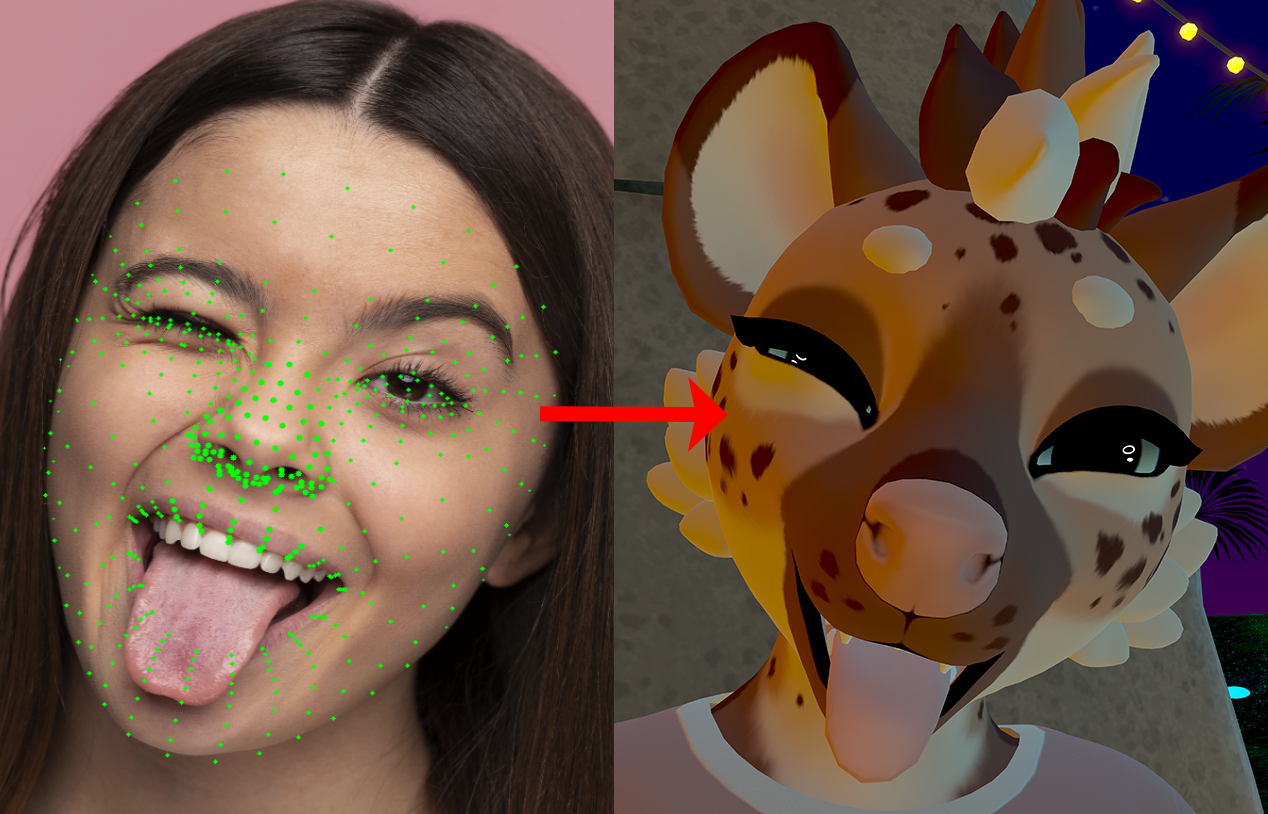
The FoxyFace is currently tracking 83 parameters out of 102 parameters supported by VRCFT, which is 81%. That's taking into account the Blended Shapes.
Supported parameters
BrowInnerUpLeft, BrowInnerUpRight, BrowLowererLeft, BrowLowererRight, BrowOuterUpLeft, BrowOuterUpRight, BrowPinchLeft, BrowPinchRight, CheekPuffLeft, CheekPuffRight, CheekSquintLeft, CheekSquintRight, CheekSuckLeft, CheekSuckRight, EyeOpennessLeft, EyeOpennessRight, EyeSquintLeft, EyeSquintRight, EyeWideLeft, EyeWideRight, EyeXLeft, EyeXRight, EyeYLeft, EyeYRight, HeadPitch, HeadRoll, HeadX, HeadY, HeadYaw, HeadZ, JawForward, JawLeft, JawOpen, JawRight, LipFunnelLowerLeft, LipFunnelLowerRight, LipFunnelUpperLeft, LipFunnelUpperRight, LipPuckerLowerLeft, LipPuckerLowerRight, LipPuckerUpperLeft, LipPuckerUpperRight, LipSuckLowerLeft, LipSuckLowerRight, LipSuckUpperLeft, LipSuckUpperRight, MouthClosed, MouthCornerPullLeft, MouthCornerPullRight, MouthCornerSlantLeft, MouthCornerSlantRight, MouthDimpleLeft, MouthDimpleRight, MouthFrownLeft, MouthFrownRight, MouthLowerDownLeft, MouthLowerDownRight, MouthLowerLeft, MouthLowerRight, MouthPressLeft, MouthPressRight, MouthRaiserLower, MouthRaiserUpper, MouthStretchLeft, MouthStretchRight, MouthUpperLeft, MouthUpperRight, MouthUpperUpLeft, MouthUpperUpRight, NoseSneerLeft, NoseSneerRight, TongueBendDown, TongueCurlUp, TongueDown, TongueFlat, TongueLeft, TongueOut, TongueRight, TongueRoll, TongueSquish, TongueTwistLeft, TongueTwistRight, TongueUp
Unsupported parameters
EyePupilDiameterMMLeft, EyePupilDiameterMMRight, JawBackward, JawClench, JawMandibleRaise, LipSuckCornerLeft, LipSuckCornerRight, MouthTightenerLeft, MouthTightenerRight, MouthUpperDeepenLeft, MouthUpperDeepenRight, NasalConstrictLeft, NasalConstrictRight, NasalDilationLeft, NasalDilationRight, NeckFlexLeft, NeckFlexRight, SoftPalateClose, ThroatSwallow
Step 0
- Make sure you've installed VRCFaceTracking.
- Make sure you find an avatar that supports face tracking or head movement. You won't be able to check if it works without this/third-party module enabled. Here's a video tutorial: link
- The most important step is to make sure that you have enabled OSC in the avatar settings and enabled tracking of individual parts of the face/head; by default, this is all turned off.
Installation
1. Pre-compiled Binaries (Windows)
For Windows users, it is recommended to use the pre-compiled standalone executable from GitHub Releases:
2. Python Package (pip)
If you want to install and run FoxyFace as a Python package, it is recommended to set up a virtual environment first.
Create and Activate Virtual Environment
Windows:
python -m venv venv
venv\Scripts\activate
Linux / macOS:
python3 -m venv venv
source venv/bin/activate
Install and Run
Windows
pip install "foxyface[default]"
Note: If you are running a Windows 10 version older than 10.0.19041 (20H1), you need to install the CPU-only version instead:
pip install "foxyface[cpu]"
Run the application:
venv\Scripts\foxyface.exe
(or just foxyface if the virtual environment is activated)
Linux
Choose the appropriate command based on your hardware/GPU:
-
NVIDIA:
pip install "foxyface[nvidia]" -f https://download.pytorch.org/whl/cu126
-
AMD:
pip install "foxyface[rocm]" -f https://repo.radeon.com/rocm/manylinux/rocm-rel-6.4.3/
-
CPU only:
pip install "foxyface[cpu]"
Run the application:
venv/bin/foxyface
(or just foxyface if the virtual environment is activated)
macOS
pip install "foxyface[default]"
Run the application:
venv/bin/foxyface
(or just foxyface if the virtual environment is activated)
3. Development / From Source
If you want to contribute or modify the source code:
1. Clone the repository
Make sure to include submodules during cloning:
git clone --recurse-submodules https://github.com/Jeka8833/FoxyFace.git
cd FoxyFace/FoxyFace
2. Set up a virtual environment
You can let your IDE (e.g., PyCharm, VS Code) automatically create and manage the virtual environment, or create one manually:
Windows:
python -m venv venv
venv\Scripts\activate
Linux / macOS:
python3 -m venv venv
source venv/bin/activate
3. Install in editable mode
pip install -e ".[default,build]"
1 maintainer

Download files
Download the file for your platform. If you're not sure which to choose, learn more about installing packages.
Source Distribution
Built Distribution
Filter files by name, interpreter, ABI, and platform.
If you're not sure about the file name format, learn more about wheel file names.
Copy a direct link to the current filters
File details
Details for the file foxyface-1.0.6.0.tar.gz.
File metadata
- Download URL: foxyface-1.0.6.0.tar.gz
- Upload date:
- Size: 26.6 MB
- Tags: Source
- Uploaded using Trusted Publishing? No
- Uploaded via:
twine/7.0.0 CPython/3.12.12
File hashes
| Algorithm | Hash digest | |
|---|---|---|
| SHA256 |
dfa44e7861cc770adefcbe47b0d48bfe7f7496aff5f1e472275f632904486e57
|
|
| MD5 |
2bf56fbffe676ad5cb413f004918520c
|
|
| BLAKE2b-256 |
b1393f61d294d08cff85807eadd471a3b04bf2df6831823912ed9377a422556e
|
File details
Details for the file foxyface-1.0.6.0-py3-none-any.whl.
File metadata
- Download URL: foxyface-1.0.6.0-py3-none-any.whl
- Upload date:
- Size: 26.6 MB
- Tags: Python 3
- Uploaded using Trusted Publishing? No
- Uploaded via:
twine/7.0.0 CPython/3.12.12
File hashes
| Algorithm | Hash digest | |
|---|---|---|
| SHA256 |
dc277416a62eee15749622369649e9257685f844d746fc52e5669ab1f5cfca5b
|
|
| MD5 |
fae34ae3d8fba0ffb343c50f73e55ea8
|
|
| BLAKE2b-256 |
f634c28dd063017577464837093c5abbe52b52eaf036ded22cb723e6a4f3f4ff
|














