
Vivado implemented design renderer and viewer
This project was made with the help of Claude Opus 5.5.
fpga-design-implview draws what a Vivado implementation uses of the device: every site
of the part (slices, BRAM, DSP, URAM, IO, GT, clocking, hard blocks), lit up when the
design uses it and colored by hierarchy, with the part, WNS/WHS and the legend. The
part comes from the checkpoint: any design, any device.
Examples
PYNQ-Z2 (xc7z020), placement and routing usage:
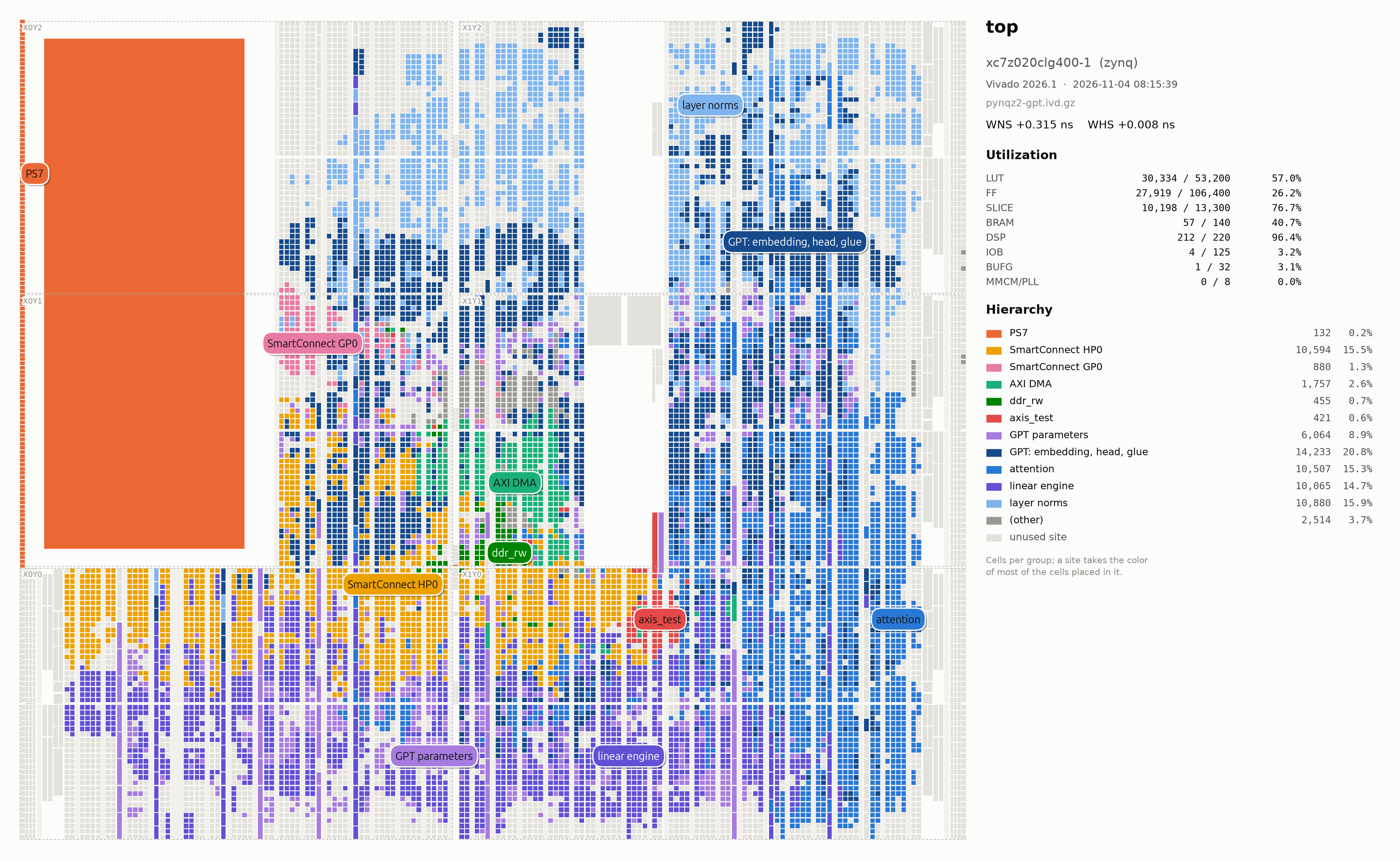
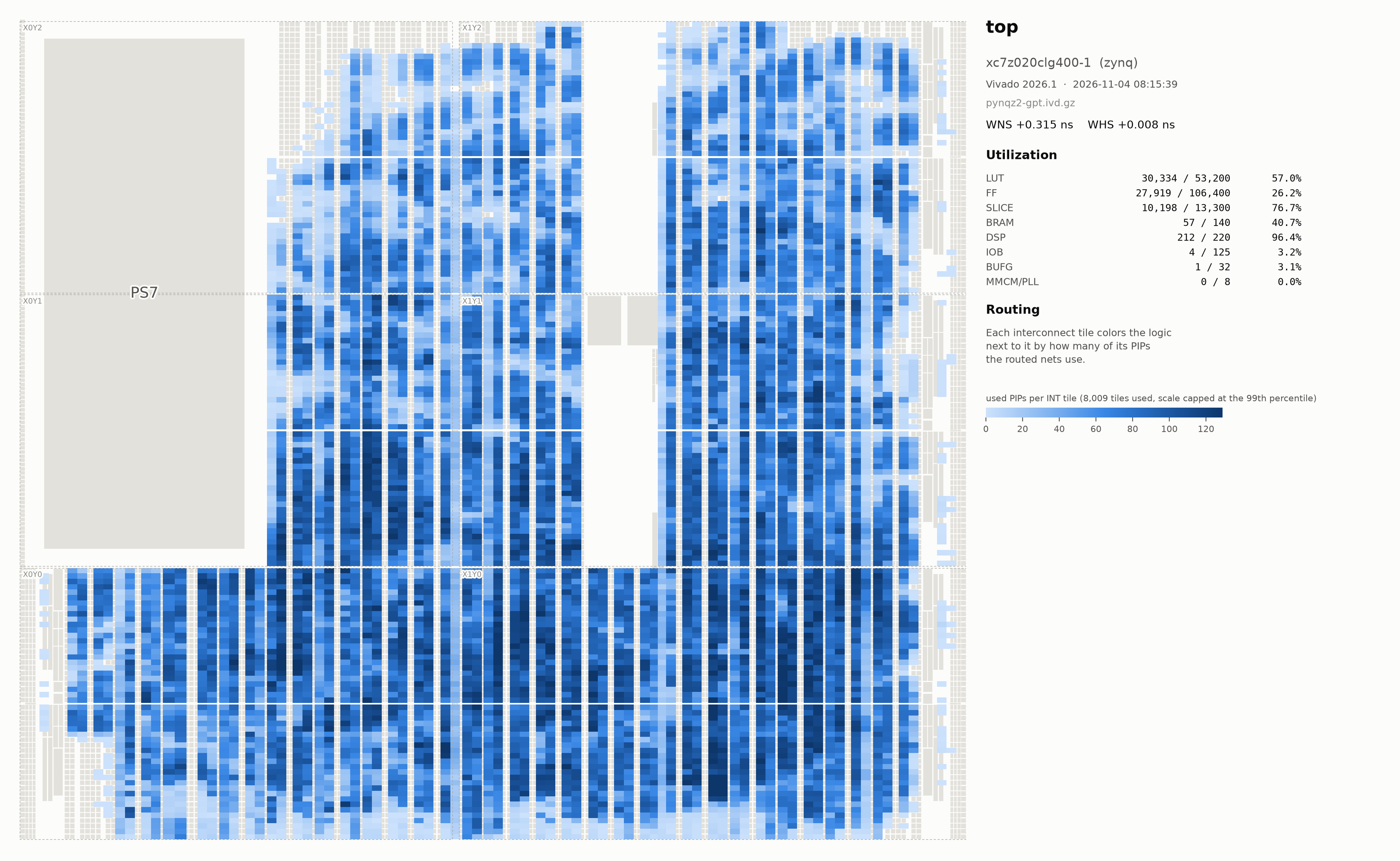
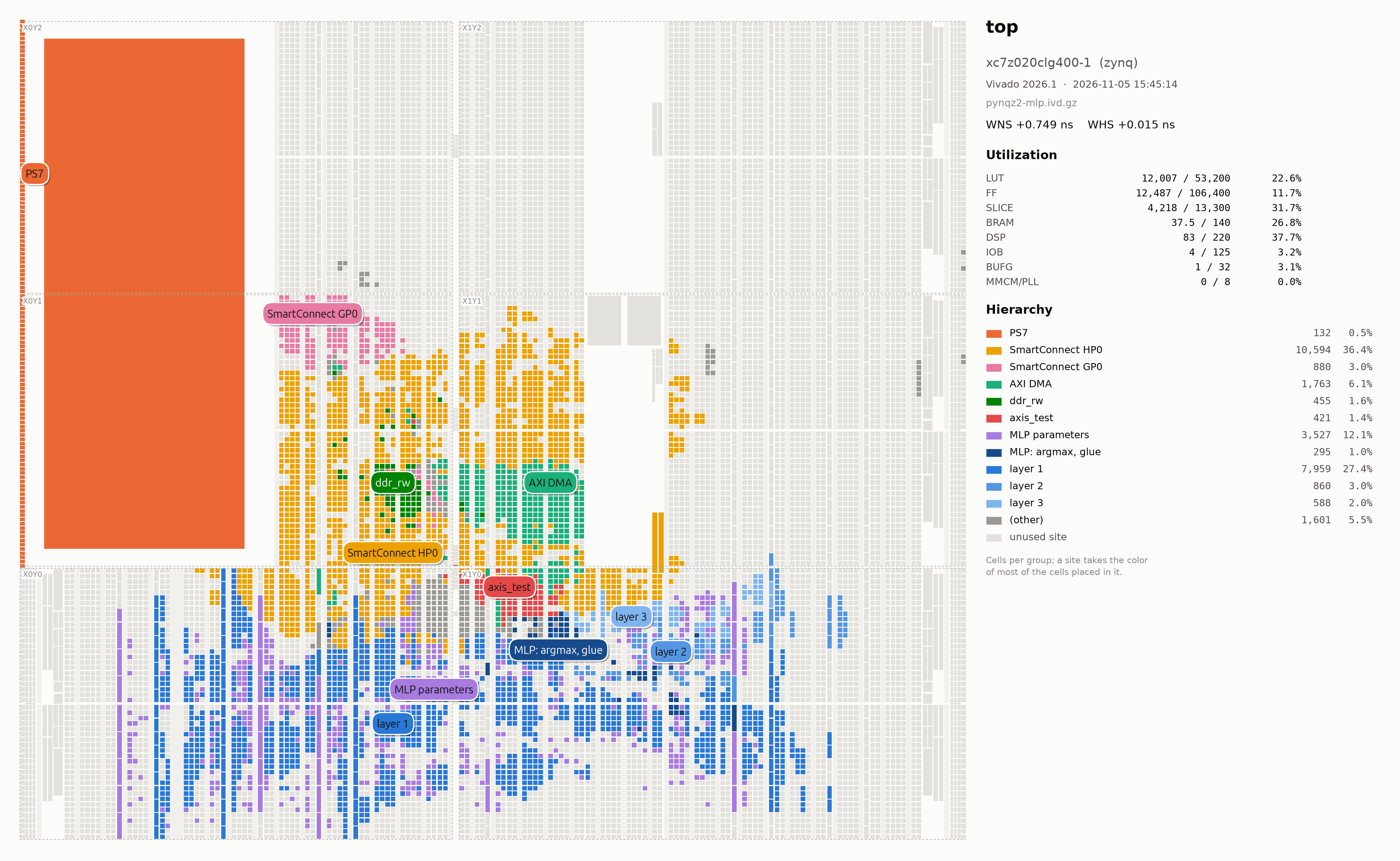
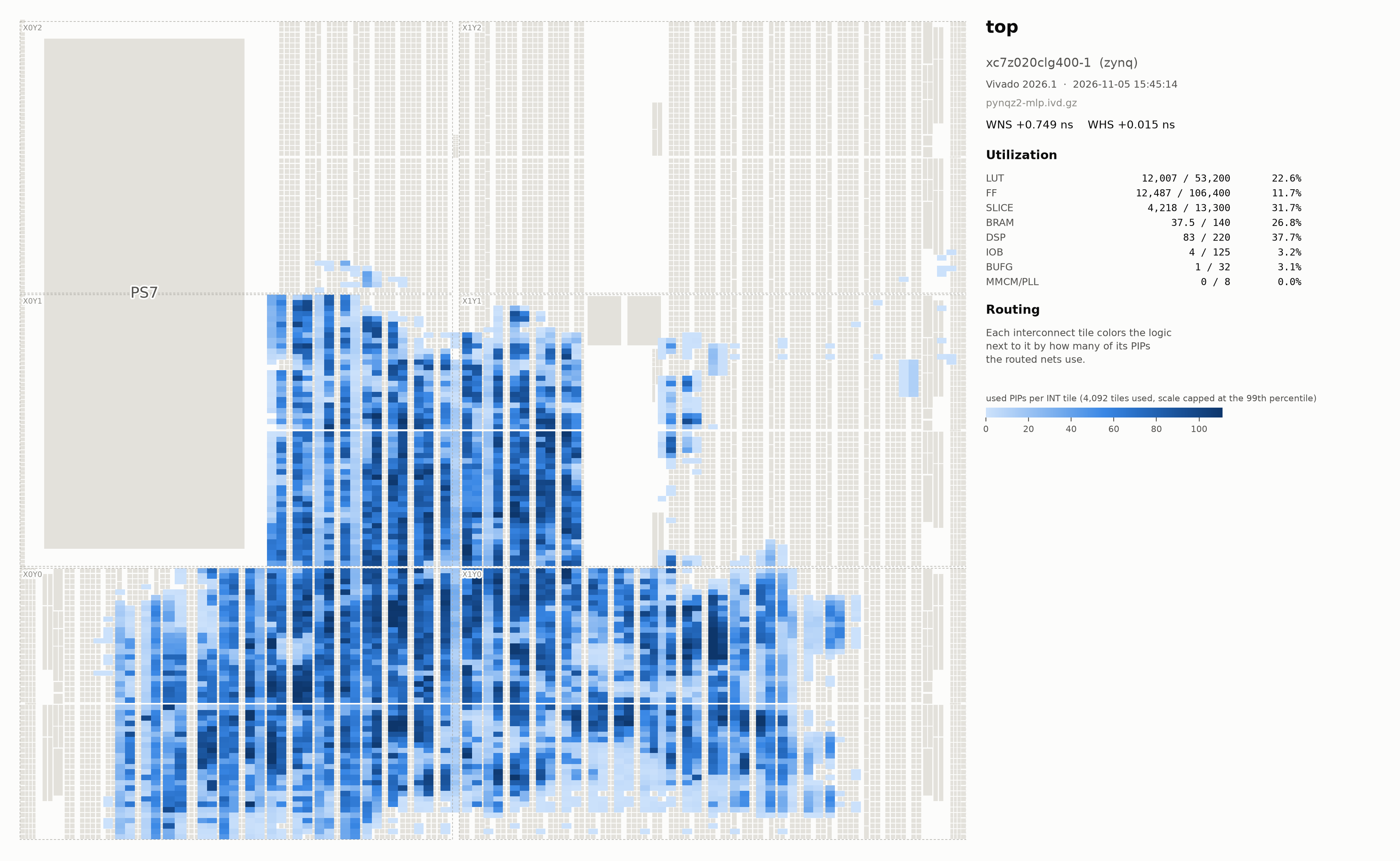
Note: the text on the right is optional, --no-panel leaves only the device.
Install
pipx install fpga-design-implview # or pip; Python 3.11+
The command is fpga-design-implview, or implview for short. Vivado is needed to read
the checkpoint (with a license for its device); drawing works without it.
Usage
fpga-design-implview render path/to/impl_1               # <top>.png, <top>.pdf
fpga-design-implview render top_routed.dcp -o top.html   # interactive viewer
fpga-design-implview render path/to/impl_1 -H highlight.toml --stats --theme dark
The input is a run directory, a project directory or a routed checkpoint. The output
format follows the extension: .png (placement, plus _routing.png), .pdf, .svg,
.html.
The first run opens the checkpoint in Vivado (batch mode) and caches the export in
~/.cache/implview, so later renders take seconds. Vivado is $IMPLVIEW_VIVADO (or
--vivado CMD before the command), else vivado on the PATH, else the install under
~/opt/xilinx, ~/Xilinx, /opt/Xilinx or /tools/Xilinx matching the checkpoint's
version.
| Option | What |
|---|---|
-o FILE, -O DIR |
output file (repeatable), output directory |
-H FILE |
highlight file: what to color and how |
-g PATH |
color a hierarchy path (repeatable) |
--depth N |
automatic groups cut at depth N |
--stats |
utilization table and cells per group |
--theme dark |
dark theme |
--no-routing |
skip the routing page (faster first export) |
--no-panel, --no-labels |
device only, no names on it |
--save-highlight FILE |
write the groups used as a highlight file |
--refresh |
export again, ignore the cache |
Other commands: export (only the export), device PART (only the device), info
(part, top, cache status), tcl (path of implview.tcl).
Colors
By default the hierarchy is split into up to 8 groups. A highlight file (-H) chooses:
[[highlight]]
path = "u_core/u_fft"                # * inside one level, ** any depth
color = "#2a78d6"
label = "FFT"

[[highlight]]
path = "u_core/gen_ch[*].u_filter"   # a generate loop: one shade per instance
color = ["#8fe0bb", "#0f6e4b"]
label = "filter"

[options]
others = "grey"                      # or "hide"; also theme, stats, labels, panel
The most specific path holds a cell. More in examples.
Viewer
Scroll to zoom, drag to pan, F to fit. Hover a site for its cells, click to pin them,
click a cell to highlight its module. Search cell names (*, ?), toggle groups and
layers (routing, clock regions, pblocks), switch light/dark, save the view as PNG.
From a build script
Export at the end of the implementation run, in the same Vivado session, to skip
opening the checkpoint again (fpga-design-implview tcl prints the script's path):
source /path/to/implview.tcl
implview::export_all $out/implview -routing     ;# <top>.ivd.gz and <part>.ivdev.gz
then fpga-design-implview render $out/implview/<top>.ivd.gz.
Status
Tried on Zynq-7000 (xc7z020) and Virtex UltraScale+ HBM (xcvu37p, three SLRs). UltraScale, Zynq UltraScale+ and Versal are not tried yet. Nets are not drawn, only how much each interconnect tile is used. The picture follows Vivado's tile grid, not the die to scale.
Tests, from a clone: pip install -e .[test] && pytest (no Vivado needed).
1 maintainer

Metadata
1 maintainer
Release files for fpga-design-implview 0.1.0
For a detailed explanation of source distributions (sdists) and built distributions (wheels), please see the package formats documentation.
Source distribution (sdist)
| File | Size | Uploaded | Provenance | Actions |
|---|---|---|---|---|
| fpga_design_implview-0.1.0.tar.gz | 53.9 kB | With provenance | Details for fpga_design_implview-0.1.0.tar.gz |
Built distribution (wheel)
| File | Interpreter | ABI | Platform | Actions Reset |
|---|---|---|---|---|
| fpga_design_implview-0.1.0-py3-none-any.whl | Python 3 | none | any | Details for fpga_design_implview-0.1.0-py3-none-any.whl |
Total release size: 102.9 kB
Release files / fpga_design_implview-0.1.0.tar.gz
| Download URL | fpga_design_implview-0.1.0.tar.gz |
|---|---|
| Size | 53.9 kB |
| Tags | Source |
|
SHA-256 checksum How to use checksums |
d8802bb37e84c48b97bd1940a982ef5dbc1abd9d97b781ce62843b7699f97522
|
|
BLAKE2b-256 checksum How to use checksums |
f5a3dec9f06153111a9ca199dc70b1691f034d2a7f0578e29196b8996ca58463
|
| Upload date | |
|
Uploaded using Trusted Publishing? What is trusted publishing? |
Yes |
| Uploaded via |
twine/7.0.0 CPython/3.13.16
|
Provenance
Provenance describes where a file came from. On PyPI, provenance is shared via attestations, which provide a verifiable record of the build or publishing details. View details, limitations and caveats.


PyPI Publish Attestation
PyPI verified that this artifact, at this checksum, originated from the publisher listed below.
Signed by GitHub Actions, verified by PyPI on Nov 6, 2026.
Transparency logRelease files / fpga_design_implview-0.1.0-py3-none-any.whl
| Download URL | fpga_design_implview-0.1.0-py3-none-any.whl |
|---|---|
| Size | 49.0 kB |
| Tags | Python 3 |
|
SHA-256 checksum How to use checksums |
847a53266273631206bb7312d56d1a2659f79d5504629195243cfb6ed33d0aab
|
|
BLAKE2b-256 checksum How to use checksums |
31f31193bd56f63bfa63e4ac8d6c508c8d7fb3febd07dea54a004f46e64929b5
|
| Upload date | |
|
Uploaded using Trusted Publishing? What is trusted publishing? |
Yes |
| Uploaded via |
twine/7.0.0 CPython/3.13.16
|
Provenance
Provenance describes where a file came from. On PyPI, provenance is shared via attestations, which provide a verifiable record of the build or publishing details. View details, limitations and caveats.
PyPI Publish Attestation
PyPI verified that this artifact, at this checksum, originated from the publisher listed below.
Signed by GitHub Actions, verified by PyPI on Nov 6, 2026.
Transparency logSecurity for fpga-design-implview 0.1.0
Provenance
Provenance describes where a file came from. On PyPI, provenance is shared via attestations, which provide a verifiable record of the build or publishing details. View details, limitations and caveats.
Full provenance
Both files in this release have been uploaded with provenance metadata.
Attestation for fpga_design_implview-0.1.0.tar.gz
PyPI Publish Attestation
PyPI verified that this artifact, at this checksum, originated from the publisher listed below.
Signed by GitHub Actions, verified by PyPI on Nov 6, 2026.
Transparency logA note on package security
PyPI is a repository for distributing packages, not a service for auditing them. While third-party security researchers and our staff do their best to detect and remove malicious packages, PyPI cannot guarantee the quality, security or suitability of any given package.
To learn more about protecting yourself from malicious actors, visit our package security documentation.














