
fpl-cli
Fantasy Premier League analysis from the terminal. Classic and Draft formats. Six data sources, one interface.


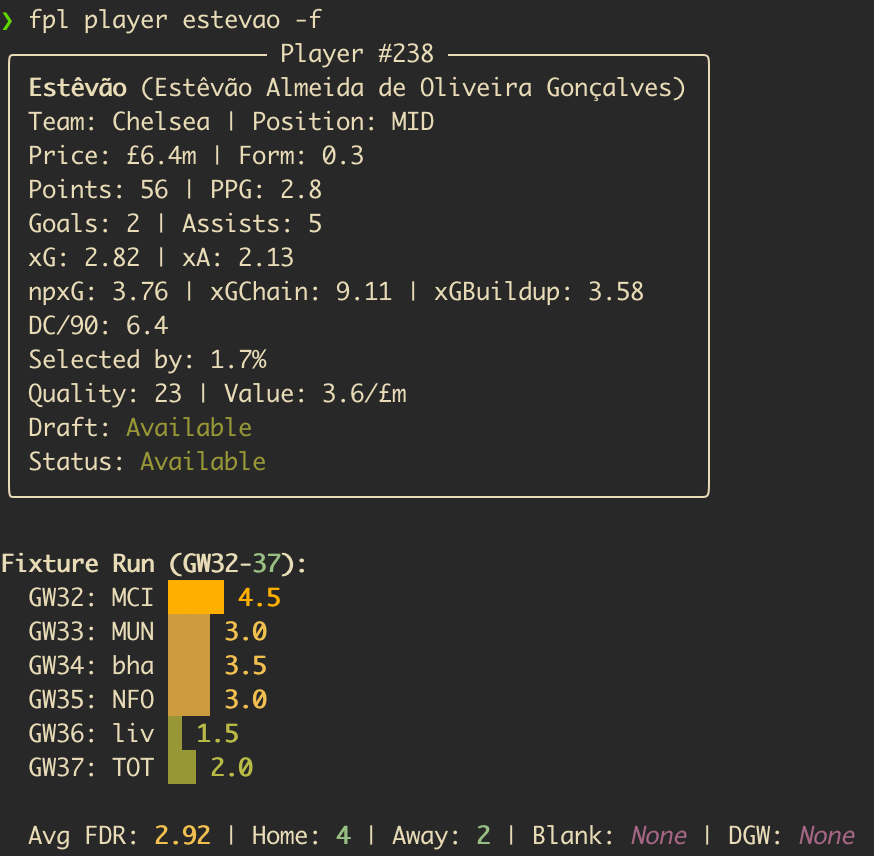
Example output from fpl player — real-time player analysis with form, xGI and availability flags.
Features
- Multi-source data - FPL API, Draft API, Understat (npxG/xGChain), historical data (vaastav 2022-25 + Core-Insights 2025-26), and football-data.org in one place.
- Player scouting - Filter by any stat, track xG trends, spot underperformers, check fixture runs.
- Fixture intelligence - Bayesian difficulty ratings from actual match results, blank/double GW detection, squad exposure analysis.
- Custom analysis - Captain picks, transfer targets, differentials, waivers, and ILP-optimal squad allocation. Opt-in, off by default.
- Gameweek reports - Post-GW reviews and league recaps with optional LLM narrative.
- Draft parity - Most commands work for both Classic and Draft. Waivers cover the free-agent wire.
- Agent-friendly -
--format jsonwith a consistent envelope on key commands. Ready-made agent skills in.agents/skills/.
Quickstart
$ pipx install fplkit
$ fpl init
$ fpl status
$ fpl stats -p MID -s form --available-only
fpl init configures your FPL IDs and optional features. With just an entry ID you get the full data toolkit.
Installation
Requires Python 3.11+.
$ pipx install fplkit
Alternatives: uv pip install fplkit or pip install fplkit.
[!NOTE] Browser scraping (
fpl squad sell-prices --refresh) requires the scraper extra and Playwright:$ pipx install 'fplkit[scraper]' $ playwright install chromium
Usage
After the Gameweek
$ fpl status                       # GW result, deadline, rank movement, flagged players
$ fpl review --save --summarise    # Full review with LLM narrative
$ fpl league                       # Live league standings
$ fpl league-recap                 # Awards, standings movement, and running streaks
$ fpl league-recap --summarise     # Add the LLM editorial for the group chat
$ fpl league-fines                 # Who owes what this season, and which weeks were ruled
Fines are ruled per gameweek by league-recap and recorded against it, so fpl league-fines reads them straight back off disk — no network, and any season still
on disk (--season 2025-26). Every gameweek that could not be ruled is named
beneath the table, because a zero there means "not known", not "not fined".
The recap prints the season table only at GW19 and at the finale, so the set-piece
stays a set-piece — though with --summarise its editorial knows the running totals
every week and may work one into a sentence. fpl league-fines answers the season
question any week you want it.
Streaks come with season totals: the recap counts every time a condition has occurred this season — gameweek wins, last places, weeks on top, captain blanks — across resets, so a report or editorial can say "their sixth gameweek win of the season", not just "two in a row". Each count has its own rule for when it is worth mentioning, tuned to how often it happens: wins and last places on every third, captain blanks and waiver hauls on every fifth, bottom-half gameweeks only in the second half of the season and only on every tenth, and a green-arrow drought only while unbroken at five or ten gameweeks, never counting the weeks a manager spent top of the table with nowhere to climb. Some bring along others who added to the same count that week. The full list prints twice a season, at GW19 and the finale, alongside the fines table. Unjudged gameweeks are always stated beside the number — see Season counts for the per-count rules.
Checking Your Setup
$ fpl doctor                       # Verify configured IDs and data files - essential after a season rollover
$ fpl doctor --providers           # Probe the external data sources for shape and volume drift
Every ID in settings.yaml is resolved against the live API and the team/league name reported back, so a dead or recycled ID (which otherwise fails silently) is visible. Per-team data files are checked against the current season's clubs. Exits non-zero when something needs fixing.
--providers checks the other side of the bargain: that each external data source (FPL and Draft APIs, the historical datasets, Understat, football-data.org) still serves data of the expected shape and size, that every club resolves across sources, and that the per-gameweek match files actually parse into records through the same code the scoring commands run — the upstream drift that otherwise surfaces as plausible but wrong output, especially at a season rollover.
Scouting Players
$ fpl stats -p FWD -s form -a             # Forwards by form, excluding unavailable
$ fpl player Rice -f -u                   # Deep dive: fixtures + Understat analysis
$ fpl xg                                  # xG/xA analysis, over/underperformers
$ fpl history                             # Career arc across 3 seasons
$ fpl price-history -n 4 -s price_slope   # Bandwagon detection
$ fpl returnees                           # Injured and suspended players due back soon
$ fpl returnees --enrich                  # Add searched return timing where FPL says nothing
fpl returnees reads the availability news attached to each player, works out who is due back inside the next few gameweeks, and keeps the list short by filtering on past performance — the players worth claiming in draft before they are fit again, and worth planning around in classic. FPL states a return date for only a small minority of flagged players, so --enrich searches the web for fresher timing on the ones it is quiet or stale about and shows what it finds alongside the FPL news rather than in place of it. Each run remembers what it showed, so the next one can say whose outlook moved.
Before the Deadline
$ fpl squad                        # Squad health: form, injuries, recommendations
$ fpl squad grid -n 8 -w Mbeumo    # 8-GW fixture difficulty grid with a watchlist player
$ fpl fdr --my-squad               # Your squad's blank/double GW exposure
$ fpl preview --save --scout       # Full analysis + BUY/SELL research via LLM
Strategic Planning
$ fpl fdr --blanks                 # Confirmed + predicted blank/double GWs
$ fpl chips timing                 # Rule-based Free Hit / Bench Boost / Triple Captain signals
$ fpl fixtures                     # Next GW fixtures with FDR
Season Preview Intel
Optional. Notes you write up per team before the season — projected XIs, long-term injuries, new signings with no Premier League record — from whatever source you read. Nothing ships with the tool; the previews are yours.
$ fpl intel schema                 # The file format, every field explained
$ fpl intel init                   # Scaffold one empty file per team
$ fpl intel resolve ARS --write    # Match player names to FPL codes, save them
$ fpl intel                        # Coverage across the league, and what it permits
$ fpl intel show ARS               # One team's intel, aged to the current gameweek
Intel expires on a schedule (fpl intel --show-decay prints it): each section is aged
out at the point where real data supersedes it — API news for injuries, actual minutes
for projected XIs. There is no in-season upkeep, and squad-builder and gw-prep read it
automatically when present.
Custom Analysis
Off by default. Enable via fpl init or custom_analysis: true in settings.yaml.
$ fpl captain                      # Ranked captain picks (0-100 matchup scoring)
$ fpl targets --min-own 30         # Transfer targets, template tier
$ fpl differentials -t 3           # Ultra-differentials (<3% owned)
$ fpl waivers                      # Free-agent waiver picks with drop suggestions (draft)
$ fpl transfer-eval --out Palmer --in "Salah,Mbeumo"  # Side-by-side comparison
$ fpl allocate --horizon 1         # Free Hit: optimal squad for a single GW
$ fpl ratings                      # Bayesian team strength ratings from match results
Enabling custom analysis also enriches other commands: fpl stats gains --value columns, fpl xg adds Value Picks, fpl fdr upgrades to Bayesian FDR with ATK/DEF split.
JSON Output
Commands with --format json emit a consistent envelope:
{
  "command": "stats",
  "metadata": {"gameweek": null, "format": "classic", "custom_analysis": true},
  "data": [...]
}
$ fpl stats --format json -p MID -s expected_goal_involvements
$ fpl status --format json
$ fpl fdr --blanks --format json
$ fpl league-recap --format json
$ fpl league-fines --format json
Failures come back on the same stream: {"command", "error"} on stdout with exit code 1.
Parse stdout either way, and read the message from error rather than from stderr — see
JSON Output.
Configuration
Run fpl init to configure interactively. Settings stored in your platform's config directory (override with FPL_CLI_CONFIG_DIR, and also home to the optional previews/ intel files); generated data such as team ratings, chip plans and the league history ledger league-recap builds up is stored in your platform's data directory (override with FPL_CLI_DATA_DIR). In ephemeral environments (e.g. Claude Code on the web), point both at a persistent workspace. Both overrides must be absolute paths — see Directories. Saved reports (--save, --output) are written to a season subdirectory — <output_dir>/2026-27/gw21-review.md — so a new season never overwrites the last one's files; see Report layout.
Required: FPL classic entry ID or draft league + entry IDs.
| Feature | What it enables |
|---|---|
| Custom Analysis | Captain, targets, differentials, waivers, allocate, ratings, value scores, Bayesian FDR |
| League ID | Standings, fines, league recaps |
| LLM providers | --summarise and --scout flags (Perplexity, Anthropic, OpenAI, or any compatible API) |
| FPL credentials | fpl squad sell-prices (browser scraping) |
FOOTBALL_DATA_API_KEY |
League table in fpl review; Championship form for promoted teams in pre-season ratings |
# LLM providers (for --summarise and --scout)
export PERPLEXITY_API_KEY="your-key"    # Research role
export ANTHROPIC_API_KEY="your-key"     # Synthesis role
See Command Reference for the full settings.yaml schema and LLM provider setup.
Development
$ git clone https://github.com/rossgroomio/fpl-cli.git
$ cd fpl-cli
$ python3 -m venv .venv && source .venv/bin/activate
$ pip install -e ".[dev]"
$ fpl init
$ ruff check fpl_cli/    # Lint
$ pyright fpl_cli/       # Type check
$ pytest tests/          # Tests
[!NOTE] Football data provided by the Football-Data.org API. Player and fixture data is property of the Premier League. Expected goals data is property of Understat. Historical data from vaastav/Fantasy-Premier-League (MIT, 2022-25) and olbauday/FPL-Core-Insights (2025-26+). This tool fetches data at runtime and does not redistribute third-party data.
[!WARNING] Browser scraping (
fpl squad sell-prices) uses your FPL login to read sell prices. Automated access may violate FPL website terms - use at your own risk.
Command Reference | Custom Analysis Guide | Architecture | Agent Tools & Skills | Contributing
1 maintainer

Download files
Download the file for your platform. If you're not sure which to choose, learn more about installing packages.
Source Distribution
Built Distribution
Filter files by name, interpreter, ABI, and platform.
If you're not sure about the file name format, learn more about wheel file names.
Copy a direct link to the current filters
File details
Details for the file fplkit-2.3.1.tar.gz.
File metadata
- Download URL: fplkit-2.3.1.tar.gz
- Upload date:
- Size: 1.3 MB
- Tags: Source
- Uploaded using Trusted Publishing? Yes
- Uploaded via:
twine/7.0.0 CPython/3.13.14
File hashes
| Algorithm | Hash digest | |
|---|---|---|
| SHA256 |
cb67e4d934c00942e75b7759a28322c979e7d82076564c662166aea65e537e77
|
|
| MD5 |
bfb48dd0e25e97075d5ca7ed887d25b8
|
|
| BLAKE2b-256 |
d8182e3e00a312604432059b74480ff2be2b2777b65c92f03d792f7521d0a01f
|
Provenance
The following attestation bundles were made for fplkit-2.3.1.tar.gz:
Publisher:
release.yml on rossgroomio/fpl-cli
-
Statement:
-
Statement type:
https://in-toto.io/Statement/v1 -
Predicate type:
https://docs.pypi.org/attestations/publish/v1 -
Subject name:
fplkit-2.3.1.tar.gz -
Subject digest:
cb67e4d934c00942e75b7759a28322c979e7d82076564c662166aea65e537e77 - Sigstore transparency entry: 2604377696
- Sigstore integration time:
-
Permalink:
rossgroomio/fpl-cli@1e26bdd764dc4f92c08ad08cfc144a5f480e0ff9 -
Branch / Tag:
refs/tags/v2.3.1 - Owner: https://github.com/rossgroomio
-
Access:
public
-
Token Issuer:
https://token.actions.githubusercontent.com -
Runner Environment:
github-hosted -
Publication workflow:
release.yml@1e26bdd764dc4f92c08ad08cfc144a5f480e0ff9 -
Trigger Event:
release
-
Statement type:
File details
Details for the file fplkit-2.3.1-py3-none-any.whl.
File metadata
- Download URL: fplkit-2.3.1-py3-none-any.whl
- Upload date:
- Size: 563.4 kB
- Tags: Python 3
- Uploaded using Trusted Publishing? Yes
- Uploaded via:
twine/7.0.0 CPython/3.13.14
File hashes
| Algorithm | Hash digest | |
|---|---|---|
| SHA256 |
5e8642bc0cd26099aa82bc894dfc388f694a1d0b9baf6d26ac2e8634ed870b4a
|
|
| MD5 |
6f3e1ba4c5bbf091c0d23f0dcc44dd2b
|
|
| BLAKE2b-256 |
c73fb444267c6b0d29f726f0468d0a91467488019e1f227e1491aa9bc737d657
|
Provenance
The following attestation bundles were made for fplkit-2.3.1-py3-none-any.whl:
Publisher:
release.yml on rossgroomio/fpl-cli
-
Statement:
-
Statement type:
https://in-toto.io/Statement/v1 -
Predicate type:
https://docs.pypi.org/attestations/publish/v1 -
Subject name:
fplkit-2.3.1-py3-none-any.whl -
Subject digest:
5e8642bc0cd26099aa82bc894dfc388f694a1d0b9baf6d26ac2e8634ed870b4a - Sigstore transparency entry: 2604377706
- Sigstore integration time:
-
Permalink:
rossgroomio/fpl-cli@1e26bdd764dc4f92c08ad08cfc144a5f480e0ff9 -
Branch / Tag:
refs/tags/v2.3.1 - Owner: https://github.com/rossgroomio
-
Access:
public
-
Token Issuer:
https://token.actions.githubusercontent.com -
Runner Environment:
github-hosted -
Publication workflow:
release.yml@1e26bdd764dc4f92c08ad08cfc144a5f480e0ff9 -
Trigger Event:
release
-
Statement type:







