
F Prime Flight Software Ground Data System layer


Project description
F´ GDS
Note: This README describes GDS internals. Refer to the F´ Documentation for instructions on how to use the GDS.
Issues should be reported here: File an issue
Overview
The GDS consists of a collection of classes and tools that provide an interface for fprime deployments, allowing users to view telemetry and events and send commands.
The GDS HTML GUI is an almost completely rewritten version of the F´ GSE UI, our historical ground system that has been deprecated due to its Python 2 requirement.
The GDS was designed to be adaptable, easily understandable, and easily expandable. To this end, it is built using publisher/subscriber relationships.
The diagram below shows the basic layout of the GDS. Data from the F´ deployment first enters the
GDS at the TCP client. Each packet is then passed directly to the distributor which is responsible
for parsing the packets in to data messages and sending on each message type (currently only events,
channels, and packetized telemetry are supported) to decoders registered for that type. The decoder
is responsible for turning that data message into a data object which it passes along to all
consumers registered to it. These consumers could be anything, but in the GDS they are GUI panels
that display the data. For outgoing data, the structure is similar. Currently, commands are the only
output data type included. Command data objects are created in the command panel and then sent to
the command encoder registered to that panel. Encoders take a data object and turn it into binary
data that can be sent to the F´ deployment. The binary data is then passed to the TCP client
which is registered to the encoder. Finally, the TCP client send the data back to the TCP server and
the F´ deployment.
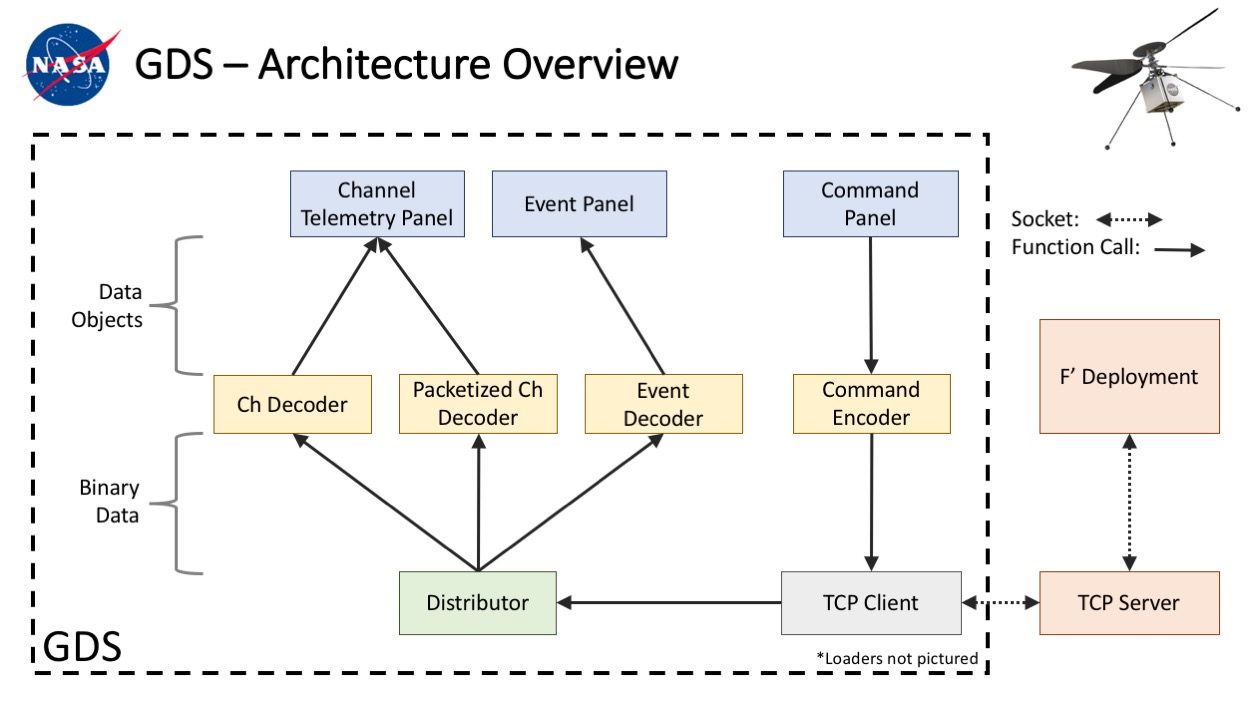
All of these objects are created and registered to other objects when the GDS is initialized. Thus, all of the structure of the GDS is created in one place, and can be easily modified.
GDS Tools
The GDS was designed to have flexible configurations of consumers for its various data decoders. This has been used to support several additional tools.
GDS Standard Pipeline
The standard pipeline can be thought of as a Python helper-layer to instantiate the GDS and connect to an F´ deployment. The pipeline provides event, telemetry and command histories, sending commands and registering consumers to the GDS decoders. The Standard Pipeline can be found here.
GDS Integration Test API
The Integration Test API is a tool that provides the ability to write integration-level tests for an F´ deployment using the GDS. The tool provides history searches/asserts, command sending, a detailed test log, sub-histories and convenient access to GDS data objects. The test API comes with its own user guide and is built on top of the Standard Pipeline.
GDS GUI Usage
A guide for how to use the GDS is available in the F Prime documentation
Classes
The GDS back end is composed of several different data processing units. For most of the units described below, a base class describes the interface and subclasses implement the interface for specific data types (such as events, channels, etc).
To expand the GDS to accept more data types or have additional features, new classes can be written and registered into the existing structure.
TCP Client
The TCP client is simply a passthrough for data coming from the TCP Server and the F´ Distribution. The client handles all the socket connection overhead and passes un-parsed data onto all objects registered with it.
Distributor
The distributer is responsible for taking in raw binary data, parsing off the length and descriptor, and then passing the data to all decoders registered to that descriptor. Descriptor types include events, channels, packets, etc (a full enumeration can be found in (config_manager.py). The binary data that the descriptor receives should be of the form:
---
title: "Binary format received by Distributors"
---
packet-beta
  0-31: "Length [4 bytes]"
  32-63: "Type Descriptor [4 bytes]"
  64-95: "Message Data [variable length]"
The distributor should then pass only the message data along to the decoders.
Templates
For each general data type (channel, event, etc) there is a template type. Instances of these classes hold information about specific channels or event types (ex. the NumPkts channel or the FirstPacketReceived event).
Template classes hold information such as the channel/event/packet's id, name, argument types, value type, format string, etc. This information is used by decoders when parsing data that they receive.
Data Types
For each general data type (channel, event, etc) there is a type class. Instances of these classes hold information about a specific channel reading or event. They contain the actual data parsed by the decoders. As such, they are the data type returned by encoders. All of these classes have a time field are derived from type SysData, which implements a compare function, allowing any list of SysData objects to be sorted by time. Each inherited type should also implement the str method so the objects can be easily printed.
Each instance of a type class also has a reference to the corresponding template class for that channel or event type.
Loaders
Loaders are used to construct dictionaries of channel and events. These dictionaries have template classes as values and ids or names as keys.
Each dictionary type has their own loader, but subclassing is used to prevent code duplication. For example, there are loaders for channel and event python file dictionaries, but they both subclass the python loader class which provides helper functions for reading python file dictionaries.
Decoders
Decoders are responsible for parsing the message data for a specific descriptor type.
Each decoder uses dictionaries produced by loaders to help with its parsing. These are given to the decoder's constructor.
The knowledge for how to parse that descriptor type should stay within the decoder. Each decoder type takes in the binary message data, parses it, and sends the resulting data object to all consumers registered to it.
Encoders
Encoders are responsible for taking data objects from consumers (GUI panels), converting them to binary data, and passing them to the TCP client to send to the F´ deployment.
Like the decoders, encoders use dictionaries produced by loaders to help craft the binary output.
Consumers
Consumers do not have a specific base class, but instead simply implement a data callback method that is called by decoders with parsed data objects as the argument. In the case of the Gds, the consumers are the GUI panels that display data. Consumers can also produce data that is sent to encoders and eventually on to the F´ deployment.
Main Frame Factory
This class is responsible for setting up the pipeline of data between different components in the publisher/subscriber interface - that is, it is responsible for registering all of the various components that wish to share data. This class also supports the creation of multiple Gds GUI windows which all share the same subscriptions and therefore receive the same data.
ConfigManager
The ConfigManager class is a singleton config class responsible for storing
configurations used by GDS classes, including internal GDS types and constants,
as well as configuration from the FSW JSON dictionary. It can be controlled via
the set_* methods, but it is recommended to use the DictionaryParser class
to automatically load FSW dictionary data into the config manager.
Modify GDS Structure
To setup the structure of the GDS, instances of the above classes are first
created. Then, they are registered to one another by calling the data producer's
register function with the data consumer as the argument. The data consumer
is expected to implement a callback function to receive the data (data_callback
for most classes, but check the base class's documentation for details).
An example of how to instantiate and register classes into the correct structure
can be found in the MainFrameFactory class.
Setup
The Gds requires the packages specified in setup.py.
These can be installed along the Gds package using the following commands:
pip install --upgrade fprime-gds
For full installation instructions, including virtual environment creation and installation verification, see INSTALL.md.
Generate Documentation
You can generate a doxygen documentation page for the GDS source.
To do this, you will need to install doxygen, doxypypy and graphviz.
Linux/Windows WSL
apt-get install doxygen graphviz
pip install doxypypy
Mac
Install doxygen from the website (http://www.stack.nl/~dimitri/doxygen/download.html) or by using the following command if you have Homebrew
brew install doxygen
brew install graphviz
pip install doxypypy
Next, make docs/py_filter available in your system path however you see fit.
Now you can run doxygen Doxyfile in the root directory to generate documentation in docs/doxy/index.html
Release history Release notifications | RSS feed


Download files
Download the file for your platform. If you're not sure which to choose, learn more about installing packages.
Source Distribution
Built Distribution
Filter files by name, interpreter, ABI, and platform.
If you're not sure about the file name format, learn more about wheel file names.
Copy a direct link to the current filters
File details
Details for the file fprime_gds-4.2.2a1.tar.gz.
File metadata
- Download URL: fprime_gds-4.2.2a1.tar.gz
- Upload date:
- Size: 2.2 MB
- Tags: Source
- Uploaded using Trusted Publishing? Yes
- Uploaded via: twine/6.1.0 CPython/3.13.12
File hashes
| Algorithm | Hash digest | |
|---|---|---|
| SHA256 |
ac00bbf96a707c4eb870c7917399f4522cca63e3bcf08414140bcaab45f62afc
|
|
| MD5 |
1a1f81e628e4d9eb38cb791854df1e35
|
|
| BLAKE2b-256 |
4923aa1595886f408cfc74169b98d0f4aaebfc3340b07b309924b2e2f6dccc1c
|
Provenance
The following attestation bundles were made for fprime_gds-4.2.2a1.tar.gz:
Publisher:
publish.yml on nasa/fprime-gds
-
Statement:
-
Statement type:
https://in-toto.io/Statement/v1 -
Predicate type:
https://docs.pypi.org/attestations/publish/v1 -
Subject name:
fprime_gds-4.2.2a1.tar.gz -
Subject digest:
ac00bbf96a707c4eb870c7917399f4522cca63e3bcf08414140bcaab45f62afc - Sigstore transparency entry: 1442202212
- Sigstore integration time:
-
Permalink:
nasa/fprime-gds@29f26036ab267de88077f8b7116d57d4f9cac643 -
Branch / Tag:
refs/tags/v4.2.2a1 - Owner: https://github.com/nasa
-
Access:
public
-
Token Issuer:
https://token.actions.githubusercontent.com -
Runner Environment:
github-hosted -
Publication workflow:
publish.yml@29f26036ab267de88077f8b7116d57d4f9cac643 -
Trigger Event:
release
-
Statement type:
File details
Details for the file fprime_gds-4.2.2a1-py3-none-any.whl.
File metadata
- Download URL: fprime_gds-4.2.2a1-py3-none-any.whl
- Upload date:
- Size: 2.2 MB
- Tags: Python 3
- Uploaded using Trusted Publishing? Yes
- Uploaded via: twine/6.1.0 CPython/3.13.12
File hashes
| Algorithm | Hash digest | |
|---|---|---|
| SHA256 |
a232ed57c216ab569f2b2aee2f2b3f60bca53363aa54c28940d7392dbbdcd126
|
|
| MD5 |
2d83aec50658f9236132ac333aad88ec
|
|
| BLAKE2b-256 |
807a698ef13e3c9030ae53fb210f72ed67713c5edaf3e2e7c6af036eef1bef70
|
Provenance
The following attestation bundles were made for fprime_gds-4.2.2a1-py3-none-any.whl:
Publisher:
publish.yml on nasa/fprime-gds
-
Statement:
-
Statement type:
https://in-toto.io/Statement/v1 -
Predicate type:
https://docs.pypi.org/attestations/publish/v1 -
Subject name:
fprime_gds-4.2.2a1-py3-none-any.whl -
Subject digest:
a232ed57c216ab569f2b2aee2f2b3f60bca53363aa54c28940d7392dbbdcd126 - Sigstore transparency entry: 1442202318
- Sigstore integration time:
-
Permalink:
nasa/fprime-gds@29f26036ab267de88077f8b7116d57d4f9cac643 -
Branch / Tag:
refs/tags/v4.2.2a1 - Owner: https://github.com/nasa
-
Access:
public
-
Token Issuer:
https://token.actions.githubusercontent.com -
Runner Environment:
github-hosted -
Publication workflow:
publish.yml@29f26036ab267de88077f8b7116d57d4f9cac643 -
Trigger Event:
release
-
Statement type:






