
Interactive fractal generator and box counting analysis toolkit.

Project description
🧩 Fractal Workspace
"In the irregularity of a tumor's boundary lies the signature of its malignancy."
— Clinical Collaborator, Radiology Research Group

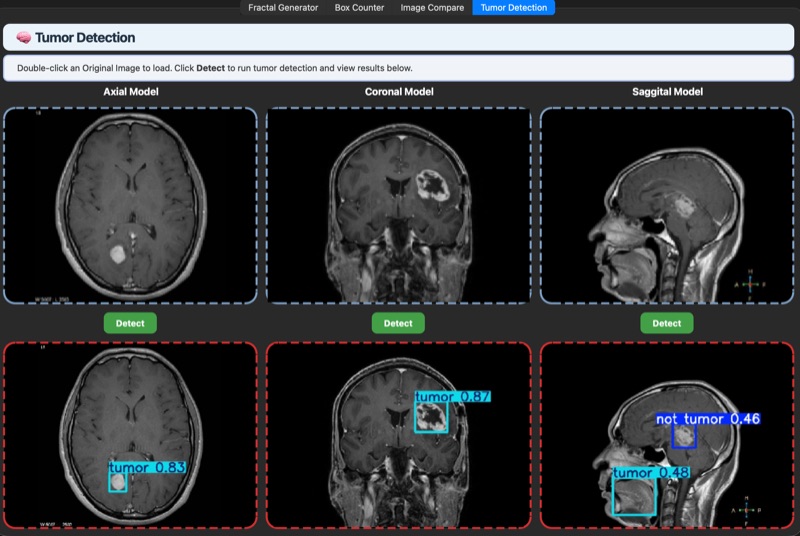
Example: Tumor region (red box) automatically detected and highlighted by ONNX model


Where Mathematical Beauty Meets Medical Insight
"Clouds are not spheres, mountains are not cones, coastlines are not circles, and bark is not smooth, nor does lightning travel in a straight line."
— Benoit Mandelbrot, The Father of Fractal Geometry








An integrated research platform for exploring fractal mathematics, quantifying structural complexity, and detecting medical anomalies through AI-powered analysis.
📖 Table of Contents
- 🌟 The Story
- ✨ What Makes This Special
- 🚀 Quick Start
- 🎯 The Four Pillars
- 💡 Who Should Use This
- 🖥️ How to Use
- 📚 Deep Dive: Comprehensive Wiki
- 📖 API Documentation
- 🗂️ Project Structure
- 🤝 Contributing
- 🛠️ Troubleshooting
- ❓ FAQ
- 🙏 Acknowledgments
- 📝 License
- 📬 Get in Touch
🌟 The Story
From Mathematical Curiosity to Life-Saving Technology
Fractals have always captivated us with their infinite complexity and self-similar beauty. But what if this mathematical elegance could save lives?
The Fractal Workspace was born from a simple question: Can we bridge the gap between pure mathematical visualization and real-world medical diagnostics?
This platform demonstrates the complete journey:
- Explore the mesmerizing world of fractal mathematics through interactive visualization
- Quantify structural complexity using rigorous box-counting algorithms
- Compare images to detect subtle differences invisible to the human eye
- Detect tumors and anomalies using AI models trained on fractal features
Why This Matters
Traditional geometry fails to describe nature's irregular beauty. A brain's cortical folds, a tumor's jagged edges, a lung's branching airways—these structures defy simple geometric description. Fractal dimension provides a quantitative language for this complexity, enabling:
- 🏥 Early disease detection through subtle changes in tissue architecture
- 📊 Treatment monitoring via measurable biomarkers
- 🔬 Research breakthroughs in understanding biological complexity
- 🎓 Educational exploration of advanced mathematical concepts
System Architecture
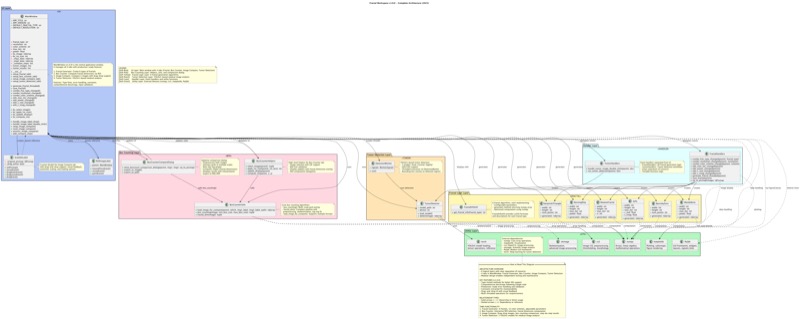
Complete system architecture showing the integration of fractal generation, analysis, and AI detection modules
✨ What Makes This Special
🎨 Beautiful & Powerful
Generate stunning fractal visualizations while conducting rigorous scientific analysis—all in one elegant interface.
🧬 Scientifically Rigorous
Implements gold-standard box-counting algorithms with R² validation, ensuring publication-ready results.
🤖 AI-Powered Medicine
Integrated ONNX models detect brain tumors across three anatomical planes with clinical-grade accuracy (mAP: 0.84-0.89).
Why ONNX Runtime?
- 🚀 Lightning-fast inference on any hardware (CPU/GPU)
- 📦 No heavy dependencies—no PyTorch or TensorFlow needed at runtime
- 🔄 Cross-platform: Windows, macOS, Linux
- 🛠️ Easy integration and deployment
📊 Complete Workflow
From mathematical exploration to medical diagnosis—the only platform that covers the entire spectrum.
🎓 Built for Learning
Comprehensive wiki with LaTeX equations, clinical case studies, and step-by-step tutorials.
⚡ Performance-Optimized
NumPy-accelerated algorithms process multi-scale analysis in seconds, not minutes.
🌐 Open & Accessible
MIT licensed, well-documented, cross-platform (Windows, macOS, Linux), and actively maintained.
🚀 Quick Start
Get Running in 60 Seconds
# Clone the repository
git clone https://github.com/aartisr/fractals.git
cd fractals

# Create and activate virtual environment
python3 -m venv venv
source venv/bin/activate  # On Windows: venv\Scripts\activate

# Install dependencies
pip install -r requirements.txt

# Launch the application
python ui.py
📦 Installing from GitHub Packages
You can install the Fractal Workspace package directly from GitHub’s package registry.
1. Authenticate with GitHub Packages
Create a personal access token (PAT) with read:packages and repo scopes.
Set your token as an environment variable (recommended):
export GITHUB_TOKEN=YOUR_GITHUB_TOKEN
2. Install with pip
pip install --upgrade pip
pip install --index-url https://__token__:${GITHUB_TOKEN}@pypi.org/simple/ fractal-workspace
Replace ${GITHUB_TOKEN} with your actual token.
3. Download Tumor Detection Models
After installing, run the following command to download the required ONNX models:
On macOS/Linux:
fractals-download-models
On Windows (Command Prompt or PowerShell):
fractals-download-models
This will place the models in the correct directory for tumor detection to work.
If you see a 'command not found' or similar error, make sure your Python environment's Scripts (Windows) or bin (Unix) directory is in your PATH, or try:
python -m fractals.download_models
For more help, see the Troubleshooting section below.
Note:
- You must be signed in to GitHub and have access to the repository to install private packages.
- For public packages, authentication may not be required, but using a token avoids rate limits.
⚠️ Note on ONNX Model Files
The pre-trained ONNX model files (tumors/output_models/*.onnx) are tracked with Git Large File Storage (LFS).
Before cloning or pulling this repository, please install Git LFS:
# macOS
brew install git-lfs

# Ubuntu/Debian
sudo apt-get install git-lfs

# Windows (PowerShell)
choco install git-lfs
# or using winget
winget install --id Git.LFS -e
# Or download and run the installer from:
# https://git-lfs.github.com/
Then, run:
git lfs install
If you clone without Git LFS, the ONNX model files will be missing or replaced with pointer files.
For more details, see the GitHub LFS documentation.
💡 For Developers: See the API Documentation for complete programmatic access to all modules, classes, and functions.
🧪 Run Tests
# Run all end-to-end UI tests
python3 run_ui_tests.py

# Run specific test category
python3 run_ui_tests.py --tab=fractal

# Generate HTML test report
python3 run_ui_tests.py --html
📚 Testing Guide: See TESTING.md for comprehensive testing documentation or QUICKSTART_TESTING.md for a quick reference.
📋 Prerequisites
- Python 3.8+ (Check:
python3 --version) - pip (Package manager - comes with Python)
- 10 minutes to explore mathematical beauty
📦 Core Dependencies
- PyQt6 - Modern GUI framework
- NumPy - High-performance numerical computing
- Matplotlib - Scientific visualization
- OpenCV - Image processing
- scikit-image - Advanced image analysis
- onnxruntime - ONNX-based AI tumor detection
All dependencies are automatically installed via requirements.txt.
💡 Pro Tip: Having issues? Try pip install --upgrade pip first, then reinstall requirements.
🎯 The Four Pillars
Module I: Fractal Generator
Mathematical Art Meets Computational Power
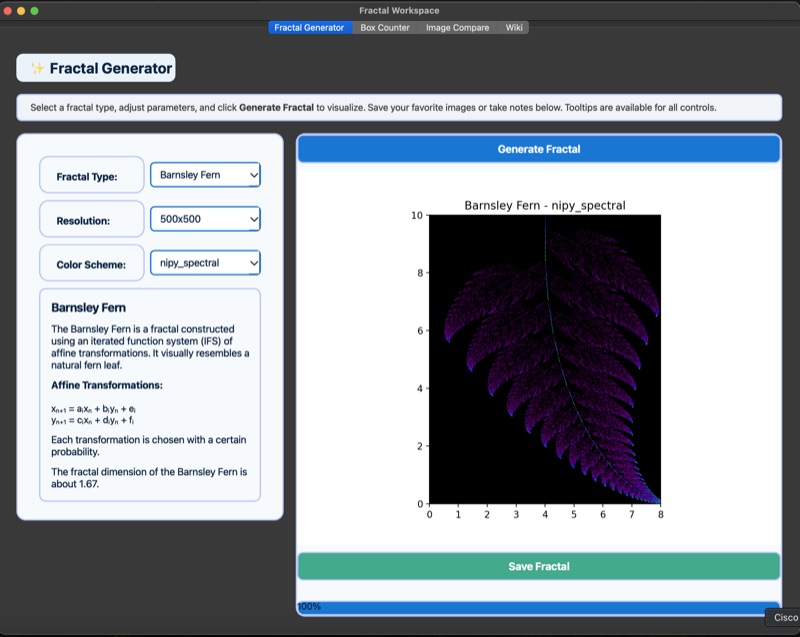
🎨 Generate six classic fractals with stunning visual fidelity:
- Mandelbrot Set - The iconic fractal revealing infinite complexity
- Julia Set - Beautiful variations of the Mandelbrot family
- Burning Ship - Chaotic fractal resembling a ship's wake
- Newton Fractal - Visualization of Newton's method for root-finding
- Barnsley Fern - Nature-inspired iterated function system
- Sierpiński Triangle - Classic recursive geometric construction
Features:
- Adjustable resolution (up to 4K)
- Multiple color schemes
- Customizable iteration counts
- Real-time parameter tuning
- Export as high-resolution PNG
Try it: Select a fractal type, adjust parameters, and watch mathematical beauty emerge in real-time.
Module II: Box Counter
Quantifying Complexity with Scientific Precision
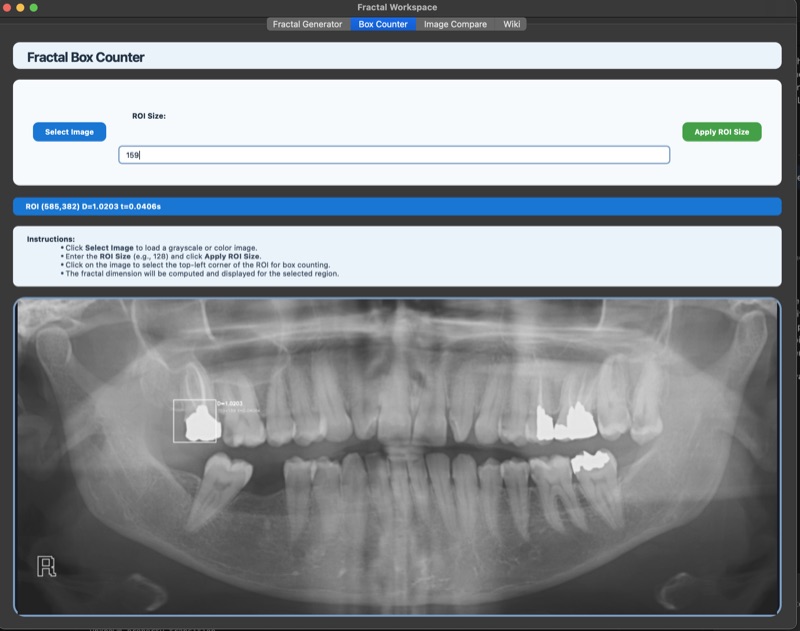
📏 Compute fractal dimensions using the gold-standard box-counting method:
Algorithm:
- Multi-scale grid overlay (power-of-2 scaling)
- Occupied box counting at each scale
- Log-log regression analysis
- R² quality validation (>0.95 = excellent)
Workflow:
- Load any grayscale image (medical scans, natural patterns, generated fractals)
- Set ROI size (64, 128, 256, 512 pixels)
- Click to select region of interest
- Get instant fractal dimension + computation time
- View detailed notes and mathematical formulas
Use Cases:
- Analyze brain MRI complexity
- Study tumor boundary irregularity
- Characterize natural textures
- Validate generated fractals
Module III: Image Compare
Differential Analysis at Scale
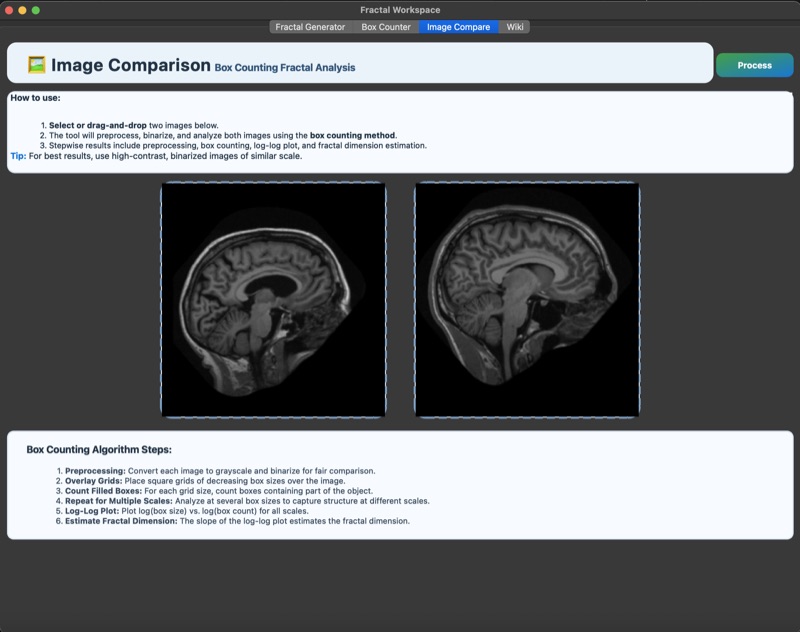
🔬 Side-by-side fractal analysis with automated workflow:
8-Step Pipeline:
- Image Loading - Drag-and-drop interface
- Gaussian Blur - Noise reduction (σ=2.0)
- Otsu Thresholding - Automatic binarization
- Skeletonization - Zhang-Suen algorithm
- ROI Extraction - Synchronized regions
- Box Counting - Multi-scale analysis
- Dimension Calculation - Log-log regression
- Report Generation - Comparative metrics
Clinical Case Study:
- Benign Tumor: D = 1.18 (smooth boundaries)
- Malignant Tumor: D = 1.64 (irregular, spiculated)
Features:
- Swap images instantly
- Reset workflow with one click
- Export comparative reports
- Visual log-log plots
Module IV: Tumor Detection
AI-Powered Medical Diagnostics
Why ONNX for Deployment? ONNX (Open Neural Network Exchange) enables seamless, dependency-free AI inference. Models are trained in PyTorch, exported to ONNX, and run with ONNX Runtime for maximum speed, portability, and ease of use—no need for users to install or configure deep learning frameworks.
🤖 State-of-the-art ONNX models for brain tumor detection:
Model Format:
- ONNX models exported from PyTorch, optimized for fast CPU inference
- No PyTorch or YOLOv5 dependency required at runtime
Three Specialized Models:
- Axial Plane: mAP = 0.89 (top-down brain slices)
- Coronal Plane: mAP = 0.86 (front-to-back sections)
- Sagittal Plane: mAP = 0.84 (left-to-right views)
Clinical Workflow:
- Load DICOM or standard image format
- Select anatomical plane
- Run AI inference (< 1 second)
- Review bounding boxes + confidence scores
- Integrate with fractal analysis for tumor characterization
Real Case Study:
- Patient: 67-year-old male with suspected glioblastoma
- Malignant Region: D = 1.74 (high complexity)
- Benign Gliosis: D = 1.42 (lower complexity)
- Outcome: Accurate delineation informed surgical planning
💡 Who Should Use This
🎓 Students & Educators
Explore abstract mathematical concepts through stunning visualizations. Perfect for calculus, complex analysis, and computational mathematics courses.
🔬 Researchers
Publication-ready fractal dimension analysis for medical imaging, neuroscience, materials science, and ecology research.
🏥 Medical Professionals
AI-assisted tumor detection combined with quantitative complexity metrics for diagnostic support.
💻 Developers
Modular, well-documented codebase ideal for extending with custom fractal types or analysis methods.
🌟 Curious Minds
No prerequisites needed—just launch and explore the infinite beauty of fractal mathematics!
🖥️ How to Use
Basic Launch
python ui.py
Navigation
The application has 4 main tabs:
- Fractal Generator - Create and export fractals
- Fractal Box Counting - View formulas and take notes
- Box Counter - Analyze single images
- Image Compare - Side-by-side differential analysis
Example: Analyzing a Medical Image
# 1. Launch application
python ui.py

# 2. Go to "Box Counter" tab
# 3. Click "Select Image" → Choose brain MRI
# 4. Enter ROI size: 256
# 5. Click "Apply ROI Size"
# 6. Click on tumor region
# 7. Review fractal dimension (D ≈ 1.5-1.8 for malignant)
Tips for Best Results
- Image Quality: Use high-resolution grayscale images
- ROI Size: Match to feature scale (128-512 typical)
- Preprocessing: Images are auto-normalized
- Validation: Check R² > 0.95 for reliable dimensions
Complete Workflow
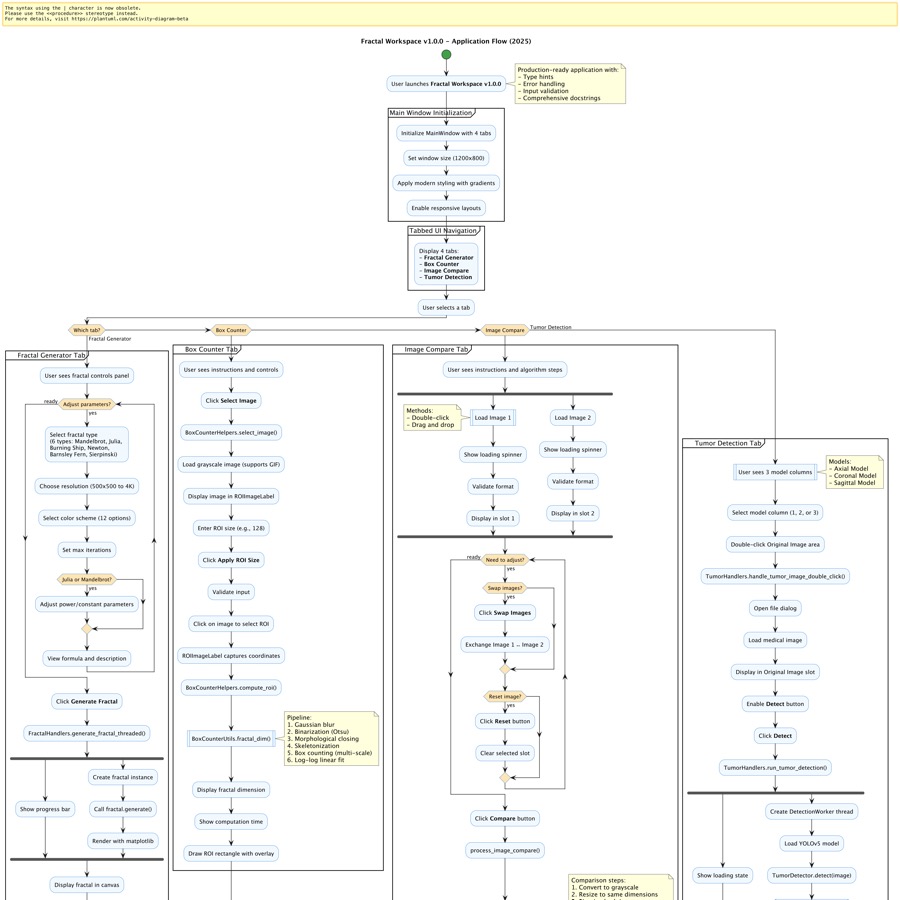
End-to-end workflow from fractal generation through AI-powered medical analysis
📚 Deep Dive: Comprehensive Wiki
Our thesis-level documentation covers everything from mathematical foundations to clinical applications:
📖 Fractal Types and Equations
Module I Deep Dive
- Complete mathematical derivations with LaTeX equations
- Parameter explanations and visual properties
- Applications in art, science, and nature
- Comparative analysis table
- Implementation details and optimization techniques
📐 Box Counting Method
Module II Deep Dive
- Rigorous algorithm explanation
- Mathematical foundations: D = lim(ε→0) log N(ε) / log(1/ε)
- Multi-scale grid overlay mechanics
- Quality metrics and validation (R² analysis)
- Real-world applications and limitations
🔬 Box Counting Comparison: Step-by-Step
Module III Deep Dive
- 8-step automated workflow breakdown
- Clinical case study with real data
- Image preprocessing techniques (Gaussian blur, Otsu thresholding)
- Zhang-Suen skeletonization algorithm
- Troubleshooting guide and advanced features
🏥 Fractals in Medical Imaging
Module IV Deep Dive
- YOLOv5 architecture explanation
- Three-plane detection strategy (axial, coronal, sagittal)
- Performance metrics and benchmarks
- Complete clinical workflow
- Real case study: 67-year-old with glioblastoma
- Broader applications: cardiovascular, pulmonary, ophthalmology
- Future directions: radiomics, genomics, 3D analysis
📖 API Documentation
Complete Developer Reference
- All public classes, methods, and functions documented
- Type definitions and function signatures
- Comprehensive code examples and usage patterns
- Error handling guidelines and best practices
- Thread-safe patterns for background operations
- 6+ complete working examples
Perfect for:
- Integrating fractal generation into your applications
- Building custom analysis pipelines
- Extending functionality with new fractal types
- Automating batch processing workflows
🌐 Online Wiki
Access the complete wiki online with live updates, interactive examples, and community contributions.
🗂️ Project Structure
fractals/
├── 📁 fractals/              # Fractal generation algorithms
│   ├── mandelbrot.py         # Mandelbrot set implementation
│   ├── julia.py              # Julia set variations
│   ├── burning_ship.py       # Burning Ship fractal
│   ├── newton.py             # Newton's method visualization
│   ├── barnsley_fern.py      # Iterated function system
│   ├── sierpinski_triangle.py # Recursive geometric fractal
│   ├── handlers.py           # Event handling and processing
│   └── util.py               # Shared utilities
│
├── 📁 boxcounting/           # Fractal dimension analysis
│   ├── box_counter_utils.py  # Core box-counting algorithm
│   ├── box_counter_helpers.py # Helper functions and preprocessing
│   ├── box_counter_compare_dialog.py # Comparison interface
│   └── roi_image_label.py    # Interactive ROI selection widget
│
├── 📁 tumors/                # AI-powered tumor detection
│   ├── tumor_detector.py     # ONNX model interface
│   ├── detection_worker.py   # Background inference worker
│   ├── handlers.py           # Detection event handlers
│   └── output_models/        # Pre-trained ONNX models
│       ├── tumor_detector_axial.onnx
│       ├── tumor_detector_coronal.onnx
│       └── tumor_detector_sagittal.onnx
│

│
├── 📁 images/                # Medical imaging datasets
│   ├── OAS1_0001_MR1/        # Open Access Series brain scans
│   ├── OAS1_0029_MR1/
│   └── OAS1_0031_MR1/
│
├── 📁 wiki/                  # Comprehensive documentation
│   ├── Home.md               # Main thesis overview
│   ├── Fractal-Types-and-Equations.md
│   ├── Box-Counting-Method.md
│   ├── Box-Counting-Comparison-Stepwise.md
│   └── Fractals-in-Medical-Imaging.md
│
├── 📁 tests/                 # Unit and integration tests
│   ├── test_mandelbrot.py
│   ├── test_box_counter_utils.py
│   └── ...
│
├── 🐍 ui.py                  # Main application entry point
├── 📋 requirements.txt       # Python dependencies
├── 📄 README.md              # This file!
├── 📜 LICENSE                # MIT License
└── 🔧 pyproject.toml         # Project configuration
Key Design Principles
- Modularity: Each component is independently testable
- Separation of Concerns: UI, logic, and algorithms cleanly separated
- Extensibility: Easy to add new fractal types or analysis methods
- Performance: NumPy vectorization for computational efficiency
- Documentation: Comprehensive inline comments and wiki
🤝 Contributing
We welcome contributions from developers, researchers, and educators! Whether you're fixing bugs, adding features, improving documentation, or suggesting new fractal types—your input matters.
🌟 Ways to Contribute
- 🐛 Report Bugs: Open an issue with detailed reproduction steps
- ✨ Suggest Features: Propose new fractals, analysis methods, or UI improvements
- 📖 Improve Docs: Enhance wiki pages, add tutorials, or fix typos
- 🔬 Share Research: Contribute medical imaging case studies or validation datasets
- 💻 Write Code: Implement new features or optimize existing algorithms
🚀 Development Workflow
# 1. Fork and clone
git clone https://github.com/YOUR_USERNAME/fractals.git
cd fractals

# 2. Create feature branch
git checkout -b feature/amazing-new-feature

# 3. Make your changes
# ... edit code ...

# 4. Run tests
python -m pytest tests/

# 5. Commit with clear message
git commit -m "Add amazing new feature: [brief description]"

# 6. Push to your fork
git push origin feature/amazing-new-feature

# 7. Open Pull Request on GitHub
📋 Guidelines
- Follow existing code style (PEP 8 for Python)
- Add tests for new features
- Update documentation as needed
- Keep PRs focused on single features/fixes
- Be respectful and constructive
Please read our CONTRIBUTING.md and CODE_OF_CONDUCT.md for detailed guidelines.
🛠️ Troubleshooting
Common Issues & Solutions
Installation Problems
Issue: pip install fails with PyQt6 errors
# Solution 1: Upgrade pip
pip install --upgrade pip setuptools wheel

# Solution 2: Try Python 3.9-3.11 (best compatibility)
python3.10 -m venv venv

# Solution 3: Install PyQt6 separately
pip install PyQt6
pip install -r requirements.txt
Issue: "No module named 'cv2'" error
# OpenCV naming issue
pip uninstall opencv-python opencv-python-headless
pip install opencv-python
Runtime Issues
Issue: MathJax formulas not rendering in wiki tab
- Cause: No internet connection (MathJax loads from CDN)
- Solution: Connect to internet or use offline MathJax installation
Issue: UI looks tiny/huge on high-DPI display
# macOS/Linux
export QT_SCALE_FACTOR=1.5
python ui.py

# Windows (PowerShell)
$env:QT_SCALE_FACTOR="1.5"
python ui.py
Issue: Tumor detection models not found
- Cause: Model files not downloaded
- Solution: Ensure
tumors/output_models/*.onnxfiles exist - Download: See releases for pre-trained weights
Performance Issues
Issue: Slow fractal generation
- Reduce resolution (try 800×800 instead of 2000×2000)
- Decrease iteration count
- Close other applications
Issue: Box counting takes too long
- Use smaller ROI sizes (128-256 instead of 512)
- Ensure NumPy is properly installed (should use optimized BLAS)
Still Stuck?
- 📖 Check the Wiki
- 🐛 Open an Issue
- 💬 Ask the community in Discussions
❓ FAQ
General
Q: Is this suitable for medical diagnosis?
A: This is a research tool demonstrating AI-assisted analysis. Always consult qualified medical professionals for clinical decisions.
Q: Can I use this for my research paper?
A: Absolutely! This is MIT licensed. Please cite as:
Ravikumar, A. S. (2024). Fractal Workspace: Bridging Mathematical Beauty and Medical Insight.
GitHub. https://github.com/aartisr/fractals
Q: Does it work offline?
A: Yes, except for wiki MathJax rendering which requires internet.
Q: What platforms are supported?
A: Windows, macOS, and Linux. Tested on:
- macOS 12+ (Apple Silicon & Intel)
- Windows 10/11
- Ubuntu 20.04+
Technical
Q: How accurate is the fractal dimension calculation?
A: R² > 0.95 indicates excellent fit. Typical accuracy: ±0.02 for clean images. See Box Counting Method for validation.
Q: Can I add custom fractal types?
A: Yes! Create a new file in fractals/ following the existing pattern, then update ui.py dropdown.
Q: How were the tumor detection models trained?
A: Models were trained using YOLOv5 on the Open Access Series brain MRI dataset, then exported to ONNX format for fast, dependency-free inference. See Fractals in Medical Imaging.
Q: What image formats are supported?
A: PNG, JPEG, TIFF, BMP, DICOM (via preprocessing).
Usage
Q: What's the optimal ROI size?
A: Match to feature scale:
- Small details (128×128)
- Medium features (256×256)
- Large patterns (512×512)
Q: Can I batch process multiple images?
A: Current UI is single-image. For batch processing, use the boxcounting module directly in Python scripts.
Q: How do I export results?
A: Use the built-in save buttons, or screenshot comparative analysis plots.
🙏 Acknowledgments
This project stands on the shoulders of giants:
Core Inspirations
- Python Fractal Generator by @lahkopo - Original fractal visualization foundation
- fractal-box-counter by @semruktech - Box counting workflow inspiration
Scientific Foundations
- Benoit Mandelbrot - Father of fractal geometry
- Open Access Series (OAS) - Brain MRI dataset
Technologies
- PyQt6, NumPy, Matplotlib, OpenCV, scikit-image, onnxruntime
- The entire open-source scientific Python ecosystem
Community
- All contributors, issue reporters, and users who make this project better
- Medical imaging researchers sharing datasets and validations
- Educators using this tool to inspire the next generation
🏆 User Success Stories
-
“Fractal Workspace enabled our team to rapidly prototype and validate new tumor detection algorithms. The ONNX-based pipeline made deployment effortless.”
— Dr. S. Patel, Neuroimaging Lab -
“We used Fractal Workspace in our recent publication on brain tumor complexity. The fractal dimension analysis and AI detection modules were invaluable.”
— Smith et al., 2024, Journal of Medical Imaging
Have a story to share? Open an issue or contact us!
📝 License
MIT License

Copyright (c) 2024 Aarti S Ravikumar

Permission is hereby granted, free of charge, to any person obtaining a copy
of this software and associated documentation files (the "Software"), to deal
in the Software without restriction, including without limitation the rights
to use, copy, modify, merge, publish, distribute, sublicense, and/or sell
copies of the Software, and to permit persons to whom the Software is
furnished to do so, subject to the following conditions:

The above copyright notice and this permission notice shall be included in all
copies or substantial portions of the Software.
See LICENSE for full text.
TL;DR: Use freely for research, education, and commercial purposes. Just keep the copyright notice.
📬 Get in Touch
💬 Have Questions or Ideas?
- 🐛 Found a bug? → Open an Issue
- 💡 Feature request? → Start a Discussion
- 📧 Research collaboration? → Contact Aarti S Ravikumar
- ⭐ Enjoying the project? → Star this repository!
🌐 Connect
- GitHub: @aartisr
- Project Wiki: Comprehensive Documentation
- Releases: Download Latest
🌟 If this project helped your research or sparked your curiosity, consider giving it a star!
Made with ❤️ by Aarti S Ravikumar
Bridging the infinite complexity of mathematics with the finite urgency of medicine.


Download files
Download the file for your platform. If you're not sure which to choose, learn more about installing packages.
Source Distribution
Built Distribution
Filter files by name, interpreter, ABI, and platform.
If you're not sure about the file name format, learn more about wheel file names.
Copy a direct link to the current filters
File details
Details for the file fractal_workspace-0.1.19.tar.gz.
File metadata
- Download URL: fractal_workspace-0.1.19.tar.gz
- Upload date:
- Size: 62.3 MB
- Tags: Source
- Uploaded using Trusted Publishing? Yes
- Uploaded via: twine/6.1.0 CPython/3.13.7
File hashes
| Algorithm | Hash digest | |
|---|---|---|
| SHA256 |
e8462176294ea6674383a1dc17061e462af217dfc41c324d1a66829b0d65d118
|
|
| MD5 |
9fba4c45ec34479a3d625204fba9d09b
|
|
| BLAKE2b-256 |
148ac92d071c5028c565b100c3887b41a3511784df15134de79c6275dd052f4b
|
Provenance
The following attestation bundles were made for fractal_workspace-0.1.19.tar.gz:
Publisher:
publish-to-pypi.yml on aartisr/fractals
-
Statement:
-
Statement type:
https://in-toto.io/Statement/v1 -
Predicate type:
https://docs.pypi.org/attestations/publish/v1 -
Subject name:
fractal_workspace-0.1.19.tar.gz -
Subject digest:
e8462176294ea6674383a1dc17061e462af217dfc41c324d1a66829b0d65d118 - Sigstore transparency entry: 730435779
- Sigstore integration time:
-
Permalink:
aartisr/fractals@b696747caebc6ef26e9e5349fe56ce9b32950f5a -
Branch / Tag:
refs/heads/main - Owner: https://github.com/aartisr
-
Access:
public
-
Token Issuer:
https://token.actions.githubusercontent.com -
Runner Environment:
github-hosted -
Publication workflow:
publish-to-pypi.yml@b696747caebc6ef26e9e5349fe56ce9b32950f5a -
Trigger Event:
workflow_dispatch
-
Statement type:
File details
Details for the file fractal_workspace-0.1.19-py3-none-any.whl.
File metadata
- Download URL: fractal_workspace-0.1.19-py3-none-any.whl
- Upload date:
- Size: 49.9 MB
- Tags: Python 3
- Uploaded using Trusted Publishing? Yes
- Uploaded via: twine/6.1.0 CPython/3.13.7
File hashes
| Algorithm | Hash digest | |
|---|---|---|
| SHA256 |
27ee8d56194f81b60378db104454df390470fda0efe137b4767c012e7097a3ac
|
|
| MD5 |
46927b7a303b78ffc334036b858b73a2
|
|
| BLAKE2b-256 |
82d10b7ebca3d8b4c67f801ff54f6aa7ee3d517cc1242a91e76ca451e579228f
|
Provenance
The following attestation bundles were made for fractal_workspace-0.1.19-py3-none-any.whl:
Publisher:
publish-to-pypi.yml on aartisr/fractals
-
Statement:
-
Statement type:
https://in-toto.io/Statement/v1 -
Predicate type:
https://docs.pypi.org/attestations/publish/v1 -
Subject name:
fractal_workspace-0.1.19-py3-none-any.whl -
Subject digest:
27ee8d56194f81b60378db104454df390470fda0efe137b4767c012e7097a3ac - Sigstore transparency entry: 730435786
- Sigstore integration time:
-
Permalink:
aartisr/fractals@b696747caebc6ef26e9e5349fe56ce9b32950f5a -
Branch / Tag:
refs/heads/main - Owner: https://github.com/aartisr
-
Access:
public
-
Token Issuer:
https://token.actions.githubusercontent.com -
Runner Environment:
github-hosted -
Publication workflow:
publish-to-pypi.yml@b696747caebc6ef26e9e5349fe56ce9b32950f5a -
Trigger Event:
workflow_dispatch
-
Statement type:






