
framelift
Extract structured data from screen recordings and screenshots with vision LLMs.




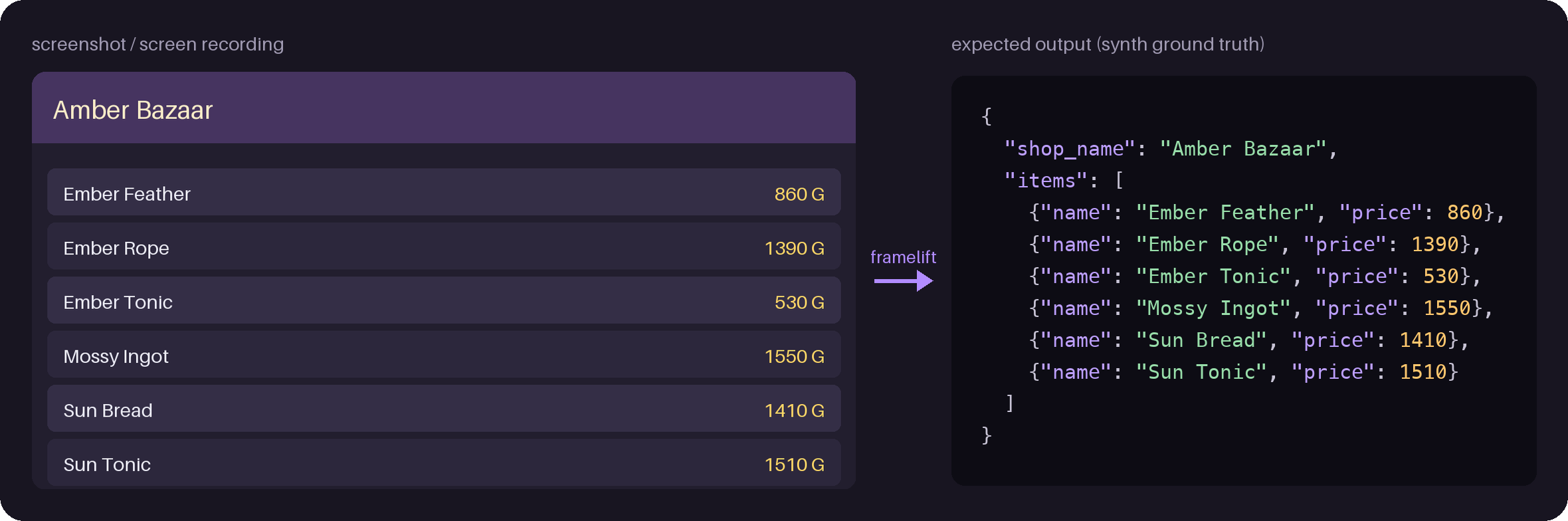
You describe what to read as a Pydantic model and how to read it as a Profile;
framelift turns screenshots and screen recordings into validated, provenance-tagged JSON Lines.
Status: pre-alpha (0.x). The public API is limited to
ProfileandPipelineand may change between minor versions.
How it works
flowchart LR
    input["Screenshots and<br/>screen recordings"] -- "videos: sharpest frame<br/>of each still screen" --> crop["Crop and redact<br/>locate / redact"]
    crop --> check{"Screen check<br/>(optional)"}
    check -- "other screen" --> skipped["skipped"]
    check -- "target" --> extract["Vision LLM<br/>retried until<br/>validators pass"]
    extract --> obs["observations.jsonl"]
    obs -- "item_key" --> items["items.jsonl"]
Features (0.7)
- Image and video input (files, directories, glob patterns), each tagged with its SHA-256
- Videos are read once per still screen: frames are sampled, scrolling frames are skipped, and the sharpest frame of each still screen is sent
- Structured extraction with Pydantic AI: your model is the output type, your validators trigger automatic retries
- Model-agnostic: pass any
provider:modelstring supported by Pydantic AI, with model settings such as turning off a local model's thinking - Only the part of the screen you choose is sent: crop each orientation to a box and paint over areas such as a chat window before anything leaves your machine
- An optional screen check: images of other screens are skipped before extraction, answered in a few tokens on a local server
- An optional cache, so a run or an evaluation repeated on the same images is not paid for again
observations.jsonloutput with source, frame, crop, usage and retry information per image or frameitems.jsonl: list items seen in several frames merged by majority vote, with disagreements kept- An evaluation harness built on pydantic-evals: score a profile and a model against images with expected outputs
- A synthetic sample generator (a fictional shop screen, still or scrolling) for demos and tests
Install
pip install "framelift[anthropic]"   # or [openai], [google]
pip install "framelift[video,anthropic]"   # to read screen recordings too
Quick start
from pydantic import BaseModel, Field
from framelift import Pipeline, Profile


class ShopItem(BaseModel):
    name: str = Field(description="Item name as displayed")
    price: int = Field(description="Price as an integer", gt=0)


class ShopScreen(BaseModel):
    shop_name: str
    items: list[ShopItem]


shop = Profile(
    name="fantasy-shop",
    version="1",
    output_type=ShopScreen,
    instructions="Read the shop's item list exactly as displayed.",
    # Required: what to send. "full" sends the whole screen; boxes are (left, top, right, bottom)
    # as fractions of the upright screen, per orientation.
    locate={"portrait": (0.0, 0.0, 1.0, 0.6), "landscape": (0.0, 0.0, 1.0, 0.9)},
    redact=[(0.0, 0.0, 0.3, 0.05)],  # painted black before cropping, e.g. a player name
    item_key=lambda item: item.name,  # merges the same item across frames
)

Pipeline(shop, model="anthropic:<model-name>", out_dir="out").run(["shots/*.png", "scroll.mp4"])
Or from the command line:
framelift synth --out samples --n 3 --videos 1   # fictional shop screenshots and a scrolling video
framelift run samples --profile examples.fantasy_shop:profile \
  --model anthropic:<model-name> --out out
Each line of out/observations.jsonl is one image or video frame, with its source, crop, usage
and retries; see Output for every field.
Guides
| Guide | What it covers |
|---|---|
| Output | observations.jsonl fields, frames, and inputs that cannot be read |
| Videos and merged items | How still screens are picked from a recording, and items.jsonl |
| What is sent | Cropping and redacting with Profile.locate and Profile.redact |
| Screen check | Skipping menus and other screens before extraction |
| Model settings | Sending Pydantic AI model settings, such as turning off thinking |
| Cache | Not paying twice for the same images, and the local server check |
| Evaluate | Scoring a profile and a model against images with expected outputs |
Privacy
framelift runs locally and only sends the cropped and redacted images, from the files you pass and the frames it picks from your videos, to the model provider you choose. It has no telemetry. It writes only to the output and cache directories you give it.
Development
uv sync --all-extras
uv run ruff check && uv run ruff format --check
uv run ty check
uv run pytest
Only the tests marked live call a real model; the others cannot (ALLOW_MODEL_REQUESTS = False).
The live tests are left out by default (-m "not live"). To run them, name the model in
FRAMELIFT_LIVE_MODEL and set the provider's API key. They read a few synthetic screens, so the
provider bills for them.
FRAMELIFT_LIVE_MODEL=anthropic:<model-name> uv run pytest -m live
License
MIT
1 maintainer

Metadata
1 maintainer
Release files for framelift 0.7.1
For a detailed explanation of source distributions (sdists) and built distributions (wheels), please see the package formats documentation.
Source distribution (sdist)
| File | Size | Uploaded | Provenance | |
|---|---|---|---|---|
| framelift-0.7.1.tar.gz | 61.8 kB | With provenance | Details |
Built distribution (wheel)
| File | Interpreter | ABI | Platform | Reset |
|---|---|---|---|---|
| framelift-0.7.1-py3-none-any.whl | Python 3 | none | any | Details |
Total release size: 133.8 kB
Release files / framelift-0.7.1.tar.gz
| Download URL | framelift-0.7.1.tar.gz |
|---|---|
| Size | 61.8 kB |
| Tags | Source |
|
SHA-256 checksum How to use checksums |
8b6535a5603ad373996cd50ce2234e2cd3615d9fdf14e4020b967772d12bf30d
|
|
BLAKE2b-256 checksum How to use checksums |
5baaa23a425b9af8782fe94d8811c73c3c886f25cef224109c490ba4bf08957b
|
| Upload date | |
|
Uploaded using Trusted Publishing? What is trusted publishing? |
Yes |
| Uploaded via |
twine/7.0.0 CPython/3.13.14
|
Provenance
Provenance describes where a file came from. On PyPI, provenance is shared via attestations, which provide a verifiable record of the build or publishing details. View details, limitations and caveats.


PyPI Publish Attestation
PyPI verified that this artifact, at this checksum, originated from the publisher listed below.
Signed by GitHub Actions, verified by PyPI on Oct 20, 2026.
Transparency logRelease files / framelift-0.7.1-py3-none-any.whl
| Download URL | framelift-0.7.1-py3-none-any.whl |
|---|---|
| Size | 72.0 kB |
| Tags | Python 3 |
|
SHA-256 checksum How to use checksums |
fd0fee534afaf4b68670c352986aa944796d7228caccdf16d9590293e6741858
|
|
BLAKE2b-256 checksum How to use checksums |
ca7315203267f81e3aa902595110f12391579f41ba950b9c232a8bf70901efc7
|
| Upload date | |
|
Uploaded using Trusted Publishing? What is trusted publishing? |
Yes |
| Uploaded via |
twine/7.0.0 CPython/3.13.14
|
Provenance
Provenance describes where a file came from. On PyPI, provenance is shared via attestations, which provide a verifiable record of the build or publishing details. View details, limitations and caveats.
PyPI Publish Attestation
PyPI verified that this artifact, at this checksum, originated from the publisher listed below.
Signed by GitHub Actions, verified by PyPI on Oct 20, 2026.
Transparency logSecurity for framelift 0.7.1
Provenance
Provenance describes where a file came from. On PyPI, provenance is shared via attestations, which provide a verifiable record of the build or publishing details. View details, limitations and caveats.
Full provenance
All 2 files in this release have been uploaded with provenance metadata.
Attestation for framelift-0.7.1.tar.gz
PyPI Publish Attestation
PyPI verified that this artifact, at this checksum, originated from the publisher listed below.
Signed by GitHub Actions, verified by PyPI on Oct 20, 2026.
Transparency logA note on package security
PyPI is a repository for distributing packages, not a service for auditing them. While third-party security researchers and our staff do their best to detect and remove malicious packages, PyPI cannot guarantee the quality, security or suitability of any given package.
To learn more about protecting yourself from malicious actors, visit our package security documentation.














