
framework-shells
framework-shells is the Python implementation of FWS, a small process-runtime layer for apps that need to run child processes and keep them observable.
Use it when your application starts long-lived workers or tools and you want one consistent way to:
- launch them
- stop them cleanly
- group them by app/project/purpose
- capture stdout/stderr logs
- write to stdin when the backend supports it
- inspect recent output
- expose a dashboard or API for runtime control
- share runtime state with other FWS-compatible managers
Examples of things FWS can supervise:
- app workers
- language servers
- build workers
- file-system or git helpers
- JSON-RPC stdio services
- terminal brokers
- adapter processes
- any other child process that should not be a hidden
subprocess.Popen(...)
framework-shells is not the application protocol. It does not know what your JSON-RPC methods mean, how your DTOs are shaped, or how your business logic routes requests. It owns process lifecycle and observability. Your application owns protocol semantics.
For Rust-native hosts or paths where Python should not own process I/O, use ferrous-framework, the Rust implementation of the same FWS runtime contract.
Mental Model
An FWS runtime is a process manager plus a small metadata store.
When FWS starts a child process, it creates a shell record. A shell record answers questions like:
- what command was launched?
- what backend owns it?
- what PID is currently running?
- where are stdout/stderr logs?
- what labels and groups does it belong to?
- can this manager write to stdin?
- can this manager stream output live?
- is the process still running or has it exited?
Those records live under a runtime-specific directory. The runtime is keyed by a repo fingerprint and secret, so different projects or manager roots do not accidentally claim each other's processes.
~/.cache/framework_shells/runtimes/<repo_fingerprint>/<runtime_id>/
  meta/<shell_id>/meta.json
  logs/<shell_id>.stdout.log
  logs/<shell_id>.stderr.log
Backends
FWS intentionally keeps the backend model small.
| Backend | Use it for | Shape |
|---|---|---|
proc |
app workers, services, build jobs, helpers that do not need stdin | supervised process plus stdout/stderr logs |
pipe |
JSON-RPC stdio servers, protocol adapters, language workers, structured backend tools | supervised stdin/stdout/stderr byte streams |
pty |
interactive shells, terminal applications, TUI-like processes | supervised terminal byte stream with input and resize |
The pipe backend is protocol-neutral. It does not parse JSON-RPC, line protocols, editor control messages, or application DTOs. It owns the child process, stdin writes, stdout/stderr capture, logs, capabilities, and shutdown. The consumer owns framing and semantics.
PTY-backed shells support pty_mode="raw" for byte-oriented compatibility and pty_mode="interactive" for normal cooked/echoing terminal behavior.
Shellspecs
A shellspec is a YAML launch file.
It is not a new protocol. It is just a declarative way to say: "these are the runtime processes this app may need, and here is how to launch them."
A shellspec gives FWS a stable process contract:
- shell id inside the spec
- backend (
proc,pipe, orpty) - command and arguments
- working directory
- environment variables
- labels and subgroups
- optional readiness checks
- optional dashboard/UI hints
- optional debug/inspection flags
Minimal example:
version: "1"
shells:
  api:
    backend: proc
    cwd: ${ctx:PROJECT_ROOT}
    command: ["python", "-m", "http.server", "${free_port}"]
    env:
      PORT: ${free_port}
      APP_ID: ${ctx:APP_ID}
In that example:
apiis the shellspec entry id.${ctx:PROJECT_ROOT}and${ctx:APP_ID}come from the render context supplied by the host app.${free_port}asks FWS to reserve and reuse one free port during rendering.- FWS launches the rendered command and stores the resulting shell record.
Starting a shellspec entry from Python:
from framework_shells import get_manager
from framework_shells.orchestrator import Orchestrator

mgr = await get_manager()
shell = await Orchestrator(mgr).start_from_ref(
    "shellspec/app_worker.yaml#api",
    base_dir=app_dir,
    ctx={"APP_ID": "demo", "PROJECT_ROOT": str(project_root)},
    label="app-worker:demo",
)
A pipe shellspec for a stdio JSON-RPC worker:
version: "1"
shells:
  rpc_worker:
    backend: pipe
    cwd: ${ctx:PROJECT_ROOT}
    command: ["python", "-m", "my_app.rpc_worker"]
    subgroups: ["demo", "rpc"]
    inspect_hints:
      - json
      - jsonrpc
FWS will supervise the process and preserve stdout/stderr observability. Your app still owns the JSON-RPC reader, writer, request routing, and DTO validation.
Quick Python Usage
from framework_shells import get_manager

mgr = await get_manager()

# A normal supervised process.
proc = await mgr.spawn_shell(
    ["python", "-m", "http.server", "8080"],
    label="demo-server",
)

# A stdio worker with live stdin/stdout while this manager owns it.
pipe = await mgr.spawn_shell_pipe(
    ["python", "-m", "my_app.rpc_worker"],
    label="rpc-worker",
)
await mgr.write_to_shell(pipe.id, '{"jsonrpc":"2.0","id":1,"method":"ping"}', append_newline=True)

# An interactive terminal process.
pty = await mgr.spawn_shell_pty(
    ["bash", "-l", "-i"],
    label="terminal",
    pty_mode="interactive",
)
await mgr.resize_pty(pty.id, cols=120, rows=40)

# Inspect and control.
shells = await mgr.list_shells()
tail = await mgr.get_log_tail(pipe.id, stream="stdout", lines=100)
await mgr.terminate_shell(proc.id, force=False)
CLI
The fws CLI uses the same runtime store and secret resolution as the Python manager.
# List current runtime shells.
fws list
fws list --all

# Start all autostart entries from a shellspec file.
fws up shells.yaml

# Start a one-off process.
fws run --backend proc --label demo -- python -m http.server 8080

# Inspect recent output.
fws inspect <shell_id>
fws inspect <shell_id> --stream stdout --format jsonrpc --json

# Write to live stdin when the owning manager exposes input.
fws write <shell_id> '{"jsonrpc":"2.0","id":"probe","method":"ping","params":{}}' --newline
cat payload.json | fws write <shell_id> - --json --newline

# Stop or remove shells.
fws terminate <shell_id>
fws rm <shell_id>
fws shutdown-group <app_id>
fws down --tree

# Show process trees.
fws tree --depth 4
Dashboard And API
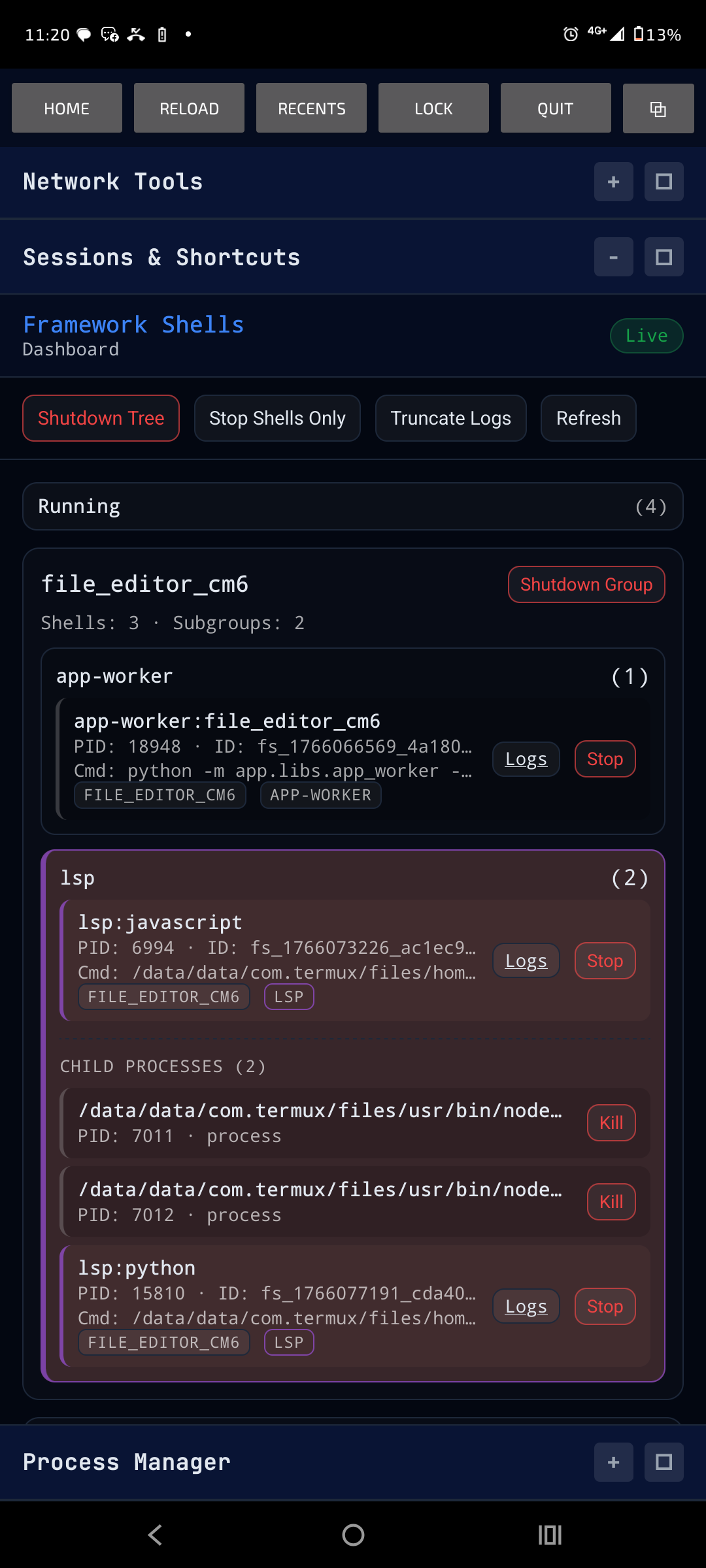
framework-shells can be mounted into a FastAPI/ASGI host. The mounted runtime exposes:
- REST endpoints for shell list/detail/control
- live dashboard updates
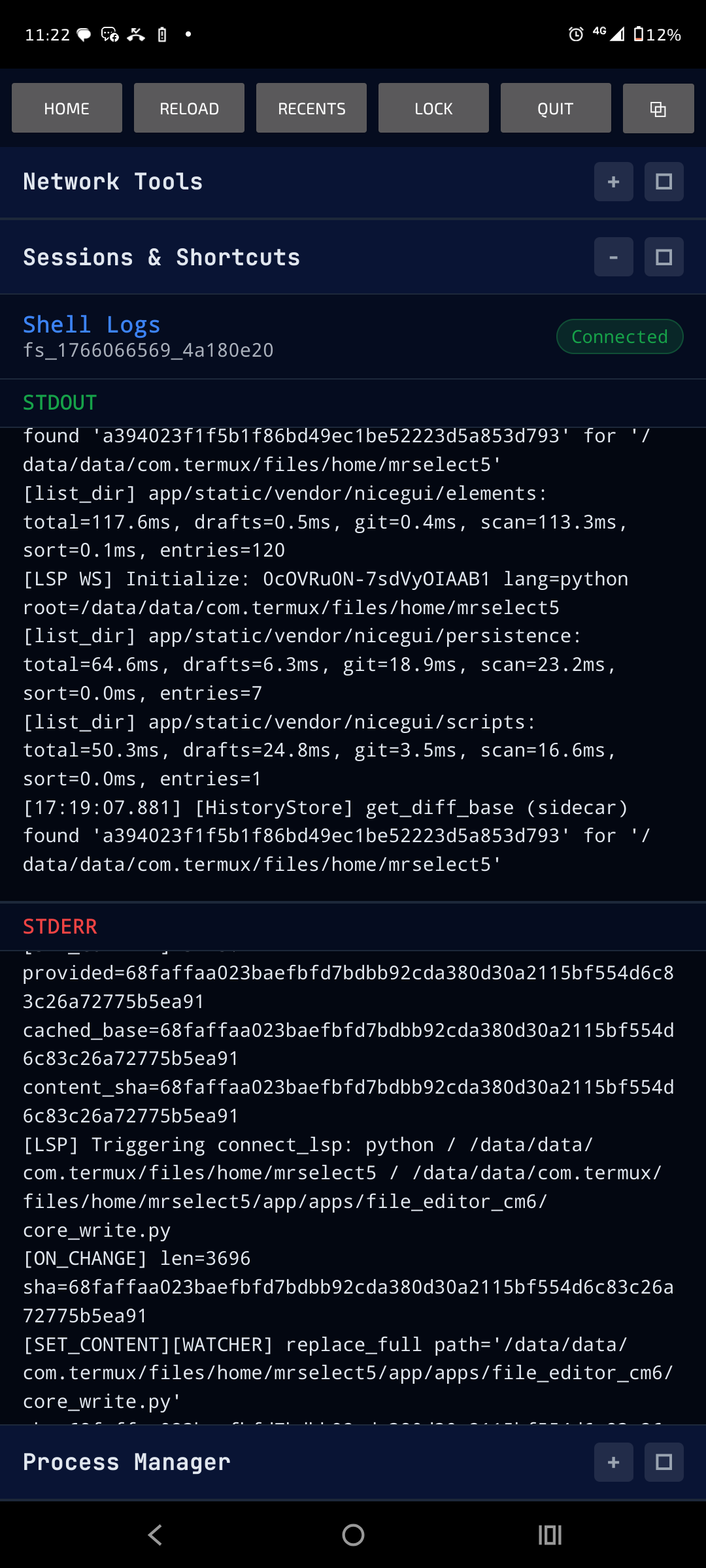
- live log streaming
- shell stdin injection for capable live shells
- log inspection helpers
- runtime auth derived from
FRAMEWORK_SHELLS_SECRET
The helper mount is:
from framework_shells.api.socketio_backend import mount_fws_dashboard_runtime

mount_fws_dashboard_runtime(app)
Important routes:
GET    /fws/                                      dashboard
GET    /api/framework_shells                     list shells
GET    /api/framework_shells/{id}                shell detail
POST   /api/framework_shells/{id}/terminate      terminate shell
POST   /api/framework_shells/{id}/input          write stdin / send EOF when supported
DELETE /api/framework_shells/{id}                remove metadata and logs
GET    /api/framework_shells/logs/{id}/tail      structured log tail
GET    /api/framework_shells/logs/{id}/inspect   plain/json/jsonrpc inspection
POST   /api/framework_shells/app/{app_id}/shutdown  group shutdown
The dashboard is an observability/control surface. It is not required for the supervised process to run.
Logs And Inspection
Raw stdout and stderr logs stay raw. FWS does not rewrite process output to add timestamps or protocol metadata.
Inspection is a read-side helper over the raw logs. It can classify recent output as:
plainjsonjsonrpc
For deeper debugging, a shell can opt into I/O metadata sidecars:
version: "1"
shells:
  rpc_worker:
    backend: pipe
    command: ["python", "-m", "my_app.rpc_worker"]
    debug:
      io_metadata: true
When enabled, FWS writes a sibling JSONL sidecar with output chunk metadata and stdin write records. Stdin is never appended to raw stdout/stderr logs.
CLI example:
fws inspect <shell_id> --io-metadata --stdin --timestamps --json
Bounded Log Views And Binary Protocols
The dashboard keeps a sliding window of up to 200 source records. Scrolling near an edge fetches another slice while retaining overlap and your reading position. Scrolling away detaches live following; Jump to live restores the newest window. Existing events signal new output without polling or accumulating hidden history. Tap a pane header to expand or collapse STDOUT, STDERR, or available STDIN input. STDOUT opens first; per-shell collapse and divider sizes persist locally. A shared Wrap checkbox controls stream wrapping (on by default). Records have subtle separators and no individual height cap; oversized records still show explicit projection omissions. Raw files are unchanged, and original-byte retrieval remains available through the raw API in pages of at most 64 KiB, not as dashboard hex controls.
Declare how each stream should be observed in its shellspec:
log_codecs:
  stdout: messagepack
  stderr: text
Supported values are text (default), json, and messagepack. Templates such
as ${env:STDOUT_CODEC} work too. MessagePack means concatenated complete objects,
not newline-separated binary. It changes observation, not stdin/stdout bytes or
Socket.IO serialization. fws inspect automatically decodes declared MessagePack
logs, including Ferrous records in the shared runtime.
Window/raw APIs live at /api/framework_shells/logs/{shell_id}/window and /raw.
See the projection plan for budgets and current
limits, including display-window filtering and historical ANSI state.
Runtime Boundaries
FWS owns:
- process launch
- shutdown and group shutdown
- process metadata
- stdout/stderr log paths
- live input/output capability reporting
- dashboard/API/control surfaces
- peer-manager coordination across Python and Ferrous runtimes
Your application owns:
- protocol framing
- request/response correlation
- DTOs
- schema validation
- business logic
- user-facing app behavior
This boundary is the reason pipe is a byte stream instead of a JSON-RPC framework. FWS should make protocol workers observable and controllable without becoming part of their protocol.
Native Packaging
Git source installs default to auto native packaging.
If Cargo is available, setup attempts to build and bundle:
- the native terminal broker binary
- the native pipe reader extension
If native build fails in auto mode, the install continues with the pure-Python package. To require native artifacts:
FRAMEWORK_SHELLS_INSTALL_MODE=build \
FRAMEWORK_SHELLS_PIPE_PUMP_MODE=build \
python -m pip install "framework-shells @ git+https://github.com/mrsurge/framework-shells@main"
To force Python-only install:
FRAMEWORK_SHELLS_INSTALL_MODE=python-only \
python -m pip install "framework-shells @ git+https://github.com/mrsurge/framework-shells@main"
Free-threaded Termux Python is supported by the source build path. The PyO3 pipe pump is built as a version-specific extension such as:
fws_pipe_pump.cpython-314t-aarch64-linux-android.so
Environment Variables
| Variable | Description |
|---|---|
FRAMEWORK_SHELLS_SECRET |
Secret for runtime ID derivation and API auth |
FRAMEWORK_SHELLS_REPO_FINGERPRINT |
Override auto-computed repo fingerprint |
FRAMEWORK_SHELLS_BASE_DIR |
Override storage base dir, default ~/.cache/framework_shells |
FRAMEWORK_SHELLS_PTY_MODE |
Default PTY mode for new PTY shells, raw or interactive |
FRAMEWORK_SHELLS_INSTALL_MODE |
Native packaging mode, auto, build, or python-only |
FRAMEWORK_SHELLS_PIPE_PUMP_MODE |
Native pipe extension packaging mode, defaults to install mode |
If FRAMEWORK_SHELLS_SECRET is missing, the CLI tries to load or create the runtime secret under the current repo fingerprint. If the secret is set, mutating API endpoints require a derived token via X-Framework-Key or Authorization: Bearer ....
Directory Layout
framework_shells/
  manager.py              core FrameworkShellManager
  record.py               ShellRecord metadata model
  store.py                runtime-scoped storage paths
  shellspec.py            YAML shellspec loader and renderer
  orchestrator.py         shellspec start/apply helpers
  events.py               process-local lifecycle/output event bus
  shutdown.py             shutdown planner/executor helpers
  native_pipe.py          optional native pipe extension loader
  terminal_stream_broker.py  Python terminal-stream fallback broker
  api/                    REST, dashboard, and Socket.IO runtime
  cli/                    fws command
  protocols/              typed JSON-RPC/dashboard/peer contracts
  ui/                     dashboard frontend assets
Screenshots
The dashboard can run as a standalone page or be embedded by a host application.
| Dashboard | Logs |
|---|---|
 |
 |
1 maintainer

Metadata
1 maintainer
Release files for framework-shells 0.0.64
For a detailed explanation of source distributions (sdists) and built distributions (wheels), please see the package formats documentation.
Source distribution (sdist)
| File | Size | Uploaded | |
|---|---|---|---|
| framework_shells-0.0.64.tar.gz | 847.7 kB | Details |
Built distributions (wheels)
| File | Interpreter | ABI | Platform | Reset |
|---|---|---|---|---|
| framework_shells-0.0.64-cp314-cp314t-manylinux_2_28_x86_64.whl | CPython 3.14 | CPython 3.14 free-threading | Linux glibc 2.28+ x86-64 | Details |
| framework_shells-0.0.64-cp39-abi3-manylinux_2_28_x86_64.whl | CPython 3.9 | abi3 | Linux glibc 2.28+ x86-64 | Details |
| framework_shells-0.0.64-cp39-abi3-android_24_arm64_v8a.whl | CPython 3.9 | abi3 | Android API level 24+ ARM64 v8a | Details |
Total release size: 3.4 MB
Release files / framework_shells-0.0.64.tar.gz
| Download URL | framework_shells-0.0.64.tar.gz |
|---|---|
| Size | 847.7 kB |
| Tags | Source |
|
SHA-256 checksum How to use checksums |
a92e6d0ddaced7c9b19d7d94ac5cc37b2d3e9b1befc109a0f4f93f256ef1413c
|
|
BLAKE2b-256 checksum How to use checksums |
492f014e59fc0e4994918e2571de2f12018c85f768b79a0ef960d9bdc1664074
|
| Upload date | |
|
Uploaded using Trusted Publishing? What is trusted publishing? |
No |
| Uploaded via |
twine/7.0.0 CPython/3.14.4
|
Release files / framework_shells-0.0.64-cp314-cp314t-manylinux_2_28_x86_64.whl
| Download URL | framework_shells-0.0.64-cp314-cp314t-manylinux_2_28_x86_64.whl |
|---|---|
| Size | 834.1 kB |
| Tags | CPython 3.14 CPython 3.14 free-threading Linux glibc 2.28+ x86-64 |
|
SHA-256 checksum How to use checksums |
3f028a8e5080592a925acafaed60259abb27b9727a0f7330cfddfd156dc21e83
|
|
BLAKE2b-256 checksum How to use checksums |
6892c39761a7da73233d345a76364462baef433dab50c7f665bd4c597c31d174
|
| Upload date | |
|
Uploaded using Trusted Publishing? What is trusted publishing? |
No |
| Uploaded via |
twine/7.0.0 CPython/3.14.4
|
Release files / framework_shells-0.0.64-cp39-abi3-manylinux_2_28_x86_64.whl
| Download URL | framework_shells-0.0.64-cp39-abi3-manylinux_2_28_x86_64.whl |
|---|---|
| Size | 842.1 kB |
| Tags | CPython 3.9 Linux glibc 2.28+ x86-64 abi3 |
|
SHA-256 checksum How to use checksums |
324966f857fccf1e8656a1b6e76ce74fe665ca0fa07517ee2352ede36de76cf4
|
|
BLAKE2b-256 checksum How to use checksums |
3737c12273ce5db3e730bd52ce605571bc7a9d39091e42342bc876e6c9db959b
|
| Upload date | |
|
Uploaded using Trusted Publishing? What is trusted publishing? |
No |
| Uploaded via |
twine/7.0.0 CPython/3.14.4
|
Release files / framework_shells-0.0.64-cp39-abi3-android_24_arm64_v8a.whl
| Download URL | framework_shells-0.0.64-cp39-abi3-android_24_arm64_v8a.whl |
|---|---|
| Size | 873.2 kB |
| Tags | Android API level 24+ ARM64 v8a CPython 3.9 abi3 |
|
SHA-256 checksum How to use checksums |
8e42a191e723f594352b1ff698b9672db813fa5bf796d42222aca54bdf1bdbea
|
|
BLAKE2b-256 checksum How to use checksums |
f5d1cfb905de2c1b9bf3b902518e6a24238edd35b1d8ffda42556dbed15c127f
|
| Upload date | |
|
Uploaded using Trusted Publishing? What is trusted publishing? |
No |
| Uploaded via |
twine/7.0.0 CPython/3.14.4
|














