

FrameX


FrameX is a light-weight, dataset fetching library for fast prototyping, tutorial creation, and experimenting. FrameX has currently over 80 datasets available.
Built on top of Polars.
Installation
To get started, install the library with:
pip install framex
Usage
Python
import framex as fx
Loading datasets
iris = fx.load("iris")
which returns a polars DataFrame
Therefore, you can use all the polars functions and methods on the returned DataFrame.
iris.head()
shape: (5, 5)
┌──────────────┬─────────────┬──────────────┬─────────────┬─────────┐
│ sepal_length ┆ sepal_width ┆ petal_length ┆ petal_width ┆ species │
│ ---          ┆ ---         ┆ ---          ┆ ---         ┆ ---     │
│ f32          ┆ f32         ┆ f32          ┆ f32         ┆ str     │
╞══════════════╪═════════════╪══════════════╪═════════════╪═════════╡
│ 5.1          ┆ 3.5         ┆ 1.4          ┆ 0.2         ┆ setosa  │
│ 4.9          ┆ 3.0         ┆ 1.4          ┆ 0.2         ┆ setosa  │
│ 4.7          ┆ 3.2         ┆ 1.3          ┆ 0.2         ┆ setosa  │
│ 4.6          ┆ 3.1         ┆ 1.5          ┆ 0.2         ┆ setosa  │
│ 5.0          ┆ 3.6         ┆ 1.4          ┆ 0.2         ┆ setosa  │
└──────────────┴─────────────┴──────────────┴─────────────┴─────────┘
iris = fx.load("iris", lazy=True)
which returns a polars LazyFrame
Both these operations create local copies of the datasets by default cache=True.
Available datasets
To see the list of available datasets, run:
fx.available()
{'remote': ['iris', 'mpg', 'netflix', 'starbucks', 'titanic'], 'local': ['titanic']}
PS, shorthened for clarity
which returns a dictionary of both locally and remotely available datasets.
To see only local or remote datasets, run:
fx.available("local")
fx.available("remote")
{'local': ['titanic']}
{'remote': ['iris', 'mpg', 'netflix', 'starbucks', 'titanic']}
Getting information on Datasets
To get information on a dataset, run:
fx.about("mpg") # basically the same as `fx.about("mpg", mode="print")`
which will print the information on the dataset as the following:
NAME    : mpg
SOURCE  : https://www.kaggle.com/datasets/uciml/autompg-dataset
LICENSE : CC0: Public Domain
ORIGIN  : Kaggle
OG NAME : autompg-dataset
Or you can get the information as a single row polars.DataFrame by running:
row = fx.about("mpg", mode="row")
print(row)
which will print the information on the dataset ASCII art as the following:
shape: (1, 4)
┌──────┬─────────────────────────────────┬────────────────────┬────────┐
│ name ┆ source                          ┆ license            ┆ origin │
│ ---  ┆ ---                             ┆ ---                ┆ ---    │
│ str  ┆ str                             ┆ str                ┆ str    │
╞══════╪═════════════════════════════════╪════════════════════╪════════╡
│ mpg  ┆ https://www.kaggle.com/dataset… ┆ CC0: Public Domain ┆ Kaggle │
└──────┴─────────────────────────────────┴────────────────────┴────────┘
or you can simply treat row as a polars DataFrame in your code.
Getting Dataset URLs
In case you need the file links.
url_pokemon = fx.get_url("pokemon")
by default, the format is " feather".
Optionally, you can specify the format of the dataset.
url_pokemon_csv = fx.get_url("pokemon", format="csv")
CLI
framex CLI has a slight overhead of around 400 milliseconds due to imports. However, operations still take less than a second, unless bottlenecked by the download speed.
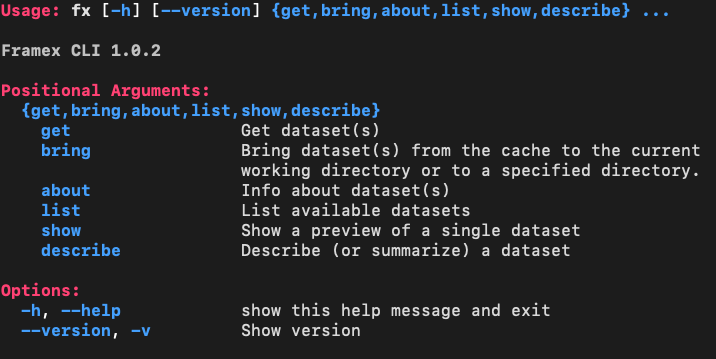
TO see all the available commands, run:
fx -h
get
Get a single dataset (to the current directory):
fx get iris
or get multiple datasets:
fx get iris mpg titanic
which will download dataset(s) to the current directory.
to get the datasets into cache directory:
fx get iris mpg titanic --cache
or to a specific directory:
fx get iris mpg titanic --dir data
list
To get the name of the available datasets on the remote server.
fx list
this will list all available datasets on the remote server.
to get the names of the available datasets that includes "dia"
fx list dia
Locally available datasets: (feather, parquet, csv, other)

Remote datasets:
diamonds
about
To get information on a dataset or datasets, run:
fx about mpg iris
show
To show a preview of a single dataset
fx show iris
describe
To describe (or summarize) a dataset
fx describe iris
For more parameters
fx get --help
bring
Bring a dataset to the current directory from cache:
fx bring iris
or bring multiple datasets:
fx bring iris mpg titanic
which will bring dataset(s) to the current directory from cache directory.
1 maintainer

Metadata
1 maintainer
Release files for framex 1.0.3
For a detailed explanation of source distributions (sdists) and built distributions (wheels), please see the package formats documentation.
Source distribution (sdist)
| File | Size | Uploaded | Provenance | Actions |
|---|---|---|---|---|
| framex-1.0.3.tar.gz | 16.2 kB | Without provenance | Details for framex-1.0.3.tar.gz |
Built distribution (wheel)
| File | Interpreter | ABI | Platform | Actions Reset |
|---|---|---|---|---|
| framex-1.0.3-py3-none-any.whl | Python 3 | none | any | Details for framex-1.0.3-py3-none-any.whl |
Total release size: 35.6 kB
Release files / framex-1.0.3.tar.gz
| Download URL | framex-1.0.3.tar.gz |
|---|---|
| Size | 16.2 kB |
| Tags | Source |
|
SHA-256 checksum How to use checksums |
a11731ca1e77a45cbe3f7db3399771579d401bc5b4ed8fd2d783c69032ef7d27
|
|
BLAKE2b-256 checksum How to use checksums |
6dd3f1cbb92498977e4522954633456ea1c9d1d04334199d03937968d887f98b
|
| Upload date | |
|
Uploaded using Trusted Publishing? What is trusted publishing? |
No |
| Uploaded via |
poetry/1.8.5 CPython/3.12.8 Windows/11
|
Release files / framex-1.0.3-py3-none-any.whl
| Download URL | framex-1.0.3-py3-none-any.whl |
|---|---|
| Size | 19.4 kB |
| Tags | Python 3 |
|
SHA-256 checksum How to use checksums |
568ed2d5ca4dd749648e7a94f86af1ac1f9bd19432e57ef21b9e25b43744bff7
|
|
BLAKE2b-256 checksum How to use checksums |
bfd69d188b7312a448289751551e99aad0936d2b0b6a6ed1ce703d3011c42729
|
| Upload date | |
|
Uploaded using Trusted Publishing? What is trusted publishing? |
No |
| Uploaded via |
poetry/1.8.5 CPython/3.12.8 Windows/11
|
Security for framex 1.0.3
Provenance
Provenance describes where a file came from. On PyPI, provenance is shared via attestations, which provide a verifiable record of the build or publishing details. View details, limitations and caveats.
No provenance found
None of the files in this release were uploaded with provenance metadata.
A note on package security
PyPI is a repository for distributing packages, not a service for auditing them. While third-party security researchers and our staff do their best to detect and remove malicious packages, PyPI cannot guarantee the quality, security or suitability of any given package.
To learn more about protecting yourself from malicious actors, visit our package security documentation.














